0:31

Arc for Students | Everything in its right place
The Browser Company · Productivity · Sep 2023
Creatify AI · Sep 2026 · 0:23 · AI-annotated
Creatify AI’s 0:23 launch film runs 13 scenes, about 1.8 s each. The product is on screen from the first frame and 3 features are revealed. The call to action lands at 0:20 (87% in), over a voiceover. The video opens on a co-branded lockup, then plays a notification ping into two Slack requests that the agent answers, closing on a platform grid and a static URL card. Pacing runs at 129 BPM with 3D-tilted UI cards that rotate flat toward camera, text typing out, spinners snapping to checkmarks, and quick dissolves between beats.
Is this your launch? to your site or press kit.
The Browser Company · Productivity · Sep 2023
Arcade · Apr 2023
Wabi · Mar 2026
A light gradient background holds a co-branding lockup: the purple Creatify play mark and wordmark, a multiplication sign, the purple Max icon and the word Max. The wordmarks and sign fade out, leaving the two logos centered, then the frame cuts to a 3D-tilted dark screen rendering a sun over a rocky space landscape with drifting star particles.
On-screen text: “creatify × Max”
Techniques: 3D mockup
Camera: Push in
A tablet floats in 3D perspective on a soft pink gradient, its screen showing a galaxy wallpaper. The view zooms into the dock, then a white app icon with a red badge scales up to fill the frame.
Techniques: 3D mockup, UI zoom
Camera: Push in
A rounded purple app tile holding a white bell outline and a small purple dot sits centered on a dark purple field. The tile then slides left and shrinks, blurring into motion as it exits frame.
Camera: Static
A white chat card with John's photo avatar and message scales in on a pale lavender background, the text typing out. A second card with a purple Max agent icon slides in below, its reply typing to a magnifier emoji.
Techniques: Kinetic type
Camera: Static
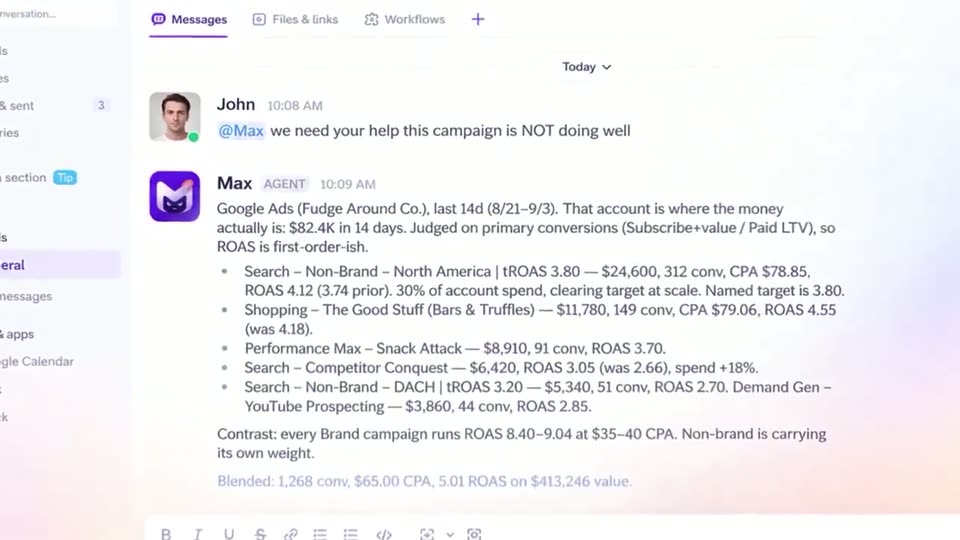
A flat chat interface shows the # general channel. John's short message scales in, then an agent reply from Max slides in and types out, listing Google Ads metrics in bullet points. The camera zooms in on the growing message.
Techniques: UI zoom
Camera: Push in
A flat white chat card on a soft pastel gradient shows Tina's message typing out, then the card expands to add John's reply above a reply bar with a green send button.
Camera: Static
A dark agent card floats tilted in 3D, then rotates flat toward the camera. Its task list refreshes, gray spinners snapping into purple checkmarks one by one, while four dots pulse next to the working status.
Techniques: 3D mockup
Camera: Static
A dark agent card for Max, showing a working status and a checklist of completed tasks, holds flat, then the interface rotates into 3D perspective while a white panel slides in from the right and a vertical icon bar appears at the left edge.
Techniques: 3D mockup
Camera: Pull out
A blurred Slack interface zooms in and sharpens to focus on a message from Max AGENT, showing text and four images of pretzels.
Techniques: UI zoom
Camera: Push in
A Slack channel view shows an agent message with four video thumbnails and Approve and Dismiss buttons. A cursor moves to and clicks Approve. The screen then blurs and dissolves to a white field where a Google logo and a blue loop shape fade in.
Techniques: Cursor demo
Camera: Static
A white pill holding eight platform logos sits on a pale gradient background as a purple headline types out “One Agent. Every Platform.” The pill then shrinks upward while a pink-purple 3D shape with a dark masked face rises from below.
On-screen text: “One Agent. Every Platform”
Techniques: Kinetic type
Camera: Pan
A white rounded search bar floats on a pale background with soft purple gradient corners. Purple text types out character by character to form a URL, beside a magenta magnifying glass icon on the right.
On-screen text: “creatify.ai/slack”
Techniques: Kinetic type
Camera: Static
A white pill-shaped search bar sits centered on a light gray background with soft pink and purple gradient glows in the corners. The bar holds the purple URL and a purple magnifying glass icon. The frame is locked off and static throughout.
On-screen text: “creatify.ai/slack”
Camera: Static