0:55

Runway - Today we're launching DIFFUSE: a platform for agencies, brands and st
Runway · AI · Sep 2026
Hanji · Jul 2026 · 1:27 · AI-annotated
Hanji’s 1:27 launch film runs 36 scenes, about 2.4 s each. The product shows up at 0:12, with social proof. The call to action lands at 1:20 (92% in), over a voiceover. Alternates locked-off founder shots with flat white motion graphics and app UI, cut briskly at about 17 cuts per minute. Signature moves are count-up numerals, sliding stat cards, and cross-dissolves between scanned documents and the interface.
Is this your launch? to your site or press kit.
Runway · AI · Sep 2026
Superserve · B2B · Oct 2026
A man in a dark shirt sits centered in a bright office lounge, marble table and chairs behind him. Large white figures fade in on both sides, 70M pages left and 2.5M users right, then a name caption appears at lower left. The frame is locked off.
On-screen text: “70M”, “pages”, “2.5M”, “users”, “David Yu”, “Co-founder & CEO”
Camera: Push in
A scatter of textbook pages spreads across a white field in 3D perspective while a large gray number counts up from 250 to 415 above the caption page textbooks, all in under a second.
On-screen text: “250”, “page textbooks”, “415”
Techniques: Kinetic type, 3D mockup
Camera: Static
A large dark gray numeral counts up from 496 to 500 at the center, with the smaller label page textbooks fixed beneath it. Behind, a faded collage of textbook pages fills the white frame.
On-screen text: “500”, “page textbooks”
Techniques: Kinetic type
Camera: Static
A flat lay of handwritten physics notes and a printed academic table rests on a white surface. The central sheet, titled Properties of Waves in pink marker, overlaps blue and black pages. A regression table slides down into the right side of the frame.
Camera: Static
Three overlapping document pages settle into one centered page of handwritten wave notes as the headline 'Built at YouLearn' appears above. A white card then slides in from the right with 'Launched as an API' and a POST endpoint.
On-screen text: “Built at YouLearn”, “Launched as an API”, “POST /v1/extract”
Techniques: Morph
Camera: Push in
A split layout shows a handwritten physics document on the left and a code panel on the right. A blue progress bar fills between them as JSON data populates the right panel.
On-screen text: “Built at YouLearn”, “Launched as an API”
Camera: Static
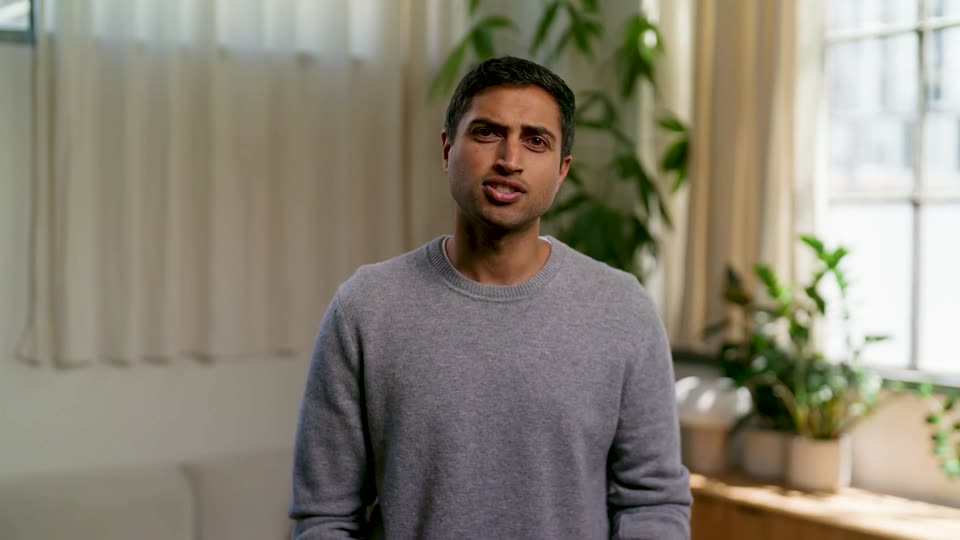
A man in a gray sweatshirt sits at a marble counter in a bright loft office, speaking to camera. Three white line icons with labels appear in sequence across the frame: a cross labeled Healthcare, a columned building labeled Government, and a shield labeled Insurance.
On-screen text: “Healthcare”, “Government”, “Insurance”
Camera: Static
A man in a dark sweatshirt sits at a marble table in a bright open-plan office, speaking to camera in a locked-off medium shot. White italic captions appear on the left and lower frame, 'still,' 'looking for a,' then 'solution,' the last one underlined.
On-screen text: “Healthcare”, “Government”, “Insurance”, “still”, “looking for a”, “solution”
Techniques: Kinetic type
Camera: Static
A white card on a light gray background shows 'In-House' and 'Open fixes' above a counter that counts up to 24 with glitching digits. A grid of small pill tickets fills in below three red-icon labels, then 'maintenance never stops' fades in as the card slides left.
On-screen text: “In-House”, “Open fixes”, “24”, “new formats”, “pipeline failures”, “edge cases”, “regression”, “new format”, “failed retry”, “timeout”
Techniques: Kinetic type
Camera: Static
Two white cards sit side by side on a light gray field. The left card holds an In-House count of 24 open fixes over a grid of red ticket chips; on the right, Existing Providers rows fade in, then the Accuracy, Cost, and Speed sliders fill red in turn.
On-screen text: “In-House”, “Open fixes”, “24”, “new formats”, “pipeline failures”, “edge cases”, “failed retry”, “timeout”, “regression”, “new format maintenance never stops”
Techniques: Split screen
Camera: Static
Two white cards fade in on a light gray field, then fade out. The left, titled In-House, pairs a large 24 under Open fixes with a grid of red-dotted rows. The right, titled Existing Providers, stacks Accuracy, Cost and Speed sliders, each capped by a red lock.
On-screen text: “In-House”, “Open fixes”, “24”, “new formats”, “pipeline failures”, “edge cases”, “failed retry”, “timeout”, “regression”, “new format”, “maintenance never stops” (wait, careful) ”
Camera: Static
On a plain white background, a gray stacked-paper logo mark and the word Hanji appear at the center, then hold still as the sign-off.
On-screen text: “Hanji”
Camera: Static
A black stacked-pages mark sits above the bold wordmark Hanji, centered on a plain off-white field, holding still as the sign-off.
Camera: Static
A centered line on a white background reads Send us your documents, the last word in blue. It blurs and crossfades into a second gray line, Tuned to your workflow, both held still on a locked-off frame.
On-screen text: “Send us your documents.”, “Tuned to your workflow.”
Camera: Static
A centered headline reads “Tuned to your” in black on a plain off-white field. The word “workflow.” then fades in beside it in blue and holds. Locked-off frame, no camera move.
On-screen text: “Tuned to your workflow.”
Techniques: Kinetic type
Camera: Static
On a plain white field, a black headline builds word by word into 'Accuracy, cost, and speed you need.', the word 'you' set in blue, while a previous line fades out behind it.
On-screen text: “Tuned to your workflow.”, “Accuracy, cost, and speed you need.”
Techniques: Kinetic type
Camera: Static
A centered line of text on a plain white background reads “Accuracy, cost, and speed you need,” with the final two words in blue. The line slides in and scales up slightly, then holds on a locked-off frame.
On-screen text: “Accuracy, cost, and speed you need.”
Techniques: Kinetic type
Camera: Static
A light gray slide holds a benchmark card under a two-line headline. Five horizontal bars fill from left to right, the top bar solid black and the others gray, while percentages and confidence whiskers pop in at each bar's end. A row of summary statistics sits beneath the card.
On-screen text: “Document parsing accuracy benchmark”, “400 pages from public datasets and documents, human-verified region by region and run through 5 providers across seven document types”
Camera: Static
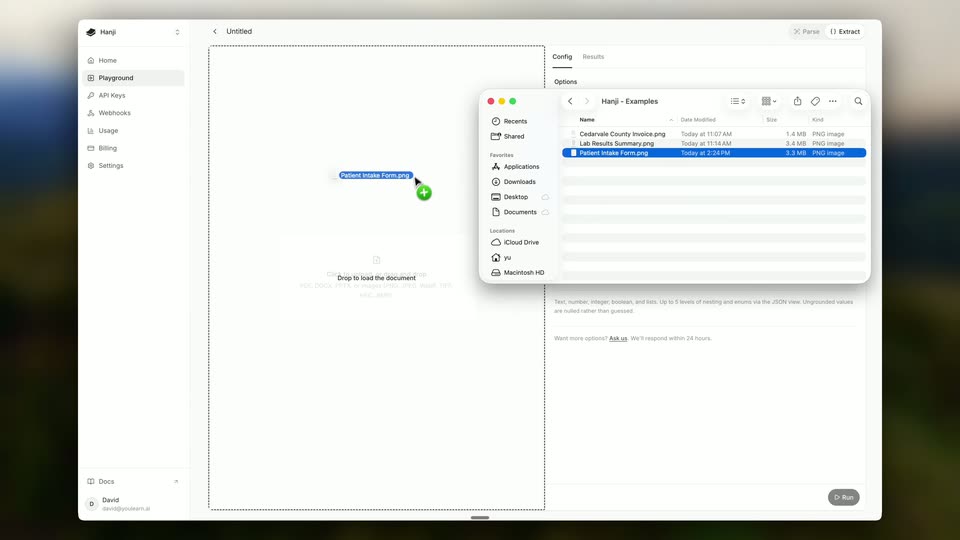
A product interface cross-dissolves from a benchmark results table to an empty upload screen. A macOS file picker sits open on the right; a cursor clicks the Patient Intake Form file, and a handwritten form image loads into the document pane.
Techniques: Cursor demo
Camera: Static
A light app window shows a scanned patient intake form beside a config panel. The cursor clicks the Run button at the bottom right, and the right panel switches to Results, listing the extracted fields such as name, date of birth and phone.
Techniques: Cursor demo
Camera: Static
The app window opens on a scanned patient intake form beside a list of extracted fields. The view zooms in on both panels while a hand cursor hovers over the results.
Techniques: UI zoom, Cursor demo
Camera: Push in
The product screen splits into two panes: a scanned handwritten medical intake form on the left and a structured field list on the right showing extracted patient data like name, address and phone. A hand cursor rests over the sex field while the panel stays static.
Techniques: Cursor demo
Camera: Static
A document-processing UI shows a county invoice scan in the center and an extracted-fields list on the right. A hand cursor moves down the field list, each row lighting up as its value fills in, while the matching region in the scan highlights.
Techniques: UI zoom, Cursor demo
Camera: Static
A lab-results PDF sits in a document viewer beside a parsed table panel; a hand cursor clicks the lipid panel row while the view zooms out to reveal the window title bar.
Techniques: Cursor demo, UI zoom
Camera: Pull out
A light app window on a dark blurred background shows a two-pane view: a lab-results document on the left with a hand cursor resting on it, and a parsed results table on the right. The frame stays locked off.
Camera: Static
A man in a dark sweatshirt sits centered in a modern office lounge, speaking to the camera. A marble counter with a small potted plant sits at left; sofas and a wood-paneled wall fill the background. The locked-off medium shot holds as he talks and gestures slightly.
On-screen text: “Triglycerides”
Camera: Static
A man in a dark long-sleeve shirt sits at a marble counter in a bright office lounge, speaking to the camera. Wood paneling, a wall screen, and a sofa sit behind him, with a small potted cactus on the counter to the left.
Camera: Static
A white stats card fades in on a light background, showing a 71% text accuracy figure above four data rows with red and green status bars, under Accuracy, Speed and Cost tabs. The Hanji tagline sits at the bottom.
On-screen text: “tuned to your workflow”
Camera: Static
A white metrics card on a light gray field: the text-accuracy score counts up from 71% to 96.5% as two red misread rows flip to green verified bars, and a green +25.5% within 5 days delta fades in beside the number. A Hanji tagline sits in the footer.
On-screen text: “Hanji tuned to your workflow”
Techniques: Kinetic type
Camera: Static
A flat metrics panel on a light gray field holds a locked-off frame. A white card shows the label END-TO-END LATENCY above a large 90s, with a four-segment bar reading Intake, Parse, Extract, Verify. Tabs Accuracy, Speed, Cost sit above; a Hanji logo and tagline sit below.
On-screen text: “tuned to your workflow”
Camera: Static
A flat white dashboard card sits centered under Accuracy, Speed, Cost tabs with Speed active. The large latency figure darkens from gray to black, then swaps from 90s to < 1 min as the Parse and Extract segments of the pipeline bar turn green and a small detail line fades in below. The Hanji footer tagline stays static.
On-screen text: “tuned to your workflow”
Camera: Static
A white metric card fades in under three tabs, Cost active. It shows 100% with a full dark bar, then the figure drops to 25% with a green -75%, the bar shrinks and turns green, and the caption swaps to relevant forms parsed. A Hanji logo and tagline sit below.
On-screen text: “tuned to your workflow”
Techniques: Kinetic type
Camera: Static
A light interface shows a metrics card beneath a Cost tab. The card holds a large 25% figure with a green -75% delta and a partly filled progress bar, while a Hanji tagline sits centered at the bottom.
On-screen text: “tuned to your workflow”
Camera: Static
A man in a dark long-sleeve shirt sits centered at a marble table, speaking to the camera in a modern office lounge. The static medium shot keeps him framed against a softly blurred background of a couch, wood paneling and chairs.
Camera: Static
A man in a dark long-sleeve shirt sits centered in a bright office lounge and speaks to camera. A marble table with a small potted plant sits in the foreground, with sofas and wood tables blurred behind. The shot fades to white at the end.
Camera: Static
A washed-out shot of a seated person dissolves to plain white, leaving the black Hanji mark centered above its wordmark and the URL. The lockup holds still on the white background for the rest of the clip.
On-screen text: “hanji.dev”
Camera: Static