
0:45
Explore
Karsa Demo
Karsa · Jan 2025 · 1:44 · Full motion · AI-annotated
- Length
- 1:44
- Scenes
- 7 · 14.9 s avg
- Product on screen
- 0:00
- Features shown
- 2
- Voiceover
- Yes
- Views
- 1.4K on YouTube
as of November 24, 2026
00:00:00 / 01:44:03
- Length
- 1:44
- Scenes
- 7 · 14.9 s avg
- Product on screen
- 0:00
- Features shown
- 2
- Voiceover
- Yes
- Views
- 1.4K on YouTube
as of November 24, 2026
Karsa’s 1:44 launch film runs 7 scenes, about 15 s each. The product is on screen from the first frame and 2 features are revealed. There is no explicit call to action; a voiceover carries the film. A single presenter narrates a step-by-step walkthrough of the Karsa app, framed by a tilted 3D laptop on a violet gradient for the intro and receipt beats and by flat screen recording for the middle, with a circular webcam bubble of the speaker pinned top-left throughout. The pacing is steady and instructional: the cursor performs each click in the seller flow, then the buyer flow, then the closed loop, so the viewer follows the product in use without any feature title cards.
No filming indicatedEstimated needs: 4 capture groups — your screens or recordings · 2 3D passages — build or supply
Is this your launch? to your site or press kit.
More like this

1:16

Feature overview: Linear cloud coding agent
Linear · Productivity · Nov 2026
3:58

Seungmin Hong - We're launching Greptile for firmware. AI code reviewers are great f
Simantic · B2B · Oct 2026
Similar soundtrack
Films whose music sounds like this one, voice left out
2:26

Novaflow Launch Video
Novaflow
1:10

Launch YC: Revyl (F24)
Revyl · Corporate tech presentation with electronic background music
1:43

My Stripe API key was leaked
SubImage · Technical tutorial voiceover
Karsa Demo, scene by scene
· 7 scenes as text
01 · Product intro · 0:00–0:09
A tilted laptop mockup on a purple background shows the Karsa website's green hero section with a gold-coin pattern, beside a circular webcam inset of a man. The page scrolls down through feature and FAQ sections, then back up, as a cursor drifts and bottom captions appear.
On-screen text: “I'm Sherir,”, “the co founder of Karsa.”, “Karsa is a global dollar account that allows”, “anyone in emerging markets to save their wealth in”, “dollar denominated stablecoins and protect from”
Techniques: 3D mockup, Cursor demo
Camera: Pan
02 · Product intro · 0:09–0:11
A laptop screen on a purple gradient shows the Karsa homepage in dark green; the headline switches from Yoruba to English while a circular webcam feed of a man sits top left and a cursor hovers the Sell link. Subtitles caption the voiceover at the bottom.
On-screen text: “dollar denominated stablecoins and protect from”, “So walking through a demo here,”
Techniques: Cursor demo
Camera: Static
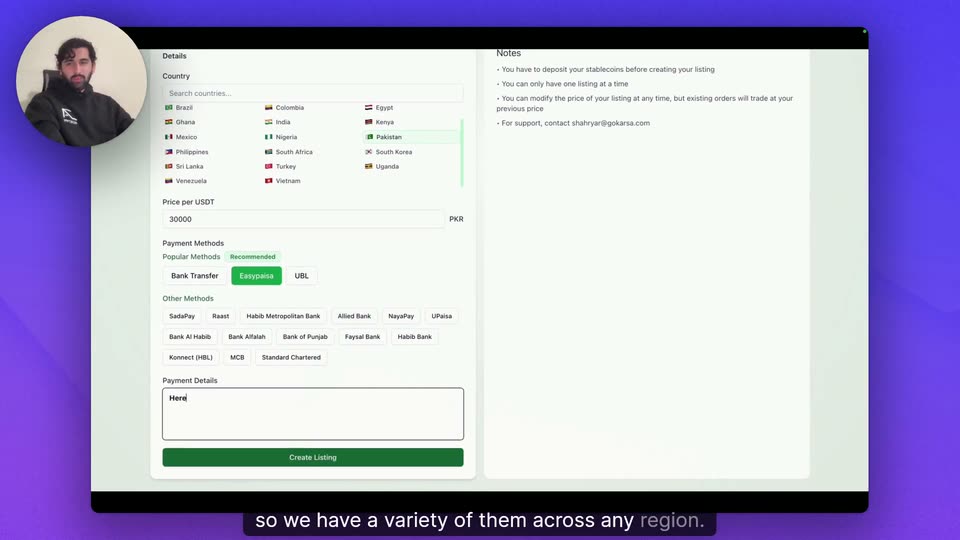
03 · Feature reveal · 0:11–1:00
A screen recording of the Karsa Sell Dollars page with a small circular webcam of a presenter in the top left. A cursor types a deposit amount, clicks Deposit, picks Pakistan, sets a price, chooses EasyPaisa, and creates the listing as the page scrolls down.
On-screen text: “I'm walking through a demo here,”, “So first from the seller perspective”, “So note that Karsa is a peer to peer marketplace”, “where there's stablecoin sellers who provide”, “So first what you're going to do is choose the”, “amount you want to deposit and the deposit goes”, “into an escrow smart contract which is essentially”, “a programmable rules based piece of code that”, “securely holds the capital,”, “while it's in the transaction. After that you're going to choose the region that you're located in you're going to choose the foreign exchange rate that you're”
Techniques: Cursor demo
Camera: Static
04 · Feature reveal · 1:00–1:14
A screen recording of the karsa Buy Dollars page, with a circular webcam inset of the presenter in the top-left. The cursor clicks Select Country, picks Pakistan from a modal grid, then types 1 into the amount field beside a green Buy button.
On-screen text: “This allows you to be in any country without any government intervention.”, “So from the buyer perspective,”, “it doesn't really look like a peer to peer marketplace”, “You don't need to chat with anybody.”, “you just see the payment details of the person”, “you're transacting with and you just send them the”, “amount via the local payment method.”, “So you put in your order over here,”
Techniques: Cursor demo
Camera: Static
05 · Feature reveal · 1:14–1:17
A screen recording of the karsa web app shows an Upload Payment Receipt modal. A cursor clicks Choose File, opening a macOS file dialog over the dimmed page, then scrolls the Downloads list and selects a PNG file. A circular webcam inset sits top-left; subtitles run along the bottom.
On-screen text: “you send the local payment method as soon as”, “possible and then typically you want to upload a”, “pdn o u o d e ssad”
Techniques: Cursor demo
Camera: Static
06 · Feature reveal · 1:17–1:36
A tilted browser window on a purple gradient shows the karsa Buy Dollars page, with a presenter's webcam in the top-left corner. A receipt modal closes, an anime avatar loads as the receipt, and the balance ticks up to $0.99 as the page scrolls.
On-screen text: “possible and then typically you want to upload a”, “for our own verification purposes since we sit in”, “the middle and”, “handle the process with these sellers.”, “So we put in a test receipt over here,”, “and we do the verification on the back end.”, “And now the balance is increased.”, “So you've gotten your money in dollars now.”, “Now we go to the seller side in just a moment and”
Techniques: 3D mockup, Cursor demo
Camera: Pan
07 · Demo · 1:36–1:44
A web app's Edit Listing page slides in and fills the screen, with a presenter in a circular webcam at the top left. Two side-by-side panels show a deposit form and listing status as the cursor drifts right. White subtitles run along the bottom.
On-screen text: “we're going to see that the amount they deposit is”, “So on both sides we have”, “the transaction concluding.”
Techniques: Cursor demo
Camera: Pan