
4:42
Explore
My Stripe API key was leaked
SubImage · Feb 2025 · 1:43 · Full motion · AI-annotated
- Length
- 1:43
- Scenes
- 11 · 9.4 s avg
- Product on screen
- 1:01
- Features shown
- 3
- Voiceover
- Yes
- Views
- 391 on YouTube
as of November 23, 2026
00:00:00 / 01:43:14
- Length
- 1:43
- Scenes
- 11 · 9.4 s avg
- Product on screen
- 1:01
- Features shown
- 3
- Voiceover
- Yes
- Views
- 391 on YouTube
as of November 23, 2026
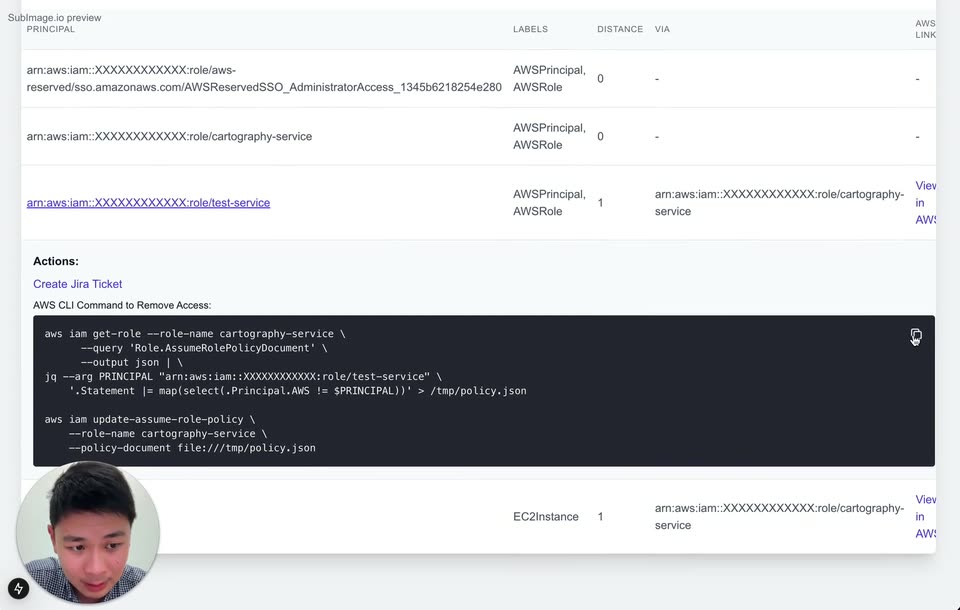
SubImage’s 1:43 launch film runs 11 scenes, about 9.4 s each. The product shows up at 1:01 and 3 features are revealed. There is no explicit call to action; a voiceover carries the film. A single continuous screen capture of the SubImage.io dashboard, cut into short beats that follow the cursor as it hovers bars, scrolls between the bar chart, node graph and table, and detours into a terminal to run remediation commands. Pacing is slow and methodical, with the presenter's webcam pinned in the corner and indigo accents on a light UI carrying the visual identity.
No filming indicatedEstimated needs: 5 capture groups — your screens or recordings
Is this your launch? to your site or press kit.
More like this

Similar soundtrack
Films whose music sounds like this one, voice left out
1:44
Conifer Demo Video
Conifer
1:51

cmux - the terminal built for multitasking
cmux · Technical voiceover
2:26

Novaflow Launch Video
Novaflow
My Stripe API key was leaked, scene by scene
· 11 scenes as text
01 · Problem · 0:00–1:01
A flat screen capture of a secrets dashboard. The cursor hovers the third bar of the Principals per Secret chart, popping a dark tooltip, then scrolls down past a node-link access graph to a principals table. A circular webcam of the presenter sits in the lower-left corner.
Techniques: Cursor demo
Camera: Push in
02 · Feature reveal · 1:01–1:08
A product screen lists AWS IAM principals in a table above a dark code block of CLI commands. A cursor drifts through the code and hovers the copy icon. A circular presenter video sits in the lower-left corner; a macOS dock slides up at the end.
Techniques: Cursor demo
Camera: Static
03 · Feature reveal · 1:08–1:17
A dark macOS terminal window fills the center, typing an AWS CLI command line by line, over a light document panel showing the same code, with a circular webcam of a presenter at the bottom left. A white blurred band wipes across the terminal mid-clip.
Techniques: Masking
Camera: Static
04 · Feature reveal · 1:17–1:18
A white dashboard table lists AWS role principals with labels and distances, and an Actions panel below shows a Jira link plus a dark code block of CLI commands. A circular webcam of a man sits in the lower left corner while a mouse cursor drifts right.
Camera: Static
05 · Feature reveal · 1:18–1:22
The SubImage.io dashboard scrolls down from the Principals per Secret bar chart and roles table to a node graph, where a tooltip appears on the test-service node, then scrolls back up to the Secrets Overview header. A presenter's webcam bubble stays in the bottom left corner.
Techniques: UI zoom
Camera: Static
06 · Feature reveal · 1:22–1:27
A dashboard shows a bar chart titled Principals per Secret. A cursor clicks the Refresh Sync button top right, which switches to a Refreshing state with a spinner, while a circular webcam of the presenter stays in the corner.
Techniques: Cursor demo
Camera: Static
07 · Feature reveal · 1:27–1:27
A black video-call screen with a circular webcam tile of a man in the bottom left corner. A white cursor hovers near the center and shifts slightly as the clip ends.
Techniques: Cursor demo
Camera: Static
08 · Feature reveal · 1:27–1:28
A light gray screen holds a white Secrets Overview panel with two tabs and a blue Refresh Sync button. A cursor hovers in the empty center while a circular webcam of a man in a checkered shirt sits in the lower left corner.
Camera: Static
09 · Demo · 1:28–1:34
A light dashboard shows a Secrets Overview header and a five-bar chart of Principals per Secret. A cursor glides across, hovering each bar to open a dark tooltip with a secret ARN and reader count. A circular webcam of a presenter stays pinned lower-left.
Techniques: Cursor demo
Camera: Pan
10 · Demo · 1:34–1:36
A dashboard screen shows a blue bar chart of secret names above a node graph linking AWS principals to a GitHub token; a circular webcam of the presenter sits bottom left. The cursor hovers the fifth bar, popping a tooltip with the secret ARN and reader count.
Techniques: Cursor demo
Camera: Static
11 · Demo · 1:36–1:43
A light dashboard opens on a five-bar blue chart, then scrolls down to a node graph with four labeled points joined by curved lines, above a data table. A circular webcam of a man stays in the lower-left corner while the cursor drifts right.
Camera: Pan