1:26
Explore
Okara - Today we're launching the world's first LinkedIn Influencer Agent. T
Okara · Oct 2026 · 0:45 · AI-annotated
- Length
- 0:45
- Scenes
- 8 · 5.7 s avg
- Product on screen
- 0:00
- Features shown
- 1
- Voiceover
- No
00:00:00 / 00:45:39
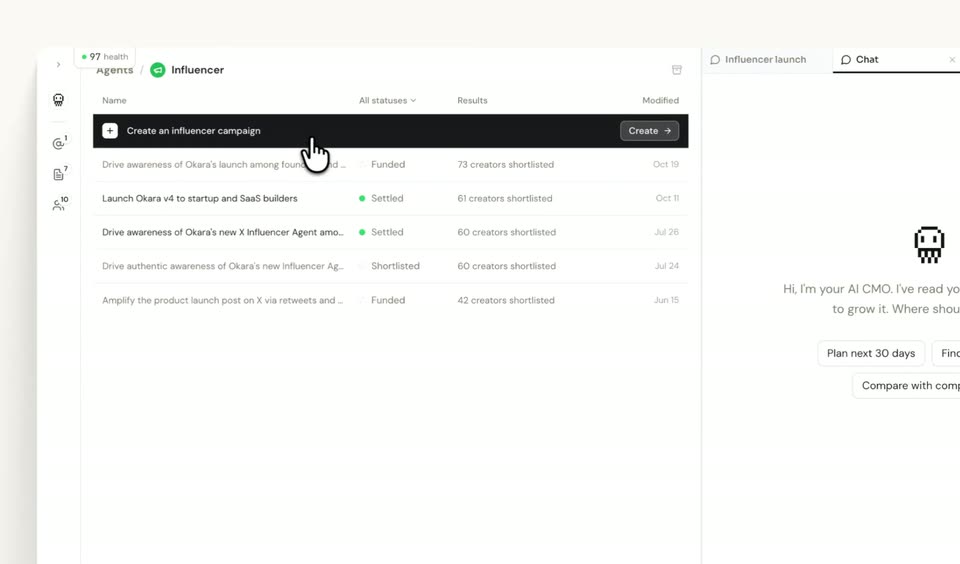
Okara’s 0:45 launch film runs 8 scenes, about 5.7 s each. The product is on screen from the first frame and 1 feature is revealed. There is no explicit call to action. The video is a single continuous cursor-driven walkthrough: a 3D-tilted homepage mockup zooms into the dashboard, then flat UI close-ups step through the influencer campaign flow from brief to creator outreach. Signature moves are the perspective tilt on entry, blur-and-slide transitions between screens, and tight zoom-ins on the control being clicked.
No filming indicatedEstimated needs: 1 capture group — your screens or recordings · 2 3D passages — build or supply
Is this your launch? to your site or press kit.
More like this
0:36

Result - We built the best experience for local AI on MacOS Introducing Resul
Result · Consumer · Nov 2026
0:30
Dreamscale Labs (YC F26) - Dreamscale Datasets is now live!
Dreamscale Labs · Industrials · Nov 2026
Okara - Today we're launching the world's first LinkedIn Influencer Agent. T, scene by scene
· 8 scenes as text
01 · Product intro · 0:00–0:01
A browser window mockup of the Okara homepage sits in 3D perspective on a light background. A cursor hovers the robot icon, then moves down and clicks the Go to Dashboard button as the page zooms forward into a transition.
Techniques: 3D mockup, Cursor demo, UI zoom
Camera: Static
02 · Demo · 0:01–0:02
A marketing dashboard and chat panel float in 3D perspective on a pale background. The view tilts and zooms into the Agents folder grid, the screen blurring as focus drops onto the colorful folder icons.
Techniques: 3D mockup, UI zoom
Camera: Push in
03 · Feature reveal · 0:02–0:04
A light campaign dashboard with a chat panel sits on screen. A cursor glides up from the lower left and clicks the dark Create an influencer campaign bar. The whole view blurs and slides into a new task screen showing a typed launch brief.
Techniques: Cursor demo
Camera: Pan
04 · Feature reveal · 0:04–0:07
A close-up of the AI chat panel pulls back to the full dashboard. A cursor clicks send on the typed prompt, the AI shows a thinking state, then a campaign details form with budget, platform and deliverables fields appears.
Techniques: UI zoom, Cursor demo
Camera: Static
05 · Feature reveal · 0:07–0:12
A flat white campaign form fills the right half of the screen. A cursor clicks the 5k budget chip, selects Video Post, opens a calendar and picks Oct 26, 2026, then hovers the Continue button. The campaign list on the left stays still.
Techniques: Cursor demo
Camera: Static
06 · Feature reveal · 0:12–0:34
A two-panel app shows a campaign list at left and an AI chat at right. A cursor fills a campaign details card, then types a brief and pastes a doc link as the chat scrolls. The frame zooms between the full app and the chat column.
Techniques: Cursor demo, UI zoom
Camera: Pull out
07 · Feature reveal · 0:34–0:36
The interface opens blurred, then resolves: a campaign list fills the left pane while the right pane's agent card swaps from a brief to a saved-campaign summary with a stage slider. A cursor drifts down to the Review button, which lifts and shows a tooltip.
Techniques: Cursor demo
Camera: Static
08 · Feature reveal · 0:36–0:45
A cursor hovers over the white Influencer Agent panel, then the frame zooms in as it clicks the Shortlist 13 creators button, which shows a spinner. A cut lands on a welcome dashboard where the panel's Outreach step is active and creator rows read Sending.
Techniques: UI zoom, Cursor demo
Camera: Static