0:25

Introducing Retool AI—powerful AI building blocks
Retool · Developer tools · Sep 2023
Dreamscale Labs · Nov 2026 · 0:30 · AI-annotated
Dreamscale Labs’s 0:30 launch film runs 8 scenes, about 3.8 s each. The product is on screen from the first frame and 2 features are revealed. There is no explicit call to action. One continuous product tour that moves from importing a dataset, to scrubbing its robot episodes, to launching a training run, all inside a floating app window over a soft blue-to-orange gradient. Pacing is steady, with slow push-ins and pull-backs framed around each cursor click, so camera moves rather than hard cuts carry the transitions.
Is this your launch? to your site or press kit.
Retool · Developer tools · Sep 2023
Craft · Productivity · Nov 2025
Papaya · B2B · Oct 2026
A tilted app window showing a Datasets list floats over a blurred blue-to-orange gradient. A cursor slides in and hovers the Datasets menu item while the list stays still.
On-screen text: “https://app.dreamcalabs.com/dashboard/datasets”
Techniques: 3D mockup, Cursor demo
Camera: Push in
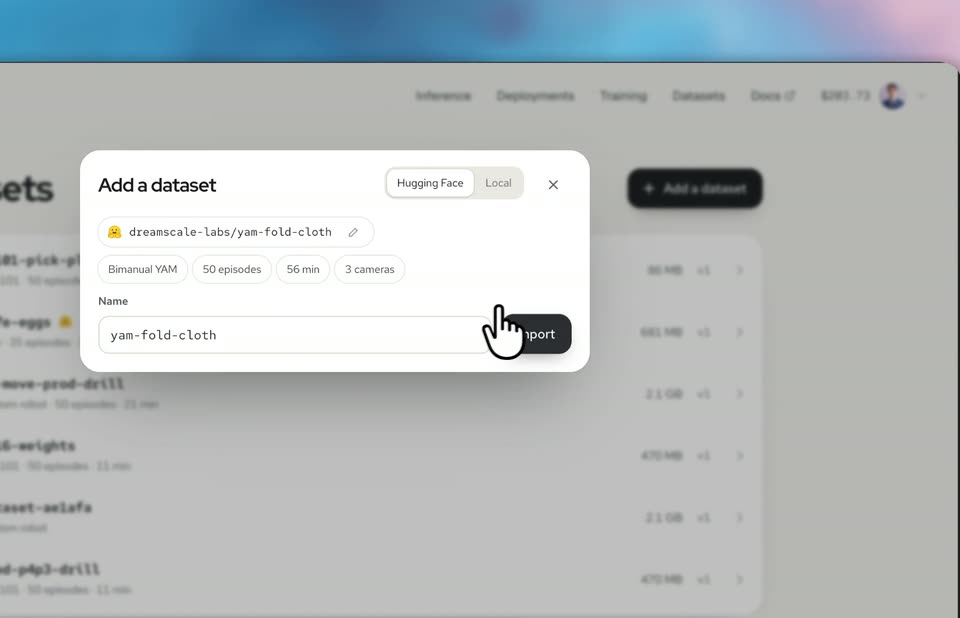
A flat product screen shows the Datasets page with an open Add a dataset modal. A cursor clears the search field, selects a dataset from the dropdown, then hovers the Import button while the view slowly zooms in on the modal.
Techniques: Cursor demo, UI zoom
Camera: Push in
A close-up of a Datasets web interface zooms out to reveal the full rounded window on a blurred blue-to-orange gradient. The top nav and a list of dataset rows with file sizes settle into place beside a dark 'Add a dataset' pill and a cursor arrow.
Techniques: UI zoom
Camera: Pull out
A floating browser window on a blurred multicolor gradient shows a Datasets list. A hand-pointer cursor clicks a row, and the view switches to a grid of numbered episode thumbnails.
Techniques: Cursor demo
Camera: Static
A dashboard window floats on a blue-to-orange gradient. Its grid of 35 episode thumbnails fills in one by one with clips of a robotic arm handling eggs, while a hand cursor hovers over tile #10.
Techniques: Cursor demo
Camera: Static
A white robotics dashboard floats over a blue-to-orange gradient. A cursor scrubs the timeline of a robot-arm egg-picking video as the camera zooms into the player, then pulls back and the cursor clicks the Train button.
Techniques: UI zoom, Cursor demo
Camera: Static
A white dashboard card titled Train a model floats over a soft blue-to-orange gradient. A cursor taps the FLUX 3 Action base model, a check mark appears, then the view scrolls down and zooms into the Start training button.
Techniques: 3D mockup, Cursor demo, UI zoom
Camera: Push in
The clip opens tight on a checkpoints list, then zooms out to reveal a white training dashboard window floating over a blue-to-orange gradient. A black cursor drifts down the list of deployable steps.
Techniques: UI zoom, Cursor demo
Camera: Pull out