1:28

Capveon - AI that discovers, understands, and wins government work
Capveon · Government · Oct 2026
Trylle · Sep 2026 · 1:55 · AI-annotated
Trylle’s 1:55 launch film runs 32 scenes, about 3.6 s each. The product shows up at 0:10. The call to action lands at 1:48 (93% in), over a voiceover. A promise, a named intro, one long end-to-end demo, and a talking-head wrap-up that lands on a free GA call to action. The presenter's face dissolves into the UI, a persistent webcam tile keeps the human present during screen recordings, and hard caption pills re-word the voiceover line by line at a steady 13 cuts per minute.
Is this your launch? to your site or press kit.
Capveon · Government · Oct 2026
BitBoard · B2B
Agentcard · Fintech · Nov 2026
A bearded man with glasses and white earbuds talks directly into a locked-off camera against a white wall, a desk lamp and plant at his left. Black caption bars at the bottom display his words in two lines.
On-screen text: “there, watch how can you”, “convert an existing issue in your”
Camera: Static
A dark pull-request page fills the frame as the man's face dissolves out from the center. A lower-third caption reads “codebase to a mergeable PR”, then re-words to “within minutes using magic” while a small video-call tile of the man holds the bottom-right corner.
On-screen text: “codebase to a mergeable PR”, “within minutes using magic”
Techniques: Kinetic type
Camera: Static
A dark pull request page fills the frame, left nav and right metadata panel visible, a video-call avatar of a man in the bottom right corner and a cursor resting over the body text. A white caption sits in a dark pill at the bottom.
On-screen text: “within minutes using magic”
Techniques: Cursor demo
Camera: Static
A dark app interface fades in from black, showing a chat screen titled What would you like to build? with three task rows and an input box. A small video inset of a man with glasses appears in the lower-left corner, and a white caption fades in at the bottom.
On-screen text: “So what's Magic Sessions It's”
Camera: Static
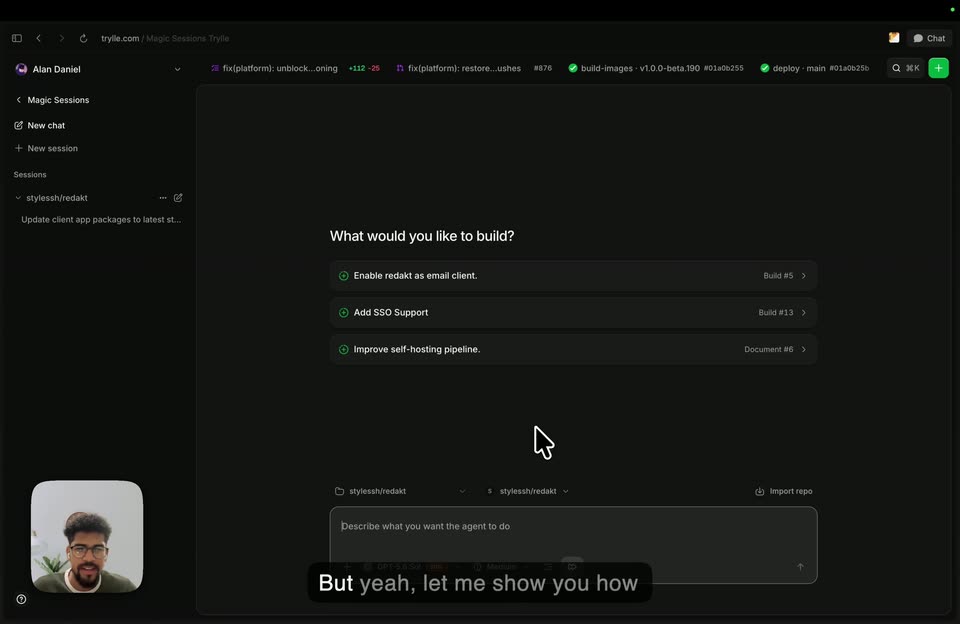
A dark web interface fills the screen, showing a task list and a text box. A small video inset of a bearded man in glasses sits in the lower left, a white cursor rests in the center. White captions on a black pill appear at the bottom.
On-screen text: “basically a long running task”, “But yeah, let me show you how”
Camera: Static
A dark web-app interface fills the frame, with a left sidebar and a central panel titled 'What would you like to build?' plus three option rows. A white cursor moves into the bottom input field and hovers over the model selector as subtitle captions fade in at the bottom.
On-screen text: “But yeah, let me show you how it works.”, “I'm going to use my Redakt”, “repository, which is an open”
Techniques: Cursor demo
Camera: Static
A dark web app screen fills the frame, showing a build prompt with three suggestion rows and an empty input box; a mouse cursor hovers in the center. A small inset video of a bearded man in glasses sits bottom-left while a caption runs along the bottom.
On-screen text: “repository, which is an open”, “source email client, I'm working”
Techniques: Cursor demo
Camera: Static
A dark web app interface fills the frame, with a heading and three task rows bearing green check icons. A cursor drifts up from the input field to hover the first row. A facecam of a man sits bottom-left, and white subtitles roll along the bottom.
On-screen text: “on the side.”, “So yeah, let's give it a go.”, “And here I have some open”
Techniques: Cursor demo
Camera: Static
A dark web interface shows three build-task rows under a heading, with a white cursor drifting down the list. A small webcam video of a man sits in the lower-left corner while a caption line swaps in at the bottom.
On-screen text: “issues that I have for the repo.”, “So let's take this as an example.”
Techniques: Cursor demo
Camera: Static
A dark product screen lists three build options; the view zooms in as the cursor clicks the 'Improve self-hosting pipeline' row, and the pick appears as a chip in the chat input with a generated prompt. A small face-cam sits in the lower-left corner.
On-screen text: “So let's take this as an example.”, “For example, like improve the”, “self-hosting pipeline just we'll”
Techniques: UI zoom, Cursor demo
Camera: Push in
A dark task list shows three rows with green plus icons. The frame reframes down onto a prompt box holding a document instruction, while a white cursor moves to the send button and clicks it. White subtitle captions roll along the bottom edge.
On-screen text: “self-hosting pipeline just we'll”, “just create a prompt that we can”, “use and run an agent to it.”
Techniques: UI zoom, Cursor demo
Camera: Pan
A dark chat interface opens on a close-up of the message box, pulls back to the full browser window, then zooms into a two-pane view of a markdown doc and a code diff. A cursor hovers at the lower right while a subtitle caption sits along the bottom edge.
On-screen text: “use and run an agent to it.”, “So let's give it a moment.”
Techniques: UI zoom
Camera: Pull out
A dark web IDE fills the frame, split into a markdown document on the left and a red-green diff panel on the right. A white cursor drifts down the center with a motion trail, while a small webcam video of a man with glasses sits in the lower left corner.
On-screen text: “Great, so agent has finished”
Techniques: Cursor demo
Camera: Static
A dark code-review interface fills the frame; a markdown document scrolls upward in the center while a color-coded diff occupies the right panel and a small webcam video of a man sits lower left. A white cursor hovers over the text as a caption bar appears at the bottom.
On-screen text: “Great, so agent has finished”, “So yeah let's review the”
Camera: Static
A dark web interface fills the screen: a left sidebar with a small video call of a man, a center document pane, and a right diff pane of green and red lines. The diff scrolls up as the cursor moves to the Open PR button, subtitles appearing at the bottom.
On-screen text: “So yeah let's review the”, “changes in here.”, “We can see it did some changes”, “in some documentation stuff.”, “So yeah I mean this looks great”, “so let's open up PR.”, “Let's click this It's just gonna”
Techniques: Cursor demo
Camera: Static
A dark code-review web app fills the frame, split into a chat column holding a long prompt and a diff panel of green and red lines. A white cursor drifts down and clicks the Open PR button as a caption updates along the bottom.
On-screen text: “send a pre-defined prompt to”, “create the PR and let's see how”
Techniques: Cursor demo
Camera: Static
A dark web app shows an AI coding agent's session. The chat panel settles from a streaming state into a finished summary of commands and a commit, while the right panel switches to 'No changes'. A cursor glides to the 'View PR #40' pill. White captions narrate at the bottom.
On-screen text: “we can see the agent has”, “finished here and now we have”, “an new pill called View PR 40.”
Techniques: Cursor demo
Camera: Static
Dark app interface with a session chat on the left and a changes panel on the right. A cursor clicks the View PR 40 pill, and the right panel switches from an empty No changes state to a pull request detail view.
On-screen text: “an new pill called View PR 40.”, “So let's open it up and yeah, we”
Techniques: Cursor demo
Camera: Static
A dark Trylle interface fills the frame, showing a session list, document chat, and a pull-request panel. A cursor scrolls the right panel downward while white subtitle captions change at the bottom.
On-screen text: “So let's open it up and yeah, we”, “have the PR open here, we”
Techniques: Cursor demo
Camera: Static
A dark-themed code-review interface fills the frame: a left session list, a center chat of shell commands and commit notes, and a right panel showing PR #40 with Problem, Result and Validation sections. A cursor hovers over the right panel while a white caption sits at the bottom.
On-screen text: “have the description, the issue”
Camera: Static
A dark pull-request page fills the screen, split into a document panel left and a checks list right. A cursor glides down the checks as the list scrolls past a green merge button; a small webcam feed of a man sits in the corner.
On-screen text: “attached and also the checks”
Techniques: Cursor demo
Camera: Static
A dark product screen shows a documentation panel on the left and a pull request checks panel on the right, with statuses like Running, Queued and Passed. A cursor glides down the checks list while a white caption bar at the bottom updates in two phrases.
On-screen text: “Since this repo has the GitHub”, “sync enabled, we also see the”
Techniques: Cursor demo
Camera: Static
A dark app interface fills the browser window. The center document stays fixed while the right panel switches from a pull request checks list to a documentation card, then scrolls down to Problem and Result sections. A cursor moves over the right panel as bottom captions change.
On-screen text: “GitHub based checks as well.”, “So yeah, that's kind of it.”, “We have an idea, we define a task, fine.”
Techniques: Cursor demo
Camera: Static
A dark product UI fills the frame: a chat and document panel left, a pull request panel right that scrolls through Problem, Result and Activity sections. A cursor hovers over the right panel; a small video-call thumbnail of a man sits bottom left. Bottom captions change in sequence.
On-screen text: “We have an idea and we define”, “a task, we run an agent and now”
Techniques: Cursor demo
Camera: Static
A dark product interface fills the frame, showing a chat and document in the center and a pull-request panel on the right. A white caption 'we have a mergeable PR.' sits on a black bar at the bottom, then the whole screen fades to black.
On-screen text: “we have a mergeable PR.”
Camera: Static
After a black frame, a man with glasses, a beard and white earbuds speaks to camera against a white wall, a desk lamp and plant at his left. A black caption box holds the line at the bottom of the frame.
On-screen text: “that is Trylle Magic Sessions for”
Camera: Static
A bearded man with glasses and earbuds speaks to the camera against a white wall, a white desk lamp and plant at left. Subtitle lines in a black rounded box swap at the bottom of the frame as he talks.
On-screen text: “that is Trylle Magic Sessions for”, “you.”, “We started to build Trylle as an AI”, “native git platform but quickly”
Camera: Static
A man with glasses, a beard and white earbuds speaks to camera in a room with a white wall, a desk lamp and plant leaves at left. The frame is locked off. White caption text in a black rounded pill swaps at the bottom as he talks.
On-screen text: “native git platform but quickly”, “realized that just running CI jobs”, “in one shot automations is not”
Camera: Static
A man with glasses and white earbuds speaks to camera against a plain white wall, a white lamp and green plant at left. A black subtitle pill at the bottom center swaps line by line with his speech on a locked-off frame.
On-screen text: “enough for modern engineering.”, “We wanted agents to work”, “alongside us on long-running”
Camera: Static
A man with glasses and white earbuds talks to camera in front of a white wall, a white lamp and green plant at his left. A black caption box at the bottom center swaps lines of white text as he speaks. The frame stays locked off.
On-screen text: “alongside us on long-running”, “tasks, have dedicated machines”, “and full access to the same”
Camera: Static
A man with curly hair, round glasses and a beard in a dark t-shirt and white earbuds sits centered against a plain white wall, a white desk lamp and green plant at his left. He speaks to the camera while caption lines swap at the bottom center.
On-screen text: “and full access to the same”, “platforms that we are using.”, “So now Magic Sessions beta is”, “generally available today and”
Camera: Static
A man with curly hair, glasses and white earbuds speaks to the camera against a white wall, a desk lamp and plant at his left. White text on black caption bars sits at the bottom, swapping lines. The camera is locked off.
On-screen text: “generally available today and”, “you can start using”
Camera: Static