
1:31
Explore
00:00:00 / 01:34:28
- Length
- 1:34
- Scenes
- 35 · 2.7 s avg
- Product on screen
- 0:00
- Features shown
- 2
- Call to action
- 1:19 · 84%
- Voiceover
- Yes
- Views
- 564 on YouTube
as of November 23, 2026
Imprezia’s 1:34 launch film runs 35 scenes, about 2.7 s each. The product is on screen from the first frame and 2 features are revealed. The call to action lands at 1:19 (84% in), over a voiceover. The video cuts between a talking-head founder in a modern lounge and dark UI mockups, moving from problem statistics to the network concept, the DSP, the SDK, and a live chat demo before a signup close. Its signature moves are 3D tilts and push-ins on interface cards, self-typing code, and a white cursor that performs every click.
Footage neededEstimated needs: 6 capture groups — your screens or recordings · 4 filmed passages — shoot, supply or replace · 1 graphic passage — draw or supply · 2 3D passages — build or supply
Is this your launch? to your site or press kit.
More like this



Imprezia Launch Video, scene by scene
· 35 scenes as text
01 · Product intro · 0:00–0:10
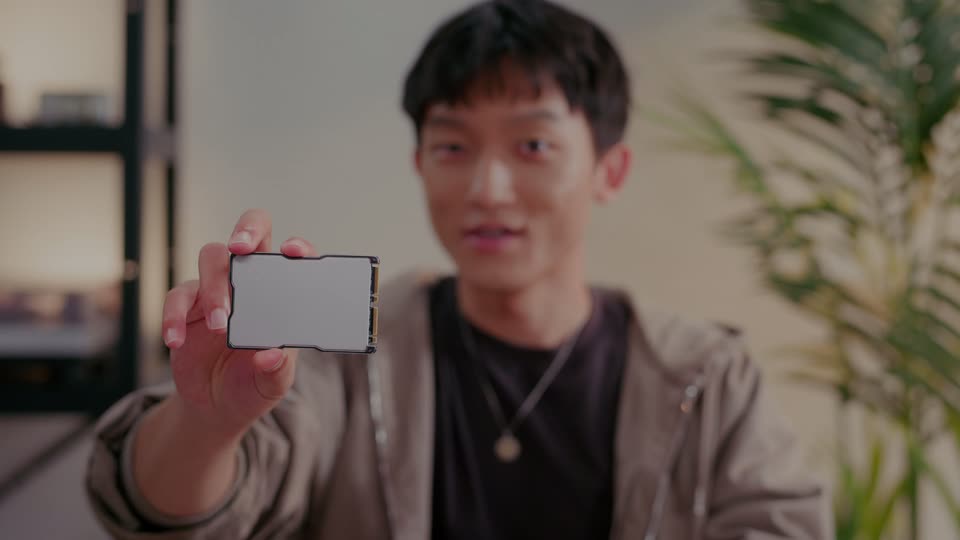
A man in a black shirt and glasses stands centered in a modern lobby with a fireplace and sofas behind him. He waves to the camera, then talks and gestures with his hands. The static medium shot ends as the frame shrinks with blurred edges.
Camera: Pull out
02 · Problem · 0:10–0:11
A man in a black sweater stands in a modern loft, shown sharp in a centered window over a blurred backdrop of the same room. The window swaps to a tilted 3D mockup of a Gartner press release page on a colorful gradient, with a cursor resting on it.
Techniques: 3D mockup
Camera: Push in
03 · Problem · 0:11–0:14
A white press-release page appears as a small window over an orange and blue gradient, then the view zooms steadily into the blue headline and gray body copy until the article fills the frame. A mouse cursor hovers near the top of the text.
Techniques: UI zoom
Camera: Push in
04 · Problem · 0:14–0:15
Two white article cards slide horizontally across a black background, the first carrying a Gartner headline and the second an OpenAI revenue story, with a mouse cursor resting on the text.
On-screen text: “Gartner Predicts Search Engine Volume Will Drop 25% by 2026, Due to AI Chatbots and Other Virtual Agents”, “Tech Marketing Tactics to be Discussed at the Gartner Tech Growth & Innovation Conference, March 20-21 in Grapevine, Texas”, “OpenAI sees roughly this year on $3.7 billion in rev”
Camera: Pull out
05 · Problem · 0:15–0:18
A white news article card slides from the right edge to the left across a black background. A cursor drifts over the byline and the key points list, then the card softens into blur as it exits.
Techniques: Cursor demo
Camera: Pull out
06 · Problem · 0:18–0:19
A white CNBC article card about OpenAI's losses slides left across an abstract blue and orange gradient, revealing a Menlo Ventures card titled How Big Is Consumer AI with two pie charts of consumer AI usage.
Camera: Pull out
07 · Problem · 0:19–0:24
A white dashboard card titled How Big Is Consumer AI? with three pie charts fills the frame, then the view zooms into the rightmost pink pie chart as a cursor slides in to point at the 3% figure, before zooming back out with a blur.
Techniques: UI zoom, Cursor demo
Camera: Push in
08 · Problem · 0:24–0:25
A white rounded frame on a colorful blurred background holds the MENLO analytics dashboard, three pie charts for consumer AI use, spend and free versus paid. It cuts to a man in a black shirt gesturing in a modern living room.
Camera: Push in
09 · Problem · 0:25–0:31
A man in a black t-shirt and clear glasses sits center frame in a modern lounge, speaking to camera. He gestures with both hands, then clasps them in front of his chest. White sofas, a lit fireplace, and potted plants fill the room behind him. The camera is locked off.
Camera: Pull out
10 · Demo · 0:31–0:32
A small live-action window of a man in a dark living room, framed by a glitchy border, expands to reveal a full-screen website mockup. The black page carries a gradient border, the IMPREZIA logo, a hero line, and two columns of brand and app cards joined by connection lines.
Techniques: Masking
Camera: Push in
11 · Demo · 0:32–0:33
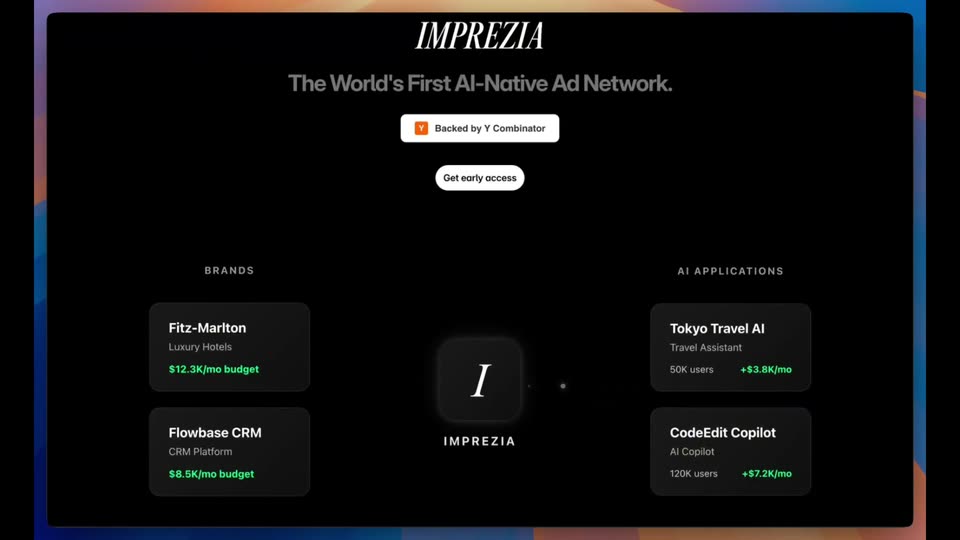
A dark interface panel on a multicolor gradient shows the Imprezia headline, a Y Combinator badge and two columns of brand and app cards. A central tile joins them with a line carrying drifting green and white dots.
Techniques: Particles
Camera: Static
12 · Demo · 0:33–0:37
A dark landing page centers the Imprezia mark between a Brands column on the left and an AI Applications column on the right. Green and white connector lines draw outward from the center with node dots. The camera then pushes in on the left column, blurring the top badges.
Techniques: UI zoom
Camera: Push in
13 · Demo · 0:37–0:38
A dark landing-page diagram zooms out from a close-up of the central Imprezia icon and the left brand cards to reveal the full layout. The header with logo, tagline and badges fades in at top while the right column of AI application cards appears, connected by a horizontal line through the center icon.
Techniques: UI zoom
Camera: Pan
14 · Demo · 0:38–0:39
A dark network diagram animates: a glowing IMPRESIA node links via a User Reach slider to two app cards on the right. The camera pulls back, parallax layers reframe the layout, and a top bar with a logo and Get Started button slides in from above.
Techniques: Parallax
Camera: Pull out
15 · Demo · 0:39–0:41
A flat black product screen framed by a blue and orange gradient border. The IMPREZIA title, tagline, Y Combinator badge and two columns of brand and AI application cards resolve from a doubled glitch state into clean type. Green and gray connector lines with dots link the side cards to a glowing central I logo.
Camera: Static
16 · Feature reveal · 0:41–0:42
A dark landing view with the IMPREZIA wordmark, tagline, and brand and AI application cards crossfades into a campaign dashboard. A sidebar and three campaign rows fill the new screen while a white cursor hovers over the first row.
Camera: Static
17 · Feature reveal · 0:42–0:44
A dark campaign dashboard fills the frame, a left nav beside a stacked list of campaign cards. A white cursor drifts from the top right corner down onto the blue Create Campaign button and presses it, the button flashing brighter on click.
Techniques: Cursor demo
Camera: Static
18 · Feature reveal · 0:44–0:45
A dark campaign builder screen fills the frame, with a left nav, a central form showing brand and name fields, and a right estimates panel. A cursor drifts across the layout, pausing near the settings and estimates cards.
Techniques: Cursor demo
Camera: Static
19 · Feature reveal · 0:45–0:47
A dark campaign-creation screen fills the frame. A cursor opens the Brand dropdown, highlights Park Hyatt Tokyo, and closes it; the field updates and the Create campaign button switches from dim to bright blue.
Techniques: Cursor demo
Camera: Static
20 · Feature reveal · 0:47–0:51
A dark campaign form blends in, then the view zooms into the Delivery Channels card. A cursor opens the AI App Network list and checks two travel apps. The camera pulls back to the full form as the performance estimates on the right update.
Techniques: UI zoom, Cursor demo
Camera: Pan
21 · Feature reveal · 0:51–0:53
A dark campaign dashboard sits flat, then tilts into 3D perspective, revealing a code editor on the left while the performance estimates panel holds on the right. A cursor hovers over the form.
Techniques: Cursor demo, 3D mockup
Camera: Static
22 · Feature reveal · 0:53–1:03
A dark code editor fades in over a blurred dashboard; TypeScript lines type themselves out around a drifting gray cursor dot, then the frame zooms out to the full editor card before dissolving into a Tokyo Travel AI chat screen with a monetization metrics sidebar.
Techniques: Cursor demo, UI zoom
Camera: Pull out
23 · Demo · 1:03–1:11
A dark chat interface for Tokyo Travel AI zooms into the input row as a hand cursor taps the Luxury Tokyo Stay chip and types a hotel query, then sends it. The assistant replies with a hotel list while the revenue counters on the right tick up.
Techniques: Cursor demo, UI zoom
Camera: Static
24 · Demo · 1:11–1:13
A dark Tokyo travel chat UI fills the frame, a hotel list in the left panel beside a green metrics column on the right. A white cursor drifts over the text, then the whole screen pushes in with a fast zoom and motion blur before sharpening again.
Techniques: Cursor demo, UI zoom
Camera: Push in
25 · Demo · 1:13–1:14
A dark chat interface listing Tokyo hotel recommendations fades to a plain dark gray field, leaving a white hand cursor mid-frame and a thin multicolor gradient strip on the left edge.
Techniques: Cursor demo
Camera: Static
26 · Demo · 1:14–1:14
A hotel website page fills the frame with a top navigation bar and body copy. A cookie consent modal drops into the center while a hand cursor tilts and moves toward it.
Techniques: Cursor demo
Camera: Static
27 · Demo · 1:14–1:15
A browser window of the Mandarin Oriental Tokyo site zooms in, pushing the cookie banner off the top while a kimono-clad woman with a red parasol walks through a petal-strewn garden.
Techniques: UI zoom
Camera: Push in
28 · Demo · 1:15–1:16
A dark chat window titled Tokyo Travel AI fills the left, listing hotel names in dense body copy, while a right panel brightens to show a $30.00 earnings line and two counters. The frame holds with a soft blur as the panel text resolves.
Techniques: UI zoom
Camera: Pull out
29 · Demo · 1:16–1:19
A dark chat window with a block of hotel text sits left of a green metrics panel. A white cursor hovers across the revenue, impressions, and clicks cards. The interface then scales down and slides left as the right half fades to black.
On-screen text: “Tokyo Travel AI (powered by Imprezia)”, “Ask about hotels, restaurants, and activities in Tokyo!”
Techniques: Cursor demo, UI zoom
Camera: Pull out
30 · CTA · 1:19–1:20
A bespectacled man in a black shirt speaks to camera in a dark modern lounge with white sofas and green edge lighting. A translucent Tokyo Travel AI interface hovers over him at the start, then fades away as he gestures with his hand.
Camera: Push in
31 · CTA · 1:20–1:30
A man with clear glasses and a black shirt speaks to camera in a modern lounge with sofas, plants and a fireplace. He lifts one hand, then points down with both index fingers. Handheld framing with a slight forward push at the end.
Camera: Pull out
32 · CTA · 1:30–1:30
A centered video-call tile of a smiling man in a dark lounge flips into a black card with an iridescent border, revealing the Imprezia wordmark, three white text lines and a cursor, all over a blurred close-up of the same man.
On-screen text: “IMPREZIA”, “An inevitable. Subscriptions are not.”, “Pay the bills with Imprezia.”, “The World's First App-Native Ad Network.”
Techniques: Cursor demo
Camera: Pull out
33 · CTA · 1:30–1:33
A black landing page framed by a thin gradient border shows the Imprezia wordmark, a white headline, a Y Combinator badge and a Get early access button. A cursor glides from the center text down to the button and hovers on it.
On-screen text: “https://www.start-imprezia.ai”
Techniques: Cursor demo
Camera: Push in
34 · CTA · 1:33–1:34
A dark web interface brightens from a dimmed state, revealing a centered sign-up card with a headline, three checkmark points and email fields. A white cursor rests over the company name input.
Techniques: Cursor demo
Camera: Static
35 · CTA · 1:34–1:34
A white cursor moves down a dark IMPREZIA landing page as it scrolls, passing a Y Combinator badge, the headline The AI Ad Network for Builders & Brands, green checkmark bullets, and an email form ending in a Get Early Access button.
Techniques: Cursor demo
Camera: Static