2:27


DJI - Introducing Spark
DJI · Hardware · May 2017
Skimbly · Nov 2026 · 0:34 · Full motion · AI-annotated
Skimbly’s 0:34 launch film runs 23 scenes, about 1.5 s each. The product is on screen from the first frame and 6 features are revealed. The call to action lands at 0:27 (80% in), over a voiceover. The video is a rapid feature tour: a named-product opening, then one headline-led demo per feature built from flat UI mockups and 3D phone rows on a light gray field, closed by a mascot-and-paper-plane CTA card. Signature moves are in-place headline swaps, dashed flight paths for the paper plane, count-up numbers, and the plush mascot popping in with a new prop for each beat.
Is this your launch? to your site or press kit.
DJI · Hardware · May 2017
OpenDesign · Oct 2026
DJI · Hardware · Aug 2019
Films whose music sounds like this one, voice left out
LangEase · Electronic pop, dance-pop
CoGrader · Upbeat electronic
osu.ai · Funk, Rock, Electronic
Black headline Tell your AI. completes at center, then blue Skimby posts it and black everywhere. drop in below. App icons pop in around the edges and collect blue checkmarks. A blue blob mascot on a paper plane skims the bottom as a white panel rises with the caption.
On-screen text: “Tell your AI.”, “Skimby posts it”, “everywhere.”, “Instagram, X, LinkedIn, Threads, Bluesky, Pinterest and Facebook.”, “Ask your AI in plain words.”
Techniques: Kinetic type
Camera: Pull out
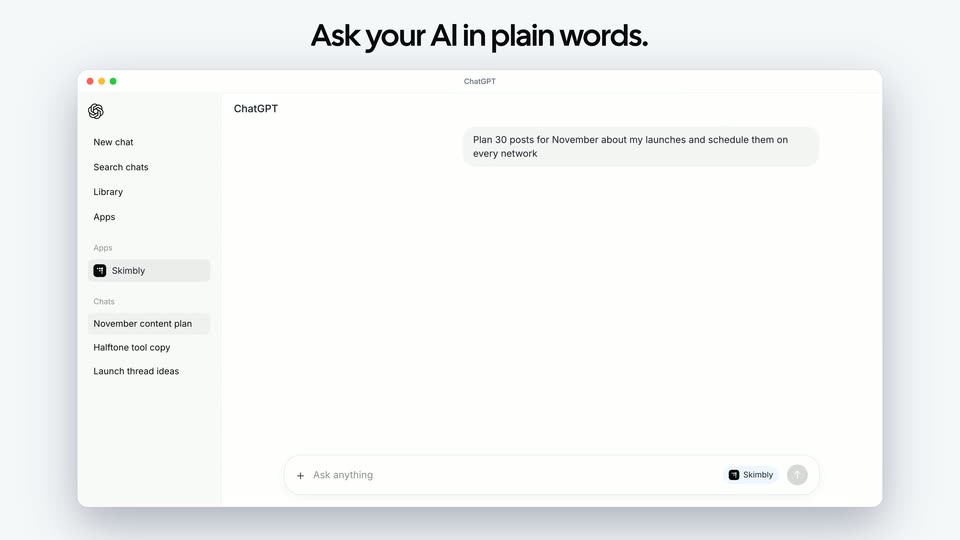
A ChatGPT-style app window sits under a large black headline. The prompt finishes typing, appears as a user message, and a blue dot with a status line appears below it.
On-screen text: “Tell your AI.”, “Ask your AI in plain words.”
Techniques: Kinetic type
Camera: Pan
A centered black headline sits above a flat ChatGPT window. Inside, a Skimply card ticks its counter from 18 to 26 of 30, the blue progress bar fills, and a row of post thumbnails scrolls left as new items load.
On-screen text: “Ask your AI in plain words.”
Camera: Static
A ChatGPT window mockup sits centered on a light gray field beneath the headline. Inside, a Skimply card shows a row of social post thumbnails scrolling left under a progress bar, with a short confirmation line below the card.
On-screen text: “30 posts. One message.”
Camera: Static
A ChatGPT window sits centered under the headline “30 posts. One message.” It slides left as a Claude window and a dark Claude Code terminal enter from the sides; the headline swaps to “Claude, ChatGPT, Claude Code. Any AI you use.”
On-screen text: “30 posts. One message.”, “Claude, ChatGPT, Claude Code. Any AI you use.”
Techniques: Kinetic type
Camera: Pan
A centered black headline sits above two flat mockups on a light gray field: a dark Claude Code terminal left, a light Claude chat right. The terminal lists a scheduled-post command; the chat shows a confirmation card. A small gray paper plane pops in over the terminal.
On-screen text: “Claude, ChatGPT, Claude Code. Any AI you use.”
Techniques: Split screen
Camera: Static
A row of product interface windows, a dark terminal, a Claude chat and a calendar, slides left across a light background as paper airplanes link them. The top headline scrolls out and a new one enters from the right.
On-screen text: “Claude, ChatGPT, Claude Code. Any AI you use.”, “Every post la”
Techniques: Parallax
Camera: Pan
A flat browser window shows the Skimby weekly calendar. Small dark post thumbnails glide along dashed blue lines from the left sidebar and drop into time slots, while the headline stays fixed above.
On-screen text: “Every post lands on your calendar.”
Camera: Pan
A flat browser window shows the Skimply week calendar grid. Paper planes glide along a dashed curve across the cells while a cursor hovers a post. The top headline then swaps to a second line.
On-screen text: “Every post lands on your calendar.”, “Drag to move: Skimply keeps up:”
Techniques: Cursor demo, Kinetic type
Camera: Static
A tilted browser window shows the Skimibly calendar, a cursor hovering over an event block. The composition slides left as a tilted phone with a social feed enters from the right beneath a changing headline and dashed lines.
On-screen text: “Drag to move. Skimibly keeps up.”, “Edit in Skim”
Techniques: 3D mockup, Cursor demo
Camera: Pan
A row of four front-facing phone mockups slides into place on a pale gray field, each showing a different social feed (X, Instagram, LinkedIn, Threads). Bold black headline sits above; small character-count labels with checkmarks fade in over each phone.
On-screen text: “Fitted to every network.”, “X 90 / 280”, “Instagram 88 / 2,200”, “LinkedIn 152 / 3,000”, “Threads 76”
Camera: Pan
A centered black headline sits above a horizontal marquee of network names with character counts. Below, a row of flat phone mockups, each showing a social post, scrolls right at a different speed than the label strip.
On-screen text: “Fitted to every network.”
Techniques: Parallax
Camera: Pan
Three phone mockups in 3D perspective show the same post on Bluesky, Pinterest and Facebook, each capped with a character-count label. A bold black headline above swaps from one line to another as the framing eases out.
On-screen text: “Fitted to every network.”, “Bluesky ✓ 99 / 300”, “Pinterest ✓ 52 / 500”, “Facebook ✓ 99 / 63,206”, “Posted everywhere, right on time.”
Techniques: 3D mockup
Camera: Pull out
A row of seven flat phone screens lines up across a white frame, each showing the same post on a different social feed with a platform name and count captioned above. A small blue blob mascot with a ball pops in at the bottom right corner.
On-screen text: “Posted everywhere, right on time.”, “X / 90 / 260”, “Instagram / 88 / 2,200”, “LinkedIn / 152 / 3,000”, “Threads / 78 / 500”, “Bluesky / 99 / 300”, “Pinterest / 52 / 100”, “Facebook / 99 / 63,200”
Techniques: Particles
Camera: Static
A row of seven flat phone screens showing social posts sits under a dark headline. A white analytics dashboard slides up from the bottom to cover the phones while the phones and a blue 3D character drift upward at different speeds.
On-screen text: “Posted everywhere, right on time.”
Techniques: Parallax
Camera: Pan
A light analytics dashboard interface displays stat cards and two line graphs. The numbers count up rapidly while the blue line graphs draw themselves from left to right.
On-screen text: “See what worked.”
Techniques: Kinetic type
Camera: Static
A light product dashboard assembles from overlapping panels: a bold headline and caption sit left while queue, best-time and CSV-import cards slide into place, with a small 3D blue mascot hugging an alarm clock.
On-screen text: “Plan it once.”, “A queue, your best times and a whole month from one sheet.”
Camera: Pan
A feature layout crossfades through three panels: a large headline and gray subtext on the left, a central card with a 3D blue mascot holding a prop, and two stacked cards on the right. The headline changes from Write it better. to Let it run. to Miss.
On-screen text: “Write it better.”, “One master text, fitted and sharpened for every network.”, “Let it run.”, “Your blog, your best posts and your weekly tips, on their own.”, “Miss”, “Replies to your posts, comments, when a new blog post drops.”
Techniques: Kinetic type
Camera: Pan
A light-gray layout holds the headline “Miss nothing.” on the left. On the right, a One inbox card shows a comment and a blue 3D character with a speech bubble, while a Retries card flips its status to Posted and an Any AI app card slides in below.
On-screen text: “Miss nothing.”, “Replies in one inbox, retries when a network is down.”
Camera: Static
A light layout with the “Miss nothing.” headline and three product cards dissolves out. A large centered headline “Your whole social media,” scrolls in vertically while small post cards drift in from the left and right edges.
On-screen text: “Miss nothing.”, “Replies in one inbox, retries when a network is down.”, “Your whole social media,”
Techniques: Kinetic type
Camera: Pan
A rounded black headline reads “Your whole social media,” with “on autopilot.” in blue appearing below. Post cards float and tilt around the edges, a row of seven platform icons pops in at center, and a round blue mascot rides a paper airplane along a dashed trail.
On-screen text: “Your whole social media,”, “on autopilot.”
Techniques: Kinetic type, Parallax
Camera: Static
A tall infographic scrolls up on a light gray field: the blue headline and a row of social icons exit the top while two plush blue mascots in knit hats flank a dotted arc linking four AI app icons on the left to four social icons on the right, each group captioned.
On-screen text: “on autopilot.”, “Ask in any AI”, “Posted everywhere”
Techniques: 3D mockup
Camera: Pull out
The Skimbly logo and headline sit above two blue plush mascots flanking a dotted arc. Paper planes with content cards fly from the left AI icons to the right social icons, where blue checkmarks pop in one by one. CTA buttons fade in below the headline.
On-screen text: “Ask in any AI”, “Posted everywhere”, “Ask your AI. Skimbly posts it everywhere.”, “Start your free trial →”, “skimbly.com”
Camera: Static