1:27
Nettle Launch Video
Nettle · Nov 2026
CoGrader · Apr 2026 · 0:42 · AI-annotated
studio ObiN Studio
The video alternates live-action teacher shots, flat UI mockups, and typed text cards, moving from the grading pain to the product name, three feature beats (instant feedback, rubrics, integrations), a benefit recap, and a URL close. Pacing is brisk at about 12.6 cuts per minute, with typing cursors, diagonal wipes, and floating UI cards as the signature moves.
Nettle · Nov 2026
Vercel · Developer tools · May 2023
Vercel · Developer tools · May 2023
On black, a rounded video card types the line in white with a blue cursor, then scales up to reveal a tired teacher holding her head with closed eyes in a classroom. The ObiN Studio mark holds the top-left corner.
On-screen text: “Fed up with grading essays late into the night?”
Techniques: Kinetic type
Camera: Static
A tired woman presses her fingers to her temples, eyes closed, in a softly lit room with blurred colorful letters and a bookshelf behind her. The shot sits in a rounded-corner frame on black, with a white question line centered across her chest.
On-screen text: “Fed up with grading essays late into the night?”
Camera: Static
A tired woman in a white shirt rubs her temples, then covers her eyes with both hands against a blurred classroom background. White UI cards for Assignments, Quiz remarks, Progress, and Results fade in around her head while a caption asks about grading essays late into the night.
On-screen text: “Fed up with grading essays late into the night?”
Camera: Push in
On a black background, the line Week after week? fades in at center, brightening from dim gray to white, while a small ObiN STUDIO logo mark sits in the top-left corner.
On-screen text: “Week after week?”
Techniques: Kinetic type
Camera: Static
On a white background, a tilted pale cyan band slides in behind the center as the blue headline appears word by word. Small purple dots fade in around the frame edges, and the ObiN STUDIO logo stays fixed in the top left corner.
On-screen text: “Meet your grading partner.”
Techniques: Kinetic type
Camera: Static
A navy g glyph sits on a pale mint field, then the cograder wordmark assembles around it as the background brightens to white with a soft green-blue glow. Rotated UI cards and a keyboard illustration frame the corners among scattered purple dots, then the headline For teachers who need meaningful feedback enters top left.
On-screen text: “cograder”, “For teachers who need meaningful feedback”, “Meet your grading partner.”
Techniques: Kinetic type
Camera: Pull out
A left-aligned headline sits beside floating UI cards: a blue document icon and a “Sam barlo” submission card drift upward while an essay card slides down out of frame, over a pale dotted background with a blurred “COURSE” word.
On-screen text: “For teachers who need meaningful feedback in minutes”
Techniques: Parallax
Camera: Pull out
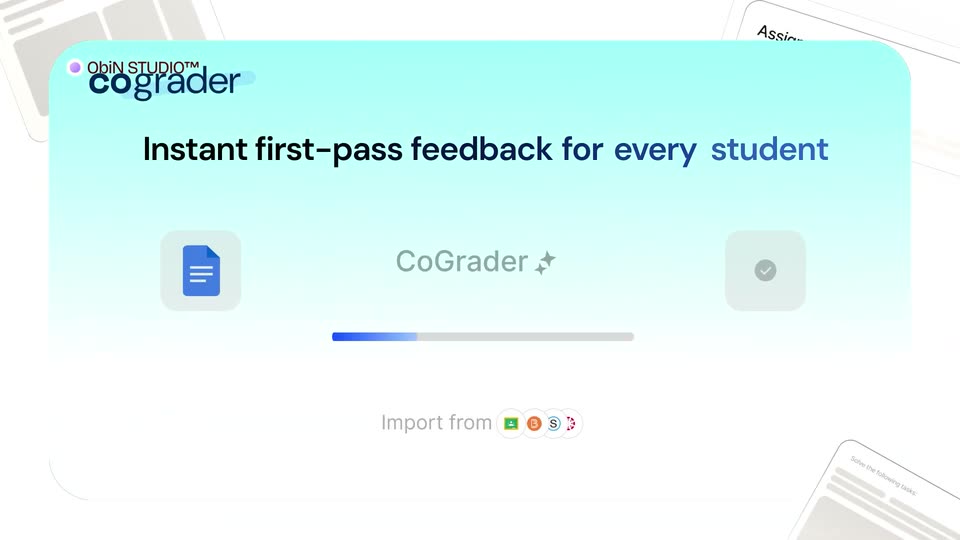
A light cyan rounded card on white holds a centered blue file icon, then populates: the CoGrader logo lands top left, a dark blue headline spans the width, the icon shifts left, and a progress bar, checkmark tile, and import row fill the rest.
On-screen text: “Instant first-pass feedback for every student”
Camera: Pull out
A flat CoGrader app panel under a teal header shows the headline 'Instant first-pass feedback for every student' over a pale background with faint tilted cards. A blue progress bar fills and the checkmark icon darkens as the bar completes.
On-screen text: “Instant first-pass feedback for every student”
Camera: Static
A flat blue-to-white gradient card on a mint background builds a feedback panel: a black headline sets the top, then a scored summary and color-coded Glow, Grow, and Think about it sections fill in, and the card scrolls down through the body copy.
On-screen text: “Timely specific feedback for every essay”
Camera: Pull out
A flat two-panel UI mockup: a document editor left, a rubric table right, joined by a blue line. A paragraph highlights yellow, then red grammar marks appear as the Grammar badge counts up. A black headline fades in below, then a mint diagonal wipe covers the frame.
On-screen text: “Get instant first pass feedback”, “Based on your rubric.”
Techniques: Split screen, Masking
Camera: Static
On a white field, a blue caret types out “Rubrics from your state. Ready to use.”, then “Or bring in your own.” A pill chip with a wand icon and “CoGrader Rubric” slides in from the right, then the text clears and the chip centers and fills blue.
On-screen text: “Rubrics from your state. Ready to use.”, “Or bring in your own”, “CoGrader Rubric”
Techniques: Kinetic type
Camera: Pull out
A pale cyan diagonal panel rotates across a white field while a blue pill button labeled CoGrader Rubric holds center, then clears as a typing cursor begins spelling CoG at the bottom. The ObiN STUDIO mark stays fixed top left.
On-screen text: “CoG”
Techniques: Kinetic type
Camera: Static
A blonde woman in a denim jacket types on a laptop. A white Grade New Class panel with import rows floats at right, a cursor slides onto the Google Classroom row, and a logo strip sits below. The frame crops into a left card beside an empty right card.
On-screen text: “ObiN STUDIO™”, “CoGrader integrates with”
Techniques: Masking, Cursor demo
Camera: Static
A white card with drifting mint abstract shapes. A large headline types out letter by letter behind a blinking cursor, the line scrolling left so specific feedback slides into view in black and blue. The ObiN Studio mark holds top left.
On-screen text: “Timely and specific feedback”
Techniques: Kinetic type
Camera: Static
A centered headline, 'Without losing your weekends', sits on a pale off-white background with large mint and white circles filling the right side. The word 'weekends' eases from periwinkle blue to black over the shot.
On-screen text: “Without losing your weekends”
Camera: Static
A pale teal circle sits on a white field as the black headline 'Without losing your weekends' scales up and slides off frame. A rounded card pops in at the center with a teacher on video, and the word 'cograder' scales in over the footage with a blue underline.
On-screen text: “Without losing your weekends”, “cograder”
Techniques: Kinetic type
Camera: Push in
The white cograder wordmark on a blue highlight bar scales up over a smiling woman at a desk, as her rounded video card zooms out from a pale blue background to fill the screen. A white URL line fades in at the bottom.
On-screen text: “ObiN STUDIO™”, “cograder”, “Try it free at cograder.com”
Techniques: Kinetic type
Camera: Push in
A woman in profile smiles while typing at a laptop, the bright room dimmed by a dark overlay. The white cograder wordmark with a blue brush stroke holds center and scales up, a URL line resting below.
On-screen text: “cograder”, “Try it free at cograder.com”
Techniques: Kinetic type
Camera: Static
A dim live-action profile of a woman at a laptop fades to black while the gray cograder wordmark scales at center and the caption Try it free at cograder.com holds below; both then fade, leaving the ObiN Studio logo top left.
On-screen text: “cograder”, “Try it free at cograder.com”
Techniques: Kinetic type
Camera: Static