0:48
Explore
00:00:00 / 00:33:03
The video is a fast montage of centered title cards and 3D UI mockups on a pale blue field, cut to a bouncy pop track at roughly one cut every two seconds. Its signature moves are the perspective phone tunnel, the morphing blue shapes (ribbon to progress bar to star) that bridge beats, and the line-art hand cursor that taps the interface.
No filming indicatedEstimated needs: 2 capture groups — your screens or recordings · 1 official logo — reused across the film · 5 graphic passages — draw or supply · 8 3D passages — build or supply
More like this

Best SaaS Product Launch Ad Video | LangEase, scene by scene
· 22 scenes as text
01 · Hook · 0:00–0:00
On a pale blue background, the blue word Turn is centered while the dark gray word Books appears to its right to complete the headline. A small gray zelios logo sits in the top-left corner.
On-screen text: “Turn Books”
Techniques: Kinetic type
Camera: Static
02 · Hook · 0:00–0:02
On a pale blue field, the dark gray words Turn Books give way to the blue word Audio, which scales up with a soft motion blur. A small zelios mark holds still in the top-left corner throughout.
On-screen text: “Turn Books”, “Audio”
Techniques: Kinetic type
Camera: Static
03 · Hook · 0:02–0:04
A blue folder icon with white documents scales in at center, tilted in 3D. The words Any language and Instantly slide in on either side, then blur out as the folder turns to face the camera.
On-screen text: “Audio”, “Any language”, “Instantly”, “Folder”
Techniques: Kinetic type, 3D mockup
Camera: Static
04 · Hook · 0:04–0:05
A blue folder icon holding white documents floats above a white app panel tilted in perspective. The folder and two hand icons drift upward and shrink as the panel's edges and buttons come into view.
On-screen text: “zelios”
Techniques: 3D mockup
Camera: Static
05 · Demo · 0:05–0:06
A 3D perspective interface card with a blue border fades out over a pale background as the blue tagline appears word by word in the center.
On-screen text: “Just drop and go”
Techniques: 3D mockup, Kinetic type
Camera: Static
06 · Demo · 0:06–0:06
On a pale blue background, the headline builds in the center as 'Just drop' then 'and go', while two smartphones in 3D perspective slide in from the left and bottom edges, showing the app's file list and credits, softly out of focus.
On-screen text: “Just drop and go”
Techniques: Kinetic type, 3D mockup
Camera: Pull out
07 · Demo · 0:06–0:09
Four phone mockups in 3D perspective form a light tunnel around a center headline that swaps from 'Just drop and go' to 'Books. Audio. Video' to 'All In One Platform'. The screens show chat, video call and document UIs while the camera pushes slowly inward.
On-screen text: “Just drop and go”, “Books. Audio. Video”, “All In One Platform”
Techniques: 3D mockup
Camera: Pull out
08 · Demo · 0:09–0:10
The camera flies through a white corridor of floating phone screens showing the app interface. The blue headline “All In One Platform” holds center as the push-in blurs past the angled screens into a tight close-up.
On-screen text: “All In One Platform”
Techniques: 3D mockup, Parallax
Camera: Push in
09 · Demo · 0:10–0:11
A blue ribbon shape sweeps the white frame, curving wide then flattening into a thin horizontal band, while a phone screen exits the left edge.
Techniques: Morph
Camera: Static
10 · Demo · 0:11–0:13
On a pale background, a rounded blue gradient bar grows rightward while the large score counts up from 90 to 100, the /100 suffix in light gray. A small gray zelios wordmark stays locked in the top left corner.
On-screen text: “zelios”, “90/100”
Techniques: Kinetic type
Camera: Static
11 · Demo · 0:13–0:13
On a pale background, the blue word Done slides up above a circular checkmark button that scales in, while blue and pink confetti pieces drift down around the frame. The gray zelios logo sits in the top-left corner.
On-screen text: “Done”
Techniques: Kinetic type, Particles
Camera: Static
12 · Demo · 0:13–0:14
A white circle with a blue checkmark sits under the word Done as blue and pink confetti falls around it. The circle morphs into a rounded square icon showing a smiling woman, and Done fades out.
On-screen text: “Done”
Techniques: Particles, Morph
Camera: Static
13 · Feature reveal · 0:14–0:15
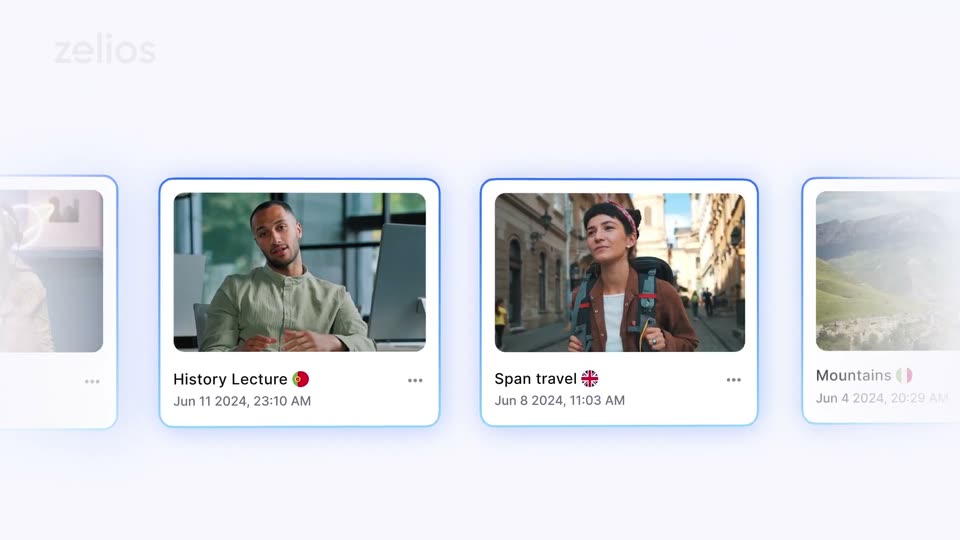
A white library view shows a row of video cards, each with a thumbnail, title and flag, and a date. The row slides left, keeping the center card framed by a glowing blue outline as its label crossfades from English Lesson to History Lecture. The zelios logo sits top left.
Camera: Pull out
14 · Feature reveal · 0:15–0:17
The LangEase Library screen, tilted in 3D perspective, shows a grid of video cards. A hand cursor glides across the grid and clicks the Birthday card as the camera eases into a tighter frame.
Techniques: 3D mockup, Cursor demo
Camera: Push in
15 · Feature reveal · 0:17–0:18
A flat grid of video cards holds a blue selection box and a hand cursor over the History Lecture tile. The tile zooms out from the grid, lifts into 3D, and spins on a white surface, leaving tilted ghost copies behind.
Techniques: Cursor demo, UI zoom, 3D mockup
Camera: Push in
16 · Feature reveal · 0:18–0:19
Four tilted video cards of a lecturer, each tagged with a country flag, float at the corners of a pale background while the blue headline “Multiple Languages” holds the center. The cards drift and rotate slightly in 3D perspective.
On-screen text: “Multiple Languages”
Techniques: 3D mockup
Camera: Push in
17 · Feature reveal · 0:19–0:20
Four video cards showing a man in a beige shirt sit at the corners around the blue headline Multiple Languages on a pale background. The flat layout then tilts into a 3D tablet mockup displaying one of the lecture cards.
On-screen text: “Multiple Languages”
Techniques: Morph, 3D mockup
Camera: Pull out
18 · Feature reveal · 0:20–0:22
A white LangEase library screen sits as a 3D card on a pale blue-lit background, tilted at a steep angle and softly blurred. It rotates and settles to a flat front view while a white mask recedes to reveal the video list and top bar.
On-screen text: “zelios”
Techniques: 3D mockup, Masking
Camera: Push in
19 · Feature reveal · 0:22–0:23
A white UI card holding a black “Distribute To Youtube” button slides in from the right and settles in the center. A blue line-art hand cursor enters from the bottom right and taps the button.
Techniques: Cursor demo
Camera: Static
20 · Feature reveal · 0:23–0:25
A hand icon clicks a dark “Distribute To Youtube” button on a white card; the button flashes blue and the label scales up to fill the frame. A blue wave sweeps in from the left, then morphs into a four-pointed star at the center.
On-screen text: “Distribute To Youtube”
Techniques: Kinetic type, Morph
Camera: Static
21 · Feature reveal · 0:25–0:28
A glowing blue star drifts across a pale background, trailing light, as “Translate. Dub. Distribute” builds word by word in blue and navy. The star shrinks and lands as a small accent after the final word.
On-screen text: “Translate. Dub. Distribute”
Techniques: Kinetic type
Camera: Static
22 · CTA · 0:28–0:33
On a pale off-white field, a blue bar and four-point star mark settle in beside the LangEase wordmark, which fades from gray to black. The URL langease.ai types in at the bottom center. A faint zelios watermark stays top left.
On-screen text: “zelios”, “LangEase”, “langease.ai”
Techniques: Kinetic type
Camera: Static