1:47


Introducing Glass. Make your entire company smarter
Ramp · Finance · Oct 2026
MAI Second Brain · 0:48 · AI-annotated
The video is built as a name-then-demos arc: a 3D icon-field hook, an 'Introducing MAI' title, then four short feature beats (watch, phone, Mac, meetings, AI) each shown as a 3D device mockup paired with a question-and-answer headline, and a black logo card with the App Store CTA to close. Signature moves are pull-back and blur transitions between 3D mockups, word-by-word headline reveals, and a strict magenta-on-white palette with letter-spaced small-caps device labels.
Ramp · Finance · Oct 2026
MusicFirst · Oct 2026
Duolingo · Consumer · Sep 2024
A grid of white rounded app icons and text pills floats in 3D space around a central pink brain icon. The camera pulls back through the field, so the outer icons blur and drift outward while the brain stays sharp.
Techniques: 3D mockup, Parallax
Camera: Pull out
A small pink brain app icon holds the center of a pale pink field while a thin ring and scattered white chips drift outward and fade. The gray word Introducing then fades in below the icon.
On-screen text: “Introducing”
Techniques: Particles
Camera: Static
On a pale gradient background, a white app icon with a pink brain sits above black “Introducing” as pink “MAI” scales in below. The lockup then slides left and “is your second brain” fades in, completing the sentence.
On-screen text: “Introducing”, “MAI”, “MAI is your second brain”
Techniques: Kinetic type
Camera: Static
On a soft white background with a faint pink corner, the magenta MAI wordmark and brain icon lead the line 'is your second brain' while 'you fill by voice.' blurs and slides into place. The frame then cuts to a white smartwatch with a solid magenta screen spinning into 3D view.
On-screen text: “MAI is your second brain”, “you fill by voice.”
Techniques: Kinetic type, 3D mockup
Camera: Static
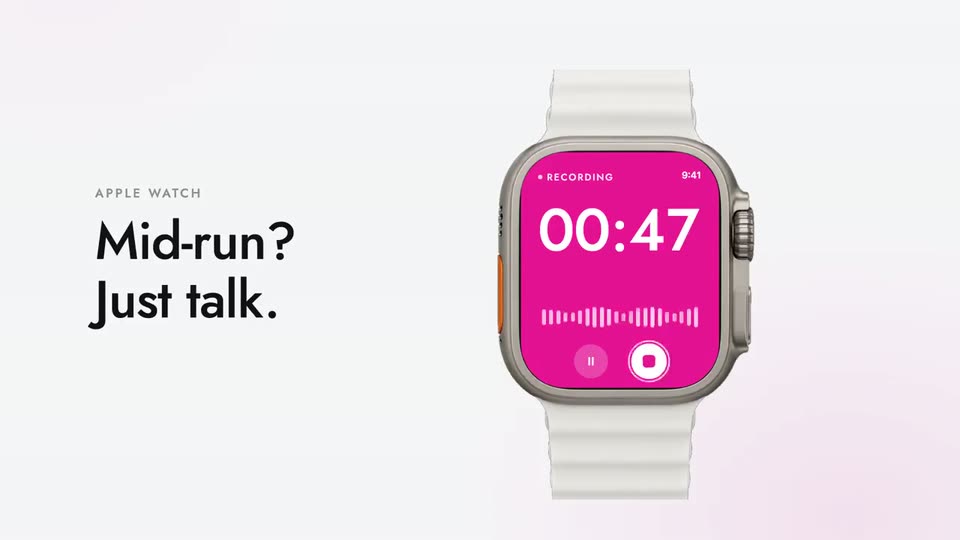
A white-banded Apple Watch in 3D shows a pink voice-recording timer on a pale background. Left, gray 'APPLE WATCH' caps sit above black 'Mid-run?' while 'Just talk.' slides in. The watch screen then switches to a saved note.
On-screen text: “APPLE WATCH”, “Mid-run?”, “Just talk.”
Techniques: 3D mockup, Kinetic type
Camera: Static
A pink-screened Apple Watch sits center-right showing a saved voice note, with the headline on the left. The frame then blurs into a fast pan that brings a matching iPhone into view on the right.
On-screen text: “APPLE WATCH”, “Mid-run? Just talk.”
Techniques: 3D mockup
Camera: Pan
A 3D iPhone mockup on a pale background shows a notes app; a floating MAI card cycles from 'Transcribing audio...' to 'Entry created!' while the phone tilts, zooms into the note, and ticks off a task. A serif headline fades in word by word; a second phone slides in as the first blurs.
On-screen text: “IPHONE”, “It writes the note.”, “And the to-dos.”
Techniques: Kinetic type, 3D mockup, UI zoom
Camera: Static
A Mac display in 3D perspective shows the Mail app with a black dictation pill and timer at the top. The camera pulls back as “Dictate into any app.” blurs in on the left beside a command key icon; dictated words type into the email body, then bullet points appear.
On-screen text: “MAC”, “Dictate into any app.”
Techniques: 3D mockup, UI zoom
Camera: Pull out
The meeting card sharpens into focus. A cursor clicks the first pink Approve button, which turns green and reads Added, and a toast Added to your Actions pops in. On the left the headline Meetings? Handled. sits still, then the frame blurs out.
On-screen text: “MEETINGS”, “Meetings? Handled.”
Techniques: Cursor demo
Camera: Static
Centered on a pale pink gradient, 'A second brain that' holds as the line below crossfades: 'connects your ideas' with a node icon, 'remembers every promise' with a pink heart, then 'your AI can read.' in pink. A white input pill with a caret appears last.
On-screen text: “A second brain that”, “connects your ideas”, “for you”, “remembers every promise”, “your AI can read.”
Techniques: Kinetic type
Camera: Static
A white rounded input bar floats centered on a pale pink gradient. The query “What did I commit to this week?” types out letter by letter behind a blinking pink cursor, then a pink circular button with an up arrow fades in at the right end.
Techniques: Kinetic type
Camera: Static
A white chat card on a pale pink gradient: a user question bubble, a Claude reply line, then three numbered commitments fade in one by one, each with a pink source tag. The UI blurs away and a black circle with a pink brain mark glows in.
On-screen text: “WORKS WITH CLAUDE, CHATGPT & ANY MCP ASSISTANT”
Techniques: Kinetic type
Camera: Static
A pink brain logo and bold white MAI wordmark sit on a black field with a soft magenta glow. The tagline, a device row, a magenta App Store pill, and a URL fade in one after another on a locked-off frame.
On-screen text: “MAI”, “Second Brain”, “The agent-first note taker.”, “iPhone · Apple Watch · Mac”, “Free on the App Store”, “maicontext.com”
Camera: Static