1:08
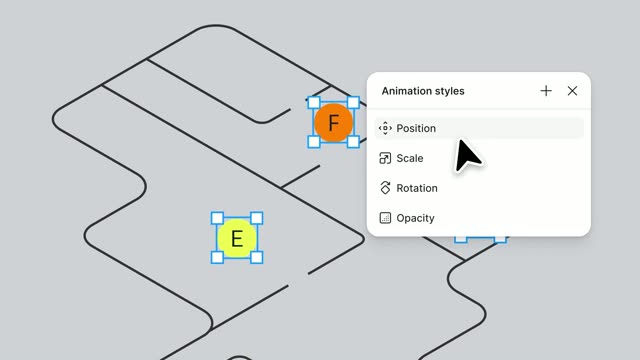

Introducing Figma Motion: Your canvas now has a timeline
Figma · Design · Jun 2026
MusicFirst · Oct 2026 · 2:40 · AI-annotated
studio MotionCue
The video alternates flat-illustration vignettes with 3D-tilted UI mockups, each feature introduced by a serif headline over a teal field and tied together by a recurring turtle mascot. Pacing is steady at about 108 bpm with short cuts, using glowing pulses, radial wipes, and perspective tilts as its signature moves.
Figma · Design · Jun 2026
Figma · Design · Oct 2019
BabyLoveGrowth · Oct 2026
A flat illustration shows a man writing at a desk in a moonlit room, with a guitar, lamp and speaker around. The camera pushes in on his frowning face as an exclamation mark pops above his head, then a bright cyan wipe fills the frame.
On-screen text: “同”
Camera: Push in
A bright cyan radial flash bursts from the center, then fades to deep blue as the glowing white treble clef shrinks to mid-frame and white notes drift in around it.
Techniques: Particles
Camera: Static
A glowing white treble clef sits at the center of a textured blue field scattered with drifting music notes. A flat cartoon hand in a green sleeve rises from the bottom and points at the clef, then a white circular burst expands from the center and floods the frame.
Techniques: Particles, Masking
Camera: Pan
On a pale blue background, a teal droplet grows into a folded-card icon with a treble clef, as the lowercase words musicfirst and elementary scale in to its right, then Powered by charanga appears beneath the lockup.
On-screen text: “musicfirst”, “elementary”, “Powered by charanga®”
Techniques: Kinetic type
Camera: Static
A close-up of the musicfirst elementary logo on a whiteboard quickly pulls back to reveal a flat-illustration classroom: a teacher in purple points at the board, a student shakes maracas, another plays a recorder, a guitar and a red app icon at the edges.
Camera: Pull out
A flat-illustration classroom with a teacher gesturing at a whiteboard showing the Music First Elementary logo, two children playing maracas and a recorder, and a small green frog bouncing on the floor. The logo lockup scales in on the board as a music symbol slides.
On-screen text: “musicfirst”, “elementary”, “Powered by charanga®”
Camera: Push in
A tablet in 3D perspective displays the Music First Elementary site above two illustrated children. The view zooms into the screen, dropping the frame to reveal a white content card with a colored grade bar on a teal field of floating notes.
Techniques: 3D mockup, UI zoom
Camera: Push in
A flat Music First Elementary website mockup on a teal background. A cartoon turtle with a yellow shell walks left to right along the top edge as the grade buttons Home to 5th enlarge in a rounded frame, then the Creative Tools and Supplementary labels pop out.
Techniques: UI zoom
Camera: Pan
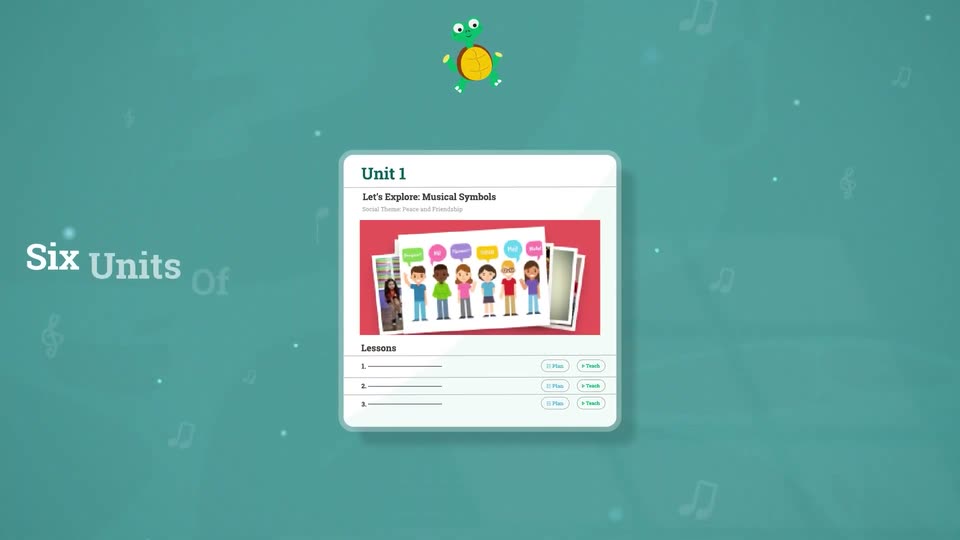
A white document card on a teal background shows a music curriculum, displaying grade tabs and a unit with cartoon children, while a green turtle bounces at the top.
Camera: Pan
A teal field of faint music notes holds two flat curriculum cards that drift slowly upward, the lower Unit 2 card sliding into view. A green frog mascot bobs on the top card. A white serif headline, Six Units Of Work Per Grade, sits fixed on the left.
On-screen text: “Six Units Of Work Per Grade”
Camera: Static
A teal backdrop with drifting music notes and dots. A horizontal carousel of white unit cards slides left, each centering under a bobbing green turtle, while the white headline stays fixed on the left.
On-screen text: “Six Units Of Work Per Grade”
Techniques: Particles
Camera: Push in
A teal field holds two lesson cards beside a white headline, then the camera zooms into one card, filling the frame with its Teach and Plan controls and an empty content panel.
On-screen text: “Six Units Of Work Per Grade”
Techniques: UI zoom
Camera: Pan
A flat teaching-platform interface sits on a teal field with faint floating music notes. The lesson header and a documents panel load in, with sidebar links and document thumbnails fading into place as the layout settles.
Camera: Pull out
The National Core Arts Standards wordmark fades in at the top, then four colored tiles (blue, purple, red, orange) with white serif initials, sans-serif labels and small line icons fade in in a row below on a white background.
On-screen text: “NATIONALCORE ARTSSTANDARDS”, “Cr Creating”, “Pr Performing”, “Re Responding”, “Cn Connecting”
Camera: Static
A white card holds the National Core Arts Standards logo above four colored tiles for Creating, Performing, Responding, and Connecting. Flat vector illustrations of a teacher, a family, and a guitarist slide in from the left and right edges to frame the card.
On-screen text: “NATIONAL CORE ARTS STANDARDS”, “Cr Creating”, “Pr Performing”, “Re Responding”, “Cn Connecting”
Techniques: Split screen
Camera: Static
A split screen shows two flat illustrations. Left, a teacher gestures toward a whiteboard while two children play maracas and a recorder beside a turtle. Right, a woman strums a blue guitar on grass while a girl holds a ukulele. Floating notes drift around both panels.
Techniques: Split screen
Camera: Static
A blue field of faint music notes holds the word Funk large at left, then the camera pulls back so Funk shrinks to center as Soul, Country, Bluegrass, Gospel, Hip Hop, Folk and Rock fade in around it.
On-screen text: “Funk”, “Soul”, “Country”, “Bluegrass”, “Gospel”, “Hip Hop”, “Folk”, “Rock”, “musicfirst”, “elementary”
Techniques: Kinetic type
Camera: Pull out
A field of music genre labels in white and gray serif type drifts slowly on a deep blue background dotted with small note icons. Pop, Gospel, and Folk pulse with a soft blue glow, then the scene fades to black.
On-screen text: “Pop”, “Soul”, “Country”, “Bluegrass”, “Gospel”, “Funk”, “Hip Hop”, “Disco”, “Folk”, “Rock, Reggae, Jazz, Sea Shanty, Musicals, Electronic”
Camera: Pull out
On a textured blue field, the MusicFirst Elementary logo assembles: a white card icon with a teal treble clef drops in, 'musicfirst' slides in, then 'elementary' slides across in large white type, and 'Powered by charanga' fades in below.
On-screen text: “musicfirst”, “elementary”, “Powered by charanga”
Techniques: Kinetic type
Camera: Static
The musicfirst elementary logo with “Powered by charanga” sits on a deep blue field, then slides away as the white headline “Engaging For ALL Ages” slides in and a flat illustration of a girl with orange pigtails appears in a blue circle at left.
On-screen text: “Engaging For ALL Ages”
Techniques: Kinetic type
Camera: Static
On a dark blue starfield, the white serif headline slides in from the right with a motion trail. Four glowing circular avatars of illustrated people then pop in one by one, left to right, beneath the title.
On-screen text: “Engaging For ALL Ages”
Techniques: Kinetic type, Particles
Camera: Pan
Starry blue space: a small Earth with four cartoon avatar circles below, under the white headline. The headline slides off as the globe zooms to center, flanked by a green guitar, orange saxophone, treble clef, and white notes trailing right, with a light beam from the top left.
On-screen text: “Engaging For ALL Ages”
Techniques: Kinetic type, Light sweep
Camera: Static
A blue globe of the Americas floats at the center of a starry dark blue field. A teal guitar, white notes, an orange saxophone and a gold flute sit on curved staff lines wrapping the globe, bobbing gently while a lens flare glints at the top left.
Techniques: Particles
Camera: Static
A flat illustration shows a woman playing a blue guitar while children play maracas, flute and ukulele in a fenced garden. The frame pushes in from the wide group to a close-up of the two girls on the right as black music notes float around them.
Camera: Push in
Flat vector illustration: a curly-haired boy in a teal polo shakes yellow maracas while a green turtle bounces beside him, notes floating. The frame cuts to a woman in white strumming a blue guitar on grass as a girl in pink dances. Locked-off camera.
Camera: Static
A flat illustration shows a woman in white and purple seated on green grass strumming a blue guitar, while a girl in a red shirt kneels beside her clapping. A white picket fence and teal tree sit behind them as music notes drift upward and hands move gently.
Camera: Static
Five diagonal panels split by purple lines show illustrated kids: a girl clapping on grass, a girl on flute, a person at a laptop with headphones, a girl on ukulele, a boy dancing. Each loops a small motion as notes float, and the panels ease leftward.
Techniques: Split screen
Camera: Pan
A white product interface card scales down from a close-up of its header and settles centered on a teal background with faint treble clefs at the sides. The Supplementary page fills in: three resource cards appear, the right one popping a girl illustration into an empty frame.
Techniques: UI zoom
Camera: Pull out
A flat webpage for a music education site rests on a teal background, then tilts into 3D perspective while the camera pushes into a grid of resource cards with instrument illustrations and song charts.
Techniques: 3D mockup, UI zoom
Camera: Push in
A tilted 3D plane of the musicfirst elementary Supplementary page. It opens zoomed in on the resource cards, then pulls back and levels to show the full header and six-card grid, set against a teal field of floating music notes.
Techniques: UI zoom, 3D mockup
Camera: Pull out
A white rounded card holding a music lesson titled Getting Going tilts in 3D over a teal background, while a recorder illustration with L and R finger labels and the letters G A G B fades into the right panel.
Techniques: 3D mockup
Camera: Static
A white sheet-music page on a teal backdrop. The title “Here I come” and “Traditional British” sit at the top above the lyric words “Ready Now Here We Go”, while three staves of notes and lyrics fade in from faint gray to full black.
Camera: Static
A music app's sheet-music view for 'Here I come' sits on a teal field, notes tagged with solfege syllables beside a line-drawn hand. The view zooms in on the score and hand, the hand's solfege label flips from So to Mi, then the frame returns to the full card.
Techniques: UI zoom
Camera: Push in
A white card with three colored question marks pulls back to become the center tile of a grid of flat instrument cards, piano, violin, drum, xylophone, harp, flute, cymbal and treble clef, on a teal field.
On-screen text: “???”
Techniques: UI zoom
Camera: Pull out
Nine white rounded cards in a 3x3 grid on a teal background show flat music icons: piano, xylophone, staff with clef and time signature, violin, three question marks, snare drum, harp, flute, tambourine. Cards lift and glow cyan in sequence while faint notes drift in the background.
Techniques: Particles
Camera: Pull out
A close-up of the YuStudio DAW zooms out to reveal the full window on a teal background dotted with faint music-note icons. Three colored track lanes, teal, orange and blue, span the grid beneath a dark toolbar.
Techniques: UI zoom
Camera: Pull out
An illustrated YuStudio music app window, with teal, orange and blue tracks, sits flat and centered on a teal field of faint floating notes. Stacked window panels peek from behind. The camera then tilts the whole mockup into a 3D perspective, angling it to the right.
Techniques: 3D mockup, Parallax
Camera: Push in
A tilted 3D mockup of the YuStudio multitrack editor rotates to face the camera as the view pulls back. Flat cards fan out behind it on both sides: a waveform card, sheet-music card, step grid, and instrument tiles, over a teal field with faint drifting notes.
Techniques: 3D mockup, Parallax
Camera: Pull out
Five stylized app screens fan out on a teal field, the YuStudio timeline centered. They blur and recede into a 3D desk scene where an animated figure in purple glasses works on a laptop running the app.
Techniques: 3D mockup
Camera: Pull out
An illustrated person with purple headphones sits at a desk, hands resting on a laptop that shows a DAW timeline. The camera pushes in toward the screen and pulls back, while birds drift past the window and a plant sits on the desk.
Camera: Push in
A flat teal interface of the YuStudio editor fills the frame, a black video preview showing stylized mountains and birds sits in the center. The camera zooms into the preview, then pans right to reveal a side panel with teal circle, square, hexagon and X icons.
Techniques: UI zoom
Camera: Push in
A flat music-app interface on a teal background scales in from a close-up of its toolbar. A cursor clicks shapes in the icon row, and matching shapes, red dots, teal squares, a starburst, pop into the four-bar score grid.
Techniques: UI zoom, Cursor demo
Camera: Pull out
A music app screen shows a 4x4 grid of abstract notation shapes above a row of eight shape tiles. A cursor clicks through the tiles, highlighting the matching grid cells in green, then the view zooms down to the playback toolbar with colored waveform blocks.
Techniques: Cursor demo, UI zoom
Camera: Push in
A white product interface panel floats in 3D perspective on a teal field with faint music notes. The panel tilts from a steep angle to face the camera, then the view pushes in on the grid of six workspace cards before pulling back to a flat front view.
Techniques: 3D mockup, UI zoom
Camera: Pull out
The Music First Elementary workspace grid tilts from a flat teal backdrop into a 3D angled screen while an illustrated woman in a purple blazer slides in from the right and points at it.
Techniques: 3D mockup
Camera: Pull out
An illustrated woman with dark curly hair and a purple jacket stands at a teal wall screen, gesturing with one hand across the Music First Elementary workspace view. A small green turtle character sits at the left edge of the screen. She shifts her hand and expression over the beat.
Camera: Static
An illustrated teacher with dark curly hair and a purple cardigan points toward a large teal monitor showing a workspace dashboard of blank cards. A small green turtle mascot waves at the screen's lower corner. A puff of smoke rises and wipes the scene away.
Techniques: Masking
Camera: Static
A teal folder icon with a treble clef sits on a white background as the musicfirst elementary wordmark fades in, then the lockup scales down and shifts up while a serif tagline about a free trial appears at the left.
On-screen text: “Don't Wait – Sign Up For Your Free Trial Today!”
Techniques: Kinetic type
Camera: Static
A white end card holds the Music First Elementary logo at top as the call-to-action line types in word by word, then the URL and a black QR code fade in below.
On-screen text: “Don’t Wait – Sign Up For Your Free Trial Today!”, “www.musicfirst.com”
Techniques: Kinetic type
Camera: Pull out