2:03

DJI - Meet Osmo Mobile 6
DJI · Hardware · Sep 2022
Figma · Jun 2026 · 1:08 · AI-annotated
Figma’s 1:08 launch film runs 36 scenes, about 1.9 s each. The product shows up at 0:06 and 6 features are revealed. The call to action lands at 1:02 (92% in). A rapid montage of two to three second UI close-ups and abstract graphics, each cut on the beat with a cursor performing the action. Flat color fields, bold type, and a recurring star mark give the piece a snappy brand rhythm that closes on a tagline and a logo morph.
Is this your launch? to your site or press kit.
DJI · Hardware · Sep 2022
Pika · AI · Sep 2026
Films whose music sounds like this one, voice left out
Perplexity · Electronic, chillwave, lo-fi
Cohere · Lo-fi hip-hop, chillhop, ambient electronic
Framer · Modern electronic
A pale green field holds a soft, out-of-focus dark green stem with a white rounded tip. The stem rises from the bottom edge toward the center, growing taller across the shot while staying blurred.
Camera: Static
Out-of-focus white circles on a green gradient sharpen into two crisp spheres, a dark green triangle rising between them. The soft blur resolves into a clean abstract mark, settling into a static composition.
Camera: Static
A dark green eight-pointed asterisk holds center on a lime green field while large white circles drift across the frame and a white rounded-square outline draws in around it.
Techniques: Masking
Camera: Static
A tight crop of three flat-illustration guide cards zooms out to reveal the full Modern Garden website, the dark green screen, the top navigation bar, and the centered heading The Latest.
Techniques: UI zoom
Camera: Pull out
A design tool window floats in 3D perspective over a speckled lime background, its canvas showing a dark green page with three cards. The flower illustrations inside each card rotate and morph as the timeline plays, while the camera tilts the panel from angled to flat.
Techniques: 3D mockup
Camera: Pull out
On a black background, the title Figma Motion scales in at the center. Small panels drift around it: a green dot grid top-right, a white 3D mesh with a yellow asterisk bottom-right, and a card with an orange dome on grass bottom-left.
On-screen text: “Figma”, “Motion”
Techniques: Kinetic type
Camera: Static
The orange Figma Motion title stays locked in the center of a black field while small framed clips drift around the edges: a scrolling row of project cards on the left, shifting pixel and dot patterns top right, and a white 3D lattice with pulsing yellow nodes bottom right.
On-screen text: “Figma Motion”
Camera: Static
A blue selection frame with corner handles reshapes from a tilted quadrilateral into a horizontal rounded rectangle on a purple canvas. Inside, a white circle holding a grab icon fades into concentric blue and white rings, while a purple cursor arrow and a black cursor arrow drift across it.
On-screen text: “Figma”, “Motion”
Techniques: Morph, Cursor demo
Camera: Pull out
A purple canvas shows a circular logo with control handles and a black cursor. The view reframes down to the timeline, where the cursor slides to a checkmark on a blue layer bar and clicks it.
Techniques: UI zoom, Cursor demo
Camera: Push in
A black cursor drags the lower bezier handle in a white easing editor, curving the line into an S-shape as the values change to 0.67, 0, 0.3, 1. Left, blue dots slide along a line toward a white diamond, spacing shifting with the easing.
Techniques: Cursor demo
Camera: Static
A light lavender toggle pill rests on a flat purple field. The dark purple circular knob, carrying a white four-pointed star logo, slides from the left end of the track to the right end.
Camera: Static
A dark purple pill badge reading Unlocked with a star icon sits centered on a light lavender field. It scales down and drops to the lower half as the headline You saved $200 for Headphones fades in above it.
On-screen text: “Unlocked”, “You saved $200 for Headphones”
Techniques: Kinetic type
Camera: Static
A white savings card on a violet field drifts slowly downward. A chrome cone wrapped in a metallic liquid splash spins at its center, above the Goal Reached headline and an Unlocked pill button.
Camera: Static
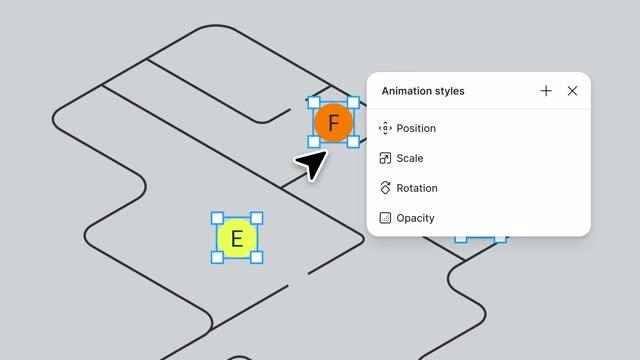
A tilted wireframe canvas with lettered shape elements; the view reframes onto the orange F circle as the cursor selects it. An Animation styles panel opens and the cursor highlights Scale. A white card slides in from the left, covering the scene.
Techniques: 3D mockup, UI zoom, Cursor demo, Masking
Camera: Pull out
A product interface shows a left page with a yellow-highlighted headline and an aerial photo of an orange dome beside a gray isometric line map. Yellow lettered pins and one fading orange pin dot the map; a large black cursor rests at the right edge.
Camera: Pull out
A flat phone mockup on a solid orange background shows a dark event card with a grainy biker photo and dotted CANYON CREW MEETUP lettering. A blue selection frame with square handles wraps the photo; a white cursor drags the right handle to resize it.
Techniques: Cursor demo
Camera: Push in
A white prompt field on a dark canvas types out a sentence as a cursor clicks the blue send button. Below it, a frame with blue selection handles shows a grayscale portrait and white dotted lettering.
Techniques: Cursor demo
Camera: Push in
A motion editor view shows a grayscale cyclist clip with a white dot-matrix title over it, then reframes down to reveal the timeline. A black cursor drags the blue playhead right across the keyframe track while the title dots glitch and re-form.
On-screen text: “CANYON CREW MEETUP”, “Create a glitchy type animation, staggering the shapes.”
Techniques: Kinetic type, Cursor demo, UI zoom
Camera: Push in
A selected photo of a white desert dome on a flat blue field straightens from a tilt. A dark tooltip and a white 3D transform panel with a hand icon open at the right, and a cursor moves over them as the photo rotates into 3D perspective.
Techniques: Cursor demo
Camera: Pan
A website homepage in 3D perspective: photo cards fanned at an angle across a blue-grey backdrop, with a pill navigation bar above. The fan shifts to reveal more cards as a yellow MSF logo badge scales in at the center.
Techniques: 3D mockup
Camera: Pull out
A rounded UI panel on a gray field holds a fanned row of image cards behind a yellow M*S*F badge and a row of pill tabs on top. A black outlined cursor glides from the top right corner to rest on a circular avatar at the bottom right.
Techniques: Cursor demo
Camera: Pull out
A comment card on a design tool shows a highlighted timecode as a cursor grabs its corner and drags it. The view then zooms out to reveal a timeline of image thumbnails, a blue playhead and a circled comment avatar.
On-screen text: “MSF”
Techniques: Cursor demo, UI zoom
Camera: Static
A close-up of a motion editor interface. The top preview shows a row of photos set in 3D perspective, slowly advancing. Below, a black cursor moves right along the timeline as a blue playhead marker with a face icon sits on the track.
Techniques: Cursor demo
Camera: Static
Screen recording of a collaborative motion tool: a 3D fan of photo cards rotates on the canvas while a yellow M*SF logo pops in the center. A green Gilles comment bubble expands to read Looking good!, and a cursor drags the Position property on the timeline below.
Techniques: 3D mockup, Cursor demo
Camera: Pull out
Close-up of a motion editor screen. The canvas shows a photo collage with a yellow M✳SF badge and two named collaborator cursors, while the blue playhead scrubs right along the timeline past avatar markers.
Camera: Static
Flat vector icons on a pale green field: a dark green chat bubble with two lime bars shrinks and slides left, a rotated rounded square with a lime dot holds the center, and a dark green bar with a lime droplet settles on the right.
Camera: Static
A light green screen holds a 3x3 grid of dark green icons that settle from offset positions into a clean layout. On the right, a white Easing panel lists Motion Tokens. A black cursor glides down the list and highlights Brand: Playful in pale blue.
Techniques: Cursor demo
Camera: Pull out
A flat green app screen splits into a left grid of nine dark green icons and a right column where three white achievement cards slide in, each with a colored icon, a name and a progress bar; a total savings bar rises from the bottom.
Techniques: Split screen
Camera: Pull out
A grid of flat finance-app cards slides horizontally across a black background, each holding a screen: a dark icon grid, three achievement bars, a green savings wallet, and colored category bars. A hand holding a card with a coffee splash enters from the right.
Techniques: Parallax
Camera: Pull out
Eight rounded panels of the Heddar app interface, a 3D metal funnel spilling money and the Heddar wordmark float in a loose grid over black, drifting slowly at slightly different speeds.
Techniques: Parallax
Camera: Static
A flat phone frame on black shows a light-green savings app. The interface scrolls down, moving past the total savings card and recent spending into the goals list, a new badge card and the profile section.
Camera: Static
A front-facing phone mockup on black shows the app's Goals screen; the view slides up to reveal the Profile page, a dark green card with the user's name and a savings streak row, while the bottom tab bar switches to the profile icon.
Camera: Static
A phone profile screen slides in from the left beside a dark code editor showing a rotate keyframe. A cursor hovers a copy icon and a Copy Keyframes tooltip pops up.
Techniques: Cursor demo
Camera: Static
On a black background, four feature cards (a green icon grid, a yellow dial with slider, a purple panel with a 3D funnel and liquid splash, a photo carousel) scatter outward to the edges, clearing the center where the headline appears and holds.
On-screen text: “Set yourideas”
Camera: Static
Centered orange headline “Set your ideas in motion” on black, white gradient fading to solid orange. A green icon grid slides up out, a photo stack with a yellow SF tag exits left, a gauge counts to 360 degrees, a purple panel with a metal cone and splash sinks down.
On-screen text: “Set your ideas in motion”
Techniques: Parallax, Light sweep
Camera: Push in
On black, flat geometric shapes: an orange circle, a yellow circle and a purple square, each framed by small corner squares, slide and morph into the Figma logo, which settles center frame.
Techniques: Morph
Camera: Static