1:18

Zaplar (YC S26) - Showcase Series 1: Booking Engine When we developed the booking engi
Zaplar · B2B · Nov 2026
Perplexity · Apr 2026 · 1:39 · AI-annotated
Perplexity’s 1:39 launch film runs 27 scenes, about 3.7 s each. The product shows up at 0:00 and 5 features are revealed. There is no explicit call to action; a voiceover carries the film. The video is built as one continuous morning: a 3D desk reveal, a serif product card, then a chain of typed and voice commands that ripple through macOS windows, a browser and a phone, closing on a cream logo lockup. Signature moves are slow camera pushes into screens, frosted command bars that type letter by letter, and top-right status pills that tick through tasks.
Is this your launch? to your site or press kit.
A 3D desk set with a monitor, Mac mini and phone on a wood surface tilts from a flat top-down view to a front view. A large numeral scales in over the scene as the camera rotates up.
On-screen text: “1”
Techniques: 3D mockup
Camera: Push in
A 3D desk holds a monitor on a pink mat, flanked by a Mac mini, phone and teal mug. The screen shows a green gradient with white serif text. The camera pulls back, then pushes into the display as a dock of app icons slides in.
On-screen text: “This is Personal Computer”
Techniques: 3D mockup, UI zoom
Camera: Push in
A tight close-up of the macOS Dock on a green dune wallpaper; a black icon with a white geometric star pops out of the Dock as the icons shift, then the camera pulls back to reveal the full desktop, menu bar, and a Design folder.
Techniques: UI zoom
Camera: Pull out
On a macOS desktop, a command bar types 'Take care of my to do list.' A status pill cycles through tasks as the camera reframes to a Calendar window, where a teal 1:1 event drops in, then a message from Jason slides in at the top right.
Techniques: UI zoom
Camera: Push in
A close-up of a screen shows a calendar grid above a row of app icons on a green speckled wallpaper. A dark translucent pill with a microphone and a listening indicator fades in at the center.
Camera: Pan
A macOS desktop shows a dark “Listening...” pill above the dock. It crossfades into a teal “Hold fn to talk” panel while a transcription types out word by word. The frame then zooms out to reveal a calendar week view.
Techniques: Kinetic type, UI zoom
Camera: Pull out
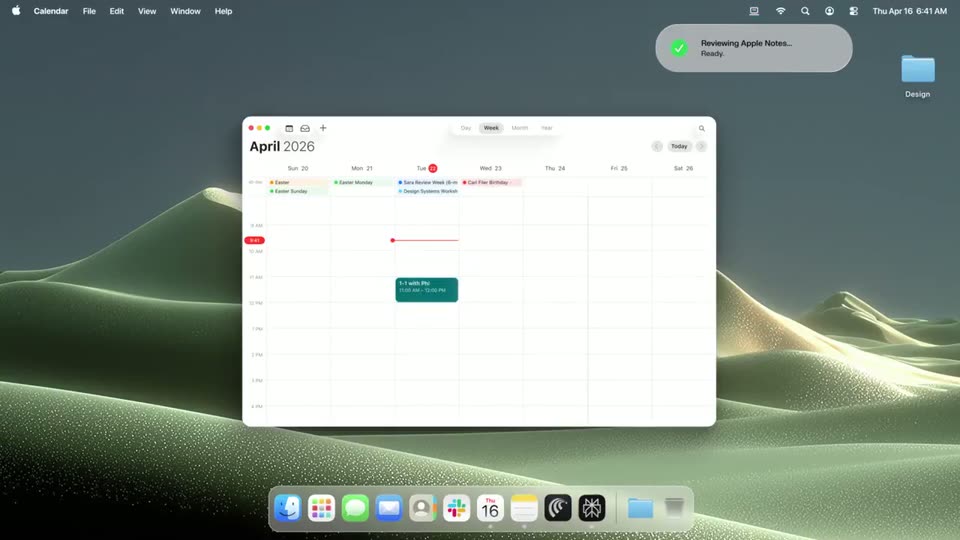
A macOS desktop on a green dune wallpaper shows a Calendar window in April 2026 week view. The window scales up into place as the month title slides in; a Vercel deployment notification sits top-right and the dock runs along the bottom.
Camera: Pull out
A macOS desktop shows the Calendar app in week view for April 2026, centered over a green dune wallpaper with a particle texture. A deployment notification pill sits top right and the dock runs along the bottom. The header settles in with a slight scale and slide.
Camera: Static
A macOS desktop shows a browser window with a Vercel deployments list. The view zooms in on a top-right toast as the cursor clicks Approve on a Slack prompt, then pulls back as the toast reports the deployment succeeded and the first row flips to Ready.
Techniques: UI zoom, Cursor demo
Camera: Static
A static macOS desktop shows a Comet browser window on the Solaris landing page over a dotted green dune wallpaper. A frosted command bar slides up at the bottom, a prompt types out letter by letter, then the bar fades and a status toast slides in at the top right.
Techniques: Cursor demo, Kinetic type
Camera: Static
A macOS desktop with a Finder window showing a long, cluttered list of website files. A Vercel notification pill in the top right cycles through status lines, and the file list crossfades into a tidy structure of folders and a few loose files.
Camera: Static
A macOS desktop shows an open Finder window and a green completion notification in the top right. The camera pulls back to reveal the full iMac screen as a dark phone mockup with flashlight and camera icons drops in from the top edge.
Techniques: UI zoom, 3D mockup
Camera: Pull out
A smartphone in sharp focus hovers in front of a blurred desktop monitor, both showing a green dune wallpaper. A Perplexity notification slides into the lock screen while a duplicate copy fades below it, then the phone settles centered.
Techniques: 3D mockup
Camera: Pull out
A smartphone in 3D perspective floats above two blurred monitors, a Perplexity notification slides in across its home screen. The view then zooms to a document listing the completed to-dos with status notes.
Techniques: 3D mockup, Parallax, UI zoom
Camera: Static
A smartphone mockup in 3D perspective sits centered over a blurred background of two tablets. Its screen shows a note document with a to-do list and status bullets. The phone scales up slowly through the clip.
Techniques: 3D mockup
Camera: Static
A black smartphone with a white assistant interface stands centered in front of two blurred monitors. The chat history stays blurred while a prompt types itself into the bottom field, line by line, until a teal send arrow appears.
Techniques: 3D mockup, Kinetic type
Camera: Static
A phone with a typed message in a chat app stands in front of a Mac on a desk. The camera pans right and down to reveal a white speaker and a spiral notebook beside the computer.
Techniques: 3D mockup
Camera: Push in
A 3D desk scene with a gray concrete wall: a small white rounded computer rests on a copper mat below a monitor. A phone rises from the bottom edge into the foreground, its lock screen facing the camera.
Techniques: 3D mockup
Camera: Static
A smartphone stands upright on a desk, its lock screen showing 7:00 and a Perplexity notification for a morning digest. The camera drifts slightly upward to reveal the full device against a blurred office background.
Techniques: 3D mockup
Camera: Static
A black phone stands centered on a desk against a blurred office backdrop. Its lock screen shows 7:00 and a Perplexity notification, then the display switches to a Morning Digest list of emails and messages.
Techniques: 3D mockup
Camera: Static
A phone mockup in 3D perspective sits centered against a blurred desk background. On its screen, a serif Morning Digest document scrolls steadily downward, moving from email summaries through message notes to a bottom input field with a microphone icon.
Techniques: 3D mockup
Camera: Push in
A silver compact computer rests on a peach desk against a gray wall, its rear panel showing two vertical slots and a round port. The camera pushes in on the device, enlarging it and cropping the dark monitor edge from the top of the frame.
Techniques: 3D mockup
Camera: Push in
A silver rounded device rests on a copper surface, its back facing the camera with two USB-C ports, a small indicator light and a round socket. The device drifts slowly left while the camera holds a low side angle.
Camera: Static
The number 11, drawn as two thick black vertical bars, sits centered on a cream background and scales into place. The frame stays locked off with no camera movement.
On-screen text: “11”
Techniques: Kinetic type
Camera: Static
A black line-art laptop icon with a two-dot face sits centered on a cream background. It contracts and morphs into a four-blade pinwheel outline.
Techniques: Morph
Camera: Pull out
On a cream field, the black line-art Perplexity mark holds left of center as the lowercase wordmark solidifies from a soft gray gradient to full black, revealing left to right, then the locked-off frame holds.
Camera: Static
A black frame holds the Perplexity logo and wordmark centered and static for the full clip, with no movement or additional elements.
On-screen text: “perplexity”
Camera: Static