0:39

Ashley Hunter - 🚀 Introducing Angular Native The stunning developer experience and e
Angular Native · Sep 2026
Bananana Effects · Jan 2026 · 4:20 · AI-annotated
Bananana Effects’s 4:20 launch film runs 108 scenes, about 2.4 s each. The product shows up at 0:12 and 15 features are revealed. The call to action lands at 4:12 (97% in). The video opens with abstract glitch visuals and a promise caption, reveals the Quimera pedal, then runs a rapid chain of feature title cards, each paired with a flat infographic or a 3D product shot, capped by recap grids and an end card. Signature moves are hard cuts between white 3D renders and locked-off diagram cards, pixel-glitch transitions, and multicolor waveform accents.
Is this your launch? to your site or press kit.
Angular Native · Sep 2026
Luca IQ · B2B · Jul 2026
A glowing four-pointed star fades in at the center of a soft pastel bokeh background, its outline shifting from yellow at the base to purple at the top while the cyan and white blobs stay blurred.
Camera: Static
Blurred orange zigzag lines glow on a black field, then a white wavy band wipes across the frame. As it clears, a thin blue teardrop outline fades into the center and holds.
Techniques: Masking
Camera: Static
Out of focus, a green square outline and a blue loop glow on a near-black background, the green fading as the blue shifts into an oval. A small centered caption holds still over the moving light.
On-screen text: “EVERY SOUND IN THIS VIDEO WAS PRODUCED BY TRANSFORMING A GUITAR SIGNAL WITH THIS PEDAL.”
Camera: Static
A near-black maroon field holds two centered lines of small pixel text, locked off and static, over a faint blurred dark shape that slowly deepens.
On-screen text: “EVERY SOUND IN THIS VIDEO WAS PRODUCED BY”, “TRANSFORMING A GUITAR SIGNAL WITH THIS PEDAL.”
Camera: Static
Two lines of small uppercase text sit centered on a dark, softly blurred background. A faint blue pedal shape remains out of focus at the bottom edge while the caption stays locked and still.
On-screen text: “EVERY SOUND IN THIS VIDEO WAS PRODUCED BY”, “TRANSFORMING A GUITAR SIGNAL WITH THIS PEDAL.”
Camera: Static
A yellow field of white squares fades into a soft pastel gradient. A two-line gray caption stays fixed in the center throughout. The grid pattern dissolves while the background shifts through pale teal and yellow tones.
On-screen text: “EVERY SOUND IN THIS VIDEO WAS PRODUCED BY”, “TRANSFORMING A GUITAR SIGNAL WITH THIS PEDAL.”
Camera: Static
A centered two-line caption in a pixelated gray typeface holds over a white field of soft, out-of-focus gray shapes. The blurred blobs drift slowly while the text and frame stay locked off.
On-screen text: “EVERY SOUND IN THIS VIDEO WAS PRODUCED BY TRANSFORMING A GUITAR SIGNAL WITH THIS PEDAL.”
Camera: Static
A soft-focus red cross shape fills the frame as a backdrop while a centered two-line pixel caption states that every sound was made with the pedal. The frame is locked off and static.
On-screen text: “EVERY SOUND IN THIS VIDEO WAS PRODUCED BY TRANSFORMING A GUITAR SIGNAL WITH THIS PEDAL.”
Camera: Static
A two-line caption holds center-left over an animated abstract background. The background morphs from smooth topographic contour lines into a pixelated dithered field of green and yellow blobs, then relaxes into soft blurred color washes.
On-screen text: “EVERY SOUND IN THIS VIDEO WAS PRODUCED BY TRANSFORMING A GUITAR SIGNAL WITH THIS PEDAL.”
Techniques: Morph
Camera: Static
A static black frame holds two centered lines of white pixel-style text, reading BANANANA EFFECTS above PRESENTS. The frame stays locked off with no movement or animation for the full duration.
On-screen text: “BANANANA EFFECTS”, “PRESENTS”
Camera: Static
A white synthesizer pedal sits in 3D perspective on a white background, its screen cycling colored waveforms. A large black LUMERA title overlays the center, then shifts to a multicolor grainy fill as the camera pulls back to reveal the full pedal, with the tagline SYNTHESIZER PEDAL appearing beneath.
On-screen text: “LUMERA”, “SYNTHESIZER PEDAL”
Techniques: 3D mockup, Kinetic type
Camera: Pull out
A white synthesizer pedal tilts in 3D on a plain background, its small screen showing a magenta wireframe shape, while large multicolor block letters spell QUIMERA across the front and a pixel caption reads SYNTHESIZER PEDAL below; the pedal rotates flat and the text clears at the end.
On-screen text: “QUIMERA”, “SYNTHESIZER PEDAL”
Techniques: 3D mockup
Camera: Pull out
A white Quimera guitar pedal is centered on a plain white background, angled in 3D perspective. Its screen shifts from a pink line sketch to a teal pixel grid, and a soft white blur sweeps over the frame at the end.
Techniques: 3D mockup, Light sweep
Camera: Static
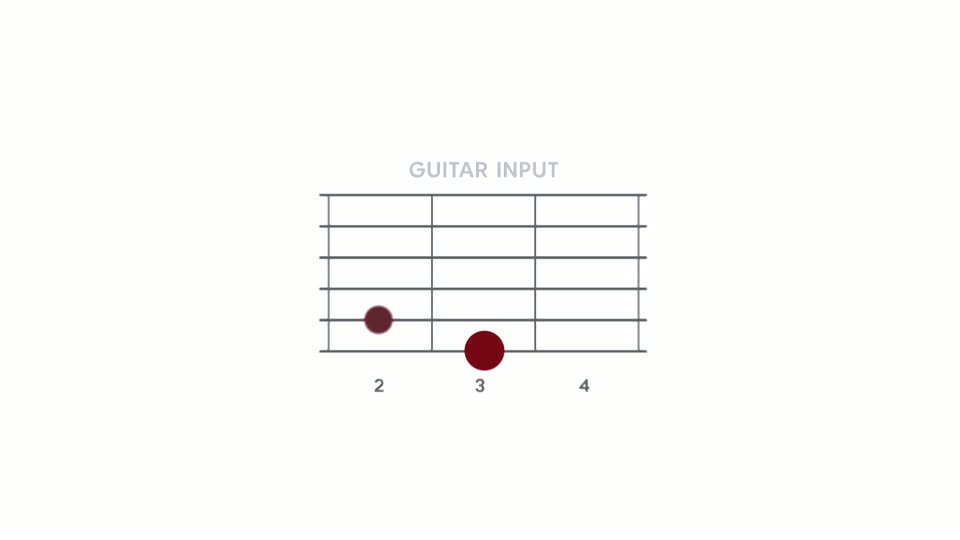
A soft black wave drifts across a white background behind a line diagram of a guitar fretboard. A gray dot sits on a string and a red dot pulses below, above the number 2.
On-screen text: “2”
Camera: Static
A guitar chord diagram on a white background shows five horizontal fret lines split by three verticals labeled 2, 3, 4, under the title GUITAR INPUT. Four dark dots mark the chord, one an open ring, each with a soft reddish halo that pulses gently.
On-screen text: “GUITAR INPUT”
Camera: Static
A white diagram shows a guitar waveform with blue fundamental and gray harmonic note labels above it, while a fretboard below updates its fret dots in sync. The scene cuts to a white pedal in 3D tilt with a yellow trace on its screen, overlaid by the latency headline.
On-screen text: “POLYPHONIC TRACKING”, “TRACKED NOTES”, “GUITAR INPUT”, “NEAR-ZERO LATENCY”, “Tracking every 5ms”
Techniques: 3D mockup
Camera: Pull out
A white audio module in 3D perspective rotates slowly on a plain white background, its small screen cycling through colored waveforms. A bold black headline and a smaller monospace subline sit centered over it, then fade out as the device remains.
On-screen text: “NEAR-ZERO LATENCY”, “Tracking every 5ms”
Techniques: 3D mockup, Kinetic type
Camera: Static
A white hardware tracker with a small purple screen sits in 3D perspective on a white field, the gray title TRACKER FUNCTIONS centered across it. The device drops out, leaving the title alone on the plain background.
On-screen text: “TRACKER FUNCTIONS”
Techniques: 3D mockup
Camera: Static
A white 3D pedal mockup tilts in perspective on the right while a stack of harmonic lines on the left shifts from green to gray, above a green FUNDAMENTAL pill. A bold headline and two-line caption fade in at the lower left.
On-screen text: “HARMONICS”, “FUNDAMENTAL”, “FILTERING HARMONICS”, “Adjusts harmonic input for pitch tracking, balancing accuracy and expression.”
Techniques: 3D mockup
Camera: Static
A low-angle 3D render of a white guitar pedal with black knobs and a chrome toggle, shot with shallow depth of field on a white background. The camera drifts slowly right. Above the pedal, the word TRANSPOSE and five dots labeled -2oct to +2oct pop in and hold.
On-screen text: “TRANSPOSE”, “-2oct -1oct 0 +1oct +2oct”
Techniques: 3D mockup
Camera: Pull out
A white synthesizer with black knobs and silver jacks is framed at a low angle on a plain white background. The title TRANSPOSE and five labeled octave dots float above the hardware. The shot drifts slowly across the device.
On-screen text: “TRANSPOSE”, “-2oct”, “-1oct”, “0”, “+1oct”, “+2oct”
Camera: Pull out
A 3D render of a white hardware unit with black knobs and chrome buttons sits in shallow focus on a white background. A yellow stepped bar graphic fills in beside the heading while the camera pans across the controls.
On-screen text: “QUANTIZE”, “Adjust the amount of quantization”, “of the detected pitch based on chromaticity.”
Techniques: 3D mockup
Camera: Push in
A white modular synth panel sits angled in 3D on the left, its knobs and jacks in focus. On the right, a blue step line morphs into a diagonal ramp above the static label GLIDE (PORTAMENTO). The shot then cuts to a macro view of a metal knob.
On-screen text: “GLIDE”, “(PORTAMENTO)”
Techniques: 3D mockup, Morph
Camera: Pull out
A close-up metallic knob on a white panel, shot with shallow depth of field. White feature cards pop in around the knob, and a large gray headline rises into frame along the bottom edge.
On-screen text: “FILTERING HARMONICS”, “TRANSPOSE”, “POLYPHONIC TRACKING”, “5ms”, “NEAR-ZERO LATENCY”, “SENSITIVITY”, “GLIDE”, “DSP-Class 32- Cortex-M7 Proc”
Techniques: 3D mockup
Camera: Static
A grid of white feature cards, each with a small diagram, sharpens and settles over a blurred desk shot of the device. A wide bottom banner states the DSP-class 32-bit MCU and Cortex-M7 processor.
On-screen text: “FILTERING HARMONICS”, “POLYPHONIC TRACKING”, “SENSITIVITY”, “TRANSPOSE”, “5ms NEAR-ZERO LATENCY”, “QUANTIZE”, “GLIDE”, “Powerful DSP-Class 32-bit MCU”, “ARM® Cortex-M7 Processor”
Camera: Static
A grid of white feature cards sits over a blurred desk, each pairing a label with a small diagram: waveforms, a red cross, a step line, a curve. The tiles stay fixed while the frame slowly zooms in, and faint pixel dots drift at the edges.
On-screen text: “FILTERING HARMONICS”, “POLYPHONIC TRACKING”, “SENSITIVITY”, “TRANSPOSE”, “5ms”, “NEAR-ZERO LATENCY”, “QUANTIZE”, “GLIDE”, “Powerful DSP-Class 32-bit MCU”, “ARM® Cortex-M7 Processor”
Camera: Static
A white device panel fills the frame with the dark QUIMERA wordmark centered. Pixelated icons in blue, green and yellow sit on the sides, a row of black circles lines the top, and a metallic dome with a bright glint rests at the bottom. The frame stays locked off.
On-screen text: “QUIMERA”
Camera: Push in
A blurred light-gray product interface fills the frame, with a wavy line near the top and a small circle on the right. White text sits locked in the lower-left: a headline over two body lines, all static for the full clip.
On-screen text: “Breaks free from the limits of the keyboard.”, “It responds to the nuance of your playing-from subtle bends to bold dynamics.”, “Connect your guitar-or any other instrument.”
Camera: Static
On a plain white background, the headline 2 OSCILLATORS sits centered in gray sans-serif, fading from light to dark gray. A thin control bar with small icons and the labels MIDI and WET rises along the bottom edge.
On-screen text: “2 OSCILLATORS”
Camera: Pull out
A dark gray headline “2 OSCILLATORS” holds center on a white field while a white 3D synthesizer panel rises into the bottom of the frame, its black knobs and blue-lined display tilting toward the camera.
On-screen text: “2 OSCILLATORS”
Techniques: 3D mockup
Camera: Pull out
A white hardware synth rests in 3D perspective at the bottom of a plain white frame, its black screen showing a red sawtooth label and waveform. The gray headline holds centered above as the camera tilts down to reveal the full display and surrounding knobs.
On-screen text: “2 OSCILLATORS”
Techniques: 3D mockup
Camera: Pull out
A white 3D synthesizer sits in perspective at the bottom as a flowchart builds above: a guitar icon labeled AUDIO INPUT points to a black TRACKER box, branching to OSC A and OSC B cards that cycle colored waveforms. A white banner, TWO INDEPENDENT OSCILLATORS, slides in over the device.
On-screen text: “AUDIO INPUT”, “TRACKER”, “TRACKED NOTES”, “OSC A”, “OSC B”, “TWO INDEPENDENT OSCILLATORS”
Techniques: 3D mockup
Camera: Pull out
A cream hardware synthesizer rests at the bottom of a white frame, its small screen cycling waveform names and traces. Above it the headline FEATURES 80 WAVES appears, then three stat columns, BASIC 20, WAVETABLE 30 and SAMPLE 30, pop in with their captions.
On-screen text: “FEATURES 80 WAVES”, “BASIC 20 HARD-SYNCABLE WAVEFORMS”, “WAVETABLE 30 MORPHING WAVETABLES”, “SAMPLE 30 MULTI-DIRECTIONAL PLAYBACK”
Techniques: 3D mockup, Kinetic type
Camera: Static
A features text card fades out to reveal a 3D hardware synthesizer. The device sharpens into focus, showing its screen and control knobs, while a light sweep highlights its left side.
On-screen text: “FEATURES 80 WAVES”, “BASIC”, “20”, “HARD-SYNCABLE WAVEFORMS”, “WAVETABLE”, “30”, “MORPHING WAVETABLES”, “SAMPLE”, “30”, “MULTI-DIRECTIONAL PLAYBACK”
Techniques: 3D mockup, Light sweep
Camera: Static
A macro close-up of a white synthesizer, angled in perspective, centers on its black OLED screen. The screen shows OSC A and OSC B, a red TRIANGLE label, and a white triangle waveform that scrolls, with green and blue arc indicators. Shallow depth of field blurs the device edges.
Techniques: 3D mockup
Camera: Static
A black BASIC pill and a HARDSYNC label sit at the top of a white card. A blue zigzag waveform in the center multiplies into four overlapping lines, then returns to a single line, while two caption lines fade from light gray to black at the bottom.
On-screen text: “BASIC”, “HARDSYNC”, “Waveforms can be hard-synced 1x to 4x”, “can be controlledby ADSR, LFO, and Envelope Follower”
Techniques: Morph
Camera: Static
Blue vertical bars on a black field morph into a horizontal bar tipped by a triangle as a green sine wave draws across it. Small static labels read BASIC and HARDSYNC with a caption on hard-syncing waveforms.
On-screen text: “BASIC”, “HARDSYNC”, “Waveforms can be hard-synced 1x to 4x”, “can be controlledby ADSR, LFO, and Envelope Follower”
Techniques: Morph
Camera: Static
A red zigzag and a teal zigzag cross on a black field. The field floods to dark red, the red line vanishes into it, and the remaining line lightens to pale green, forming a checkmark shape.
Camera: Static
A blue stepped line and a smooth wave line overlap on a dark background that fades from black to deep purple. The smooth line shifts color from green to magenta to white.
Camera: Static
Two jagged step lines, one magenta and one olive, overlap on a black field. The palette flips to lime and dark olive as the background turns dark green, with short white segments marking the peaks and crossover points.
Camera: Static
A jagged orange chart line sits on a dark red field. The line dims to a darker red as a lime-green rounded outline morphs into a bold orange checkmark, with a yellow segment flashing at the top of the long stroke.
Techniques: Morph
Camera: Static
A wall of black-and-white static noise bursts into a mirrored, RGB-fringed glitch pattern. A black pill label reading BASIC and the word HARDSYNC below it stay locked in the center as the distortion settles.
On-screen text: “BASIC”, “HARDSYNC”
Camera: Static
A grid of twenty colorful waveforms sits under a black BASIC badge and HARDSYNC label. The gray caption 20 Waveforms turns black, then vanishes as the view tilts into a 3D grid of plus markers with a purple waveform panel and a WAVETABLE badge.
On-screen text: “BASIC”, “HARDSYNC”, “20 Waveforms”, “WAVETABLE”
Techniques: Morph, 3D mockup
Camera: Static
A 3D grid of waveform traces recedes diagonally; the camera pushes through it as the traces morph in shape and shift from magenta to teal. A black pill label reads WAVETABLE, with MORPHING and two caption lines appearing below and at the bottom.
On-screen text: “WAVETABLE”, “MORPHING”, “Morphing across 64 Waveforms”, “Morphing can be controlledby ADSR, LFO, and Envelope Follower”
Techniques: Morph, Parallax
Camera: Push in
A 3D perspective grid of pink lines recedes across a pale background, framing rows of teal and gray waveform lines that morph between jagged and regular shapes. A black pill badge reading WAVETABLE and a bold black headline sit static at top and bottom.
On-screen text: “WAVETABLE”, “MORPHING”, “Morphing across 64 Waveforms”, “Morphing can be controlledby ADSR, LFO, and Envelope Follower”
Techniques: Morph
Camera: Push in
A blocky white waveform of square pixels ripples and reshapes across a black field, edged with red and cyan glitch fringes, as a small green dot sits at the bottom. The centered title holds still over the motion.
On-screen text: “WAVETABLE”, “MORPHING”
Techniques: Morph
Camera: Static
A black pill logo reading WAVETABLE sits above the word MORPHING on a blurred gray field. The defocus lifts to a flat light background, revealing a grid of small multicolored waveform lines arranged in four rows.
On-screen text: “WAVETABLE”, “MORPHING”
Camera: Static
Thirty small multicolored waveform lines in a grid morph continuously between shapes on white, under a black WAVETABLE badge and MORPHING subhead. The captions 30 Wavetables and + 10 User wavetables fade in below, then the whole scene fades to white.
On-screen text: “WAVETABLE”, “MORPHING”, “30 Wavetables”, “+ 10 User wavetables”
Techniques: Morph
Camera: Static
A black rounded pill at top center reveals the white word WAVETABLE, edged by a soft cyan glow, on a plain white field. A thin teal line and a small maroon mark sit to the right.
On-screen text: “WAVETABLE”
Techniques: Kinetic type
Camera: Static
A white synth with rows of knobs and a small screen sits tilted on a white background. The image brightens from white to reveal the device, while a black SAMPLE tag and the caption BUILT-IN & IMPORT appear at the top.
On-screen text: “SAMPLE”, “BUILT-IN & IMPORT”
Techniques: 3D mockup
Camera: Static
A white synthesizer sits in 3D perspective on a plain white background. The camera slowly drifts in, reframing onto the color screen as the sample name and waveform cycle through presets. A black SAMPLE tag and BUILT-IN & IMPORT caption hold at top; Sample playback OSC appears at right.
On-screen text: “SAMPLE”, “BUILT-IN & IMPORT”, “Sample playback OSC”
Techniques: 3D mockup, UI zoom
Camera: Pull out
A white card lists thirty sample names in gray uppercase text under a black SAMPLE badge and a BUILT-IN & IMPORT line. The bottom caption 30 Factory Samples turns from gray to black, then the name list blurs and slides off to the left.
On-screen text: “SAMPLE”, “BUILT-IN & IMPORT”, “30 Factory Samples”
Camera: Static
A title card displays the text SAMPLE in a black box, BUILT-IN & IMPORT, and 30 Factory Samples. A grid of ten green playback icons fades in and sharpens in the center.
On-screen text: “SAMPLE”, “BUILT-IN & IMPORT”, “30 Factory Samples”
Camera: Static
A white card shows a black SAMPLE badge over BUILT-IN & IMPORT, a grid of ten green playback icons with small gray captions, and the bold headline Multi-Directional Playback. The icon grid blurs and slides off to the left, leaving the text on plain white.
On-screen text: “SAMPLE”, “BUILT-IN & IMPORT”, “Multi-Directional Playback”
Camera: Static
A line-drawn laptop and a small rectangular device with four circular pads sit on a white background, linked by a dashed blue line. A black SAMPLE badge and the caption BUILT-IN & IMPORT sit above; the scene fades in from a soft blur to a sharp frame.
On-screen text: “SAMPLE”, “BUILT-IN & IMPORT”, “You can add your own audio files as sample.”, “Quimera mounts as a USB drive.”, “No software needed.”
Camera: Static
A black SAMPLE badge and BUILT-IN & IMPORT headline top a white field. A recording card on the left darkens as its timer counts up, then a black waveform with green and blue flags draws in on the right above an Editable caption. It cuts to a 3D metallic knob.
On-screen text: “SAMPLE”, “BUILT-IN & IMPORT”, “Stand-alone recording”, “Editable”
Techniques: 3D mockup
Camera: Static
A headline reads TWO INDEPENDENT OSCILLATORS above a grid of white info cards that fade in over a 3D white desk holding a metallic knob and rotated 3D text. Each card pairs a number or waveform with a label.
On-screen text: “TWO INDEPENDENT OSCILLATORS”, “20 BASIC”, “40 WAVETABLE 30 factory + 10 user”, “40 SAMPLE 30 factory + 10 user”, “1x to 4x HARD-SYNC”, “64 Tables MORPHING”, “USER SAMPLE”, “RECORDING 02:40 STAND-ALONE RECORDING”, “CAN BE CONTROLLED BY LFO ADSR ENV”, “TRIM”
Techniques: 3D mockup
Camera: Static
A grid of white spec cards fills the frame under a black headline bar reading TWO INDEPENDENT OSCILLATORS. Each card pairs a number or icon with a label, while abstract ribbons and a dark disc drift in the background at a slower speed.
On-screen text: “TWO INDEPENDENT OSCILLATORS”, “20 BASIC”, “40 WAVETABLE 30 factory + 10 user”, “40 SAMPLE 30 factory + 10 user”, “1x to 4x HARD-SYNC”, “64 Tables MORPHING”, “USER SAMPLE”, “RECORDING 02:40 STAND-ALONE RECORDING”, “CAN BE CONTROLLED BY LFO ADSR ENV”, “TRIM”
Techniques: Parallax
Camera: Static
A white banner titled TWO INDEPENDENT OSCILLATORS tops a grid of spec cards showing large numbers and colored waveform icons. The flat cards stay fixed over a blurred hardware synth that drifts slowly to the right.
On-screen text: “TWO INDEPENDENT OSCILLATORS”, “20 BASIC”, “40 WAVETABLE”, “30 factory • 10 user”, “40 SAMPLE”, “30 factory • 10 user”, “1x to 4x HARD-SYNC”, “64 Tables MORPHING”, “USER SAMPLE”, “RECORDING 02:40 STAND-ALONE RECORDING', 'CAN BE CONTROLLED BY LFO ADSR ENV', 'TRIM”
Camera: Static
A grid of white feature cards with waveform and device icons sits static over a rotating 3D render of a white hardware synth. The background unit turns, and a green, then magenta, oscilloscope trace shifts along the right edge.
On-screen text: “TWO INDEPENDENT OSCILLATORS”, “20”, “BASIC”, “40”, “WAVETABLE”, “30 factory • 10 user”, “40”, “SAMPLE”, “30 factory • 10 user”, “1x to 4x', 'HARD-SYNC', '64 Tables', 'MORPHING', 'USER SAMPLE', 'RECORDING', '02:40', 'STAND-ALONE RECORDING', 'CAN BE CONTROLLED BY', 'LFO ADSR ENV', 'TRIM”
Techniques: 3D mockup, Parallax
Camera: Static
The camera orbits low beneath a white synth panel rendered in 3D, its black knobs jutting toward the lens. As the view pulls back, the printed labels come into frame, a yellow shape slides in from the left, and a dark purple screen edge appears on the right.
Techniques: 3D mockup
Camera: Static
The word MODULATION sits centered in black on a plain white background. The frame is locked off and the text holds still for the full duration.
On-screen text: “MODULATION”
Camera: Static
White text MODULATION sits centered on a black background. Faint grey lines form a blocky, step-like shape behind it, with a small red segment on the right.
On-screen text: “MODULATION”
Camera: Static
A tilted close-up of a synth's black display in 3D perspective shows two pixelated traces, red and green, that redraw while the rate readout climbs. The white body and two dark knobs blur on the right, beside a bold black caption reading LFO and Two independent LFOs.
On-screen text: “LFO”, “Two independent LFOs”
Techniques: 3D mockup
Camera: Static
Green LFO 1 and magenta LFO 2 label boxes float on black as a faint wavy line drifts diagonally behind them. A hard cut lands on a pixelated white ADSR envelope with colored nodes, a bold ADSR headline and a subline, over partial pixelated knobs.
On-screen text: “LFO 1”, “LFO 2”, “ADSR”, “Three ADSRs for Amp, Filter & Mod”
Camera: Static
A pixelated white ADSR curve with colored nodes morphs on black as a readout counts up and ring knobs rotate below, a white caption holding on the left. It cuts to two pixel boxes, LFO 1 and LFO 2, with a line trailing right.
On-screen text: “ADSR”, “Three ADSRs for Amp, Filter & Mod”
Techniques: Morph
Camera: Pull out
Three outlined boxes, green LFO 1, magenta LFO 2 and blue ADSR, hold a row on a black field. A faint gray signal line scrolls behind them, its curve drifting across the frame.
On-screen text: “LFO 1”, “LFO 2”, “ADSR”
Camera: Static
Angled macro shot of a white synth, screen in focus showing a white dotted envelope curve and four colored knobs, rest of the body blurred. A black text block sits on the left over the white surface.
On-screen text: “ENVELOPE”, “Responsive envelope that follows your touch”
Techniques: 3D mockup
Camera: Static
Colored boxes labeled LFO 1, LFO 2, ADSR, ENVELOPE slide in over a dark blurred synth panel. The panel fades to black, the boxes turn white and move up as thin lines connect down to a second row of parameter boxes labeled OSC A, OSC B, BASIC, WAVETABLE.
On-screen text: “LFO 1”, “LFO 2”, “ADSR”, “ENVELOPE”, “PITCH”, “VOLUME”, “PITCH”, “VOLUME”, “FILTER FREQUENCY”, “HARD-SYNC, MORPH, OSC A, OSC B, BASIC, WAVETABLE”
Techniques: Masking
Camera: Static
A black diagram links four modulation sources (LFO 1, LFO 2, ADSR, Envelope) to seven targets with colored lines that brighten. Small waveform icons draw in above the sources and shift shape, while a large stepped waveform rises across the center.
On-screen text: “MODULATION CONTROLS”
Techniques: Morph
Camera: Static
On a black background, the word FILTERS in bold light gray sits above two smaller gray lines, RESONANCE / KEY TRACK and FREQ CONTROLLABLE BY LFO / ADSR / ENVELOPE. Gray rectangular masks slide down and to the right, revealing the text.
On-screen text: “FILTERS”, “RESONANCE / KEY TRACK”, “FREQ CONTROLLABLE BY LFO / ADSR / ENVELOPE”
Techniques: Masking
Camera: Static
A center FILTERS text block anchors a white layout. Right, a line curve morphs from a low-pass slope to a band-pass peak as its label swaps. Left, a vowel row U O A E I shows a triangle marker hopping between letters. The right column fades out.
On-screen text: “FILTERS”, “RESONANCE / KEY TRACK”, “FREQ CONTROLLABLE BY LFO / ADSR / ENVELOPE”, “CUTOFF”, “LOW-PASS”, “BAND-PASS”, “FORMANT”, “U O A E I”, “LOW / MID / HIGH”
Techniques: Morph, Kinetic type
Camera: Static
A dark gray list reads FILTERS, RESONANCE / KEY TRACK, and FREQ CONTROLLABLE BY LFO / ADSR / ENVELOPE on a plain off-white field, then the field shows a light pink rounded rectangle and bars in red, blue, green and gray with small outlined rectangles.
On-screen text: “FILTERS”, “RESONANCE / KEY TRACK”, “FREQ CONTROLLABLE BY LFO / ADSR / ENVELOPE”
Camera: Static
Four rounded panels in red, blue, green and grey list effect options, linked by small arrows, fade in from transparent to solid on a light background. A bold black headline and a one-line caption then appear above them.
On-screen text: “MULTI EFFECTS”, “One effect from each section can be used at the same time.”
Camera: Static
A light diagram with the heading MULTI EFFECTS and a one-line caption shows four effect modules in pink, blue, green and gray joined by arrows. The scene then flips to black as the colored bars inside each module animate.
On-screen text: “MULTI EFFECTS”, “One effect from each section can be used at the same time.”
Camera: Static
Gray rounded cards on white fade in from an overlapping semi-transparent stack into a neat grid of synth feature diagrams. Wavy LFO lines, the ADSR curve and the orange envelope loop gently while the layout holds.
On-screen text: “2 LFOs”, “ADSR”, “ENVELOPE”, “FILTERS”, “CUTOFF & FORMANT”, “U O A E I”, “MODULATION CONTROLS”, “MULTI EFFECTS”
Camera: Static
The word PRESET in white text is centered on a black background. The background shifts to gray, the text turns black, and a small light-gray rounded square appears behind the letter R.
On-screen text: “PRESET”
Camera: Static
A locked-off white grid of outlined rounded squares fills the frame with PRESET centered in black. The squares pop into pastel colors, then oversized black zeros slide in and cover the grid.
On-screen text: “PRESET”, “0000000000000”
Techniques: Kinetic type
Camera: Static
A full-frame mosaic of multicolored rounded squares on a gray field pulls back, and the background fades to white as the squares settle into a neat grid, each with a faint trailing echo.
Camera: Static
A black frame holds a tight grid of multicolored rounded squares that shuffle and twinkle slightly. Bold white text reading 128 PRESETS sits centered over the grid, locked in place while the swatches shift behind it.
On-screen text: “128 PRESETS”
Camera: Static
A white field with a faint grid of gray parameter labels, dotted with colorful rounded squares that fade out. The bold black headline 128 PRESETS scales in at center, then the subline All parameters can be saved appears beneath it.
On-screen text: “128 PRESETS”, “All parameters can be saved”
Techniques: Kinetic type
Camera: Static
A dense grid of small colored parameter labels fills the frame behind large centered black text reading 128 PRESETS with the line All parameters can be saved below it. A soft cyan glow spreads along the left and right edges over the clip.
On-screen text: “128 PRESETS”, “All parameters can be saved”
Camera: Static
A blurred grid of colored squares shifts from green-yellow to blue-teal behind three line-drawn foot-switch icons. Bold black text reads ASSIGNABLE TO EACH FOOT SW. below the icons, held static throughout.
On-screen text: “ASSIGNABLE TO”, “EACH FOOT SW.”
Camera: Static
A soft pink and yellow gradient fills the frame. Bold black 3BANKS sits left, a line-drawn controller face with three dots sits right under a heading. Two dark HOLD pills pop in beneath the outer dots as the outline and dots snap from purple to black.
On-screen text: “3BANKS”, “CHANGE BANKS ON THE FLY”, “Hold L & R to select a bank.”, “HOLD”
Camera: Static
A blurred pink-purple background drifts behind a locked-off explainer. A large dark 3BANKS title sits left; right, a line diagram shows a U-shaped bank with two circles and a gray dot, each black HOLD tag pointing up. The headline and subline stay top right.
On-screen text: “CHANGE BANKS ON THE FLY”, “Hold L & R to select a bank.”, “3BANKS”, “HOLD”, “HOLD”
Camera: Static
A blurred pastel gradient background shifts from green and blue to pink and yellow. The black text “3 x 3” stays locked in the center, with “BANKS” and “SWITCHES” held below each number.
On-screen text: “3 x 3”, “BANKS”, “SWITCHES”
Camera: Static
A black text card sits on a soft gradient that shifts from pale yellow on the left to magenta on the right, with a slow wave drifting through the background. The large '3 x 3' is centered, with 'BANKS' under the first digit and 'SWITCHES' under the second.
On-screen text: “3x3”, “BANKS”, “SWITCHES”
Camera: Static
A pale green gradient holds the bold black 3 x 3, with BANKS and SWITCHES under each digit, a faint light flare crossing the frame. It cuts to a soft gray field where CONNECTIONS sits centered in dark gray.
On-screen text: “3 x 3”, “BANKS”, “SWITCHES”, “CONNECTIONS”
Techniques: Light sweep
Camera: Static
A white hardware synthesizer sits on a plain white background, angled to show its top row of knobs and jacks. The camera pans left along the front panel, revealing MIDI and WET DRY labels and a yellow banana plug icon, while the black word CONNECTIONS holds center.
On-screen text: “CONNECTIONS”
Techniques: 3D mockup
Camera: Pan
A white audio device floats in 3D perspective on a plain off-white field. The black headline CONNECTIONS holds above it, then fades to gray as the unit rotates to show its rear panel of jacks and ports.
On-screen text: “CONNECTIONS”
Techniques: 3D mockup
Camera: Pan
A white guitar pedal is shown from the back in 3D perspective on a white background. Thin leader lines point to each port as labels fade in around it, then the heading INPUT/OUTPUT appears top left.
On-screen text: “MIDI OUT”, “MIDI IN”, “DC9V”, “DRY OUT”, “WET OUT”, “EXP.PEDAL”, “USB-C”, “INPUT”, “INPUT/OUTPUT”
Techniques: 3D mockup
Camera: Pull out
On a white field, the headline MIDI CONNECTIONS and three line icons (DAW, keyboard, controller) fade from light gray to black. A black pill above them scrambles into the label MIDI IN, while a small MIDI pill with a down arrow sits beneath the row.
On-screen text: “MIDI CONNECTIONS”, “DAW”, “KEYBOARD”, “CONTROLLER”, “MIDI”, “MIDI IN”
Camera: Static
A flat black-and-white MIDI connection diagram (DAW, keyboard, controller icons with a downward MIDI arrow) sits centered while a purple 3D wireframe grid builds up behind it. A two-line caption at the bottom reads the standalone hardware synth claim.
On-screen text: “Works as a standalone hardware synth.”
Camera: Static
A pale lavender 3D wireframe grid fills the frame. “MIDI CONNECTIONS” and a black “MIDI IN” pill sit at top. Three line icons, DAW, KEYBOARD, CONTROLLER, sit over a MIDI arrow with the line “Works as a standalone hardware synth.” The icons and tagline swap for a four-column CC table.
On-screen text: “MIDI CONNECTIONS”, “MIDI IN”, “DAW”, “KEYBOARD”, “CONTROLLER”, “MIDI”, “Works as a standalone hardware synth.”
Camera: Static
A light panel with a white wireframe pattern and a purple corner shows a multi-column list of MIDI CC mappings. A black title reads MIDI CONNECTIONS above a black MIDI IN pill, while a large black caption states most parameters can be controlled via MIDI CC. The frame holds static.
On-screen text: “Most parameters can be controlled via MIDI CC”
Camera: Static
A vertical piano keyboard and green piano-roll grid occupy the left edge over a dark teal field. A white MIDI CONNECTIONS headline and a MIDI OUT button sit at the top; a large light-gray caption fades in beneath them as a small blue note pops into the roll.
On-screen text: “MIDI CONNECTIONS”, “Send pitch-tracked notes to your DAW or instruments”
Techniques: Masking
Camera: Static
White headline text overlays a music-app screen: a cream piano keyboard at left and a green piano-roll grid where blue note bars grow rightward. A MIDI CONNECTIONS title and a MIDI OUT pill sit at top.
On-screen text: “MIDI CONNECTIONS”, “Send pitch-tracked notes to your DAW or instruments”
Camera: Static
A green piano-roll grid with blue note blocks and a key strip on the left sits behind a white MIDI OUT pill at top center. Two lines of white overlay text span the middle, and the shot holds still for the full duration.
On-screen text: “MIDI CONNECTIONS”, “Send pitch-tracked notes to your DAW or instruments”
Camera: Static
A small lavender equals sign sits centered on a white field. The background shifts to light purple as two tall rounded bars, a dark one on the left with MAX and MIN labels and a pale one on the right, grow in around the sign, which darkens and tilts.
Camera: Static
Four vertical bars with green fill levels pulse between MIN and MAX markers, numbered 1 to 4. A title and tagline fade in, parameter names appear under each bar, and faint columns of CC parameter names fill the background.
On-screen text: “EXP. PEDAL CONTROL”, “Control up to 4 parameters at once”, “SETTING EXAMPLE”, “OSC A PITCH”, “FILTER FREQ”, “LFO1 RATE”, “DIST GAIN”
Camera: Static
A white audio module sits at a low angle, its black screen in focus showing a blue USB icon and text. A focus pull brings the body into view as a white headline and three icon labels fade in across the frame.
On-screen text: “COMPUTER CONNECTIONS”, “QUIMERA mounts as a USB drive.”, “IMPORT”, “SAMPLES&WAVETABLES”, “PRESET”, “MANAGEMENT”, “FIRMWARE”, “UPDATES”
Techniques: 3D mockup
Camera: Static
A dark rounded bar with circular cutouts sits centered on a black field. A thin white jagged waveform line draws itself inside the central slot, shifting shape across the clip, while a small white dot hovers still below the bar.
Camera: Static
A tilted, out-of-focus macro of a white hardware synth racks focus and reframes to a flat top-down view. White feature cards with icons and short labels assemble across the surface, and a Cortex M7 badge with a caption slides in along the bottom edge.
On-screen text: “POLYPHONIC TRACKING”, “SENSITIVITY”, “MIDI IN / MIDI OUT”, “EXP.PEDAL CONTROL”, “128 PRESETS”, “5ms NEAR ZERO LATENCY”, “QUANTIZE”, “MIDI CC”, “Most parameters can be controlled”, “Works as a standalone HARDWARE SYNTH Control up to 4 parameters at once 3x3 BANKS SWITCH TWO INDEPENDENT OSCILLATORS 30 WAVETABLE 1x to 4x MORPHING 2 LFOs 3 ADS”
Techniques: 3D mockup
Camera: Pan
A dense grid of white rounded feature tiles with small icons and labels fills the frame on a light gray background. The tiles snap from a blurred, scattered state into a tight grid while the camera slowly pushes in, and a black outline highlights individual tiles in sequence.
On-screen text: “FILTERING HARMONICS”, “POLYPHONIC TRACKING”, “SENSITIVITY”, “MIDI / MIDI IN / MIDI OUT”, “EXP/PEDAL CONTROL”, “128 PRESETS”, “TRANSPOSE”, “5ms NEAR ZERO LATENCY”, “QUANTIZE”, “GLIDE', 'MIDI CC Most parameters can be controlled', 'SEND TRACKED NOTES', 'Works as a standalone HARDWARE SYNTH', '3 x 3 BANKS SWITCHES', '2 LFOs', '3 ADSRs', ”
Camera: Pull out
A top-down 3D view of a black synthesizer sits behind a dense grid of white feature tiles. The tiles drift, tilt and slide apart, exposing the device's waveform screen and round knobs underneath.
Techniques: 3D mockup, Parallax
Camera: Static
A white synthesizer with black knobs and a green waveform screen sits in 3D perspective on a white field. White feature callouts and lines flash over it, then clear to leave the device and its QUIMERA mark.
On-screen text: “QUIMERA”, “HARMONICS”, “1x to 4x”, “ARM Cortex M7 Processor”
Techniques: 3D mockup
Camera: Pull out
A white pedal in 3D on a white background. The camera opens on an angled close-up of the knobs and screen, pulls back to a front view as the display cycles through UI pages, then holds as a QUIMERA wordmark slides in below and turns black.
On-screen text: “QUIMERA”
Techniques: 3D mockup, Kinetic type
Camera: Pull out
A dark gray end card holds still. A small yellow banana mark sits centered above the URL, with two credit blocks naming JUMPEI NOGUCHI and KEIICHIRO HIRAI and a company line along the bottom. The frame is locked off with no motion.
On-screen text: “QUIMERA”, “BANANANAEFFECTS.COM”, “JUMPEI NOGUCHI”, “PLANNING/SOUND DESIGN”, “HARDWARE/SOFTWARE/UI”, “KEIICHIRO HIRAI”, “DIRECTION/UI/VISUAL DESIGN”, “WEB/VIDEO&MUSIC”, “NOHT CO.,LTD.”
Camera: Static