
0:31
Explore
00:00:00 / 00:37:23
- Length
- 0:37
- Scenes
- 11 · 3.4 s avg
- Product on screen
- 0:16
- Features shown
- 1
- Voiceover
- Yes
- Views
- 356 on X
as of November 25, 2026
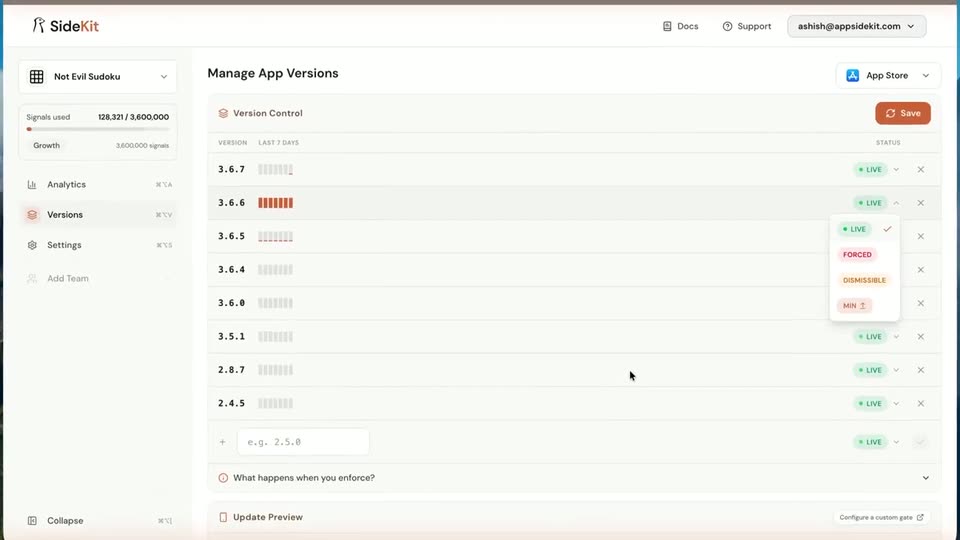
SideKit’s 0:37 launch film runs 11 scenes, about 3.4 s each. The product shows up at 0:16 and 1 feature is revealed. There is no explicit call to action; a voiceover carries the film. The video moves from a problem (stacked user requests, then a long version history) to a single feature demo, using a continuous pull-back from UI close-up to full desktop as its main transition. Pacing is steady at about six cuts per minute, with signature moves: an orange highlight box tracing list rows, a 3D tilt that turns the flat dashboard into a card, and a cut from 3D to live-action hands holding a phone.
Footage neededEstimated needs: 2 capture groups — your screens or recordings · 1 official logo — reused across the film · 3 filmed passages — shoot, supply or replace · 2 3D passages — build or supply
Is this your launch? to your site or press kit.
More like this



Similar soundtrack
Films whose music sounds like this one, voice left out
1:45

Invertix launch film
Invertix · Corporate Tech
2:00

Jonathan Unikowski | 219 likes · 63 comments
Avec · Narrative sound design with ambient music and voiceover
3:40


Sense, Solve, and Go: The Magic of the Waymo Driver
Waymo · Modern electronic
SideKit - Users hate being forced to update before they can access their apps., scene by scene
· 11 scenes as text
01 · Problem · 0:00–0:05
A slow pan across a mountain desktop wallpaper while notification cards slide in from the right and stack down the screen. Each card pairs a username with a short message asking for autofill or flagging activity grid bugs.
Camera: Pull out
02 · Problem · 0:05–0:07
A white Version History panel pops open over a dimmed App Store review page, listing numbered releases with descriptions and dates. The panel settles into place as a cursor hovers at the right edge of the window.
Camera: Static
03 · Problem · 0:07–0:14
A white Version History panel lists app releases with version numbers, dates and release notes. A cursor travels down the list while an orange outline box highlights each row in turn as the list scrolls.
Techniques: Cursor demo
Camera: Pull out
04 · Problem · 0:14–0:16
A close-up of a version history list pulls back to reveal a full App Store interface with a sidebar and user reviews.
Techniques: UI zoom
Camera: Pull out
05 · Feature reveal · 0:16–0:27
The camera pulls back from a close-up of the version list to reveal the full SideKit window on a macOS desktop, then zooms in as a cursor opens a status menu and picks FORCED, turning the green LIVE badge pink.
Techniques: UI zoom, Cursor demo
Camera: Pull out
06 · Feature reveal · 0:27–0:28
A version-control dashboard with App Store dropdowns and a status column sits flat; a hand cursor taps the orange Save button, then the whole interface tilts into 3D perspective, rotating away like a card over a warm desk.
Techniques: Cursor demo, 3D mockup
Camera: Static
07 · Feature reveal · 0:28–0:29
An angled MacBook on a desk shows the SideKit dashboard, the Manage App Versions page with a version list and a phone mockup reading Update Available. The camera drifts slowly across the tilted screen while a cursor rests near a dropdown.
Techniques: 3D mockup
Camera: Pull out
08 · Feature reveal · 0:29–0:31
A hand holds a phone in front of an open laptop showing an app dashboard. The phone screen switches from a Sudoku app with an Update button to a full-screen card reading Update Available, while a finger taps the device.
On-screen text: “Update Available”, “My cool app has a lot of cool new features!!!”
Camera: Pull out
09 · Feature reveal · 0:31–0:33
A hand holds a phone in front of an open laptop on a desk. The phone screen changes from a dark update alert to an app store listing for a Sudoku game, while the laptop displays a dashboard and a chat window.
Camera: Static
10 · Feature reveal · 0:33–0:34
A hand holds a phone with a dark puzzle app in front of a laptop showing an app-store dashboard. The hand slides the phone out to the right, revealing the phone mockup embedded in the page.
Camera: Static
11 · Outro · 0:34–0:37
A 3D isometric app icon with a soft glow scales up at center, the SideKit wordmark fades in to its right, then the URL appsidekit.com fades in below. Plain beige background, locked-off frame.
On-screen text: “SideKit”, “appsidekit.com”
Techniques: 3D mockup
Camera: Static