1:18


Operon's New Home: operonsolutions.com | Operon Solutions
Operon · Industrials
Avec · 2:00 · AI-annotated
Avec’s 2:00 launch film runs 43 scenes, about 2.8 s each. The product is on screen from the first frame and 4 features are revealed. The call to action lands at 1:47 (89% in), over a voiceover. The video is built as a cinematic short film: a dark, low-lit story of a man who keeps forgetting to reply to an email, cut to macro UI shots of the app resolving it. Signature moves include locked-off frames with white centered captions, ghosted scrolling inbox lists, green swipe cards that collapse the inbox, and rack-focus pulls on the phone screen.
Is this your launch? to your site or press kit.
Operon · Industrials
Willow · Consumer · Nov 2026
Films whose music sounds like this one, voice left out
AirCaps AI · Soft, ambient electronic and piano underscore
Spacesheep · Cinematic orchestral transitioning to modern electronic
Airbnb · Ambient electronic with piano
Overhead static shot of a dim wooden floor with red chairs. A seated figure holds a device top left. White centered text reads Avec Presents, then swaps to Emails You'll Never Reply To. A person in red walks down the aisle and crouches to lift a glowing blue object.
On-screen text: “Avec Presents”, “Emails You'll Never Reply To”
Camera: Pull out
In a dim cinema, a man in a plaid shirt walks down the aisle holding a phone and a paper cup, then sits beside a smiling woman in red seats while a man in black eats a snack. The camera holds a static wide shot in low warm light.
On-screen text: “Emails You'll”, “Never Reply To”
Camera: Push in
A close-up of a phone screen at an angle shows a dark-mode inbox list with sender names and preview lines. A finger enters from the top right and taps the upper area of the screen while the list stays in place.
Camera: Static
A tilted phone in a dark room shows a Gmail inbox in dark mode. A finger taps the Riley Gray email, and the screen transitions into the opened thread, the camera holding a close angled view of the display.
Camera: Push in
In a dark room, a man's face is lit from below by his phone as he types with one finger. On the black left side of the locked-off frame, a white text message appears line by line.
On-screen text: “John,”, “Long time.”, “Some big news: my father finally croaked.”, “No condolences needed. This means I finally have the money.”, “And I want to make a movie.”, “Coffee soon?”, “Riley”
Techniques: Kinetic type
Camera: Static
A tilted smartphone held in a hand fills a dark frame, its screen in shallow focus. An email draft under the subject line types out letter by letter, the opening word growing from a single letter to a full greeting, with a blinking blue caret.
Techniques: 3D mockup
Camera: Static
In a dark room, a man in the right foreground and a woman in the left background stare at a phone screen. The man holds the glowing device low in frame as the lighting shifts from warm orange to cool blue.
Camera: Static
A close-up of a Gmail inbox, Primary tab highlighted in blue, the email list scrolls upward past sender names and subject lines. The opening frame shows a ghosted overlap of two list positions as the scroll begins.
Camera: Push in
A man in a white shirt lies in a dark bedroom holding a glowing blue phone, his face lit by the screen. A woman in a red plaid shirt, blurred by motion, reaches across and settles beside him as he turns to look at her.
Camera: Static
Two people sit up in a dim bedroom at night, lit by warm orange light. The man in a white shirt and the woman in a red plaid shirt reach toward each other under a yellow blanket, hands meeting. The frame holds on the quiet moment.
Camera: Static
A curly-haired man in a white shirt steps through an open doorway into a sunlit room, talking to a woman seen from behind in the foreground. Warm light, brick building visible outside the door.
Camera: Static
A close-up of an email inbox with the Primary, Promotions, Social, Updates tabs across the top. The message list scrolls upward while a crossfade dissolves one set of senders into the next, leaving ghosted double text. Numbers on the left edge overlap during the transition.
Camera: Push in
A close-up of a pale interface list scrolls upward, with date labels moving past a teal contact card on the right.
Camera: Static
A man with a topknot in an olive shirt sits at a wooden table, a blue pen pressed to his temple as he reads papers. He raises his head and looks to camera, speaking. Soft daylight through sheer curtains; a fruit bowl and a child's drawing fill the background.
Camera: Push in
A man with gray hair in a blue knit sweater sits at a wooden desk, turning the pages of an open notebook under a lit desk lamp. A bookshelf fills the dim background. The camera slowly pushes in toward him.
Camera: Static
A woman in a black top settles onto a white couch holding an orange drink, in a dim room washed in warm orange and cool blue light. The shot is framed low behind a dark foreground edge, with a metal chair to the right.
Camera: Pan
A couple sits on a couch in a dim living room, lit by flickering blue and warm light from an off-screen TV. The man holds a bowl of popcorn, the woman a jar of orange candies; they watch the screen, then turn to exchange a glance as the camera slowly pushes in.
Camera: Push in
A tired man in a beanie and cable-knit cardigan sits at a glass desk in a dim room, closes his laptop, and looks up at the camera. A centered white caption reads “Email shouldn't be this hard.” The frame is locked off throughout.
On-screen text: “Email shouldn't be this hard.”
Camera: Static
A man in a cream cardigan sits at a glass desk in a dim room, lit by a desk lamp. A smartphone is raised into the foreground, its blue app grid out of focus, partially blocking the view of him.
Camera: Static
A hand holds a phone in a dim room, the screen showing a blue home screen with a weather widget and a grid of app icons. The locked-off shot racks from soft focus to sharp, and a small asterisk icon pulses once.
Camera: Static
A tight close-up of a teal phone screen shows a search pill and a blue app icon with a white mark. A finger sweeps in from the upper right and taps the icon, blurring across the frame.
Camera: Static
A hand holds a phone upright over a blurred wooden desk. The screen shows the Avec logo on white, then loads an email thread titled 'Re: Q2 deck' from David Marks with a blue Reply button. The camera stays locked off.
Camera: Static
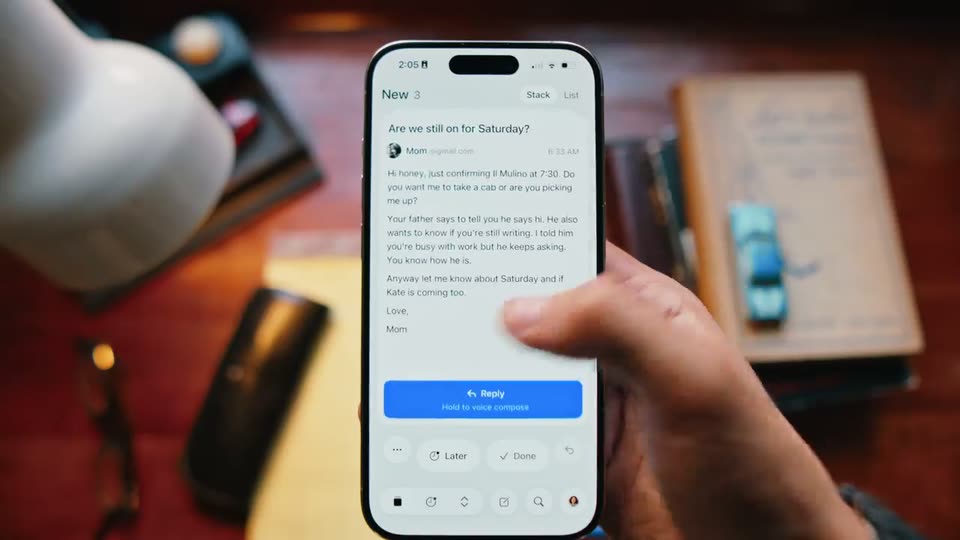
A hand holds a phone over a blurred desk as a green Done card collapses and vanishes, revealing an email from Mom. The thumb taps the screen, then a green Reply button with a microphone icon slides up at the bottom.
Camera: Static
A hand holds a phone showing an email inbox. A finger swipes a card to the right, sliding a green Done panel with a checkmark across the screen as the email list changes from a Mom message to a wedding reminder.
Camera: Static
Close-up of an iPhone held in a hand, showing an email inbox in Stack view against a blurred warm background. The thumb swipes down, moving from a wedding RSVP reminder to a personal email, and the New count drops from 2 to 1.
Camera: Static
Static macro close-up of a phone screen. A finger swipes up over an email view; the blue Reply bar and the Later and Done pills hold position while a +1 Later / Add due date chip appears below as the list scrolls.
Camera: Static
A thumb swipes down a phone screen held over a blurred desk, scrolling a list of low-importance emails. Each row slides up to reveal an Unsubscribe button as the finger passes, moving from Con Edison to LinkedIn.
Techniques: Cursor demo
Camera: Static
A hand holds an iPhone in close-up; the low-importance email list collapses from overlapping ghosted rows into a neat stack, then a green “Archive 26 items” card slides up as the thumb swipes.
Camera: Static
A hand holds a smartphone upright over a blurred wooden desk. The screen shows a green “Mark all Done” card, which clears to an empty inbox reading “No new emails” with a pill noting one overdue email in Later.
Camera: Static
A hand holds a phone against a blurred warm background. The email inbox, first empty with a “1 overdue email in Later” pill, fills with cards and scrolls down through Overdue, Today, This week and No due date, then back up as the finger swipes.
Camera: Push in
A hand holds an iPhone in close-up, showing an open email titled “long time” from Riley Gray. The screen stays mostly still, with the message body visible against a warm blurred background.
Camera: Static
A man in a plaid shirt holds a phone in both hands while a woman beside him looks up at a screen in a dark auditorium. Warm front light illuminates their faces against a black background.
Camera: Push in
A tight macro frame of a phone held in a hand against a black background. The thumb presses the blue hold-to-speak panel below a chat line that reads Describe your key points.
Camera: Static
Macro close-up of a thumb resting on a large red button on a phone screen, marked with a mic icon and the label Hold to speak. Above it a chat bubble ends with soon? and a Release to generate hint sits over the input bar. The frame is locked off as focus pulls from soft to sharp.
Camera: Static
Two audience members sit in a dark theater. The man on the right holds a phone up and speaks into it while the woman beside him rests a hand near her mouth, both watching something off screen.
Camera: Static
A hand holds a smartphone at an angle against a dark blurred background, the screen filling the frame with an email thread. The email body text transitions from the original message to a rewritten, polished version, and an Add polish control appears at the bottom.
Techniques: 3D mockup
Camera: Static
Macro close-up of a hand holding a phone, thumb resting on a blue hold-to-speak button. The button fills red as the recording state starts, while the chat text above stays soft and out of focus.
Camera: Static
An extreme close-up holds on a man's mustache and parted lips in warm amber light against a black background. A hand stays blurred in the foreground near his face as he speaks, the framing tight and shallow throughout.
Camera: Static
A hand holds a tilted phone showing an email draft. The body rewrites itself into a shorter reply, then the thumb taps the blue send button, which spins into a loader.
Techniques: Cursor demo
Camera: Pan
In a dim room, a woman in a rust top and a man in a brown shirt sit side by side, faces lit by warm light. The woman smiles while the man holds a small device near his chin, both watching something off screen.
Camera: Pull out
A gray-haired man in a blue shirt sits at a glass desk crowded with golden trophies, working a mouse and watching the monitor. A white caption holds centered mid-scene, then the white AVEC logo fades in over the locked-off frame.
On-screen text: “Handle your Gmail inbox in seconds.”, “AVEC”
Camera: Static
A man in a blue sweater leans forward at a desk lined with golden statuettes and a building model, reaching for a folder. A white three-petal logo with the word Avec holds center, then the line Now available on the App Store. takes its place.
On-screen text: “Avec”, “Now available on the App Store.”
Camera: Static
A single line of white text holds centered on a solid black background, completely static for the full duration of the shot.
On-screen text: “Now available on the App Store.”
Camera: Static