2:08


Semble launch film
Semble · B2B · Nov 2026
Willow · Nov 2026 · 0:55 · Full motion · AI-annotated
Willow’s 0:55 launch film runs 23 scenes, about 2.4 s each. The product is on screen from the first frame and 3 features are revealed. The call to action lands at 0:49 (89% in), over a voiceover. The video alternates full-bleed green brand cards with cream split-screen demos, where a bold left-aligned headline pairs with a UI mockup that animates step by step on the right. Signature moves are line-by-line headline reveals, a green circle wipe, slow zoom-ins on interface rows, and the bearded scout avatar bookending the brand cards.
Is this your launch? to your site or press kit.
Films whose music sounds like this one, voice left out
Genspark · Electronic, Chiptune, Latin Dance
Oboe · Instrumental electronic, blending chillwave and lo-fi elements
Orior AI · Eurodance / Trance
On a green gradient background, the Scout by willow logo lockup with a bearded man avatar in a green circle sits above a row of four white app icons labeled Instinct, Grok Bot, Muse, Dots. The whole lockup drifts slowly and settles into place over the clip.
On-screen text: “Scout by willow”
Camera: Static
The Scout by willow logo and four bot icons sit on a green gradient, then a green circle expands from the center over a cream background as the dark green headline begins to slide in from the left.
On-screen text: “Scout by willow”, “Instinct”, “Grok Bot”, “Muse”, “Dots”, “Your agent wants to work in your inbox, your calendar, your Slack, your Jira”
Techniques: Masking, Kinetic type
Camera: Static
On a cream background with a green glow, dark green text reads “Your agent wants to work in your” while the last word swaps through inbox, calendar, Slack, Jira. Matching app icons pop in on the right, then a 3D bearded character in a hat rises from the bottom right.
On-screen text: “Your agent wants”, “to work in your”, “inbox.”, “calendar.”, “Slack.”, “Jira.”
Techniques: Kinetic type
Camera: Static
On a deep green gradient, the bold cream headline “Bring it to work.” slides up into the center, then “Safely.” in pale green slides in beneath it, the whole block continuing to drift upward. A smaller locked line, “Your agent wants to work in your Jira.,” sits in place while the headline passes.
On-screen text: “Your agent wants”, “to work in your”, “Jira.”, “Bring it to work.”, “Safely.”
Techniques: Kinetic type
Camera: Pan
A cream background holds a tilted 3D tablet mockup of the Scout by willow onboarding screen, its dark green and white panels showing an agent list. On the left, a green STEP 1 badge and the heading Pick your agent. fade in.
On-screen text: “STEP 1”, “Pick your agent.”
Techniques: 3D mockup
Camera: Static
A cream left panel holds a green STEP 1 badge and the headline Pick your agent. A white list of agent options expands from the right as a cursor selects Instinct, adding a green check and a 0 of 3 picked tag while the other rows dim.
On-screen text: “STEP 1”, “Pick your agent.”
Techniques: Cursor demo, Masking
Camera: Pull out
A green STEP 2 headline sits left of an app grid where a cursor clicks three apps, the counter jumping to 3 of 3 picked. The grid then swaps to a connected-apps list as the headline changes.
On-screen text: “STEP 2”, “Choose the apps it can use.”, “Pick up where and what”
Techniques: Kinetic type, Cursor demo
Camera: Static
A static headline sits on the left while the right shows an integrations list. The view zooms into the Gmail row as the cursor hovers the allow and ask labels, which gain green and orange outlines, then the frame pulls back.
On-screen text: “STEP 3”, “Decide what it does on its own, and what needs your OK.”
Techniques: UI zoom, Cursor demo
Camera: Static
A cream two-column frame shows bold headlines on the left and a product setup panel on the right. The panel advances through its steps as green checkmarks appear and a cursor hovers the password field, while the left caption changes from STEP 3 to STEP 4.
On-screen text: “STEP 3”, “Decide what it does on its own, and what needs your OK.”, “STEP 4”, “Connect it in a few steps. Your password never touches the chat.”
Techniques: Kinetic type, Cursor demo
Camera: Static
A white product panel on the right lists onboarding steps with a green Copy password button and a blinking caret, while a dark green headline reveals line by line on the left. A mouse pointer glides from the button down the panel.
On-screen text: “STEP 4”, “Your password never touches the chat.”
Techniques: Split screen, Kinetic type, Cursor demo
Camera: Static
A cream left panel holds a green STEP 4 pill above a dark green headline. On the right, a checklist with green checkmarks sits over a chat card, then a phone mockup slides in from the right edge, revealing the matching chat thread.
On-screen text: “STEP 4”, “Your password never touches the chat.”
Camera: Static
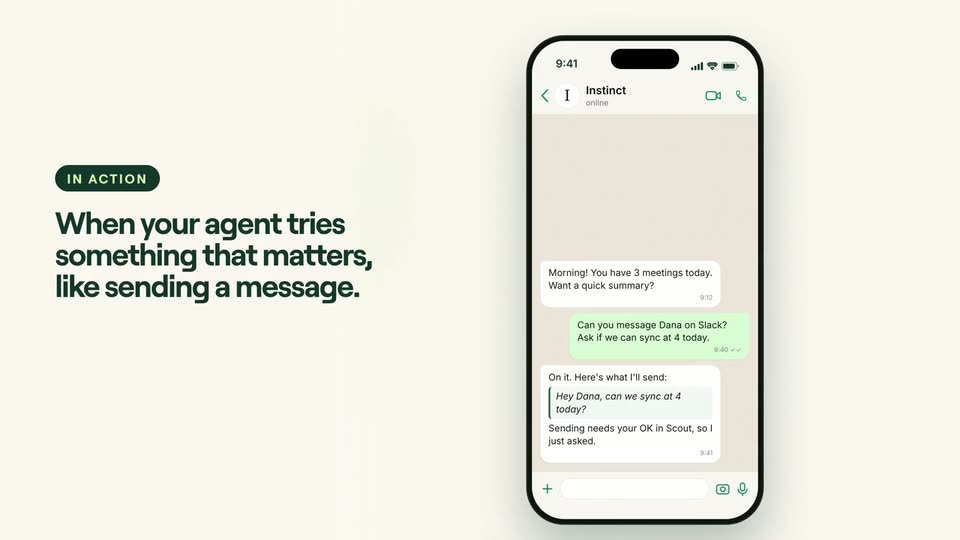
A cream stage holds a green IN ACTION pill and a bold dark-green headline on the left while a front-facing phone mockup on the right builds a chat conversation, message by message, then a Scout approval banner slides in at the top.
On-screen text: “IN ACTION”, “When your agent tries something that matters, like sending a message.”
Techniques: Kinetic type
Camera: Static
A cream background holds a flat phone mockup on the right showing a chat approval flow, while a dark green headline on the left cross-fades from a long sentence to a short line. The phone's top card expands into a detail view with a green Approve button.
On-screen text: “SCOUT”, “When your agent tries something that matters, like sending a message.”, “Scout asks you first.”
Techniques: Kinetic type, UI zoom
Camera: Static
Cream background split into a left text panel and a right phone mockup. The phone shows the Scout approval screen with a countdown ticking from 29:52 to 29:51, while the green headline and badge stay static on the left.
On-screen text: “SCOUT”, “Scout asks you first.”
Camera: Static
A phone mockup on cream shows the Scout approvals screen, then a chat with Dana Cole, while the left headline crossfades to “One tap, and it's sent.” and a thumbs-up emoji pops in. The phone slides down to reveal the desktop dashboard with connectors and activity feed.
On-screen text: “SCOUT ASKS”, “Scout asks you first.”, “ONE TAP”, “One tap, and it's sent.”
Techniques: Kinetic type, UI zoom
Camera: Static
A cream stage holds a green AUDIT LOG badge and serif headline on the left, a flat Scout dashboard mockup on the right. Both ease in from a pale, blurred state to full black and sharp.
On-screen text: “AUDIT LOG”, “And behind the scenes, every action is logged in Willow.”
Camera: Push in
A cream dashboard: a dark green AUDIT LOG pill and headline overlay a faded settings panel on the left, while a Recent activity list highlights an approved Slack action on the right. A cursor moves to View all, then the view zooms into the full log with timestamps as the left panel fades.
On-screen text: “AUDIT LOG”, “And behind the scenes, every action is logged in Willow.”
Techniques: Cursor demo, UI zoom
Camera: Static
A dark green headline and AUDIT LOG badge sit left on a cream field. On the right, an audit log list fades in, the cursor moves to the first row, which highlights green, then a detail card opens over the dimmed list.
On-screen text: “AUDIT LOG”, “And behind the scenes, every action is logged in Willow.”
Techniques: Cursor demo
Camera: Pan
A dimmed activity list sits behind a detail card titled You approved Post Message. A green AUDIT LOG pill and headline hold the left side as the camera slowly zooms into the card, ending on the green-outlined approval field, then cuts to a dashboard window.
On-screen text: “AUDIT LOG”, “Who asked, what ran, and who approved it.”
Techniques: UI zoom
Camera: Push in
A 3D-angled laptop showing the Scout home screen flattens into a top-down view as the gray headline on the left fades to bold dark green. The green ALWAYS ON pill and the interface settle into a locked-off frame.
On-screen text: “ALWAYS ON”, “Every agent, secured by Scout.”
Techniques: 3D mockup, Kinetic type
Camera: Push in
A cream panel on the left holds a dark green ALWAYS ON pill and the headline Every agent, secured by Scout. beside a product screen listing Personal assistants. A green pulse briefly highlights the Secured by Scout badge on the Instinct card.
On-screen text: “ALWAYS ON”, “Every agent, secured by Scout.”
Camera: Static
A light sidebar listing agent names slides out to the left, leaving a 3D avatar of a bearded man in a hat on a green circle beside the Scout by willow wordmark on a green gradient.
On-screen text: “Scout by willow”
Camera: Static
On a green gradient, the Scout by willow logo with a circular avatar sits at top. The headline builds line by line, with “safely” in light green. A white pill button with an arrow fades in below, followed by a small URL.
On-screen text: “Bring your agent to work, safely.”, “Connect my agent for free →”, “withwillow.ai/scout”
Techniques: Kinetic type
Camera: Static