1:54

Introducing Ramp for Private Equity
Ramp · Finance · Oct 2026
Giga (Scout) · Jun 2026 · 2:37 · AI-annotated
Giga (Scout)’s 2:37 launch film runs 61 scenes, about 2.6 s each. The product is on screen from the first frame and 4 features are revealed. The call to action lands at 2:28 (95% in), over a voiceover. Confident, polished tech tone that pairs a warm live presenter with sleek product demos. The structure alternates the brick loft presenter, white UI mockups and black title cards at a fast pace of about 14 cuts per minute. Signature moves are blur-to-focus UI reveals, count-up metrics and charts, and the recurring golden mountain valley as the brand backdrop.
Is this your launch? to your site or press kit.
Ramp · Finance · Oct 2026
Navier AI · Nov 2026
Hue · B2B · Oct 2026
A field of fine white dots and dashes fills a dark frame around a faint circular orb holding a node-and-line network. The dot field fades to black as the orb brightens, then resolves into a glossy 3D sphere with blue and peach reflections and arcing data bands.
Techniques: Morph
Camera: Static
A grid of panels mixes mountain footage, white typographic character fields and a circular cutout. The panels shuffle to new positions while the center circle swaps from a photo with white arcs to a black line-art dial, with small bracket markers appearing.
Techniques: Masking
Camera: Static
A thin white grid frames a black field with an animated wireframe network in the center. The word AUTOMATE sits in monospace on both sides, dropping its brackets as a giant white word scales in behind the masked center panel. A status readout at the bottom updates MISSION to [AUTOMATING].
On-screen text: “AUTOMATE”, “AGENTS: LIVE”, “MODELS: NOMINAL”, “QUEUE: [RESOLVING]”, “MISSION: [AUTOMATING]”
Techniques: Kinetic type, Masking
Camera: Static
Locked-off black-and-white collage: a vertical white band carries the bold GIGA wordmark and tagline, a blocky pixel HI! fills in on the right, wireframe panels on the left type out data labels, and an equalizer bar flickers at the bottom.
On-screen text: “GIGA”, “AGENTIC AUTOMATION”, “ALL OF THE WORLD'S WORK”, “V.2026.04”, “19.04.26”, “HI!”
Techniques: Split screen
Camera: Static
A black-and-white block mosaic resolves into a medium shot of a bearded man in a green jacket speaking in a brick loft, a translucent white loop ring floating behind him. White labels “Q Carlson” and “Head of Design” sit at the left and right edges while he gestures.
On-screen text: “HI!”, “Q Carlson”, “Head of Design”
Techniques: Masking
Camera: Static
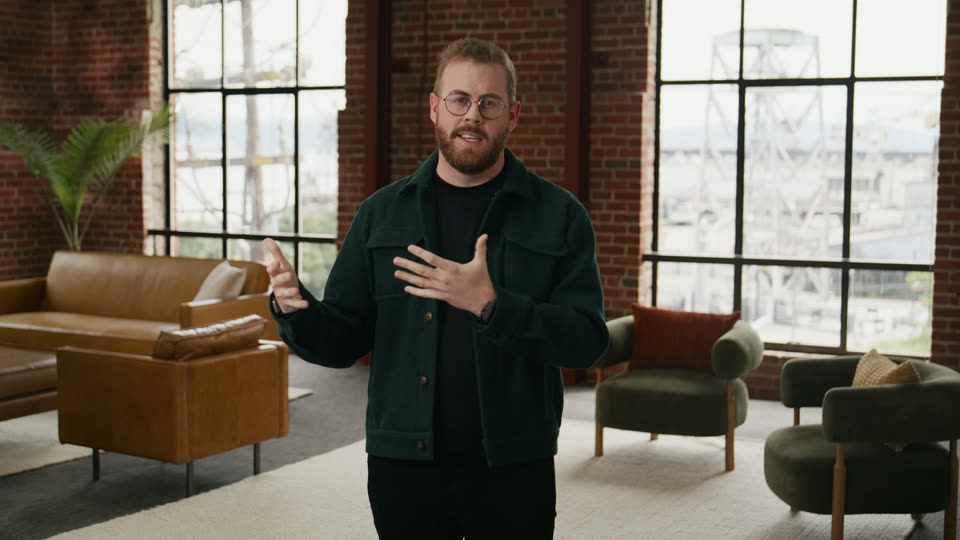
A bearded man in round glasses and a dark green jacket speaks to camera, gesturing with both hands, against a brick wall with a bright window and a blurred plant. The medium close-up is locked off and steady.
On-screen text: “Q Carlson”, “Head of Design”
Camera: Static
A bearded man in a green jacket stands center frame in a brick-walled loft, gesturing with both hands as he speaks directly to the camera. Leather sofas and tall industrial windows fill the background.
Camera: Static
A bearded man in round glasses and a dark green corduroy jacket talks to camera, raising and moving both hands to emphasize his words. The brick wall, bright window and blurred plant stay static behind him.
Camera: Static
A hazy mountain slope with scattered sheep snaps into focus as the word Scout scales up across the frame in oversized white letters. The landscape tilts diagonally under a pale sky.
On-screen text: “Scout”
Techniques: Kinetic type
Camera: Pull out
A framed aerial shot of a mountain valley, river and patchwork fields sits on a white background, the rectangle widening as it holds. The word Scout in white sans-serif sits centered over the misty landscape and scales gently in place.
On-screen text: “Scout”
Techniques: Kinetic type
Camera: Pull out
A wide aerial view of a sunlit mountain valley dotted with small white cabins fills the frame, and the word Scout scales up in the center as the shot holds.
On-screen text: “Scout”
Techniques: Kinetic type
Camera: Pull out
A wide panel on a light backdrop holds a white line chart over a blurred mountain photo, with dotted grid lines and date labels along the bottom. A white half-circle gauge scales in at the center to reveal a total figure, while the word Scout scales up as a headline.
On-screen text: “Scout”
Techniques: Kinetic type
Camera: Pull out
A wide photo of golden mountain slopes on a white background carries a partially filled white semicircular gauge. The label TOTAL and a large white number count up from 213 to 236 at the center.
On-screen text: “TOTAL”, “236”
Techniques: Kinetic type
Camera: Pull out
A rounded app icon holding a blurred mountain landscape and a white play triangle sits centered on a white field that warms to a soft glow, the icon tilting and rotating gently in 3D with a soft drop shadow.
Techniques: 3D mockup
Camera: Static
A cream background holds a small video card with a white play button. The card scales up to fill the frame, revealing a bearded man in round glasses and a dark jacket speaking in front of a brick wall and a potted plant.
Techniques: Morph
Camera: Static
A man with glasses and a beard, wearing a dark green jacket, stands in a brick-walled loft with leather and green seating and tall windows. He faces the camera in a steady medium shot and gestures with both hands while speaking.
Camera: Static
A line chart draws in on white: a gray wavy segment becomes a rising orange line, and a glowing orange dot labeled SCOUT moves along it. Small axis labels read FUNDED DEPOSITS and TIME, while a large dollar figure counts up at top right and settles on $16M.
On-screen text: “$4M”, “$9M”, “$11M”, “$13M”, “$18M”, “$16M”
Camera: Pull out
A mountain landscape photo, blurred and full-bleed, settles into a sharp rectangular display frame on a white background. White tagline text builds word by word across the scene, scaling in over the sunlit ridge.
On-screen text: “You set the goal.”
Techniques: Kinetic type, Masking, 3D mockup
Camera: Pull out
A 3D mountain valley with a stream of small colored cubes flowing down the slope. White text “You set the goal.” scales in at the center, then “Scout gets you there.” appears on a second line below. The frame stays locked-off.
On-screen text: “You set the goal.”, “Scout gets you there.”
Techniques: Kinetic type, Particles
Camera: Push in
A bearded man in a dark green jacket stands in a brick loft office, speaking to camera and gesturing with both hands. At the end, the tagline “You set the goal.” scales in, followed by “Scout gets you there.” holding still. Locked-off frame.
On-screen text: “You set the goal.”, “Scout gets you there.”
Techniques: Kinetic type
Camera: Static
A bearded man in round glasses and a dark green jacket talks to camera, raising both hands to his chest before lowering them, set against a soft-focus brick wall and bright window.
Camera: Static
A gradient gold headline “Funded deposits” scales up on a white background, then a flat phone mockup rises in front of it, revealing the onboarding form with two input fields and Cancel/Continue buttons.
On-screen text: “Funded deposits”
Techniques: Kinetic type
Camera: Static
A flat iPhone mockup sits centered on a white field, showing a bank enrollment form. The camera zooms into the screen, scaling the phone up until the form fields for account and SSN fill the frame.
On-screen text: “Funded deposits”
Techniques: UI zoom
Camera: Static
A front-facing phone mockup on a white background steps through onboarding screens, from an enrollment form to a security-question setup to a completion screen. The orange progress bar fills to a check, and an orange check badge with a welcome line appears.
Techniques: 3D mockup
Camera: Static
A silver phone top in 3D perspective sits on a plain white field. Its lock screen shows a mountain wallpaper, the carrier label and status icons, and a large clock whose digits change from 10:45 to 12:30.
Techniques: 3D mockup
Camera: Static
A frosted-glass notification from SFBC fades into the lower part of an iPhone lock screen, reading “Hi Q, this is Samantha. How can I help you complete your deposit?” The flashlight and camera buttons sit below on a white background.
Camera: Static
A bearded man in glasses and a dark green jacket stands in a brick-walled loft with tall windows and tan leather seating. He faces the camera at medium distance and gestures with both hands while speaking. The frame stays locked off.
Camera: Static
A centered two-option toggle sits on a plain off-white field. The left segment, marked with a terminal icon, reads Console on a white pill; the right shows a cursor icon beside Scout in gray. The frame stays locked and still throughout the shot.
Camera: Static
Over a soft blurred gradient, a two-segment control reading Console and Scout sits centered. The pill shrinks toward the top as a rounded input field with placeholder text and an Auto selector scales in below, then the control drops out, leaving the input bar centered.
Techniques: Morph
Camera: Static
A white rounded command bar with a gray placeholder and a black arrow button floats over a blurred blue-to-tan gradient. The camera zooms in as a query is typed, the line scrolling left until it reads '...we recover when our agent reaches out.'
Techniques: UI zoom, Kinetic type
Camera: Static
A 3D laptop rests on a desk before a blurred mountain backdrop, its screen showing the Giga console with KPI chart cards. The camera pushes in on the window as a cursor hovers the black Create KPI button.
On-screen text: “s we recover when our agent reaches out.”
Techniques: 3D mockup, UI zoom, Cursor demo
Camera: Push in
A white KPI panel floats over a dashboard, listing Abandonment Rate and Transfer Rate cards above a dashed Start from scratch tile. A hand cursor rests on the tile as the view scrolls slightly upward.
Techniques: Cursor demo
Camera: Static
A white Create a KPI modal sits over a blurred dashboard. The description field types out New customers fund their account within 7 days, then the form scrolls down to the toggles and a cursor clicks the Create KPI button.
Techniques: UI zoom, Cursor demo
Camera: Pan
A white KPI card scales into focus on a pale gradient background. An orange line chart with a soft gradient fill draws in from left to right as the value counts up to 38%, a glowing dot marking the line's end.
Camera: Pull out
A bearded man in glasses and a green jacket stands centered in a brick-walled loft with leather sofas and green armchairs, gesturing with both hands as he speaks to the camera on a static shot.
Camera: Static
A light chat screen shows an assistant message, then a black customer bubble appears on the right, followed by a transfer notice and another assistant reply. The sequence ends with a subtle zoom toward the lower messages.
Techniques: UI zoom
Camera: Pull out
A soft blurred background holds a chat thread. A white bubble from James types out a deposit message with a promo code, then a dark bubble from Gio slides in on the right with a short reply.
Techniques: Kinetic type
Camera: Pull out
On a soft gray-to-beige gradient, a 4x4 grid of small squares sits left of the caption “Identifying pattern”. The caption fades in letter by letter from left to right while the grid squares flip between dark and light, suggesting pattern detection.
On-screen text: “Identifying pattern”
Techniques: Kinetic type
Camera: Static
A support-ticket table resolves from blur into sharp focus, then scrolls upward with a depth-of-field effect that keeps one row crisp while rows above and below soften. A still caption reads Identifying pattern as a small 8% figure slides in.
On-screen text: “Identifying pattern”, “8%”
Camera: Pull out
A white task card titled Connect promo code API holds center frame while a pastel kanban board scrolls left behind it, passing the Triage, Ready to experiment, and Collecting data columns. The shot opens blurred and snaps to focus; the card's status dot shifts from red to green.
Techniques: Parallax
Camera: Static
A bearded man in a green jacket stands centered in a brick-walled loft, speaking to camera while gesturing with both hands. The medium shot stays static as he explains, with leather seating and tall windows behind him.
Camera: Static
A tight, out-of-focus close-up on the Scout assigned you a ticket line pulls back to reveal the full activity panel, its three tabs and a message card with body copy, all on a soft cream gradient.
Techniques: UI zoom
Camera: Pull out
Three status cards sit on a light background; the middle Ready to experiment card holds focus while the neighbors blur. It eases from a soft close-up into sharp view, showing a Connect promo code API sub-card with a person avatar, a comment count and a green +18% expected pill.
Techniques: UI zoom
Camera: Pull out
A notification pill with a small app icon and the line 'Scout is waiting for your API update' holds on a soft gradient, then blurs out. A black 'Create API' button pops in and a cartoon hand cursor clicks it before the whole element blurs and shrinks away.
Techniques: Cursor demo
Camera: Static
On a soft off-white gradient, two notification lines with icons appear: “Scout is unblocked” and “Promo-code API connected”, then swap to “Scout picked the task back up” and “Experimenting”. The frame drifts slightly, then blurs into a dark chat bubble with a small avatar.
Techniques: UI zoom
Camera: Static
A dark chat bubble asks about a funding bonus; a white assistant bubble replies with code FUND50 and a $50 offer. The frame blurs and reframes onto a New Customer Deposit Rate card, its orange area chart ending at 34% with a green dot.
On-screen text: “Scout picked the task back up”, “Experimenting”
Techniques: UI zoom
Camera: Pull out
A white metric card on a light gray field resolves from a blur as a green line with a soft gradient fill draws across it. The line's endpoint climbs from 31% to 40% just below a dashed 50% reference line, while a small arrow label sits at the bottom.
Techniques: UI zoom
Camera: Pull out
A bearded man in glasses and a dark green jacket stands centered in a brick loft with leather sofas and tall windows. He faces the camera and gestures with both hands while speaking. The frame is locked off and the pace is steady.
Camera: Static
A bearded man with round glasses and a dark green corduroy jacket speaks to camera, gesturing with both hands. The background is a soft-focus brick wall with a bright window and a green plant.
Camera: Static
A white rollout-approval dialog is centered on a pale gray gradient. The dialog is soft and out of focus at the start and end, snapping into sharp focus in the middle so the green metric pill and the Approve rollout button read clearly.
Camera: Pull out
A white task card sits centered on a soft beige blur. The card scales in from a blurred, larger state, then the task title types out with a blinking caret, changing from one phrasing to another, while the green expected-rate pill updates from +10% to +12%.
Techniques: Kinetic type
Camera: Pull out
A close-up of a light dashboard holds a sharp 'Collecting data' experiment card with two variant rows and green lift badges, while blurred side columns drift at a different speed. The frame then defocuses into a blur transition onto an experiment screen with a 0% to 100% progress bar.
Techniques: Parallax
Camera: Pull out
A white experiment card sits centered on a soft gray field, starting blurred and snapping into focus. The test percentage counts up from 7% to 10% while the control drops from 93% to 90%, and the green segment of the tick bar grows as a handle slides right.
Techniques: UI zoom
Camera: Pull out
A blurred experiment card sits in the background as a notification line scales in at center: a gradient play icon, 'Scout' in bold, 'moved the experiment to' in gray, then a blue play icon and 'Adopted' in bold.
On-screen text: “Scout moved the experiment to Adopted”
Techniques: Kinetic type
Camera: Static
A white Experiment card sits on a pale gray field. The green test segment of the split bar lengthens as the purple control segment shortens, the divider glides right, and the figures climb from 13 and 87 to 100 and 0. A caption scales in at the close.
On-screen text: “Scout moved the experiment to Adopted”
Camera: Pull out
A bearded man in glasses and a dark green jacket stands center frame in a brick loft with leather seating, speaking to camera. He gestures with both hands as he talks, the camera holding a static medium shot.
Camera: Static
A mountain slope built from a dense dot matrix, with a pale blue sky and a field of teal and orange dots in the foreground, drifts slowly in 3D perspective. The white headline scales up gently at center over the terrain.
On-screen text: “Autoresearch for your KPIs”
Techniques: Particles, Kinetic type
Camera: Static
White centered text on black reads “Learn more at giga.ai/scout”, then cross-dissolves into the Scout logo, a rounded square icon with a mountain photo and white cursor arrow beside a gold gradient wordmark. The logo fades out to a thin white circle outline.
On-screen text: “Learn more at”, “giga.ai/scout”
Camera: Static
Thin white concentric elliptical outlines sit centered on a black field. The nested rings rotate around their center, the innermost rings trailing curved streaks as the whole group turns from a diagonal to a near-vertical tilt.
Camera: Static
A circular logo with three white arcs sits centered on a plain white background. The circle first holds a desert photograph, then the fill transitions to solid black while the arcs remain white.
Camera: Static
A solid black screen holds for the full duration. The brand logo is on screen but rendered in black, so it stays invisible against the dark background.
Camera: Static