1:55

Asakana: Automating sales and the entire back office for food distributors
Asakana · B2B · Oct 2026
Alfera · Sep 2026 · 2:10 · AI-annotated
Alfera’s 2:10 launch film runs 69 scenes, about 1.9 s each. The product shows up at 0:06 and 7 features are revealed. The call to action lands at 2:05 (96% in), over a voiceover. A CEO talks to camera in front of a bookshelf while flat UI mockups and 3D-tilted screens cut in to demo each capability, anchored by a gray caption pill. The structure alternates a live presenter with interface demos and big serif or sans title cards, building from a problem statement through named features to a URL call to action.
Is this your launch? to your site or press kit.
Asakana · B2B · Oct 2026
MirrorMirror · Oct 2026
A young man in a light blue shirt speaks to camera in front of a blurred wall of bookshelves, gesturing with both hands. Large white serif words appear at left mid-shot. Lower-third captions run across the bottom of the frame.
On-screen text: “you want to automate your business with Al”, “Automate your”, “but it knows nothing about your company”
Camera: Static
A man in a light blue shirt gestures while talking in front of a full bookshelf, then the shot cuts to a man in a striped shirt rubbing his tired eyes at a laptop. White subtitles sit in a dark bar along the bottom of each frame.
On-screen text: “but it knows nothing about your company”, “your customers or how you work”
Camera: Static
A young man in a light blue shirt stands before a full bookshelf, speaking to camera. He blinks and lifts a hand to gesture mid-sentence while a caption bar holds the spoken line at the bottom of the frame.
On-screen text: “your customers or how you work”
Camera: Static
A young man in a light blue shirt stands in front of a full bookshelf, speaking directly to the camera. Two subtitle captions in a dark rounded box appear at the bottom, swapping as he talks.
On-screen text: “your customers or how you work”, “we fix that hi”
Camera: Static
A man in a light blue shirt speaks to camera in front of a blurred bookshelf, framed head and shoulders. A white name lower-third sits at left. A dark pill subtitle reads at the bottom. Near the end, the white Alfera wordmark and ring fade in across his chest.
On-screen text: “Oliviero Pinotti”, “CEO, Alfera”, “we fix that hi”
Camera: Static
A young man in a light blue shirt stands centered before a wall of bookshelves, speaking to camera in a locked-off medium shot. The white Alfera logo overlay sits static across the lower center of the frame.
On-screen text: “Alfera”
Camera: Static
A laptop on a desk shows the Alfera home screen with the prompt 'What would you like to work on?'. The view zooms into the interface as 'Automate my business' is typed into the input box, while a gray caption pill appears along the bottom.
On-screen text: “and gets the work done let me show you how it works”
Techniques: 3D mockup, UI zoom
Camera: Push in
A young man in a light blue shirt speaks to camera against a blurred bookshelf, gesturing with both hands. A subtitle line sits at the bottom of the frame. The shot is a locked-off medium close-up with shallow depth of field.
On-screen text: “and gets the work done let me show you how it works”
Camera: Static
A young man in a light blue shirt stands centered before a full bookshelf, speaking to camera and gesturing with one hand. The framing is locked off. White subtitle captions in a dark pill appear at the bottom of frame as he talks.
On-screen text: “let's look at an example”, “say that you run an online store”
Camera: Static
A light-themed admin dashboard holds a locked-off frame on an Orders page, with a left sidebar and a three-row table of customer orders. A gray rounded caption pill sits at the bottom center.
On-screen text: “say that you run an online store”
Camera: Static
A flat, front-facing view of an Orders admin screen with a left sidebar and a three-row order table. A gray rounded caption pill at the bottom center swaps from one line to the next.
On-screen text: “say that you run an online store”, “every Monday morning you wake up”
Camera: Static
A 3D phone with a copper frame rotates from a side angle to face the camera, its dark lock screen showing stacked Zendesk notification cards. A gray caption pill sits at the bottom.
On-screen text: “and there's eight customer support requests”
Techniques: 3D mockup
Camera: Push in
A young man in a light blue shirt stands centered before a tall bookshelf, speaking directly to camera in a locked-off medium close-up. White subtitles in a dark rounded pill appear at the bottom of the frame.
On-screen text: “and there's eight customer support requests”, “by the time you've woken up”
Camera: Static
A static support-ticket dashboard fills the frame, a dark teal sidebar lists views on the left while the main panel shows a table of eight new tickets. A gray caption bar fades in at the bottom center.
On-screen text: “Alfera has already handled six of them”
Camera: Static
A light chat interface fills the frame. The view reframes from the full app with sidebar to the conversation panel, and the bot reply gains a second line about the 30-day return policy. A gray caption pill at the bottom swaps text to track the voiceover.
On-screen text: “Alfera has already handled six of them”, “by looking at your specific return policy”
Techniques: UI zoom
Camera: Static
A Google Docs page titled Return policy sits flat on a light gray background, its key line highlighted in yellow. A chat panel and a schedule card fade out over it in the first second. White captions in a gray pill update along the bottom.
On-screen text: “by looking at your specific return policy”, “that you saved in Google Drive”, “the rest were refund requests”
Camera: Static
A flat ticket-management interface fills the frame, its All tickets table and left Views sidebar held still. A dark caption pill at the bottom swaps phrases, and a small rounded video of a man in a blue shirt pops in at the right edge.
On-screen text: “the rest were refund requests”, “this is a sensitive action”
Camera: Static
A flat product interface showing a support chat with two refund approval cards fills the left, while a man in a blue shirt speaks inside a rounded window on the right. The panel slides into place at the start. A gray caption bar sits at the bottom.
On-screen text: “so Alfera asks specifically for your approval”
Techniques: Split screen
Camera: Static
A messaging app interface fills the left of the frame beside a rounded live-action box where a man in a blue shirt speaks. A cursor taps Approve on two refund cards, each collapsing into a green 'Approved by Ana - continuing' status line.
On-screen text: “so if a customer specifically asks for your approval”, “you tap approve”, “the refund goes out and the tickets are closed”
Techniques: Split screen, Cursor demo
Camera: Static
A chat interface for Nord Goods shows the conversation with Alfera. The previous refund cards slide out to the left as a new message card slides in from the right, revealing a green confirmation box. A gray caption bar sits across the bottom of the frame.
On-screen text: “the refund goes out and the tickets are closed”
Camera: Static
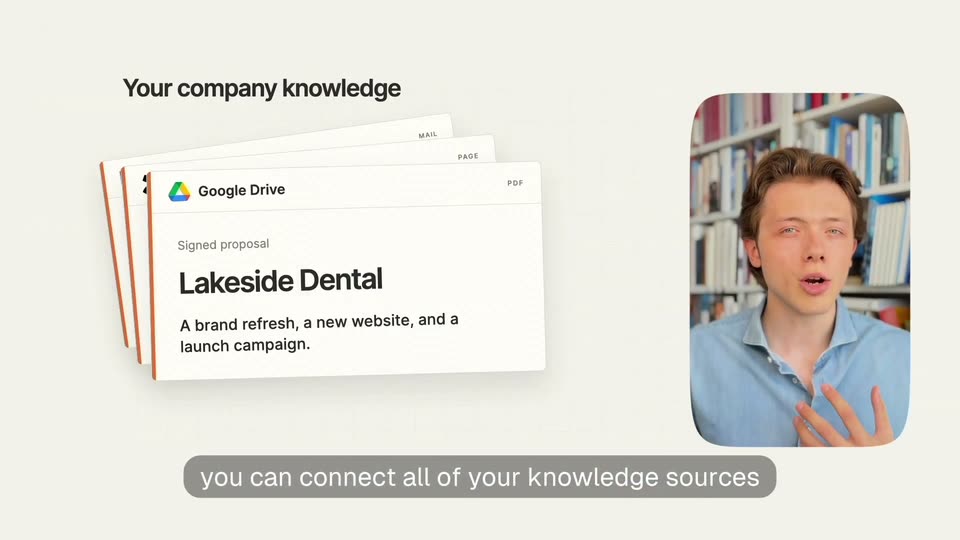
A cross-dissolve resolves the previous chat and document panels into a clean cream grid layout. A fanned stack of document cards (Google Drive proposal, mail, page, pdf) settles on the left under the headline, while a rounded video window of a man in a blue shirt gesturing in front of bookshelves sits on the right. A gray caption bar holds the line at the bottom.
On-screen text: “Your company knowledge”, “you can connect all of your knowledge sources”
Camera: Pull out
Left, a stacked deck of source cards swaps from a Google Drive doc to a Gmail one; right, a presenter in a blue shirt talks in a rounded video. A gray caption pill at the bottom changes from a tagline to 'Google Drive Confluence'.
On-screen text: “Your company knowledge”, “you can connect all of your knowledge sources”, “Google Drive Confluence”
Techniques: Split screen
Camera: Static
On a light grid backdrop, a 3D stack of white cards labeled Gmail, Confluence and Google Drive rotates so the Gmail note swings to the front. A gray headline sits above and a gray caption bar stays fixed at the bottom.
On-screen text: “Your company knowledge”, “Gmail and more and it creates a company brain for you”
Techniques: 3D mockup
Camera: Static
A cream grid background holds a line-art brain with orange neural lines that fade in, while small source chips for Drive, Confluence and Gmail pop in around it and the title darkens above. A gray caption bar at the bottom swaps its text mid-scene.
On-screen text: “Company Brain”, “Gmail and more and it creates a company brain for you”, “Lakeside Dental”, “40% / 60% split”, “September 15”, “it's like hiring a super smart employee”
Camera: Static
A white brain with orange circuit lines sits left of a “Lakeside Dental” panel. Lines extend from the brain as Scope, Payment, and Kickoff rows fade in. A gray pill caption below reads “it's like hiring a super smart employee,” then “that knows everything from day one.”
On-screen text: “it's like hiring a super smart employee”, “that knows everything from day one”
Camera: Static
A young man in a light blue shirt speaks to the camera in front of a blurred bookshelf wall. A caption runs along the bottom while large white serif words, “Runs on its own,” fade in on either side of his head.
On-screen text: “Alfera also runs on its own without you prompting it”, “Runs on its own”
Techniques: Kinetic type
Camera: Static
A tilted 3D view of the Alfera Slack interface shows the daily channel with a morning report of payments and new customers. A gray caption bar at the bottom reads 'Alfera also runs on its own without you prompting it', then swaps to 'for example every morning'.
On-screen text: “Alfera also runs on its own without you prompting it”, “for example every morning”
Techniques: 3D mockup
Camera: Static
A chat application interface fills the frame, its left sidebar listing channels and its main panel showing a morning report message with bulleted payments and customer data. A mouse cursor rests in the message area. A gray caption pill at the bottom carries the line.
On-screen text: “I get a report where I see everything”
Camera: Static
A man in a light blue shirt stands before a blurred bookshelf, speaking to the camera and gesturing with his right hand. White subtitles on a dark rounded bar appear at the bottom of the frame.
On-screen text: “I get a report where I see everything”, “that happened in the days before”
Camera: Static
A locked-off view of the Alfera browser interface displays a morning report message, its payments summary outlined in a blue box. A gray rounded caption bar sits at the bottom with white text asking about payments and new customers, a cursor arrow resting at its right edge.
On-screen text: “how many payments we had how many new customers”
Camera: Static
A Slack-style report screen scrolls down through a morning report, while a small video of a man in a blue shirt speaks in a rounded inset on the right. Captions track his words along the bottom, and a cursor opens a reply menu at the end.
On-screen text: “how many payments we had how many new customers”, “how many visitors on our website”, “and what we should be focusing on”, “and the people that I should be following up with”, “then I can just reply in the thread in Slack and say”
Techniques: Cursor demo
Camera: Pull out
A browser window of a Slack-style app zooms in on a message thread. A cursor selects Reply in thread, then a question is typed letter by letter and posted as a reply in the input box.
On-screen text: “then I can just reply in the thread in Slack and say”, “can you make this into a spreadsheet”
Techniques: Cursor demo, UI zoom
Camera: Push in
A close-up of an agent chat thread shows a Done message with a spreadsheet link, then the frame pulls back to reveal the open Google Sheet and a revenue dashboard on the desktop. A white caption reads and minutes later it's ready with a link.
On-screen text: “and minutes later it's ready with a link”
Techniques: UI zoom
Camera: Pull out
A 3D-tilted browser window floats over a mountain desktop, showing a Google spreadsheet titled Morning Report with a cursor at its base. The shot cuts to a curly-haired man in a light blue shirt speaking before a packed bookshelf.
On-screen text: “and minutes later it's ready with a link”
Techniques: 3D mockup
Camera: Static
A young man in a light blue shirt stands centered before a full white bookshelf and speaks to camera. A white caption in a dark rounded pill sits at the bottom of the frame. The shot is a locked-off medium close-up.
On-screen text: “Alfera works everywhere web Slack”
Camera: Static
A white background holds the headline Alfera. Everywhere. at the top. A row of platform icons, globe, Slack, Gmail and a code symbol, pops in one by one from left to right, each with a small label. A gray caption pill at the bottom swaps its text to match.
On-screen text: “Alfera. Everywhere.”, “Alfera works everywhere web Slack”, “email API”, “WhatsApp and more”
Camera: Static
White card with black headline 'Alfera. Everywhere.' above a row of app icons for Web, Slack, Email, API and WhatsApp. A gray pill at the bottom changes from 'WhatsApp and more' to 'you can even give it access to your own inbox' as small gray 'And more.' appears.
On-screen text: “Alfera. Everywhere.”, “Web”, “Slack”, “Email”, “API”, “WhatsApp”, “WhatsApp and more”, “And more.”, “you can even give it access to your own inbox”
Camera: Static
A young man in a light blue shirt stands before a white bookshelf, speaking to the camera and gesturing with his hands. A subtitle pill sits centered at the bottom of the frame.
On-screen text: “you can even give it access to your own inbox”
Camera: Static
A young man in a light blue shirt speaks to the camera in front of a soft-focus bookshelf, gesturing with one hand. A white subtitle line sits on a dark rounded bar across the lower frame. The camera stays locked off throughout the shot.
On-screen text: “you can even give it access to your own inbox”
Camera: Static
The email settings panel cuts to a full inbox list filled with customer update rows. A gray pill caption sits at the bottom of the frame.
On-screen text: “or give it a whole inbox of its own”
Camera: Pan
A Gmail inbox list sits behind a New Message compose window that fades in, the To field and body fill in, then a cursor clicks Send and a Message sent toast appears. A gray caption bar at the bottom swaps its text.
On-screen text: “to which you can forward”, “CC it and give it whole jobs from just one message”
Techniques: Cursor demo
Camera: Pan
The Northwind inbox screen, with one 'Friday customer update' row, holds for a beat, then cuts to a man in a blue shirt centered before a tall bookshelf. He speaks to camera while a gray lower-third pill carries the line in white text.
On-screen text: “CC it and give it whole jobs from just one message”
Camera: Pan
A young man in a light blue shirt faces the camera in front of a tall white bookshelf, speaking and gesturing with one hand at his chest. A dark caption pill with white text holds at the bottom of the frame.
On-screen text: “something I run every day is”
Camera: Static
A young man in a light blue shirt stands centered before a wall of white bookshelves, talking to the camera and raising one hand to gesture. The shot is a locked-off medium close-up with the books softly blurred. A caption pill sits at the bottom of the frame.
On-screen text: “something I run every day is”, “I go out there and I ask it”
Camera: Static
The Northwind app UI shows a chat panel left and a HubSpot Top 20 accounts table right. Row checkboxes tick on one by one as the activity status cycles to Working, while a gray caption pill carries the voiceover. At the end the right pane flips to a browser view of the CargoWise Italia site.
On-screen text: “I go out there and I ask it”, “look at my top 20 accounts and find 100 leads”, “like that, Alfera will scour the internet”
Camera: Static
A Northwind app window on a pale background. A video call tile overlaps the chat panel; the right browser shows the CargoWise Italia page. A gray pill rolls subtitles below, then the profile card swaps to a teal decision-maker card as the video tile blurs, revealing the sidebar.
On-screen text: “like that. Alfera will scour the internet”, “find relevant websites in my industry”
Camera: Static
A workspace screen: the left chat pane cycles its agent status from Editing to Listing files, then a What happened Sheet card slides in. The right pane cuts from a HubSpot contacts table to an import report showing 100 created contacts. Subtitles roll along the bottom.
On-screen text: “and after that it will also automatically”, “log each and every single one of them into HubSpot”, “and give me a summary of everything that happened”
Camera: Static
A young man in a light blue shirt speaks directly to camera in front of a full white bookshelf. He gestures slightly while talking, and a static lower-third caption remains at the bottom of the frame.
On-screen text: “with alfera you can just connect Google and meta ads”
Camera: Static
A light product interface shows an Integrations page with Google Ads and Meta Ads rows, while a rounded picture-in-picture video of a man in a blue shirt speaks in front of a bookshelf. A dark caption bar with white text runs across the bottom of the frame.
On-screen text: “with alfera you can just connect Google and meta ads”
Camera: Static
A flat white chat screen shows Google Ads and Meta Ads connected badges above an empty input field. The query Which ad groups types in letter by letter while a gray caption sits at the bottom.
On-screen text: “and you can manage your entire ad strategy”
Camera: Static
A light chat interface types a question about ad groups, then the layout expands into two columns: an activity log on the left and an ads manager table on the right. A gray caption bar at the bottom holds the line throughout.
On-screen text: “and you can manage your entire ad strategy”
Camera: Static
A locked-off two-panel product view. The left card shows an AI activity feed with input and output blocks for Google and Meta Ads, the right card shows an Ads Manager table of ad sets with toggles and costs. A rounded gray caption bar at the bottom carries the voiceover line.
On-screen text: “and you can manage your entire ad strategy”
Techniques: Split screen
Camera: Static
A young man in a light blue shirt stands centered before a white bookshelf, speaking to camera and gesturing with his hands. White subtitles in a dark bar appear at the bottom as he talks. The frame stays locked off.
On-screen text: “and you can manage your entire ad strategy”, “from a couple of prompts you can run ad reports”
Camera: Static
A flat ad-report card titled Cost per lead by ad group builds row by row, each cost bar extending to its value, while a gray caption pill at the bottom reads from a couple of prompts you can run ad reports.
On-screen text: “from a couple of prompts you can run ad reports”
Camera: Static
A flat data table titled Cost per lead by ad group fills in row by row as the cost-per-lead bars extend to length, then a green-outlined lowest cost per lead summary card slides in at the top. A gray caption bar at the bottom swaps text.
On-screen text: “from a couple of prompts you can run ad reports”, “and understand which ad groups are performing better”
Camera: Static
A white report panel displays an ad-group performance list, with a green box highlighting the lowest cost per lead and three rows of horizontal bars below. A gray caption bar at the bottom carries the phrase, held static for the duration.
On-screen text: “and understand which ad groups are performing better”
Camera: Static
A pale report card shows a keyword table under the heading “Keywords to bet on”. A green-outlined summary row at the top clears, leaving three keyword rows with impressions and costs. A gray caption pill at the bottom swaps its text mid-scene.
On-screen text: “and understand which ad groups are performing better”, “and which keywords you should be betting up”
Camera: Static
A young man in a light blue shirt speaks to camera in a medium close-up, standing before a wall of packed bookshelves and gesturing with both hands. A subtitle line runs along the bottom of the frame while he talks. The shot is static and evenly lit.
On-screen text: “the alfera you get the power of a real agent”
Camera: Static
A young man in a light blue shirt stands before a packed bookshelf, speaking to camera and gesturing with both hands. Lower-third captions in a dark pill read his words, switching lines mid-shot. The camera stays locked on a medium framing.
On-screen text: “the alfera you get the power of a real agent”, “but with the control of a human”
Camera: Static
A full-screen Gmail integrations settings panel, listing connection details and per-tool permission toggles, dissolves out to reveal a presenter in a light blue shirt speaking before a wall of bookshelves. A gray caption pill stays at the bottom throughout.
On-screen text: “you can decide what alfiera can do in each application”
Camera: Static
A young man in a light blue button-up shirt speaks to camera in front of a tall, full bookshelf, raising one hand to gesture. A white subtitle on a translucent dark pill bar sits at the bottom of the frame throughout the locked-off shot.
On-screen text: “you can decide what alfera can do in each application”
Camera: Static
A light integrations settings page shows a Gmail connection with two panels; the left panel exits and the Tool management list expands full width as a highlight box steps down the Read, Modify and Delete rows, while a gray caption strip runs along the bottom.
On-screen text: “you can decide what alfera can do in each application”, “where you can read modify and delete”
Camera: Static
A young man in a light blue shirt stands centered before a white bookshelf, speaking to camera and gesturing with both hands. A dark caption bar holds a line of white text along the bottom edge.
On-screen text: “with alfera you're not locked into any model”
Camera: Static
A white card holds the heading 150+ models above two rows of AI brand logos (OpenAI, Anthropic, GLM, deepseek) that fade in one by one. A gray caption bar at the bottom cycles through lines, then the frame splits as a presenter in a blue shirt appears on the right in front of a bookshelf.
On-screen text: “150+ models”, “with alfera you're not locked into any model”, “you can decide to use any model in the market”, “from closed to open source models”
Techniques: Masking, Split screen
Camera: Static
A presenter in a blue shirt stands before a bookshelf while a white panel on the left swaps from a 150+ models grid of AI logos to an OpenAI mark with Bring your own ChatGPT subscription. Bottom captions track the voiceover.
On-screen text: “150+ models”, “from closed to open source models”, “and even bring your own API key”, “Bring your own”, “ChatGPT subscription”, “all with one subscription”
Techniques: Split screen
Camera: Static
A young man in a light blue shirt talks to camera in front of a wall of bookshelves. A dark rounded caption at the bottom center reads “start now”, then swaps to “and put your business on autopilot at alfera.ai”.
On-screen text: “start now”, “and put your business on autopilot at alfera.ai”
Camera: Static
A plain off-white card holds the bold headline “put your business” in black over “on autopilot” in orange, with a gray caption pill at the bottom. The headline cuts to the angular black-and-gray brand mark centered on the same background.
On-screen text: “put your business”, “on autopilot”, “and put your business on autopilot at alfera.ai”
Camera: Static
On a pale background, the black Alfera logo settles into full contrast as the gray bottom caption fades out. Below it, the small Visit line sharpens, with alfera.ai in an orange rounded pill.
On-screen text: “and put your business on autopilot at alfera.ai”, “Visit alfera.ai”
Camera: Static
The black Alfera wordmark sits centered on a light gray field, with the word Visit and an orange pill reading alfera.ai beneath it. Thin white and gray horizontal bars drift slowly leftward behind the logo, holding a locked-off sign-off frame.
On-screen text: “Visit alfera.ai”
Camera: Static