
2:30
Explore
00:00:00 / 00:56:17
- Length
- 0:56
- Scenes
- 21 · 2.7 s avg
- Product on screen
- 0:00
- Call to action
- 0:39 · 69%
- Voiceover
- Yes
- Views
- 247 on YouTube
as of November 23, 2026
PgDog’s 0:56 launch film runs 21 scenes, about 2.7 s each. The product is on screen from the first frame, with social proof. The call to action lands at 0:39 (69% in), over a voiceover. The video alternates locked-off talking-head shots with fast screen recordings, cutting on a steady 135 BPM pulse at about 4 cuts per minute. Its signature moves are the blur-and-vignette hand-offs between live action and UI, and the cursor-led scroll-throughs of the GitHub repo and docs that keep static screens in motion.
Footage neededEstimated needs: 3 capture groups — your screens or recordings · 1 official logo — reused across the film · 4 filmed passages — shoot, supply or replace
Is this your launch? to your site or press kit.
More like this


0:48

Wispr Flow - We launched Notetaker today, and there's a few key features we're exc
Wispr Flow · Aug 2026
1:16

Pax Historia Introduction
Pax Historia · Consumer · Feb 2026
Similar soundtrack
Films whose music sounds like this one, voice left out
2:31

Autumn: Stripe for AI Startups
Autumn · Speech
3:05

Lune AI Demo
Endstack
4:04

Building a Github Clone with Corsair
Corsair · Technical tutorial / Product demonstration
PgDog Launch, scene by scene
· 21 scenes as text
01 · Product intro · 0:00–0:04
A bearded man in a teal t-shirt sits centered against a plain off-white wall, speaking directly to the camera. A potted plant in a patterned white pot sits at the left edge. The shot is a static medium close-up with soft, even lighting.
Camera: Static
02 · Demo · 0:04–0:08
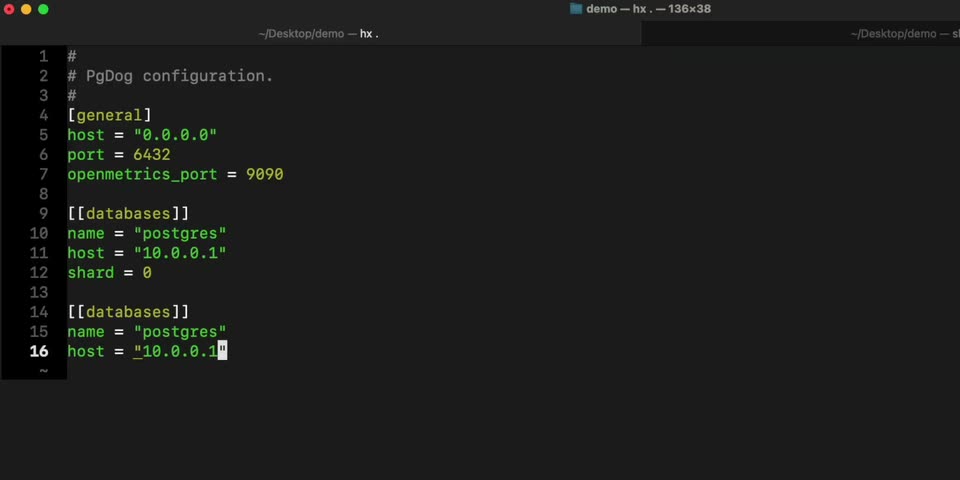
A dark terminal code editor displays a configuration file being typed. The window opens as a floating panel with a drop shadow, then zooms to fill the frame as the host and shard lines complete.
Techniques: UI zoom
Camera: Static
03 · Demo · 0:08–0:10
A dark terminal fills the frame. A typed command sits at the top, then compile messages and timestamped log lines appear line by line and drift left as the service starts.
Techniques: Kinetic type
Camera: Static
04 · Demo · 0:10–0:12
A terminal window is centered on a black background. Monospace log lines in gray, blue, green and orange scroll downward as the pgdog service streams DEBUG and INFO entries, SQL statements and connection messages.
Camera: Static
05 · Demo · 0:12–0:16
A bearded man in a gray t-shirt sits centered against a white wall, a leafy plant blurred at the left edge. He faces the camera and talks, then folds his arms across his chest as a small caption slides in.
On-screen text: “6”, “Teeus”
Camera: Static
06 · Social proof · 0:16–0:16
A bearded man in a gray t-shirt stands with arms crossed against a white wall, a potted plant at left. The frame softens and blurs as a settings list interface fades in over him, ending on the blurred UI.
Camera: Static
07 · Social proof · 0:16–0:19
A browser window on a dark background shows a GitHub repository page. The view shifts from the README document to the repository overview with the file list and a right-hand sidebar, then a hand cursor moves down to hover over the examples folder.
Techniques: Cursor demo
Camera: Pan
08 · Social proof · 0:19–0:20
A dark GitHub page lists files in a subfolder, then the view switches to the main repository, showing a 1.5k star badge and a README banner with the pgdog logo and the words PostgreSQL sharding.
Camera: Static
09 · Social proof · 0:20–0:21
A dark GitHub page for the Pgdog repo opens on the project overview with its logo and right sidebar, then the view zooms into the source folder as a cursor clicks through subfolders, listing Rust files and commit messages.
Techniques: UI zoom, Cursor demo
Camera: Static
10 · Social proof · 0:21–0:23
A dark GitHub repository view fills the screen. The left file tree expands as the cursor clicks through folders, drilling from src to frontend to client, and the right-hand file list updates to match each selection.
Techniques: Cursor demo
Camera: Static
11 · Demo · 0:23–0:28
A browser window displays the PgDog documentation site. A cursor moves down the left sidebar, loading each page in turn: features, load balancer, health checks, transaction mode, sharding. Each page pairs body text with a small diagram of labeled nodes and arrows.
Techniques: Cursor demo
Camera: Static
12 · Demo · 0:28–0:29
A dark browser window displays the PgDog documentation site. The page content shifts from the Query routing section to the Shard number and Shard routing comments sections, and the left sidebar highlight moves down to Manual routing.
Camera: Static
13 · Demo · 0:29–0:32
A dark browser window displays the PgDog docs page on cross-shard queries. The page scrolls down past a diagram of a PgDog diamond routing to three shard cylinders, then past shard number and routing keys sections with code blocks.
Camera: Static
14 · Demo · 0:32–0:32
A browser window shows the PgDog documentation page on a dark theme. A left sidebar lists navigation links with a cursor hovering and drifting down the menu, while the main panel holds the COPY heading, body text, and a small flow diagram of data shards.
Techniques: Cursor demo
Camera: Static
15 · Demo · 0:32–0:33
A browser window displays a dark documentation page featuring a sidebar and a data flow diagram. A cursor moves down the left sidebar, expanding the Plugins and Authentication menu items to reveal their sub-pages.
Techniques: Cursor demo
Camera: Static
16 · Demo · 0:33–0:34
Dark-mode browser window shows the PgDog Authentication documentation page with a left sidebar, body text and a TOML code block. A cursor drifts down the menu and hovers a link, opening a URL tooltip at the bottom edge.
Techniques: Cursor demo
Camera: Static
17 · Demo · 0:34–0:37
A dark browser window shows the PgDog documentation site. A cursor clicks down the left sidebar, switching from the Metrics page to Multi-tenancy, then to Prepared statements, each click loading a new page of text and a small flow diagram.
Techniques: Cursor demo
Camera: Static
18 · Demo · 0:37–0:38
A dark PgDog documentation page fills a browser window, showing the Prepared statements article and a flow diagram. A cursor slides down the left sidebar, moving from the Prepared statements link to Session mode.
Techniques: Cursor demo
Camera: Static
19 · Demo · 0:38–0:39
A dark-themed browser window displaying the PgDog documentation page sits centered on a black background. The sharp frame then loses focus, blurring out as the corners darken into a vignette.
Camera: Static
20 · CTA · 0:39–0:52
A bearded man in a gray t-shirt addresses the camera in a locked-off medium close-up, centered against a white wall with a leafy plant on the left. He speaks with small head movements, and the shot fades to white at the end.
Camera: Static
21 · Outro · 0:52–0:56
A locked-off end card on black. A blue paw-print mark sits left of the white PgDog wordmark, with the tagline and a contact line centered below. The frame holds still for the full duration.
On-screen text: “Automatic sharding for Postgres”, “Reach out to [email protected]”
Camera: Static