2:26

Novaflow Launch Video
Novaflow · Healthcare · Aug 2025
Notion · Feb 2023 · 4:38 · Full motion · AI-annotated
Notion’s 4:38 launch film runs 31 scenes, about 9.0 s each. The product is on screen from the first frame and 4 features are revealed. There is no explicit call to action; a voiceover carries the film. The video is a single continuous screen-recording tour: a static title card names Notion AI, then the cursor walks through four AI features in sequence inside the Notion interface, ending on a crossfade montage and the animated logo. Pacing is slow and steady with few cuts, and the signature moves are the cursor-driven selections and the AI text streaming in line by line over a cream and light-gray palette.
Is this your launch? to your site or press kit.
Novaflow · Healthcare · Aug 2025
Anthropic · AI · Jul 2025
Films whose music sounds like this one, voice left out
Reception · Modern electronic
Ekho Lab · Modern electronic
Avec · Narrative sound design with ambient music and voiceover
A static split layout on a cream background: the bold black headline 'Notion AI' holds on the left, and a white dropdown panel on the right lists AI writing prompts under 'Draft with AI', with the 'Outline...' row shaded gray. An 'Ask AI what to write...' field sits above the panel. The frame stays still for the full duration.
On-screen text: “Notion AI”
Camera: Static
A cream screen pairs the bold Notion AI title on the left with an open AI command menu on the right, Outline highlighted. It then cuts to a full Notion window showing a People Home page with sidebar and illustration.
On-screen text: “Notion AI”
Camera: Static
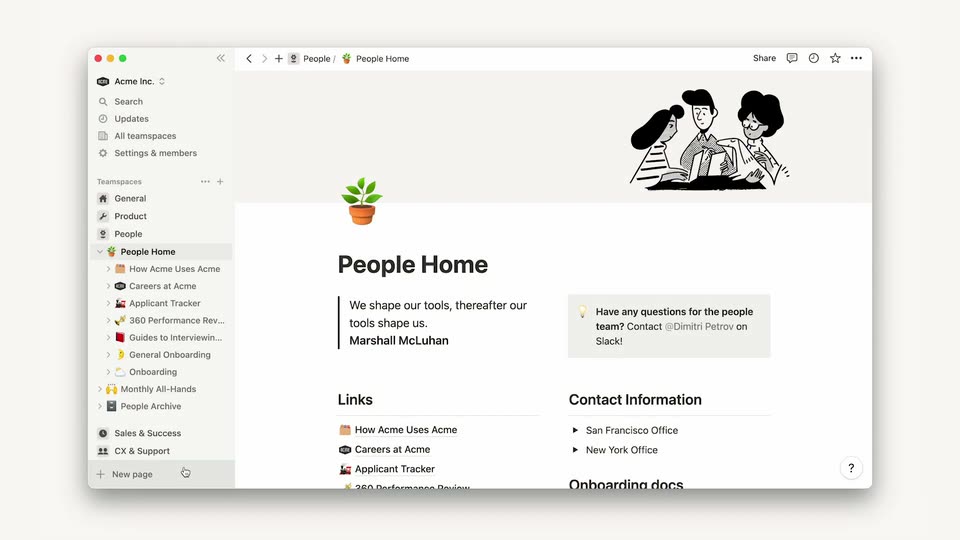
A Notion-style workspace window sits on a light gray field. The left sidebar lists teamspaces while the main pane shows a People Home page with a plant icon, headings, link lists and a line drawing of three people. A cursor hovers near the sidebar's bottom edge.
Camera: Static
A Notion page appears as a floating card on a gray backdrop. A cursor selects the AI writing option, a prompt field opens, and the cursor types a brainstorm request. The interface then fills with a bulleted list while the cursor adds a title.
Techniques: Cursor demo
Camera: Push in
A Notion page opens with an AI prompt bar and a 'Draft with AI' menu. The cursor selects 'Press release', the prompt is typed as 'generate schedule for acme hackathon', and on enter the title updates while a three-day schedule writes itself as the view zooms in.
Techniques: Cursor demo, UI zoom
Camera: Static
A workspace schedule page lists Day 3 tasks in light blue rows. A results menu closes, then a cursor types 'show in table format' into an AI prompt box, and the box switches to an 'AI is writing' state.
Techniques: Cursor demo
Camera: Static
A Notion document builds itself as an AI writes a three-day hackathon schedule, tables and headings appearing line by line. A small menu pops up, the cursor hovers Done, then the view scrolls to show the completed page.
Techniques: Cursor demo
Camera: Static
A Notion-style page titled Careers at Acme scrolls down through sections of job openings. The cursor moves to the SEO Specialist link, the row highlights, and the click opens that role's detail page.
Techniques: Cursor demo
Camera: Pan
A Notion page titled 'SEO Specialist' opens with an Ask AI menu of writing options. The document text is highlighted, a prompt bar appears, the user types 'reformat into job description', and AI streams a new job description card into the page.
Techniques: Cursor demo
Camera: Pan
A Notion-style page shows a job posting with a paragraph highlighted blue and an Ask AI toolbar. The highlight clears, the page scrolls to show a small mountain image above the title, then the cursor moves down the left sidebar.
Techniques: Cursor demo
Camera: Pan
A Notion-style page with French text about Claude Monet. The cursor selects the text, opens the Ask AI toolbar, and types 'translate', choosing English from the dropdown. The view scrolls and the translated English paragraphs appear in an AI response box.
Techniques: Cursor demo
Camera: Pan
A Notion page shows a French paragraph highlighted in blue above its English translation, with an AI answer box and an open dropdown menu. A cursor moves from the prompt field to hover the Replace selection option.
Techniques: Cursor demo
Camera: Static
A Notion-style workspace shows a document about Claude Monet with its last paragraph highlighted in blue; the page scrolls up to the title, then the left sidebar swaps to a Teamspaces list as a cursor hovers over Meeting Notes, revealing plus and menu icons.
Techniques: Cursor demo
Camera: Pan
A Notion workspace opens on a Claude Monet document, then switches to the Docs list view. A cursor hovers over Brand Guide and a pencil icon fades in beside it, while category tags line the right edge.
Techniques: Cursor demo
Camera: Static
A Notion doc panel scrolls to the Brand positioning heading, which a cursor selects and rephrases via an Ask AI prompt, swapping in Acme's Positioning in the Market. The left sidebar then expands, showing the workspace tree and tag columns.
Techniques: Cursor demo
Camera: Pan
A Notion page titled Careers at Acme shows a hexagon logo, a line drawing of four people at a table, and a list of open positions. The cursor moves from the sidebar item down to the first job row, which highlights on hover.
Techniques: Cursor demo
Camera: Static
A Notion job posting page. The body paragraphs highlight in blue as a text selection, an Ask AI toolbar and a dropdown of editing actions pop open, and the cursor moves down to hover Fix spelling & grammar.
Techniques: Cursor demo
Camera: Static
A Notion page shows a block of highlighted text above an AI response card. A dropdown menu of editing options sits below, and a cursor moves in to hover over the Replace selection item.
Techniques: Cursor demo
Camera: Static
A Notion page titled Software Engineer, Data Platform (San Francisco, CA) fills the screen. A blue highlight selects the body copy with a floating Ask AI toolbar, then the selection clears and the left sidebar expands into a Teamspaces list while a cursor hovers the items.
Techniques: Cursor demo
Camera: Static
A Notion-like Docs page with a team-tagged list and a stone illustration. A bold job-title headline fades out, the list scrolls up, and a cursor hovers over rows, revealing a pencil edit icon on Vacation policy.
On-screen text: “Software Engineer, Data Platform (San Francisco, CA)”
Techniques: Cursor demo
Camera: Pan
A docs app shows a page list beside a Vacation policy article that scrolls to the Vacation accrual section. A cursor opens an AI prompt menu, hovers over Brainstorm ideas, Make shorter, Continue writing, then closes it as an answer expands in blue. The sidebar expands at the end.
Techniques: Cursor demo
Camera: Static
A Notion workspace screen. A cursor slides down the left sidebar and clicks Meeting Notes, and the main panel switches from a tagged document list to the Meeting Notes page, which opens on a line-art paper-and-pen illustration above a list of meetings with attendee avatars and color tags.
Techniques: Cursor demo
Camera: Static
A Notion-style Meeting Notes page fills the frame with its left sidebar and a list of meeting entries. The view zooms in toward the list, cropping the sidebar, while a cursor rests on the Sales discovery call row.
Techniques: UI zoom
Camera: Pan
A Notion-style split view shows a meeting notes list on the left and the selected page's details on the right. A cursor moves from the highlighted row to the top toolbar, and a black tooltip labeled Open in full page pops up beside the icon.
Techniques: Cursor demo
Camera: Static
A Notion-style sales-call document is shown, zooming into the title as the cursor types slash commands to open AI menus. It clicks Generate to insert an action-item checklist, then a summary block types itself under the heading.
Techniques: UI zoom, Cursor demo
Camera: Pan
A flat Notion-style workspace fills the frame. The left sidebar stays fixed while the main pane crossfades between documents, ghost titles overlapping as the content dissolves from a brainstorm list to a job posting.
Camera: Static
A workspace interface displays a job posting page titled SEO Specialist, then cuts to a long biographical document titled Claude Monet. The left sidebar listing teamspaces stays fixed while the main content panel swaps.
Camera: Static
A Notion-style window stays fixed while the content pane switches from a meeting notes page with a checklist to a Company Home page. The new page shows a 3D illustration of open books and a coffee cup above two section cards.
Camera: Static
A static Notion workspace view: the left sidebar lists teamspaces, the main panel shows a banner of hands holding papers next to a coffee cup, and section cards for must reads, new employee, general, and policies hold still.
Camera: Static
A grey Notion logo scales up from the center of a plain off-white background.
Camera: Static
A tilted 3D cube marked with the letter N morphs into the flat Notion logo mark, then the word Notion appears to its right and holds still on a cream background.
Techniques: Morph
Camera: Static