0:47
Explore
Cognition - Starting today, you can now use your ChatGPT subscription directly in
Cognition · Sep 2026 · 0:27 · AI-annotated
- Length
- 0:27
- Scenes
- 7 · 3.9 s avg
- Product on screen
- 0:00
- Features shown
- 1
- Voiceover
- No
00:00:00 / 00:27:03
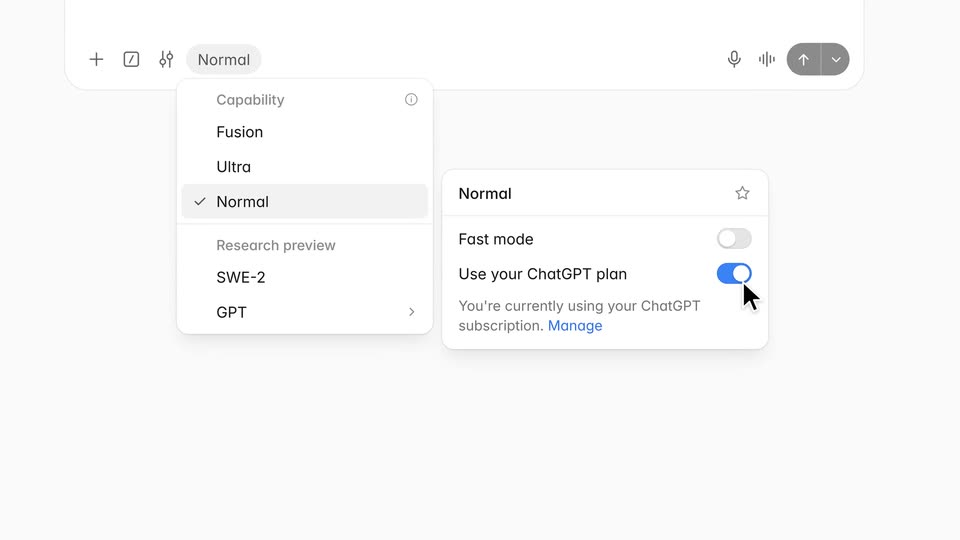
Cognition’s 0:27 launch film runs 7 scenes, about 3.9 s each. The product is on screen from the first frame and 1 feature is revealed. There is no explicit call to action. The video is one unbroken UI walkthrough: slow push-ins on pale screens while a black cursor signs in, flips the ChatGPT plan toggle, types a prompt, and watches Devin's checklist tick off. Pacing is even and unhurried until the final cut to black, where the hexagon mark assembles with a silver sheen as the only dramatic beat.
No filming indicatedEstimated needs: 3 capture groups — your screens or recordings · 1 official logo — reused across the film
Is this your launch? to your site or press kit.
More like this
0:37

Introducing Brand Kit by ElevenCreative
ElevenLabs · AI · Oct 2026
1:00


Shielded Live Demo
Shielded · B2B · Jul 2026
Cognition - Starting today, you can now use your ChatGPT subscription directly in, scene by scene
· 7 scenes as text
01 · Product intro · 0:00–0:03
A pale login screen fades in on a light gray background, listing social sign-in buttons above an email form. The view then zooms in as a cursor glides in to hover over the ChatGPT button.
Techniques: UI zoom, Cursor demo
Camera: Push in
02 · Product intro · 0:03–0:05
A pale login panel shows a hexagon mark, a Welcome back heading and four provider buttons stacked vertically. A black cursor hovers over the top ChatGPT row as the frame slowly pushes in toward the list.
Techniques: Cursor demo, UI zoom
Camera: Static
03 · Feature reveal · 0:05–0:11
A wide Devin input bar zooms into the model selector. A cursor clicks the Ultra chip, a capability menu expands, the cursor picks Normal, and a side panel opens where the cursor flips the Use your ChatGPT plan toggle on.
Techniques: UI zoom, Cursor demo
Camera: Pull out
04 · Feature reveal · 0:11–0:12
A Devin interface fades into view with a text field, an open capability dropdown showing Normal selected, and a settings card on the right with toggles. A cursor hovers over the field as the layout settles.
Camera: Pull out
05 · Demo · 0:12–0:16
A white prompt field on a pale background types out a query letter by letter as a black arrow cursor clicks into it, then slides to the black send button. The Devin wordmark and an Agent/Ask toggle sit above. The panel blurs and fades out at the end.
Techniques: Cursor demo
Camera: Static
06 · Demo · 0:16–0:24
A light chat interface shows a task header and a user prompt bubble. A Thinking label is replaced by a typed assistant reply, then a three-item checklist card appears as its rows check off in sequence. The frame ends with a soft zoom and blur.
Camera: Static
07 · Outro · 0:24–0:27
A lone white hexagon sits at the center of a black field, then resolves into the three-part Devin mark as the wordmark fades in with a silver sheen that settles to flat white.
Techniques: Morph, Light sweep
Camera: Static