0:32

New Spotify Premium Duo Subscription Plan Launches in 55 Markets — Spotify
Spotify · Consumer · Jun 2020
Notion · Feb 2023 · 0:45 · AI-annotated
Notion’s 0:45 launch film runs 15 scenes, about 3.0 s each. The product is on screen from the first frame and 3 features are revealed. There is no explicit call to action; a voiceover carries the film. The video is staged as one deadline: a three-item to-do list where each item is solved by a single AI command, shown as a zoom-in, a streaming output, and a checked box. Pacing is brisk at about 129 bpm with quick zoom-and-reframe cuts; the signature moves are the streaming purple AI text, the hand and arrow cursors, and the fade to a black tagline-and-logo close.
Is this your launch? to your site or press kit.
Spotify · Consumer · Jun 2020
Shopify · Business software · May 2026
On a white field the Notion logo, a black box icon holding a serif N beside the wordmark, holds center with a hand cursor resting on the icon. The purple letters AI then type in to the right of the wordmark as an arrow cursor slides in.
On-screen text: “AI”
Camera: Static
A close-up of a Notion document zooms in from the full window to the title and due-date field, where the label changes from Next Friday to @Today with a flame emoji, then reframes onto the to-do checklist.
Techniques: UI zoom
Camera: Push in
A cream to-do card with a pushpin icon and three unchecked boxes scrolls up on a white page, revealing a Website feedback section with body copy and a paper airplane icon below.
Camera: Pan
A document page with a bold heading and body copy scrolls up while a stack of large command phrases fades in over the text and dissolves out. A preview card with a paper plane line drawing sits on the right.
On-screen text: “Find action items”, “Summarize feedback”, “Rewrite conclusion”
Techniques: Kinetic type
Camera: Push in
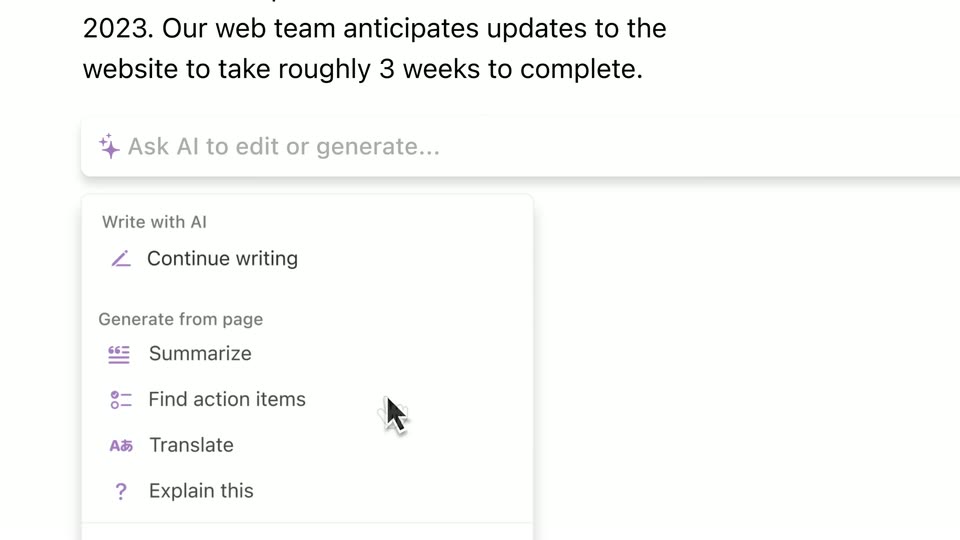
A document editor shows a paragraph and an AI input bar. The bar expands and a command menu drops down with options like Continue writing, Summarize, Find action items, Translate, Explain this. A hand cursor hovers over Find action items, then an arrow cursor drifts right across the empty space.
Techniques: Cursor demo
Camera: Static
A white document view shows an AI writing bar beneath body copy while a four-item checklist fills in line by line. The frame then reframes down to a context menu, where a hand cursor hovers over the Done option.
Techniques: Cursor demo, UI zoom
Camera: Push in
A plain light card holds a bold Customer feedback heading, a Call Transcript subheading, and a block of transcript lines. The text sharpens out of vertical streaks, then the block scrolls up a few lines.
On-screen text: “Customer feedback”, “Call Transcript”
Techniques: Masking
Camera: Pan
A flat white interface shows a prompt bar typing 'Summarize and make a table', then flipping to an 'AI is writing' status with action buttons. A summary paragraph streams in above it, a three-column table builds below, and the frame scrolls down to a yellow-highlighted Conclusion line.
Techniques: Kinetic type
Camera: Pan
A white document page shows a yellow-highlighted Conclusion heading with the cursor hovering beside it. The page scrolls down and a comment bubble from Maya Jones reading Could we sound stronger appears on the right.
Techniques: Cursor demo
Camera: Pan
A document editor shows a paragraph beside a comment card reading “Could be stronger.” The view zooms onto the text, which is highlighted, then a cursor opens the Ask AI menu and picks Change tone, Confident, raising an “AI is writing” banner.
Techniques: UI zoom, Cursor demo
Camera: Push in
A white panel at the top of a gray screen types out a business paragraph word by word, with a purple status line and shortcut labels below. As the text completes, the status row swaps to a prompt field and a dropdown menu of actions opens beneath the hovering cursor.
Techniques: Cursor demo
Camera: Static
A zoomed-in AI panel shows a finished paragraph and a suggestion menu with an arrow cursor; the view then reframes to a document where a hand cursor checks the final to-do item, all items struck through, before the screen fades to black.
Techniques: UI zoom, Cursor demo
Camera: Pan
A black frame holds a centered white line that builds left to right, first reading “Your wiki, docs,” then completing to “Your wiki, docs, & projects.” The text locks in place and holds still once the full phrase is shown.
On-screen text: “Your wiki, docs, & projects”
Techniques: Kinetic type
Camera: Static
A black screen shows the text 'Your wiki, docs, & projects' in white and purple. It cuts to 'Now with Al' with a small purple four-pointed star above the letter 'l'. The text remains static in both shots.
On-screen text: “Your wiki, docs, & projects”, “Now with Al”
Camera: Static
The Notion logo, a white rounded square holding an N beside the wordmark, sits centered on a plain black background. It holds completely still for the entire shot, with no motion or reveal.
Camera: Static