
0:27
Explore
Anthropic - Turn written content into professional designs with Claude + @canva
Claude · Jul 2025 · 0:51 · AI-annotated
- Length
- 0:51
- Scenes
- 10 · 5.1 s avg
- Product on screen
- 0:00
- Features shown
- 1
- Voiceover
- No
00:00:00 / 00:51:10
Claude’s 0:51 launch film runs 10 scenes, about 5.1 s each. The product is on screen from the first frame and 1 feature is revealed. There is no explicit call to action. A single continuous UI walkthrough on a flat terracotta field: a two-second icon convergence opens, a hand cursor drives a flat browser mockup through the Canva connector flow, and a logo lockup closes. Signature moves are the zoom in and out on menus and the input box, the split-screen doc-versus-design comparison, and slow scroll reveals, all cut at a relaxed pace near 81 bpm.
No filming indicatedEstimated needs: 2 capture groups — your screens or recordings · 1 official logo — reused across the film · 1 graphic passage — draw or supply
Is this your launch? to your site or press kit.
More like this

Anthropic - Turn written content into professional designs with Claude + @canva, scene by scene
· 10 scenes as text
01 · Product intro · 0:00–0:02
On a terracotta field, a row of overlapping white app icons collapses into one dark-circle tile, then a white square with a dark checkmark pops in at the center, flanked by the dark circle and a red sparkle icon.
Techniques: Morph
Camera: Static
02 · Feature reveal · 0:02–0:06
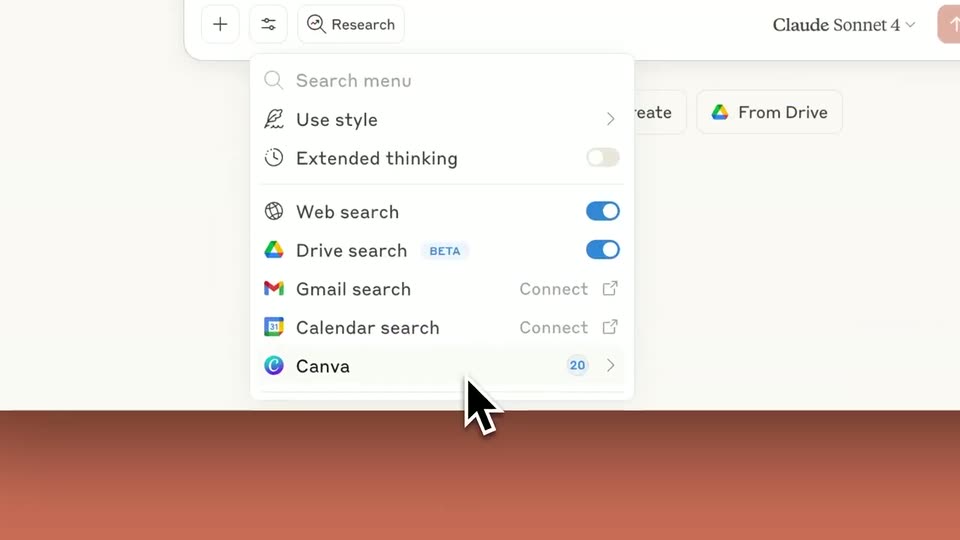
A browser window mockup of a chat app sits on a brick background. A cursor moves to the sliders button and a search-connectors dropdown opens below it. The view zooms into the menu, then pulls back as the menu closes.
Techniques: Cursor demo, UI zoom
Camera: Push in
03 · Feature reveal · 0:06–0:32
A flat browser mockup of a Claude chat on a terracotta gradient. A cursor clicks plus, opens a Drive menu, attaches a DOC file. The view zooms into the input as a prompt types, then pulls back to a scrolling thread streaming a reply and code blocks.
Techniques: Cursor demo, UI zoom
Camera: Pull out
04 · Feature reveal · 0:32–0:33
On a coral backdrop, a white chat panel on the left lists three infographic options while a browser window on the right shows a Cozy Reading Nook design. The chat panel scales up from a small card to full size as the browser window fades in from a translucent state.
Techniques: UI zoom
Camera: Static
05 · Feature reveal · 0:33–0:36
A split view holds a Claude chat window on the left and a Canva browser window on the right over a terracotta background. A cursor scrolls the right window down an autumn-toned infographic titled Cozy Reading Nook while the left chat text remains static.
Techniques: Split screen, Cursor demo
Camera: Static
06 · Feature reveal · 0:36–0:38
Two flat browser windows sit side by side on a solid coral background, a Google Doc on the left and a Canva infographic on the right. Both scroll slowly, revealing the document's heading and the infographic's orange and yellow text blocks.
Techniques: Split screen
Camera: Static
07 · Feature reveal · 0:38–0:42
Two browser windows sit side by side on a terracotta background. The Google Doc on the left auto-scrolls up through a five-step guide, while the Canva canvas on the right zooms in on the Cozy Reading Nook infographic title as its color shifts from black to rust.
Techniques: Split screen, UI zoom
Camera: Static
08 · Demo · 0:42–0:43
Two browser windows, a Google Doc and a Canva infographic, sit side by side on a coral background. They dim as a Connectors dialog fades in at the center, listing integrations like Canva and Google Calendar, while a hand cursor rests at the right edge.
Techniques: Split screen, Cursor demo
Camera: Static
09 · Demo · 0:43–0:47
A cream Connectors panel on a terracotta field scrolls down, its two-column grid of app tiles (Asana, Canva, Notion, Zapier) sliding up past plus and check icons. A white cursor sits at the right edge.
Techniques: Cursor demo
Camera: Pan
10 · Outro · 0:47–0:51
A white twelve-point starburst mark assembles at the center of a flat terracotta field, then slides left as the wordmark Claude fades in beside it in black serif. The lockup holds still through the end of the clip.
On-screen text: “Claude”
Camera: Static