1:12
supermemory - Introducing the supermemory company brain A super employee with all
Supermemory · Jul 2026
Microsoft · Nov 2021 · 1:00 · Full motion · AI-annotated
Microsoft’s 1:00 launch film runs 36 scenes, about 1.7 s each. The product is on screen from the first frame. There is no explicit call to action; a voiceover carries the film. The film runs logo, tunnel, product tour, brand close: it opens on the Loop mark, plunges the camera into a pastel 3D world of floating workspaces and desks, then steps back to the Microsoft 365 app icons and the Microsoft lockup. Hold the pace near 20 cuts per minute on a 140 BPM pulse, and reuse the signature moves: plunging and orbiting camera paths, parallaxing glossy blobs, white squiggle lines and confetti bursts.
Is this your launch? to your site or press kit.
Supermemory · Jul 2026
Airtable · Productivity · Nov 2021
Films whose music sounds like this one, voice left out
Ploy · Modern electronic, lo-fi hip-hop, and future bass
Essential · Electronic
ChatGPT Atlas · Electronic
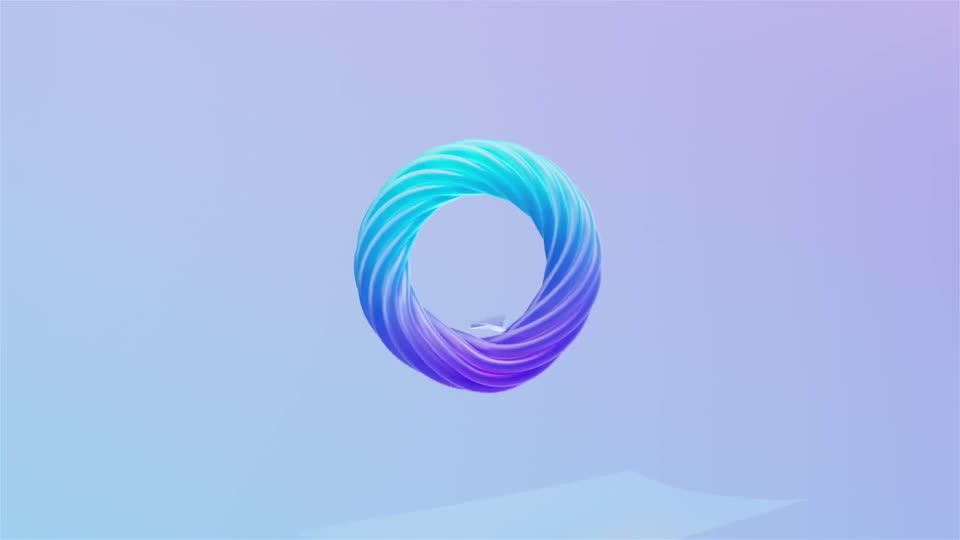
A 3D gradient loop logo, framed by wireframe construction lines, sharpens from a distorted blur into a solid purple-to-blue form. The wordmark below fades into focus on a locked-off light gray background.
On-screen text: “Microsoft Loop”
Techniques: 3D mockup
Camera: Static
A glossy twisted blue-and-purple 3D ring hovers over a stack of angled translucent sheets with a pink base, on a soft blue-to-lilac gradient. The ring rotates slowly while the sheets shift beneath it, and a small white cursor arrow sits to its left.
On-screen text: “Microsoft Loop”
Camera: Static
A twisted ring, gradient from cyan to purple, hovers over a faint ground plane on a soft blue backdrop. The camera then plunges through its open center into a ribbed blue tunnel, where loose white and yellow fragments float.
Camera: Push in
The camera pushes forward through a blue, ribbed 3D tunnel toward a bright circular opening. A glass tag, a yellow fist-like blob and an orange flame-like blob drift past at different depths, rotating as they pass.
Techniques: Parallax
Camera: Push in
The camera flies forward through a ribbed blue tunnel as a kissing-face emoji, a gradient card, a white shard and an orange flame float past in the center. The walls ripple and blur at the edges while the bright opening widens ahead.
Techniques: Parallax
Camera: Push in
A grid of six cards with 3D abstract artwork and text labels flies into a neat arrangement on a light blue background. The cards transition from a blurred, scattered state to a sharp, aligned layout.
Techniques: 3D mockup
Camera: Push in
A white notification card tilts in 3D perspective on a blue-to-pink gradient, its image filled with glossy blue, purple and pink blobs and spheres that drift and rotate around it. The camera pushes in, the shapes growing until they fill the frame.
Techniques: 3D mockup, UI zoom
Camera: Push in
Glossy 3D bubbles in purple, blue and pink float over the Microsoft Loop window, then shrink and fade to reveal the full Project Overview page, its left sidebar and three preview cards.
Techniques: Masking
Camera: Push in
The camera starts on a close-up of a laptop screen displaying a project overview document, then pulls back to show the laptop on a white desk in a bright room, beside a pink chair, a vase of purple flowers and a potted plant.
Techniques: 3D mockup
Camera: Pull out
A 3D-rendered pastel desk holds a tablet showing an email inbox; three floating comment cards with avatars rise above the screen and fade out one by one. The camera stays locked on the room.
On-screen text: “Love this”, “This one gets my vote”, “Yesss”
Techniques: 3D mockup
Camera: Static
A 3D rendered desk holds a laptop showing a webpage, flanked by a lamp, notebooks, a vase of pink and blue flowers and purple books. A white notification card floats above the laptop. The camera drifts left, revealing a pink chair.
Techniques: 3D mockup
Camera: Static
A 3D desk with a tablet on a stand, lamp, flowers and chair, lit in shifting blue and pink. The camera orbits the set while the tablet screen cycles through app views and chat bubbles pop up above it, ending on an 'Amazing' reaction.
On-screen text: “Amazing”
Techniques: 3D mockup, Morph, Masking
Camera: Pull out
A pastel 3D desk holds a tablet on a stand displaying a productivity app with a Concepts grid and task list. The camera pushes in from a wide view to a close-up of the screen, past a framed print, pink flowers and a mug.
Techniques: 3D mockup
Camera: Push in
A flat Loop workspace window sits centered on a lavender field of glossy 3D blobs. It tilts into 3D perspective as the camera pushes in, ending on a close-up of the sidebar and the Task List panel.
Techniques: 3D mockup, Parallax, UI zoom
Camera: Push in
A tilted 3D interface shows a nested project list on the left and a task list on the right, floating over a pastel backdrop with blurred purple and blue spheres. The camera drifts laterally across the panels, the spheres sliding at a different speed.
Techniques: 3D mockup, Parallax
Camera: Pan
A ring of white document cards with purple edges spins in 3D on a blue-to-purple gradient. A party popper bursts confetti at the center, then a raised-hand and a kissing-face emoji pop onto the rim as white arrows trace the rotation, and the ring speeds up into blur.
Techniques: 3D mockup, Particles, Speed ramp
Camera: Static
A fan of translucent colored cards in 3D perspective rotates open against a purple-to-blue gradient. A penguin emoji and a white paper airplane icon float above the cards.
Techniques: 3D mockup
Camera: Push in
A Loop document with a numbered list and avatar comment bubbles floats in 3D perspective over a soft purple gradient, ringed by drifting 3D spheres, a torus and a cylinder. The camera eases in as the interface scales forward while the background shapes parallax past.
On-screen text: “Concepts”
Techniques: 3D mockup, Parallax
Camera: Static
A Microsoft Loop document scrolls down past a Marketing Ideas list to a Concepts image grid, while participant name tags slide in around the window over drifting 3D bubbles.
On-screen text: “Jesse”, “Serena”, “Nate”, “Adi”, “Erin”
Techniques: Parallax
Camera: Pan
A tilted Microsoft Loop page rotates as the camera pushes into the Task List. A Dynamics 365 card for Alpine Ski House, scored 96, lifts out and floats in 3D while a dropdown opens and a cursor highlights Review Time. Blue blobs and name tags drift around.
Techniques: UI zoom, 3D mockup, Cursor demo
Camera: Pan
A 3D wave of translucent pink and blue ribbons assembles across a purple-to-blue gradient while a white line traces through them. A tilted document mockup and a thumbs-up emoji float at the right beneath two pale chat pills.
On-screen text: “This is the one!!”, “Agreed 100”
Techniques: 3D mockup
Camera: Pull out
Two 3D app windows, a chat and an email, float over a purple-blue gradient with 3D props like a Teams logo, folder and speech bubble. The windows tilt into perspective as the view orbits, the chat showing a deal card for Alpine Ski House with a 96 score.
Techniques: 3D mockup, Parallax
Camera: Pull out
Two 3D stacks of layered app screens, purple left and blue right, rest on a soft gradient field. The top screen of each stack tilts up and flips away like a page, exposing the sheeted layers beneath.
Techniques: 3D mockup
Camera: Pull out
A thick 3D stack of layered blue and purple cards tilts in perspective against a blue-to-pink gradient. Its top sheet displays a credit interface with a score of 96, and a white hand-drawn line loops and scribbles around the stack.
Techniques: 3D mockup
Camera: Pan
Three stacked interface slabs sit in 3D perspective on a pastel blue surface, cycling through a document, a project calendar and a concepts board while small 3D props and white squiggles drift around them.
Techniques: 3D mockup
Camera: Static
A tilted 3D view of a design app window floats on a blue gradient. A grid of colorful 3D thumbnails cycles through new images, a red 100 sticker pops onto one card, and pastel sticky notes and a Serena label sit on the canvas.
Techniques: 3D mockup
Camera: Static
A tilted 3D tablet mockup of a team workspace with an image grid and comment thread rests on a pastel surface among small candy-colored 3D shapes. Confetti bursts across the screen and a fire emoji pops in.
Techniques: 3D mockup, Particles
Camera: Static
A 3D laptop on a glossy blue platform shows a Notion page with image thumbnails, while a smiley emoji and a flame shape hover above the screen and confetti drifts down. The camera swings to a frontal view, revealing a pink lamp and potted plant beside the device.
Techniques: 3D mockup, Particles, Parallax
Camera: Pull out
A 3D laptop on a pastel desk shows stacked app windows, one with a red 100 graphic. Two emojis, a fist and a heart-eyed face, bob above the screen. A pink bubble machine and confetti fill the desk as the camera pulls back.
Techniques: 3D mockup
Camera: Pull out
A tablet on a stand rests on a desk in a stylized 3D landscape with a large moon, hills and lavender fields. The screen changes from a dark task list view to an abstract 3D wallpaper of blue, purple and red shapes. The camera pulls back slightly.
Techniques: 3D mockup
Camera: Pull out
A cluster of glossy 3D shapes, a cube, spheres, a glass swirl and cloud puffs, floats over a purple-to-blue gradient. A gradient loop logo sits at the center as the pieces drift apart and the camera pulls back.
Camera: Static
A lavender cube with a glass tube, glossy pink-blue hooks, blue torus rings, spheres and capsules float against a blue-to-lilac gradient. The shapes drift and rotate slowly, a translucent ribbon curls at the bottom right.
Camera: Static
A magenta-to-cyan 3D loop logo with a central dot rests on a white pedestal with a curved notch, set against a purple-to-blue gradient. The camera orbits the pedestal slowly, turning the logo from a tilted angle to a front-facing upright view.
Camera: Static
A cluster of white pedestals in 3D perspective, each crowned by a glossy colored letter icon and abstract shape, sits in soft focus on a pale gray backdrop. Icons scale in as the camera drifts, then whips into the plinths, which open into hollow boxes with motion blur.
Techniques: 3D mockup, Parallax, Speed ramp
Camera: Pull out
Four white rectangular pillars stand in a two-by-two grid, each capped by a glossy colored square: red, blue, green and yellow. The blue square flips down from a tilted open flap to lie flat, while the whole group turns slowly against a pale gray backdrop.
Camera: Static
The four-color Microsoft flag opens centered on a white background, then shrinks and slides left as the gray Microsoft wordmark scales in beside it, settling into the standard lockup.
Camera: Static