1:53
Opal Zero — SaaS Product Explainer Video | SaaS Animate
Opal · Oct 2026
Microsoft · Oct 2026 · 1:15 · AI-annotated
The film is built as one continuous Excel session: a scrolling list of skills, the manual matching pain, then Copilot generating a reconciliation and an interactive dashboard, all bookended by the logo on drifting pastel cards. Motion stays restrained and grid-aligned: cards fade in and settle, panels update in place, and a glowing ring cursor drives every filter change.
Opal · Oct 2026
Google · AI · Dec 2023
Airtable · Productivity · Jun 2025
A gradient two-shape logo shrinks toward the center of a cream background while three pastel rounded cards drift in from the edges and pause around it.
Camera: Static
Centered on a cream field, the Copilot logo and the two-line headline hold still while rounded app tiles carrying Microsoft 365 icons drift in around them, then fade out, leaving only the logo and text.
On-screen text: “Accounting skills”, “for Copilot”
Camera: Pull out
A colorful rounded logo on a tilted white band over a pastel gradient rotates off, revealing a pale green spreadsheet grid bordered by green and pink diagonals. The static title “Accounting skills for Copilot” holds over the grid.
On-screen text: “Accounting skills”, “for Copilot”
Techniques: Masking
Camera: Push in
A vertical list of white rounded cards, each with a black calculator icon and a skill label, scrolls upward over a pale green grid. New cards fade in at the bottom in gray, sharpen to black as they settle, and exit at the top before the frame fades to white.
Camera: Pan
A full-screen Excel window shows a bank statement table. The header rows stay frozen at the top while the transaction rows scroll downward, revealing more dated entries, document numbers and reference codes. The frame is locked off with no camera movement.
Camera: Pan
An Excel-style ledger fills the frame. The view scrolls horizontally right across dense columns of transaction data, ending on document, reference, and account balance fields.
Camera: Pan
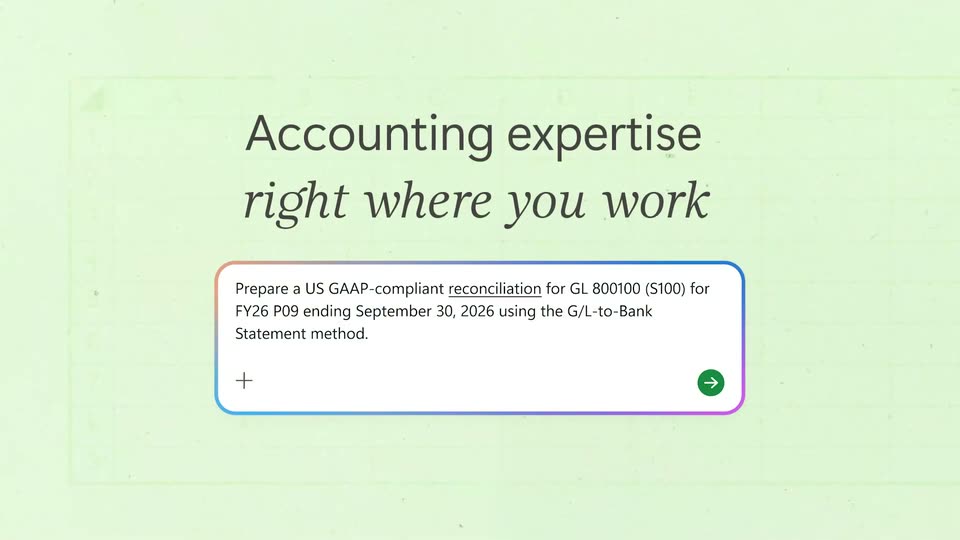
On a pale green spreadsheet grid, a charcoal headline fades in above a white prompt card with an animated blue-to-purple gradient border. The card and headline then fade out, leaving the empty grid and a small gradient dot at the lower right.
On-screen text: “Accounting expertise”, “right where you work”
Techniques: Kinetic type
Camera: Static
A spreadsheet of bank statement rows fills the left of the frame. On the right, the Copilot side panel updates from a working spinner to a paragraph of reconciliation notes.
Camera: Static
A reconciliation spreadsheet fills the left half; on the right, the Copilot panel swaps a loading spinner for a Completed summary with a green check and bulleted results, while a cell spinner in the sheet resolves to a figure.
Camera: Static
A flat screen capture of an Excel workbook titled MATCHING RESULTS fills the frame, its table of GL rows and amounts static. A Copilot pane on the right lists completed steps with green checkmarks. A small orange-and-blue progress ring glides along the bottom sheet tabs, resting on Matching Results, then on Open Exceptions.
Camera: Static
A spreadsheet window fills the frame, showing an exceptions table on the left and a Copilot results panel on the right. A multicolored cursor glides along the bottom sheet tabs, drifting from the active tab toward the right edge.
Techniques: Cursor demo
Camera: Static
A spreadsheet window shows a reconciliation summary; two floating reference cards pop up over the calculation columns, then glide to the highlighted source rows while green outlines mark the Bank source and GL source cells, and the cards collapse.
Camera: Static
A full Excel workbook with a reconciliation table and a Copilot panel sits on screen. A callout box with a color-cycling border pops over the input, holding the user's dashboard prompt, then folds into the field as a spinner starts.
On-screen text: “Thanks, now make an interactive exec ready dashboard. Include deposits vs expense and show what expenses have POs vs those that do not.”
Camera: Static
A full-screen Excel sheet shows the September 2026 Cash & Spend Dashboard beside a Copilot panel. A glowing ring cursor opens the Activity and PO status filters, and the KPI cards, donut chart and bar lists recalculate as each selection lands.
Techniques: Cursor demo
Camera: Static
On a pale green field with a faint spreadsheet grid, the line Less time reconciling fades in at center, holds, and fades out. Then More time on what matters fades in and out the same way. The emphasized words are set in italic serif.
On-screen text: “Less time reconciling”, “More time on what matters”
Techniques: Kinetic type
Camera: Static
A faint spreadsheet grid sits behind the italic gray headline “on what matters”. A large white rounded shape wipes in from the right, covering the grid and revealing green and pink gradient shapes at the frame edges.
On-screen text: “More time on what matters”
Techniques: Masking
Camera: Pull out
The Copilot logo and wordmark hold center on a cream background while colorful rounded shapes and Office app icons around them drift and fade away, leaving the logo alone.
On-screen text: “Microsoft Copilot”
Camera: Static