
1:20
Explore
The new Microsoft Planner is here! Streamline the planning, management, and execution of work
Microsoft · Jun 2024 · 1:06 · Full motion · AI-annotated
- Length
- 1:06
- Scenes
- 35 · 1.9 s avg
- Product on screen
- 0:00
- Features shown
- 4
- Call to action
- 1:00 · 90%
- Voiceover
- No
- Views
- 236K on YouTube
as of November 21, 2026
00:00:00 / 01:06:17
- Length
- 1:06
- Scenes
- 35 · 1.9 s avg
- Product on screen
- 0:00
- Features shown
- 4
- Call to action
- 1:00 · 90%
- Voiceover
- No
- Views
- 236K on YouTube
as of November 21, 2026
Microsoft’s 1:06 launch film runs 35 scenes, about 1.9 s each. The product is on screen from the first frame and 4 features are revealed. The call to action lands at 1:00 (90% in). Logo sting, a 3D desk establishing shot, then four features each opened by a checkmark pill headline and shown as tilted UI panels, closing on a CTA and a static brand card. The whole piece runs on a pastel 3D world where glossy spheres and rack-focus blur-to-sharp transitions carry the pacing.
No filming indicatedEstimated needs: 3 capture groups — your screens or recordings · 1 official logo — reused across the film · 27 3D passages — build or supply
Is this your launch? to your site or press kit.
More like this


Similar soundtrack
Films whose music sounds like this one, voice left out
0:46

Slashy Scheduling | Just CC Slashy
Slashy · Modern electronic dance music
1:36
Robbyant - What changes when robots can feel—not just see? 🤖✋ Meet LingBot-Touch
Robbyant · Electronic, deep house, lo-fi hip-hop, ambient
0:46
I put ChatGPT in our meetings
Tana · Electronic, Lo-fi Hip-Hop
The new Microsoft Planner is here! Streamline the planning, management, and execution of work, scene by scene
· 35 scenes as text
01 · Product intro · 0:00–0:02
On a soft pastel gradient, a small blurred 3D logo of purple and blue rounded cubes sits above a faint wordmark. Both scale up and sharpen into a centered lockup of the Microsoft Planner mark and name.
On-screen text: “Microsoft Planner”
Camera: Static
02 · Demo · 0:02–0:03
A pastel 3D desk holds an open laptop displaying the Planner app in a bright room. The locked-off frame keeps the device centered as soft light fills the space.
Techniques: 3D mockup
Camera: Push in
03 · Demo · 0:03–0:05
A 3D-rendered pink workspace centers on a laptop showing a project board. A glowing pendant lamp hangs left, a stacked vase with purple leaves stands right, a pen cup sits beside. The camera slowly pushes in toward the screen.
Techniques: 3D mockup
Camera: Pan
04 · Feature reveal · 0:05–0:07
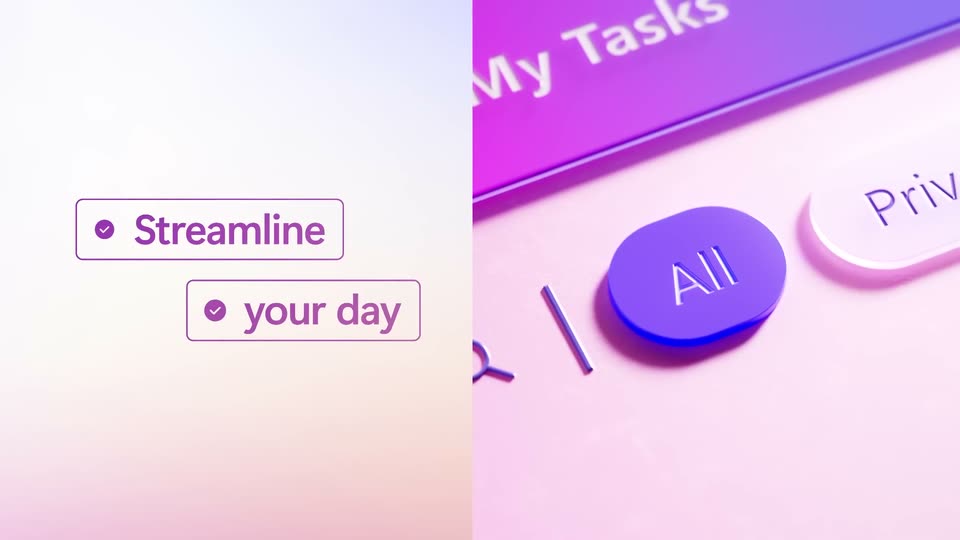
Split layout: on a pale gradient, two outlined pill chips reading “Streamline” and “your day” slide in and gain filled checkmarks, while a 3D “My Tasks” screen with purple “All” and white “Priv” pill buttons scales into view on the right.
On-screen text: “Streamline”, “your day”
Techniques: Split screen, Kinetic type, 3D mockup
Camera: Pull out
05 · Feature reveal · 0:07–0:07
A split screen pairs a pale gradient panel, where two outlined pill labels, Streamline and your day, drift sideways, with a 3D task interface on the right: a purple All button and a white Priv button on a pink surface, the camera drifting laterally through soft focus.
On-screen text: “Streamline”, “your day”
Techniques: Split screen, 3D mockup, Kinetic type
Camera: Static
06 · Feature reveal · 0:07–0:08
A close-up of a purple All button on a pink interface. A purple cursor hovers over the button, with a search icon on the left and a Priv label on the right.
Techniques: Cursor demo
Camera: Push in
07 · Feature reveal · 0:08–0:09
A blue circular button labeled All sits at the center of angled, translucent task bars floating in 3D space. Glassy purple and pink spheres and a dark arrow cursor drift around them. The shot starts soft and blurred, then snaps into focus as the bars spread apart.
Techniques: UI zoom, 3D mockup, Particles
Camera: Push in
08 · Feature reveal · 0:09–0:12
A 3D-tilted task planner interface fills the frame. The camera starts close on the glowing blue All button and a few task rows, then pulls back to reveal the sidebar cards, the task list, and the top search bar in soft purple and pink.
Techniques: UI zoom, 3D mockup
Camera: Pull out
09 · Feature reveal · 0:12–0:16
A pink Planner interface floats in 3D perspective, its left rail and stacked My Day, My Tasks, My Plans tabs catching light. The camera eases right onto the My Day panel, where a glossy blue pointer hovers the first tab as the task list sharpens into focus.
Techniques: 3D mockup, UI zoom, Cursor demo
Camera: Pull out
10 · Feature reveal · 0:16–0:19
A flat task-planner UI with a sidebar and greeting header sits on a pink and purple gradient. Task rows update and fade to bare checkmarks, a small blue sphere drifts past, and the whole screen defocuses into a soft blur.
Camera: Pull out
11 · Feature reveal · 0:19–0:22
Purple chips reading “Works the way” and “you do” slide in on the left as their circles fill with checkmarks. On the right, a cursor hovers a blue Share button that scales while glossy blue and purple spheres burst around it over a split lavender and peach background.
On-screen text: “Works the way”, “you do”
Techniques: Split screen, Kinetic type, Cursor demo, Particles
Camera: Push in
12 · Feature reveal · 0:22–0:24
A pink 3D surface holds a tilted task board of white cards with green progress bars and a search field. A purple sphere rolls across the top edge as the headline text slides into frame.
On-screen text: “Works the way”, “you do”
Techniques: 3D mockup, Kinetic type
Camera: Push in
13 · Feature reveal · 0:24–0:26
A project management interface tilts in 3D over a pink gradient as the camera pulls back from a close angled task card to the full board, then softens into blur. Two glossy spheres float at the left edge.
Techniques: 3D mockup, Parallax
Camera: Pull out
14 · Feature reveal · 0:26–0:28
A pink-tinted project management board floats in 3D perspective, tilted at an angle, as glossy spheres in pink, blue and orange drift through the scene. A blue cursor glides across the kanban columns while the camera holds a locked-off frame.
Techniques: 3D mockup, Cursor demo
Camera: Static
15 · Feature reveal · 0:28–0:29
A 3D project management interface with task cards floats against a pink and purple gradient background with blurred spheres. The tilted board shifts slightly to the right.
Techniques: 3D mockup
Camera: Static
16 · Feature reveal · 0:29–0:30
A kanban task board floats in 3D perspective over a pink backdrop with soft spheres, then rotates flat as the backdrop fades to white. A pink arrow cursor appears and points at the Interactive Learning Platform card.
Techniques: 3D mockup, Cursor demo
Camera: Static
17 · Feature reveal · 0:30–0:32
Split layout: on a pink-white gradient, two purple outline pills read Power up and your plans, each checkmark filling in as the pills slide left. On the right, the planner app menu tilts in 3D perspective.
On-screen text: “Power up”, “your plans”
Techniques: Split screen, 3D mockup, Kinetic type
Camera: Push in
18 · Feature reveal · 0:32–0:33
A pale gradient panel holds two outlined pills reading 'Power up' and 'your plans' beside a 3D angled pink planner interface showing menu tiles and a search bar. The frame drifts slowly left, sliding the text toward the edge.
On-screen text: “Power up”, “your plans”
Techniques: 3D mockup
Camera: Push in
19 · Feature reveal · 0:33–0:34
A 3D-tilted app interface floats over a pink-purple gradient. A left rail lists Calendar, Calls, Planner; a center stack shows My Tasks, My Plans, My Portfolios. A cursor hovers on My Portfolios. The frame racks from soft blur into sharp focus.
Techniques: 3D mockup, Cursor demo
Camera: Push in
20 · Feature reveal · 0:34–0:36
A glossy blue 3D folder floats on a soft pink background, then opens to fan out a stack of translucent labeled bars, with small 3D icons like a pencil and clock drifting above.
Techniques: 3D mockup
Camera: Static
21 · Feature reveal · 0:36–0:37
A 3D stack of translucent folder bars labeled with project names floats in a soft pink space. A blue check, a pink and an orange warning icon hover on the bars, above a solid blue folder. The whole group drifts and tilts gently.
Techniques: 3D mockup
Camera: Static
22 · Feature reveal · 0:37–0:40
A 3D pink grid surface with purple tubes and small platforms holding bouncing spheres. Handwritten date labels and a feedback phase marker sit on the surface. The camera pans across the layout with shallow depth of field, the foreground blurring as it moves.
Techniques: 3D mockup, Parallax
Camera: Pull out
23 · Feature reveal · 0:40–0:41
A 3D pink project grid tilts at a low angle as the camera glides right, sliding colored status bars and bouncing blue spheres past a soft-focus foreground.
Techniques: 3D mockup, Parallax
Camera: Pull out
24 · Feature reveal · 0:41–0:43
A 3D pink tiled surface holds stacked blue and orange status blocks labeled On Track and At Risk, with translucent glass panels and a purple sphere. The camera pans and tilts across the diagonal arrangement as the blocks and labels shift in depth.
Techniques: 3D mockup, Parallax
Camera: Pull out
25 · Feature reveal · 0:43–0:46
A white panel retracts left, revealing a 3D twisted ribbon in blue, purple and orange gradients with the Copilot icon and a purple cursor embedded. Two outlined text boxes, one with a checkmark and one with a circle, slide out to the left edge.
On-screen text: “Work smarter”, “with Copilot”
Techniques: Morph, Masking, 3D mockup
Camera: Push in
26 · Feature reveal · 0:46–0:47
A 3D abstract set of pink rounded shapes holds a vertical blue wavy ribbon that morphs into a flat panel. A white UI card with the line 'Create a plan to' and three small icons pops in mid-ribbon, then the ribbon settles flat.
On-screen text: “Work smarter”, “with Copilot”
Techniques: Morph, 3D mockup, Kinetic type
Camera: Pull out
27 · Feature reveal · 0:47–0:52
A glossy blue-purple wavy 3D ribbon scrolls upward, carrying white UI cards in perspective. The goal card's text fills in, a “Creating Tasks …” bar slides in below it, then a stack of task cards follows. A purple cursor arrow hovers at the right as the camera pans up the ribbon.
Techniques: 3D mockup, Cursor demo
Camera: Pull out
28 · Feature reveal · 0:52–0:53
A vertical task-list panel with a blue-to-pink gradient floats in a soft pink 3D space lined with rounded arches. The list scrolls upward while individual rows scale into place, the panel and background shapes drifting at different depths.
Techniques: 3D mockup, Parallax
Camera: Pan
29 · Feature reveal · 0:53–0:56
A vertical list of rounded suggestion chips scrolls down over a magenta gradient panel in a soft pink 3D space, revealing a prompt box that fills with text. A glossy burst of pink and blue bubbles then sweeps across the frame.
Techniques: Kinetic type, Particles
Camera: Push in
30 · Feature reveal · 0:56–0:57
A 3D perspective task list on a pink and blue gradient is covered by a swarm of glossy spheres in blue, pink and beige. The spheres drift outward, revealing the rows for scheduling, updating and sharing.
Techniques: Particles, 3D mockup
Camera: Pull out
31 · Feature reveal · 0:57–0:59
A blurred pink, orange and purple gradient fills the frame behind a task app interface. Three white task rows sit center stage while small blue and purple orbs drift across them. The row labels swap from “Schedule market research.” and “Update timeline.” to “Outline project overview.” and “Add latest schedule.” as the view eases back to reveal the sidebar and top banner.
Techniques: Particles, Morph
Camera: Pull out
32 · Feature reveal · 0:59–1:00
A close-up of a pastel planner app zooms out to reveal the full My Day view, with a purple banner reading Relax and recharge and a task field below.
Techniques: UI zoom
Camera: Pull out
33 · CTA · 1:00–1:01
A 3D laptop sits on a pink desk inside a pastel room, its screen showing a messaging app with a sun icon. A swarm of glossy pink, blue and white spheres floats around the device, drifting and bobbing. A cursor hovers over the chat list.
Techniques: 3D mockup, Particles, Cursor demo
Camera: Push in
34 · CTA · 1:01–1:04
A pastel 3D desk with a laptop on a riser, a purple chair, lamp and vase; the white headline locks in above the screen with a small check icon, then gives way to a floating gradient purple-blue logo as tiny colored particles drift past.
On-screen text: “Try Planner today.”
Techniques: Kinetic type, Particles, 3D mockup
Camera: Pull out
35 · Outro · 1:04–1:06
A static end card on a plain white background. The Microsoft logo, four colored squares beside the gray wordmark, sits centered, with the gray URL aka.ms/planner below it. The frame is locked off with no motion.
On-screen text: “Microsoft”, “aka.ms/planner”
Camera: Static