0:57

AI Lip Sync, Dubbing & Video Translation Demo | SyncMonster
SyncMonster.AI · Sep 2025
Tana’s 0:46 launch film runs 22 scenes, about 2.1 s each. The product is on screen from the first frame. There is no explicit call to action; a voiceover carries the film. The video opens on a black title card, runs three back-to-back meeting demos in Tana, Teams and Google Meet, and closes on a tagline card, with each demo repeating one beat: a spoken command types into a side chat, a result card slides in, and the target app window expands or tilts into view. Signature moves are the iris circle transitions, the expanding white-circle reveals, and the 3D tilts of app windows over the near-black field.
Is this your launch? to your site or press kit.
SyncMonster.AI · Sep 2025
Spotify · Consumer · May 2026
SpAItial AI
Films whose music sounds like this one, voice left out
Fish Audio · Electronic, cinematic
Cognition · Upbeat electronic
Confido Health · Modern electronic, cinematic
A black screen holds a single small lavender dot at center. The dot appears and stays fixed for the duration of the clip.
On-screen text: “·”
Camera: Static
A plain black screen holds a small white dot at center, then the wordmark ChatGPT appears left of center, Chat in white and GPT in dim gray. The frame stays locked and the text holds still for the rest of the beat.
On-screen text: “ChatGPT in”
Techniques: Kinetic type
Camera: Static
A black card shows white text “ChatGPT in” at left. A small multicolor 3D cube logo and the word “tana” sit at right; the wordmark fades out, then the OpenAI knot mark fades in at center as the text dims.
On-screen text: “ChatGPT in”, “tana”
Camera: Static
A white line-drawn logo mark sits centered on a black field and scales up, then resolves into a solid blue circle with a soft orange gradient on its left edge. The frame stays locked on the centered mark throughout the short scene.
Techniques: Morph
Camera: Static
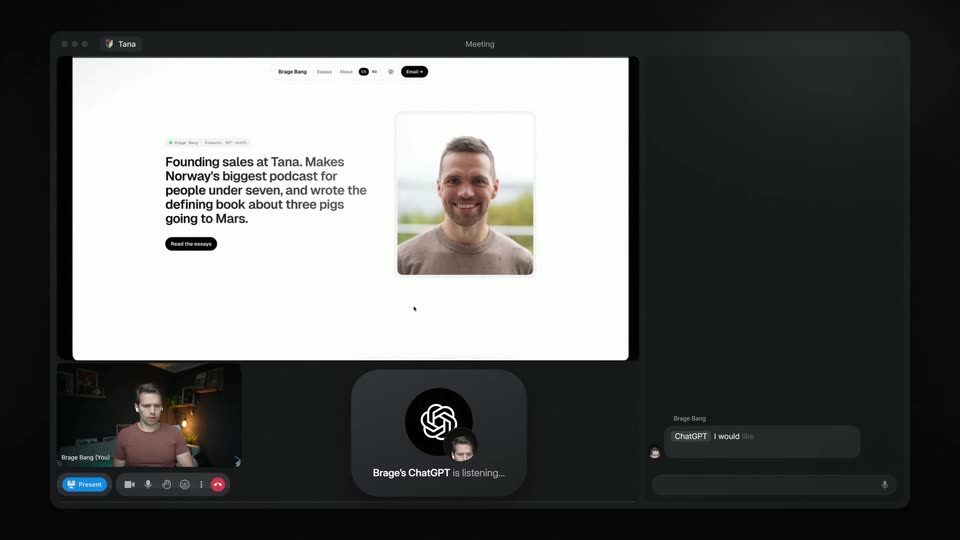
A dark video call window opens through an expanding white circle, revealing a presented profile page with a man's photo and bio. A small camera tile and a ChatGPT listening badge sit at the bottom, with a chat panel on the right.
Techniques: Masking
Camera: Pull out
A dark meeting window shares a profile page with a man's photo and bio, a small live video tile sits bottom left, and a ChatGPT tile sits center. A chat message types out on the right, a reply appears, and the frame zooms into the chat.
Techniques: UI zoom
Camera: Push in
A dark chat screen on a 3D phone mockup scrolls upward as new messages type in. A placeholder reads Generating images, then a 2x2 grid of four watercolor thumbnails fades in with small captions. A white card holding a portrait sits over the left edge.
Techniques: 3D mockup, UI zoom
Camera: Push in
A white card slides in from the left and scales up to fill the frame, revealing a four-tile grid of watercolor background concepts. The dark chat interface with image thumbnails is pushed to the right edge. The frame stays locked-off.
Camera: Pull out
A flat Tana app screen shows a cream panel with a dark gray headline and two pill buttons over a watercolor background that crossfades from a soft blue wash to a painted mountain and map scene.
Camera: Static
A full-screen Tana profile page for Brage Bang cuts to a desktop where the Tana window slides left and shrinks, revealing a Linear board, a Teams meeting with three video tiles, and a chat panel on the right.
Camera: Pull out
A Teams meeting screen shows four video tiles above a shared Linear page. A ChatGPT widget with the OpenAI logo fades in, captioned “Kim's ChatGPT is listening...”, as a chat message types out word by word. The view pushes in on the video tiles.
Techniques: Kinetic type, UI zoom
Camera: Static
A video call grid with four participants overlays a shared documentation screen. The view pans right to a dark chat panel where Kim Joar's message about assigning an issue to Mads appears.
Techniques: UI zoom
Camera: Pull out
A dark multi-panel layout slides horizontally, dimming a left app window and a right panel as the view settles on a chat. The conversation shows a ChatGPT prompt and a Linear issue card titled “Set up configuration for the meetings hub landing page.”
Camera: Pull out
A dark chat thread with a ChatGPT message and a Linear issue card fills the center. A Linear issue window then scales up in front of it, showing the ticket and its properties panel.
Camera: Push in
A dark Linear issue view holds steady in the center, sidebar on the left and properties panel on the right. The Assignee row on the right flashes a highlight, then settles on Mads with a small avatar, matching the activity log below.
Camera: Static
A Google Meet window on a dark desktop shows a woman speaking in the main tile and a man in a small self-view. A ChatGPT side panel types her voice command, while a dark card with the ChatGPT logo and her avatar pops in over the video.
Camera: Push in
A split screen shows a video call on the left and a dark chat panel on the right. The frame reframes onto the chat as a new reply and a calendar card slide in, while the call window shrinks to the edge.
Techniques: UI zoom
Camera: Push in
A dark chat panel updates in place: a PDF card and a confirmation message appear below the kickoff invite, while a small video-call window with a man stays fixed on the left.
Camera: Static
A dark chat panel shows a user asking ChatGPT to send invites and a plan; the panel slides right as a Google Calendar window tilts in from the left in 3D, flattening to a week view with kickoff events.
Techniques: 3D mockup
Camera: Push in
A Google Calendar week view holds still as the Pilot kickoff event card pops open and scales up to reveal its guest list and a PDF chip. The frame then zooms in while a black circular iris closes around the calendar.
Techniques: UI zoom, Masking
Camera: Pull out
On a black field, a small circle pulses at the center: a yellow disc with a soft blue shadow at 0.1s, then a tiny white dot at 0.6s, each fading to black.
Camera: Static
A small white hexagon spinner sits centered on black, then fades as the tana logo with its gradient cube mark, the tagline, and three gray camera icons fade in and hold.
On-screen text: “ChatGPT, in every meeting.”
Camera: Static