1:06
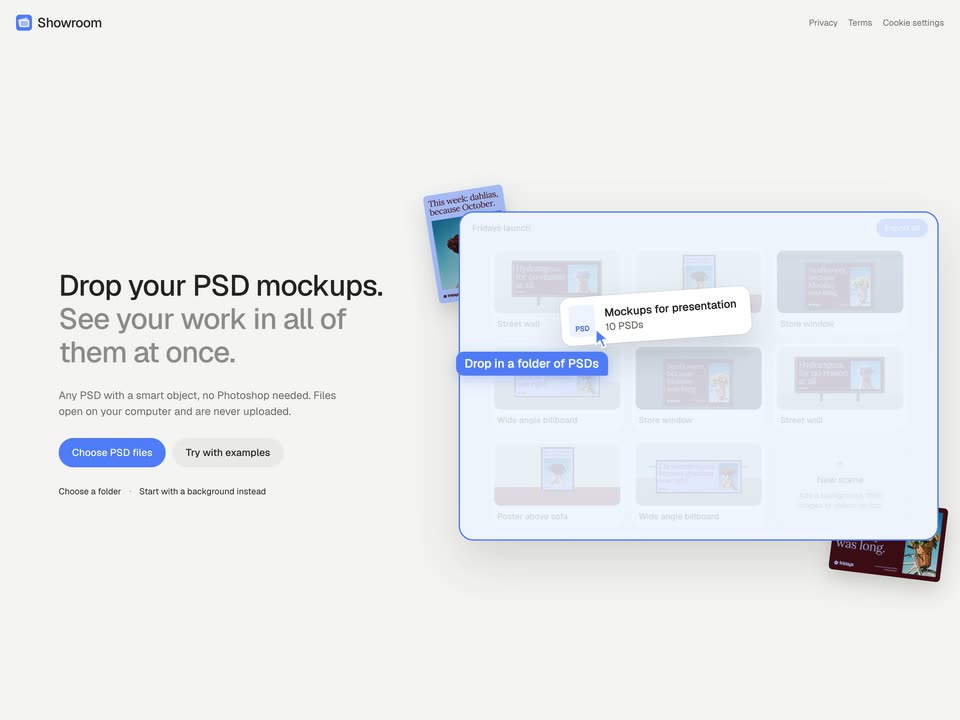
Seyi - Introducing Showroom, an app that lets you see your designs in every
Showroom · Oct 2026
ChatGPT Atlas · Oct 2025 · 1:37 · AI-annotated
ChatGPT Atlas’s 1:37 launch film runs 36 scenes, about 2.7 s each. The product shows up at 0:02 and 4 features are revealed. The call to action lands at 1:26 (89% in). The video alternates centered title cards with UI mockups, introducing each feature as a short phrase and then showing it inside a browser panel. Pacing is quick and clean, using typing, cursor clicks, and soft gradient backdrops to keep the focus on the interface.
Is this your launch? to your site or press kit.
Showroom · Oct 2026
Executor · B2B · Nov 2026
Polar Browser · Oct 2026
A white rounded dock bar holding six app widgets sits centered on a plain white background. The bar then shrinks as four widgets slide out, leaving only the black knot logo and the dark blue paper-plane icon in a smaller bar.
Camera: Static
A small dark-blue rounded app icon with a white paper-plane mark sits centered on a white field, then shrinks away. The headline “Meet ChatGPT Atlas” appears in the center in dark navy bold sans-serif.
On-screen text: “Meet ChatGPT Atlas”
Camera: Static
On a plain white background, the black headline “Meet ChatGPT” sits centered, then the word “Atlas” is added and the whole line re-centers to read “Meet ChatGPT Atlas”. The frame stays locked off.
On-screen text: “Meet ChatGPT Atlas”
Techniques: Kinetic type
Camera: Static
A plain white screen shows a gray ChatGPT knot logo above a rounded search bar with a plus icon, placeholder text, and a microphone icon; the whole composition scales down and drifts upward over the clip.
Camera: Static
A flat browser window sits centered on a plain background that fades to a soft blue gradient. The address bar is typed into as “vrbo.com”, a suggestion list expands beneath it, and a cursor glides over to the up-arrow button at the bar’s right edge.
Techniques: Cursor demo
Camera: Static
A Chrome browser window showing the Vrbo homepage rests on a soft pastel gradient. The whole window slowly scales down toward the center, opening up more of the gradient around it while the page content stays still.
Camera: Static
On a white background, the black word Unlock sits centered, then grows into the line Unlock the web with as a second line types out ChatGPT by your side. The frame stays locked off.
On-screen text: “Unlock the web with”, “ChatGPT by your side”
Techniques: Kinetic type
Camera: Static
A tilted browser mockup of a vacation rental listing sits on a blue-purple gradient beside a static two-line headline. A cursor glides to the Ask ChatGPT button in the top right and clicks it, and a chat panel slides in from the right edge.
On-screen text: “Unlock the web with”, “ChatGPT by your side”
Techniques: 3D mockup, Cursor demo
Camera: Static
Close-up of a booking interface with a cabin photo and date fields on the left. A question types itself into the ask field, then a mouse cursor moves to and clicks the black send button.
Techniques: Cursor demo
Camera: Static
Split screen: a static property listing with a search bar and Save button on the left, an AI chat on the right. The chat types out a numbered list of hiking trails, the text scrolling up to a follow-up question.
Techniques: Split screen
Camera: Pan
A Coursera Pandas quiz screen floats on a blue-purple gradient. The page scrolls up to reveal the quiz title and a size guide table, while a help prompt types out character by character in a field at the bottom.
Camera: Static
A floating card on a soft gradient background shows a sneaker product page on the left and an AI chat panel on the right. A context chip sits above an input field where the question is typed out. The left page briefly dissolves to a tax table.
Camera: Static
A split interface: left pane holds a tax article with a 2026 bracket table, right pane shows a Wall Street Journal source chip above a prompt field where “Can you explain this in simple term” types out letter by letter beside plus and send icons.
Camera: Static
A two-panel product interface shows a flight booking summary on the left and an assistant chat on the right. A typed question is sent with a hand cursor, then the view reframes to the full itinerary as the assistant's answer streams in.
Techniques: Cursor demo
Camera: Static
A split screen shows a flight itinerary list on the left and a United Airlines chat on the right. The left panel fades out, centering the chat, as the word Assists fades in large and gray across it.
On-screen text: “Assists”
Techniques: Split screen, Kinetic type
Camera: Static
A plain white background holds a centered black headline that builds from the single word “Assists” into the full phrase “Assists when you need it.” The frame is locked off with no camera movement; the text simply expands in place.
On-screen text: “Assists when you need it”
Techniques: Kinetic type
Camera: Static
A single bold black headline sits centered on a plain off-white background. The letters begin tightly packed and ease into normal spacing in the first moment, then hold still on a locked-off frame.
On-screen text: “Assists when you need it”
Techniques: Kinetic type
Camera: Static
A flat email draft on white with the body highlighted. A blue AI badge pops in, the cursor clicks it, and a prompt bar types “Make this more concise” before the cursor clicks the send arrow. The scene fades to white and the caption “Picks up” appears centered.
On-screen text: “Picks up”
Techniques: Cursor demo
Camera: Static
A bold black headline assembles word by word on white, then a ChatGPT prompt bar with three suggestion rows fades in beneath it while the headline rises and scales up to clear the top of the bar.
On-screen text: “Picks up where you left off”
Techniques: Kinetic type
Camera: Static
A white new-tab screen shows a search bar above four suggestion rows. A cursor glides down to the Etsy row and clicks it, then a large gray two-line caption appears over the bar stating the prompt.
On-screen text: “Open the halloween decorations I was looking at last week in some new tabs”
Techniques: Cursor demo
Camera: Static
A pale blue rounded card sits centered on an off-white field, holding two lines of dark gray sans-serif text that state a command. The frame is locked off and the type holds perfectly still for the full duration.
On-screen text: “Open the halloween decorations I was looking at last week in some new tabs”
Camera: Static
A browser window on a soft blue gradient background pans right across a ChatGPT chat. A user prompt bubble holds the request on the right, while a bulleted list of five opened Etsy tabs fades in line by line on the left.
Camera: Pan
A browser window mockup, showing a prompt to open Halloween decorations in new tabs, slides left off a soft blue-to-purple gradient. The headline Takes action for you appears word by word in large gray bold sans on the right.
On-screen text: “Takes action for you”
Techniques: Kinetic type
Camera: Static
A plain white background holds centered black text that builds word by word, opening on “Takes” and completing to “Takes action for you.” The frame stays locked and static once the line is full.
On-screen text: “Takes action for you”
Techniques: Kinetic type
Camera: Static
A product page shows a bucket-hat listing on the left and a chat composer on the right. The beach request types out character by character, then a cursor glides to the round black send button. A locked-off tagline and a small bottom caption hold at the edges.
On-screen text: “Takes action for you”, “Agent mode not available to free users.”
Techniques: Cursor demo
Camera: Static
A browser window shows the Instacart shopping page on the left and an assistant chat on the right, where a cursor clicks the black Continue button. The question and buttons fade out, replaced by the line Starting to assist with your request now.
Techniques: Cursor demo
Camera: Static
A flat browser mockup on a blue gradient shows a shopping page with a right-side chat panel. A cursor hovers across products, green Add buttons pop in, a black status tooltip switches from Getting started to Fulfilling request, and a new assistant message fills the chat.
Techniques: Cursor demo
Camera: Push in
A black cursor glides to the search bar of a light shopping interface and types the word sunscreen. A black rounded caption bubble labeled Searching for sunscreen hovers below the bar while product tiles with green Add buttons stay static.
On-screen text: “Searching for sunscreen”
Techniques: Cursor demo
Camera: Static
A light Instacart web page with a search bar reading sunscreen scrolls down through sunscreen product cards while a black cursor moves and clicks a green Add button. Black pill captions appear in turn narrating each step.
On-screen text: “Looking for best option”, “Scrolling search results”, “Adding sunscreen to cart”
Techniques: Cursor demo
Camera: Pan
A white screen shows a chat message from the Instacart assistant: a circular icon, the header “Finalizing and reviewing shopping cart” with a down chevron, and three lines of body copy confirming sunscreen and beach-day essentials were added to the cart. The frame stays static.
Camera: Static
A white shopping cart panel slides left across a dimmed shopping app background showing category tiles and an Ask ChatGPT button. The cart lists sunscreen and orange items with prices and quantity steppers.
On-screen text: “Finalizing and reviewing shopping cart”, “All set. I've added some highly rated SPF 50 sunscreen”, “and other beach-day essentials to your Instacart cart.”, “Everything's ready. Would you like to check out?”
Camera: Pan
A white cart panel lists beach items over a dimmed product page, set on a soft blue-purple gradient. A hand cursor moves down and hovers on the green Go to checkout button showing the total.
Techniques: Cursor demo
Camera: Static
A single line of black text sits centered on a plain white field. The letters begin overlapping and compressed, then slide apart into even spacing before holding still for the rest of the shot.
On-screen text: “A smarter way to explore the web”
Techniques: Kinetic type
Camera: Static
A black title reading ChatGPT Atlas sits centered on a plain white background. The frame is locked-off with no motion, no entrance or exit animation, and no other elements present.
On-screen text: “ChatGPT Atlas”
Camera: Static
A dark navy rounded-square icon is centered on a white background. Its inner blue petal shape and white play triangle fade from near-black to full color, then hold still.
Camera: Static
On a plain white background, the URL chatgpt.com/atlas sits centered in black. It then slides to the right as download now appears on the left, leaving the two lines side by side.
On-screen text: “chatgpt.com/atlas”, “download now”
Techniques: Kinetic type
Camera: Static