1:15

Screenpipe YC Launch Video
Screenpipe · Sep 2026
Polar Browser · Oct 2026 · 1:01 · AI-annotated
Polar Browser’s 1:01 launch film runs 35 scenes, about 1.8 s each. The product shows up at 0:04 and 3 features are revealed. The call to action lands at 0:58 (95% in), over a voiceover. Tone is calm, bright and confident, built on a near-white palette with soft leaf shadows and a single LinkedIn blue accent. The video alternates clean typographic cards on a paper or fabric texture with 3D-tilted UI mockups that flatten into front view, paced at a steady ~129 bpm with a cut roughly every eight seconds. Signature moves are the blur-to-focus reveal of tilted interface cards, the black cursor typing prompts and drawing selection boxes, and the recurring black polar mark that book-;
Is this your launch? to your site or press kit.
Screenpipe · Sep 2026
Executor · B2B · Nov 2026
Dalet Labs · Oct 2026
A soft white paper texture fills the frame as the question builds word by word in the center. Dark gray sans-serif reads “Do you want LinkedIn working 50 hours a week for you?”, with “LinkedIn” and “50 hours” in blue. The lines slide in and settle.
On-screen text: “Do you want LinkedIn working 50 hours a week for you?”
Techniques: Kinetic type
Camera: Static
A curved row of phone mockups in 3D perspective on a white field resolves from blur, the center screen lifting forward with a small circle above it. A two-line headline with blue accents slides in overhead, then the whole frame blurs and fades out.
On-screen text: “Do you want LinkedIn”, “working 50 hours a week for you?”
Techniques: Kinetic type, 3D mockup
Camera: Pan
A sunlit desk with a potted plant and pen holder sits softly out of focus. A black logo of a filled circle and open ring sharpens in the center as the headline settles and the second line scales in.
On-screen text: “Meet Polar,”, “your AI LinkedIn - maxxer”
Techniques: Kinetic type
Camera: Pull out
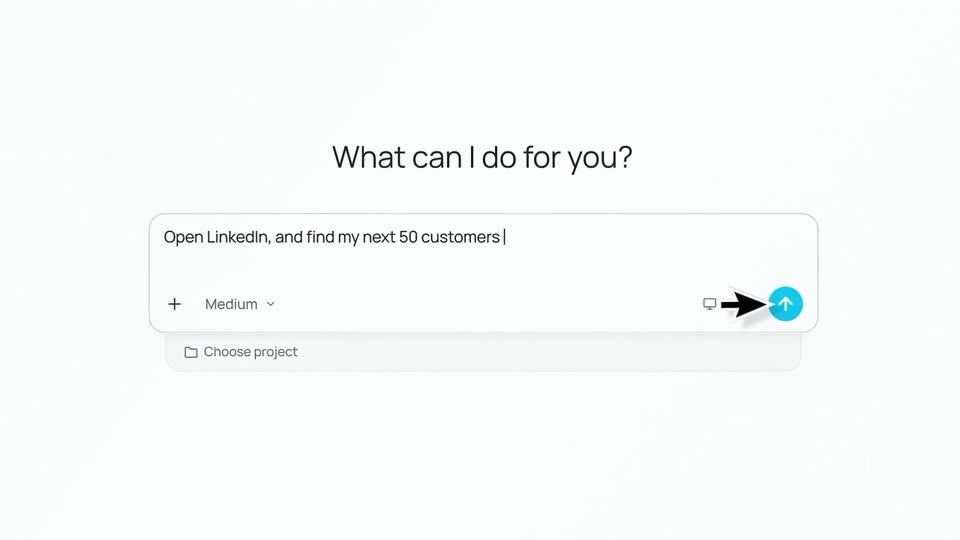
A tilted 3D app window flattens to a front view beneath a Meet Polar tagline. The camera zooms into the prompt field as a cursor types a LinkedIn task and clicks the blue send button, and the request appears in the main pane.
On-screen text: “Meet Polar,”, “your AI LinkedIn - maxxer”
Techniques: 3D mockup, UI zoom, Cursor demo
Camera: Pull out
A light task-management window sits on a soft gradient background. A sidebar lists tasks and projects on the left, while a cursor hovers over a typed command in the empty canvas. The frame stays locked as the cursor drifts slightly.
Techniques: Cursor demo
Camera: Static
A tilted 3D task-app window snaps from blur into focus. The left sidebar lists outreach tasks; the main pane shows a LinkedIn feed tab and a blue panel reading “Opening www.linkedin.com” with a cursor at its edge.
Techniques: 3D mockup
Camera: Static
A split screen pairs a task panel on the left with a browser on the right. The LinkedIn feed scrolls and zooms onto individual posts while a cursor hovers at the right edge.
On-screen text: “Open LinkedIn, and find my next 50 customers”
Techniques: Split screen, Cursor demo, UI zoom
Camera: Push in
A pale blue field of floating LinkedIn-style post cards drifts at different depths and sizes while the large black headline Understand why it fits slides in across the center of the locked-off frame.
On-screen text: “Understand why it fits”
Techniques: Kinetic type, Parallax
Camera: Static
A grid of LinkedIn post cards floats on a pale blue field as black arrow markers hop between posts. The bold black headline slides in from the right and locks at the left.
On-screen text: “Understand why it fits”
Techniques: Kinetic type
Camera: Static
A LinkedIn profile card for Emily Carter rests on a soft peach-to-blue gradient while a black cursor hovers over a highlighted field. To the left, a dark headline slides from “Understand why it fits” to “B2B SaaS” above a spinning loading indicator.
On-screen text: “Understand why it fits”, “B2B SaaS”
Techniques: Cursor demo
Camera: Static
A tilted 3D list of LinkedIn profile cards scrolls downward while a black cursor hovers over highlighted fields. On the left, dark filter labels swap in: B2B SaaS, 51-200 employees, then Rotterdam, South Holland, Netherlands.
On-screen text: “B2B SaaS”, “51-200 employees”, “Rotterdam, South Holland, Netherlands”
Techniques: 3D mockup, Cursor demo
Camera: Pan
A LinkedIn profile card for Daniel Brooks rests on a peach-to-blue gradient, a cursor hovering near its details. Bold black text “51-200 employees” anchors the left margin while “Polar is scanning” status lines frame the card above and below.
On-screen text: “51-200 employees”
Techniques: Cursor demo
Camera: Static
A light gradient frame holds a vertical feed of LinkedIn profile cards on the right, each with a banner, headshot and company chips, while large black labels on the left cycle through industry and size filters as the cards refresh and a cursor hovers a Connect button.
On-screen text: “Software Development”, “51-200 employees”, “Food & Beverage”
Techniques: Kinetic type, Cursor demo
Camera: Pan
A LinkedIn profile card for Jordan Hayes sits on a light background between two Polar scanning status lines, with the label US-based in outline type to the left. A cursor hovers by the Connect button. The card blurs out as the scene ends.
On-screen text: “US-based”
Camera: Pull out
A white prompt box sharpens over a blurred bright room as a cursor moves to the blue send button after the prompt is typed. Four candidate cards with photos and names then pop in around the box.
Techniques: Cursor demo
Camera: Static
A white grid of contact cards, each with an avatar and name, fills the frame. A search field reading 'Find my next sales hire' with a Medium dropdown and blue arrow button hovers over the center card. A cursor glides across the interface as the grid shifts.
Techniques: Cursor demo
Camera: Push in
A grid of candidate cards, each with a photo and name, fills the screen. Several black cursors glide across and draw dashed selection boxes around chosen cards, which tint light blue as they are picked. The outer cards blur out of focus.
Techniques: Cursor demo
Camera: Static
A light grid of profile cards, each with a round avatar and a name. A black cursor glides down to select one card, then moves right as a second card expands into a detail panel listing role, experience and location. Surrounding cards blur out.
Techniques: Cursor demo, UI zoom
Camera: Pull out
Three LinkedIn-style profile cards float in 3D space over a blurred grid of candidate thumbnails. The cards rotate and settle as a cursor moves between them, and green High match tags pop in beside each name.
Techniques: Cursor demo, 3D mockup, Parallax
Camera: Static
A white shortlist card assembles in the center of a soft light background as three candidate rows slide in with avatars and green checkmarks. The card then shifts down as a large headline appears above it.
On-screen text: “Find. Qualify. Shortlist.”
Techniques: Kinetic type
Camera: Static
Over a blurred white backdrop with soft plant shadows, the dark headline and a shortlist card with three candidate rows fade out, while a new gray headline begins, building word by word with “Find the”.
On-screen text: “Find. Qualify. Shortlist.”, “Find the”
Techniques: Kinetic type
Camera: Pull out
A defocused bright room with diagonal leaf shadows and a green leaf at the left edge fills the frame. The charcoal line “Find the right people” fades in at center, the last word trailing slightly.
On-screen text: “Find the right people”
Techniques: Kinetic type
Camera: Pull out
A white prompt card floats over a blurred sunlit room with a potted plant at left. The prompt is typed out letter by letter behind a blinking caret, above a row of controls and a blue up-arrow button, while the card slowly zooms in.
Techniques: Kinetic type, UI zoom
Camera: Static
A white rounded prompt card sits on the left over a blurred light-gray background. The card shows the text 'to 25 experts in my industry' with a monitor icon, a mic icon, and a blue send button. A black cursor glides to the button and clicks it.
Techniques: Cursor demo
Camera: Static
A single profile card for Marcus Johnson on a soft blue gradient pulls back to reveal a grid of contact cards with banner photos and titles. Black cursor arrows hover over the cards, then the view zooms into one card, Stephanie Buscemi, showing a blue Connect button.
Techniques: UI zoom
Camera: Push in
A LinkedIn profile card with a Golden Gate Bridge banner and a smiling woman's photo fills the frame. The view zooms in as a cursor glides in from the left and rests on the mutual-connections row above the Connect button.
Techniques: UI zoom, Cursor demo
Camera: Push in
A close-up of a LinkedIn profile page displays a woman's photo and professional details. A black cursor hovers over the page, and the view blurs out at the end.
Techniques: Cursor demo
Camera: Pull out
A white card on a soft pink-to-blue gradient shows a contact row and an empty message field. A black cursor hovers over the field as outreach text types in line by line, then a tone dropdown panel slides in from the right edge.
Techniques: Cursor demo
Camera: Push in
A tilted white outreach card floats in 3D over a soft gradient. A black cursor hovers the Tone menu and selects Professional, marking it with a blue check. The card then blurs and fades as a blue check badge above the number 50 appears.
Techniques: 3D mockup, Cursor demo
Camera: Pan
A white rounded card with a blue checkmark and the dark headline “50 personalized messages ready” sits centered on a soft, blurred light background. Five circular avatars slide in one by one from the left, then a light pill with “+47” slides in from the right.
On-screen text: “50 personalized messages ready”, “+47”
Techniques: Kinetic type
Camera: Static
A soft off-white background with blurred leaf shadows holds a centered gray headline that sharpens from blur, then three white cards with green checkmark icons slide in diagonally beneath it.
On-screen text: “Customers. Talent. Audience.”
Camera: Static
Three white notification cards with green checks rise and settle on a soft white background, each pairing a label with avatars or signal tags. Above them, the black headline 'Customers. Talent. Audience.' holds static and centered against blurred leaf shadows.
On-screen text: “Customers. Talent. Audience.”
Camera: Static
The app interface floats tilted in 3D perspective on white, then rotates to a flat front view. Its right panel shifts from three result cards to a chat feed showing a company card, candidate cards and a people row, while the left sidebar lists tasks.
Techniques: 3D mockup
Camera: Pull out
A soft white fabric fills the locked-off frame with diagonal shadows. The dark gray line “More value from” scales in at center, the blue LinkedIn wordmark pops in beside it, then the line dissolves into “Less manual work.”
On-screen text: “More value from Linkedin”, “Less manual work”
Techniques: Kinetic type
Camera: Static
A soft, out-of-focus pale background with diagonal light streaks holds the centered Polar lockup. The mark and wordmark draw in, then two tagline lines fade in beneath as the voiceover says give Polar a try.
On-screen text: “LinkedIn fully automated for you.”, “Try Polar today.”
Techniques: Kinetic type
Camera: Static