1:38

Best Product Launch Video | DrM Group
DrM Group · Aug 2026
The video alternates live-action founder lines with flat UI cards and line graphics on a dotted off-white grid, cutting at a steady mid-tempo of about eight cuts per minute. Its signature moves are letter-by-letter monospace typing, hard black offset shadows on every card, and pastel chips that slide in from the edges.
DrM Group · Aug 2026
Help Scout · Oct 2026
Cal.com · Productivity · Aug 2022
A man in a black polo shirt sits at a wooden table with a closed laptop, gesturing as he speaks to camera in a blurred office. White monospace text appears in two lines on the left.
On-screen text: “What if”, “your AI”
Techniques: Kinetic type
Camera: Static
A man in a black polo sits in a sunlit office, speaking to a locked-off camera. White text builds in the top left, an eye and a sound icon for 'see' and 'hear', then resolves into 'Everything you and your team does?'. A white lower third names him.
On-screen text: “Could”, “and”, “Louis Beaumont”, “Founder, Screenpipe”, “Everything”, “you and”, “your team”, “does?”
Techniques: Kinetic type
Camera: Static
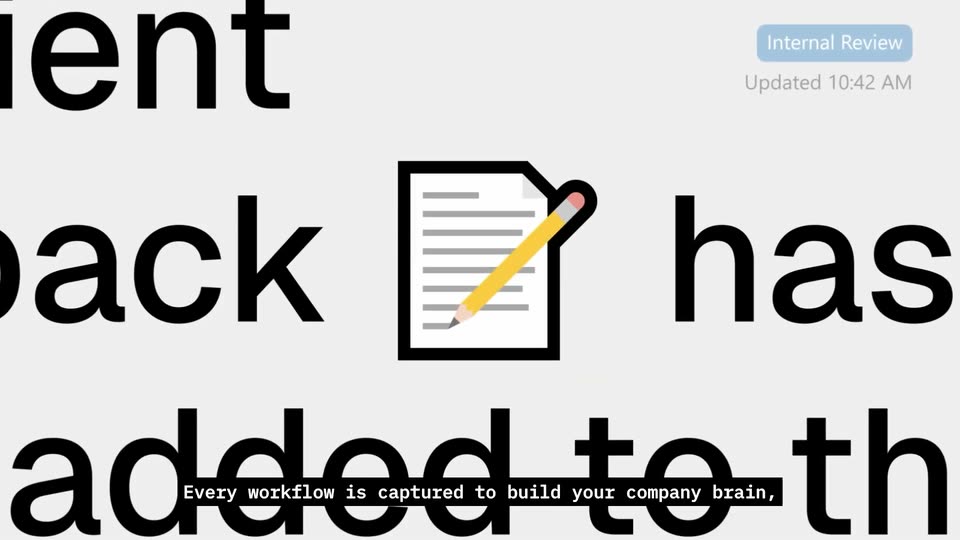
Locked-off close-up of a document in the app: oversized black text with a line-art paper-and-pencil icon inline, a blue Internal Review tag and timestamp in the top right. The frame opens soft and sharpens, while a monospace caption bar sits at the bottom.
On-screen text: “Louis Beaumont”, “Founder, Screenpipe”, “Every workflow is captured to build your company brain,”
Camera: Static
Locked-off close-up of a task list on a pale lavender card. The top row is highlighted with a blue check tile, a yellow star and a gray arrow; the row below shows empty checkbox and star outlines. A black caption bar reads the workflow line.
On-screen text: “Every workflow is captured to build your company brain,”
Camera: Static
A flat Gantt chart fills the frame: an orange Design bar, a yellow Sync bar and a green Development bar span the week columns while a yellow dot marks current progress. A black caption bar at the bottom carries white text.
On-screen text: “Every workflow is captured to build your company brain,”
Camera: Static
A dark chat composer with image, clip and mic icons plus a highlighted send button cuts to a light calendar grid. A purple rounded card on the 20th shows a Data Review event with a time range.
On-screen text: “Every workflow is captured to build your company brain,”
Camera: Static
A grid of video-call tiles of smiling people holds a dark blue center tile with a brain icon and AP, titled Company Brain. It cuts to a light dotted field where the white brain icon sits centered as colored agent chips slide in from the edges.
On-screen text: “Company Brain”, “Every workflow is captured to build your company brain,”, “and turned into agents that run your company.”
Camera: Static
A white rounded tile with a line-drawn brain icon, labeled Company Brain, sits on a dotted grid while pastel chips with hard drop shadows (Deal spotter, Digital clone, Time Tracker, SOP generator, Contact dossier) drift slowly. A bottom caption reads and turned into agents that run your company.
On-screen text: “Deal spotter”, “Auto assign tasks”, “Digital clone”, “SOP generator”, “Time Tracker”, “Company Brain”, “Contact dossier”, “CRM Update”, “and turned into agents that run your company.”
Camera: Pull out
A rounded-square app icon on a dotted light-gray background morphs from two line-drawn pipe connectors into a solid black S-shaped pipe mark. Below it, a monospace caption reads “Introducing ScreenPipe.” on a black highlight bar.
On-screen text: “Introducing ScreenPipe.”
Techniques: Morph
Camera: Static
A centered ScreenPipe icon and wordmark sit on a light dotted grid, above a row of gray brand logos and the line Trusted by 300k users and by:. A black caption box reading Introducing Screenpipe. flashes at the bottom, then the frame holds still.
On-screen text: “Trusted by 300k users and by:”, “Introducing Screenpipe.”
Camera: Static
A white input bar with a hard black shadow sits on a dotted gray background. The prompt is typed letter by letter as the bar widens, a model chip slides in beneath it, then the bar shrinks and hops up. A monospace caption sits at the bottom.
On-screen text: “Screenpipe runs quietly in the background”, “and remembers everything you saw,”
Techniques: Kinetic type, Cursor demo
Camera: Static
A white date chip reading June 30 22:27 PM opens large and centered, then shrinks and drops as a tilted Gmail window appears above it and a row of colored ovals slides in along the bottom.
On-screen text: “June 30 22:27 PM”, “and remembers everything you saw,”
Techniques: 3D mockup
Camera: Static
A Gmail mockup floats in 3D perspective at the center of a dotted light-gray space as spreadsheet, chat, and code-editor windows slide in around it. A date-and-time speech bubble and a dock of colorful pills sit below the central window.
On-screen text: “and remembers everything you saw,”, “June 30 22:27 PM”
Techniques: 3D mockup
Camera: Pan
App windows with hard offset shadows drift over a timeline of colored capsules and app icons on a dotted grid. A central calendar bubble counts time backward from June 20 22:58 PM to June 19 15:40 PM, a robot-arm video preview pops in at center, and the caption 'everything you heard' appears at the bottom.
On-screen text: “June 20 22:58 PM”, “June 20 16:25 PM”, “June 19 15:40 PM”, “everything you heard”
Techniques: Parallax
Camera: Push in
A dotted-grid desktop holds a spreadsheet, a proposal document, a video player of a robotic arm, a slide deck and a chat window; a row of colored timeline blocks and a date bubble sit below. The windows scale down and spread apart as the view pulls back.
On-screen text: “June 19 15:40 PM”
Camera: Static
A dotted grid holds two small star icons, one of which morphs into a white card listing weekly deadlines and notes. The card then slides up to reveal its closing lines, while a black caption bar reads the voiceover line.
On-screen text: “and everything you talked about.”
Techniques: Morph
Camera: Static
A white prompt bar with a hard black shadow sits centered over a slowly scrolling grid of gray app icons. The prompt types out a question, then the bar shrinks into a small Analyzing chip with a pixel loader as icons behind darken.
On-screen text: “It pulls from every tool your team uses”, “and turns how you actually work”, “into your company brain.”
Techniques: Parallax, Morph
Camera: Pan
A grid of grayed-out app logos fills the light background. A white card with a black offset shadow sits center, showing a pixel icon and “Analyzing...”, then shifts left to reveal a document excerpt with a quote mark. A black caption reads “into your company brain.” at the bottom.
On-screen text: “into your company brain.”
Camera: Static
A white SOP document card on a dotted grid, ringed by small app logo chips, scrolls its text upward to reveal a Sources row of call and doc cards as the camera pushes in; a black caption bar carries the voiceover line at the bottom.
On-screen text: “It knows how your best people work and documents it.”
Techniques: UI zoom
Camera: Pan
A dark send-icon square scales up into a white notification card that types a prompt, then rotates into 3D perspective while a blank sheet flies out from behind it, on a dotted gray background.
On-screen text: “Setting up automations is simple.”
Techniques: Kinetic type, 3D mockup
Camera: Static
On a dotted gray field, a LinkedIn comment card and a Hubspot contact card flank a command box that types out a plain-English prompt. A reminder card drops in below as the frame zooms in and a black caption bar states the instruction.
On-screen text: “Just tell Screenpipe what you want in plain English.”, “And voilà!”
Techniques: Kinetic type, UI zoom
Camera: Push in
A white prompt card with highlighted keywords sits over a blurred inbox, above a bell reminder card; the scene cuts to a dotted gray background where a black caption bar reads “After a while Screenpipe”.
On-screen text: “After a while Screenpipe”
Camera: Static
A dark video player frames a call: a laughing woman in a striped shirt waves in the main view, and a red-haired woman waves in a small inset at the top right. Playback controls run along the bottom edge beneath a white caption.
On-screen text: “After a while Screenpipe”
Techniques: Split screen
Camera: Pull out
A split layout pairs a video player on the left, showing a smiling woman waving beside a smaller inset clip, with a TO DO panel on the right where task cards slide in one by one. A monospace caption sits at the bottom.
On-screen text: “doesn't even wait to be asked.”
Techniques: Split screen
Camera: Push in
A three-panel product interface with black borders scrolls upward: photo cards on the left, purple to-do cards in the center, and a chat thread on the right. A white caption on a dark bar at the bottom swaps from one line to the next.
On-screen text: “doesn't even wait to be asked.”, “It already knows exactly”
Camera: Push in
A video call, a TO DO task list and a product-team chat panel scale in side by side on a dotted gray backdrop. A smiling woman appears in the left call window as the panels settle, with a bottom subtitle reading the line.
On-screen text: “It already knows exactly”
Techniques: Split screen
Camera: Pull out
A dotted gray background holds a stack of workflow diagrams. Colored header boxes reveal rows of white step boxes linked by lines, building top to bottom. A black caption bar at the bottom swaps its monospace line, then the diagram fades out.
On-screen text: “what you and your team needs.”, “No more information silos.”
Camera: Push in
A dark dot-grid field of white note cards, each with small app icons and monospace text, drifts past at varying depths and opacities as the camera pans across them. A black caption bar at the bottom reads “No more information silos.” then switches to “No more manual workflows.”
On-screen text: “No more information silos.”, “No more manual workflows.”
Techniques: Parallax
Camera: Push in
On a light gray dot-grid background, monospace text reads “Your company brain” as a line-drawn brain icon sketches in, then “knows everything” completes the line. The line crossfades to “And automates everything”, and a caption “Finally, everything you” appears in a dark box at the bottom.
On-screen text: “Your company brain”, “knows everything”, “And automates everything”, “Finally, everything you”
Techniques: Kinetic type
Camera: Static
A man in a black polo shirt sits at a wooden table with a closed laptop, speaking to camera and gesturing with his hands. White headline text builds line by line on the left as subtitles run along the bottom.
On-screen text: “Finally, everything you”, “capture stays on your computer.”, “Stays on your computer”
Techniques: Kinetic type
Camera: Static
A flat captured-form mockup rests on a dotted gray field, a stacked shadow behind it. A headline builds above it line by line. Black diagonal-stripe bars sweep across the card, SSN and key fields, each stamped REMOVED as the values vanish.
On-screen text: “Stays on your computer”, “Any sensitive data is automatically removed”
Techniques: Kinetic type, Masking
Camera: Push in
A flat account card shows the name and three fields marked REMOVED, with a monospace heading above it. The card clears and a centered line assembles from scattered letters.
On-screen text: “is automatically removed”, “Your data is safe”
Techniques: Kinetic type
Camera: Static
Centered monospace line on a light dotted grid reads “Your data is safe” with “safe” in bold. The words “Your data” swap to a row of asterisks while a white rounded square rises above the text.
On-screen text: “Your data is safe”, “****** is safe”
Techniques: Kinetic type, Morph
Camera: Static
On a light dot-grid background, the Screenpipe icon and wordmark build up letter by letter at the center. A pill field below types out https://screenpipe.com while three small trust badges sit underneath. A black caption bar at the bottom swaps the install count for the call to action.
On-screen text: “300,000 people have already installed Screenpipe.”, “https://screenpipe.com”, “Try it yourself on Screenpipe.com”
Techniques: Kinetic type
Camera: Static