5:21

Introducing Continuum: A Real-Time Video Operating System | Runway Labs
Runway · AI · Oct 2026
Help Scout · Oct 2026 · 1:28 · AI-annotated
studio MotionCue
The video is built as a cursor-led product tour: it opens on the logo, walks through the inbox, customer context, collisions, routing, automation and reporting one feature at a time, then closes on a scale statement and the logo lockup. Signature moves are slow zooms and pans over flat UI mockups, 3D-tilted dashboard cards, and word-by-word caption reveals over pastel gradients.
Runway · AI · Oct 2026
Apple · Hardware · Oct 2026
Notion · Productivity · Apr 2025
On a plain off-white background, the blue Help Scout mark sits left of the wordmark, which reveals letter by letter from left to right, then holds centered.
Techniques: Kinetic type
Camera: Static
A flat Help Scout inbox screen fades in on a lavender background, listing customer conversations under a FAQs header. A black cursor glides across the rows, then clicks the inbox icon in the left sidebar, which highlights.
Techniques: Cursor demo
Camera: Static
A helpdesk inbox shows a customer email from Lena Brooks. The message body types in line by line while the view slowly zooms into the message card, then eases back to the full layout.
Techniques: UI zoom
Camera: Push in
A customer support dashboard is shown in a flat 2D view. The frame tightens onto the right-hand customer card, which lists the company name, website, location and a highlighted note, while the conversation thread on the left slides partly out of frame.
Techniques: UI zoom
Camera: Push in
A customer detail panel on the right switches from the SignalNest company profile to the Lena Brooks contact card. A cursor clicks the Note button, expanding a note box, then the view zooms in on the panel.
Techniques: Cursor demo, UI zoom
Camera: Pull out
A right-hand contact panel expands downward while a cursor glides down the conversation list, opening to reveal an integrations row (HubSpot, Salesforce, Shopify, Stripe) beside an email thread with Reply and Note buttons on the left.
Techniques: Cursor demo, Masking
Camera: Static
A customer email sits in the main pane of a support app while two integration cards fade in from the left, each with a logo, a PLUS badge and a one-line caption for HubSpot and Salesforce. A cursor hovers over the Salesforce entry in the right sidebar list.
Techniques: Cursor demo
Camera: Pull out
A dimmed Help Scout inbox sits in the background as four white integration cards for HubSpot, Salesforce, Shopify and Stripe line up across the frame. A black cursor glides over the cards, hovering each in turn, while the Stripe card fades in.
Techniques: Cursor demo
Camera: Static
A translucent card showing HubSpot, Salesforce and Shopify integrations fades out over an email inbox. A cursor then hovers down the Shopify orders panel on the right before moving to the Reply button below the message.
Techniques: Cursor demo, UI zoom
Camera: Push in
A white task card, tilted in 3D perspective, floats on a pink gradient background. It shows a customer message titled Shipping address needs to be updated, an Active pill, and Reply and Note buttons. The card drifts upward as a cursor arrow sits at the lower left.
Techniques: 3D mockup
Camera: Pull out
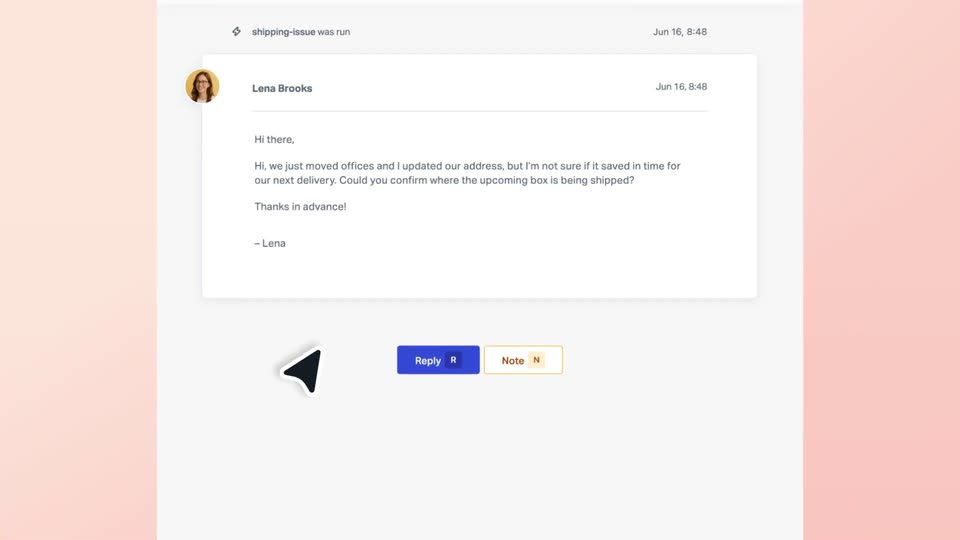
A light gray support ticket card showing an email from Lena Brooks sits on a peach gradient background. The card slides up a few pixels while a black cursor arrow glides from the blue Reply button down to the lower left. The motion is slow and locked-off.
Techniques: Cursor demo
Camera: Static
A white email thread sits on a pink background. A black cursor types 'Yes absolutely' into the reply box at the bottom, then a new email card from Sabrina Bachman drops in above the input field.
Techniques: Cursor demo
Camera: Static
A two-thread email list sits on a peach background. A red collision flag and a dark tooltip pop up on the second email, the first thread fades out, and a hand cursor opens a Retry/Edit/Dismiss menu, hovering Dismiss.
On-screen text: “Collision detected”, “We've held off sending this”
Techniques: UI zoom, Cursor demo
Camera: Pan
A white Routing settings card on a lavender gradient. A cursor scrolls down, selects Round Robin, types 8 in the limit field, and clicks Add Teammate, opening a grid of teammate cards. A green 'Changes saved' toast pops over the dimmed modal.
Techniques: UI zoom, Cursor demo
Camera: Pan
A white tags list with colored pills and counts fades in on a peach gradient as a cursor glides across the rows. The layout then slides left, revealing a second white panel with checkboxes at the right edge.
Techniques: Cursor demo
Camera: Pull out
A white automation card on a soft pink gradient starts zoomed in on the If field, then pulls back to show the full card. A cursor hovers the condition and action rows as a tag row and a blue Activate Workflow button appear, then clicks the button.
Techniques: Cursor demo, UI zoom
Camera: Pull out
A reporting dashboard assembles on a light lavender background as its panels slide into place, then the view scrolls down past stat cards and a bar chart to reveal two donut charts and breakdown tables.
Camera: Pull out
A Chat Report dashboard in 3D perspective settles on a lavender field as its line graph and two donut charts draw in. Bold black text reads “See volume” on the left and “as it rises” on the right, appearing word by word.
On-screen text: “See volume”, “as it rises”
Techniques: 3D mockup, Kinetic type
Camera: Push in
A flat analytics dashboard sits centered on a pale purple background. It morphs from a chat report to an email report, swapping the header, metric tiles, line chart and two donut charts. Black serif captions “See volume” and “as it rises” flank the panel and fade.
On-screen text: “See volume”, “as it rises”
Techniques: Morph
Camera: Static
A Zoho-style analytics dashboard floats in 3D on a lavender field, tilting and rotating as it swaps from an email report with line and donut charts to a happiness report with three score gauges. Large dark text reads Watch response times at right.
On-screen text: “Watch response times”
Techniques: 3D mockup
Camera: Static
A front-facing Happiness Report dashboard fills the frame with three ring gauges: a green 90% Great, a gray 0% Okay and a red 10% Not Good, above a small 81 score. The window eases upward into place, then drifts down to expose a second header bar at the bottom edge.
Camera: Static
Chat message cards with round avatars drift slowly across a cream background at varying depths. In the center, the black headline scales up from a faint letter into full size while the cards keep sliding.
On-screen text: “a few hundred conversations”
Techniques: Kinetic type, Parallax
Camera: Pull out
A horizontal row of circular headshot avatars, each in a soft colored ring, slides left across a plain cream background, with new faces entering from the right edge.
Camera: Static
A row of circular headshot avatars on pastel backgrounds scrolls slowly left across the top of a cream field, while the centered caption coordinating multiple teams sits below, the second line fading in.
On-screen text: “coordinating”, “multiple teams”
Camera: Static
On a light gray background, the gray caption “across thousands of requests” sits left of a large blue diagonal-stripe mark. The mark shrinks and slides left into the logo icon as the “Help Scout” wordmark settles in beside it, then the lockup holds.
On-screen text: “across thousands of requests”, “Help Scout”
Camera: Pan