1:15

Screenpipe YC Launch Video
Screenpipe · Sep 2026
Executor · Nov 2026 · 1:32 · AI-annotated
Executor’s 1:32 launch film runs 31 scenes, about 3.0 s each. The product shows up at 0:03 and 7 features are revealed. The call to action lands at 1:29 (97% in). A launch film for Executor that opens with a promise card, names the product inside a connection diagram, then tours six capabilities (Tools, Storage, Triggers, Skills, Workflows, UI) before a recap grid and a URL card. The recurring 'Introducing Apps' six-card grid acts as a hub: each feature is explored by zooming from the grid into a close-up UI or terminal demo, then pulling back, with statement cards ('Your agent builds it. Executor runs it.') as beats between demos. Motion language is calm
Is this your launch? to your site or press kit.
Screenpipe · Sep 2026
ElevenLabs · AI · Oct 2026
A light gray grid holds a centered black headline that gains a second line, then the headline fades as two columns of rounded app icons settle in at the left and right edges under small column labels.
On-screen text: “One place to connect all your agents”, “to everything you use.”, “agents”, “services”
Techniques: Kinetic type
Camera: Static
A grid diagram shows two icon columns, agents left and services right, joined by thin gray lines with small key marks. A black circle with a white E scales into the center, the lines re-route into curves through it, executor appears below, then the diagram fades to white.
Techniques: Morph
Camera: Static
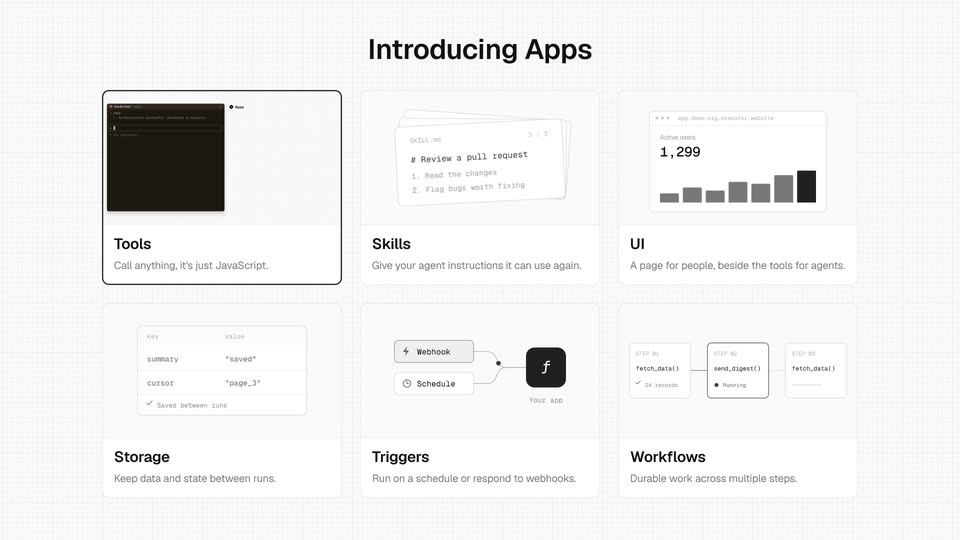
A 3x2 grid of feature cards fades in under the heading Introducing Apps on a light grid background. The Tools card highlights, then the frame zooms into a dark terminal displaying a connected prompt, with the Apps label at right.
On-screen text: “Introducing Apps”, “Tools”, “Call anything, it's just JavaScript.”, “Skills”, “Give your agent instructions it can use again.”, “UI”, “A page for people, beside the tools for agents.”, “Storage”, “Keep data and state between runs.”, “Triggers Run on a schedule or respond to webhooks. Workflows Durable work across multiple steps.”
Techniques: UI zoom
Camera: Push in
A dark terminal on the left types “add gmail, github and posthog” and prints an installed result, while the Apps panel on the right fills with Gmail, GitHub and PostHog cards; the terminal then fades out, leaving the list.
Techniques: Split screen
Camera: Static
A faint grid fills a light background. A centered dark gray headline sits mid-frame from the start, then a matching second line fades in directly below it. A small breadcrumb label sits in the top-left corner.
On-screen text: “Your agent builds it.”, “Executor runs it.”
Camera: Static
Split screen: a dark Claude Code terminal on the left types 'let's add a jev app', writes a file, and runs a deploy command. On the right, an apps list (Gmail, GitHub, PostHog) crossfades into a TypeScript code view and back. The two panels stay side by side throughout.
Techniques: Split screen, Morph
Camera: Static
A dark terminal window on the left logs a Claude Code session in monospaced text, while a light panel on the right lists four app cards for Gmail, GitHub, PostHog and Jev. The prompt cursor blinks at the bottom of the terminal.
Techniques: Split screen
Camera: Static
A black headline holds centered on a pale off-white grid background, with a small gray breadcrumb in the top-left corner. The frame is locked off and the text stays static throughout the shot.
On-screen text: “Your agent never sees the key.”
Camera: Static
A dark Claude Code terminal sits beside a browser window showing the Jev Connect modal with a masked API key. The cursor clicks Connect account, the button spins, then the modal reads Account connected while the terminal prints the completed status and a confirmation line.
Techniques: Split screen, Cursor demo
Camera: Static
A Gmail icon at the center of a white grid expands into a card listing four tool chips. Four AI app icons fade in on the left, linked by thin curves to the card; the search chip gains a dark outline, then the icons fade out.
Techniques: Morph
Camera: Static
On a light grid background, the tagline “Customization is a prompt away.” sits centered in dark gray sans. It is replaced by two rounded prompt chips, one with a purple flag icon and one with a GitHub icon, each carrying a short instruction.
On-screen text: “Customization is a prompt away.”
Camera: Static
Two white setting cards on a grid background expand vertically to reveal code snippets, each gaining a checkmark. The view then zooms out to a wide shot, revealing a six-card feature grid under the headline.
On-screen text: “Introducing Apps”
Techniques: UI zoom
Camera: Pull out
On a white grid canvas, a Claude Code avatar and message bubble fade in above an X app card with tool chips and a cache code block. A curved line draws to the search tool, which highlights as cache and X API nodes show timing labels.
Camera: Static
A zoomed-in caching diagram (Claude Code icon, X app card, code block, cache timing labels) sits on a graph-paper grid. The view pulls back to reveal the full feature grid, with Tools, Skills, UI, Storage, Triggers and Workflows cards and their captions.
On-screen text: “Cache X API responses so we pay less”, “Tools”, “Call anything, it's just JavaScript.”, “Skills”, “Give your agent instructions it can use again.”, “UI”, “A page for people, beside the tools for agents.”, “Storage”, “Keep data and state between runs.”, “Triggers, Run on a schedule or respond to webhooks.”
Techniques: UI zoom
Camera: Pull out
A six-card feature grid sits under the headline 'Introducing Apps' on a pale grid background. The Triggers card gets a black outline, then a white circular mask wipes from the right to reveal a trigger screen with a ChatGPT icon, a prompt pill and a code block.
On-screen text: “Introducing Apps”
Techniques: Masking
Camera: Push in
An automation builder UI: a prompt bubble on top, a code card left, a Gmail-to-Trash flow right. The Gmail card fills with a spam email, a 'spam 0.97' badge pops on the Jev card, the Trash card lights up 'moved to Trash', and the code lines highlight.
Camera: Static
A light grid background holds a two-column interface. The left column shows a code panel under Your agent writes and the right column lists action cards under What happens. The screen cross-fades from an email spam example to a GitHub issue example, swapping the headline, code, and cards.
Camera: Static
A light two-column workflow screen: a ChatGPT prompt bubble sits above a TypeScript code card on the left, three labeled cards stack on the right. The bottom T3 Code card fades from gray to solid, then the whole screen fades out.
Camera: Static
On a light grid, a ChatGPT prompt pill asks for a reminder. A code card types a cron schedule on the left; a reminder card and a notification slide in on the right. A bold headline appears below, then the camera pulls back to reveal the wider interface.
On-screen text: “No inference. Just code.”, “Give your agent instructions it can use again.”
Techniques: Kinetic type, UI zoom
Camera: Pull out
A white grid of six feature cards labeled Tools, Skills, UI, Storage, Triggers and Workflows snaps into place, the doubled ghosted text and borders resolving to a clean layout, with the central Skills card framed by a thick black border around a phone reminder mockup.
On-screen text: “Introducing Apps”, “Tools”, “Call anything, it's just JavaScript.”, “Skills”, “Give your agent instructions it can use again.”, “UI”, “A page for people, beside the tools for agents.”, “Storage”, “Keep data and state between runs.”, “Triggers, Run on a schedule or respond to webhooks.”
Camera: Static
On a pale grid, a Claude Code logo sits left of a white chat bubble that fills with a prompt, while a GitHub app card slides right and its tool pills reflow into two rows.
Camera: Push in
A light grid canvas holds a Claude Code prompt bubble and a SKILL.md card whose markdown lines type in one by one, beside a GitHub app card listing tool chips. At the end the layout scales down as a smaller duplicate fades in at the lower right.
Camera: Static
A column of app icons (Claude Code, Cursor, ChatGPT, Grok Bot) on a light grid each gains a 'pr-review' chip as lines draw to a shared skill card; a GitHub app card fills in with tools. The camera zooms out to reveal the page's 'Skills' heading.
Techniques: UI zoom
Camera: Pull out
A light grid of six feature cards, each pairing a small interface thumbnail with a title and one-line caption, sits under the headline Introducing Apps. A dark rounded selection ring jumps from the Skills card to the Workflows card as the grid drifts upward.
On-screen text: “Introducing Apps”, “Tools”, “Call anything, it's just JavaScript.”, “Skills”, “Give your agent instructions it can use again.”, “UI”, “A page for people, beside the tools for agents.”, “Storage”, “Keep data and state between runs.”, “Triggers, Run on a schedule or respond to webhooks.”
Techniques: Parallax
Camera: Static
A black Claude Code icon and a white prompt pill sit top left on a light grid. A white code editor card appears below and syntax-highlighted TypeScript types out line by line behind a blinking caret.
Camera: Static
A workflow screen pairs a code card with a progress card: numbered tiles flip to black checks, the DM counter ticks, a red crash banner flags page 13, then a restart note and Complete state appear. The screen ends on a six-card feature grid titled Introducing Apps, the UI card outlined in black.
On-screen text: “Introducing Apps”, “Tools”, “Call anything. It's just JavaScript.”, “Skills”, “Give your agent instructions it can use again.”, “UI”, “A page for people, beside the tools for agents.”, “Storage”, “Keep data and state between runs.”, “Triggers”
Camera: Pull out
A flat product interface on a light gray grid. The view holds on a feature panel titled UI with the Claude Code icon, then the layout swaps to a white chat bubble beside the icon carrying a typed prompt. The camera stays locked off and the text remains still.
Camera: Static
A white prompt bubble beside the Claude Code logo asks for a Superhuman-style inbox, above a light inbox fading in. The dark inbox mockup then scales up from center to fill the frame, and a new email row slides in at the top.
On-screen text: “Apps / UI”, “Claude Code”, “build me a Superhuman-style inbox that combines my X DMs, Gmail, and Outlook”
Techniques: UI zoom
Camera: Push in
A dark email inbox list, flat at first, rotates into a 3D tilt and slides right, opening space for a white GitHub app card on the left and a tagline along the bottom.
On-screen text: “UI”, “A page for people, beside the tools for agents.”
Techniques: 3D mockup
Camera: Pull out
A six-card grid of product interface screenshots settles onto a light gridded background, each card pairing a UI close-up with a bold label and gray tagline. A bold headline fades in above the grid, then the whole composition dims out.
On-screen text: “Tools”, “Call anything, it's just JavaScript.”, “Skills”, “Give your agent instructions it can use again.”, “UI”, “A page for people, beside the tools for agents.”, “Storage”, “Keep data and state between runs.”, “Triggers”, “Run on a schedule or respond to webhooks. No inference. Just code. Durable work across multiple steps. Workflows. Everything you and your agent need to get work”
Camera: Pull out
A light grid background holds the executor hero: a black circular logo with a serif E beside the wordmark, a bold headline, a gray label, a monospace URL with a Copy button, and a black button. The block blurs into focus, the button fades in, then it holds.
On-screen text: “Connect your agents once. Ask them for the rest.”, “https://mcp.executor.sh/mcp”
Camera: Static