1:04
Explore
Seyi - Introducing Showroom, an app that lets you see your designs in every
Showroom · Oct 2026 · 1:06 · AI-annotated
- Length
- 1:06
- Scenes
- 32 · 2.1 s avg
- Product on screen
- 0:03
- Features shown
- 3
- Call to action
- 1:01 · 94%
- Voiceover
- No
00:00:00 / 01:06:03
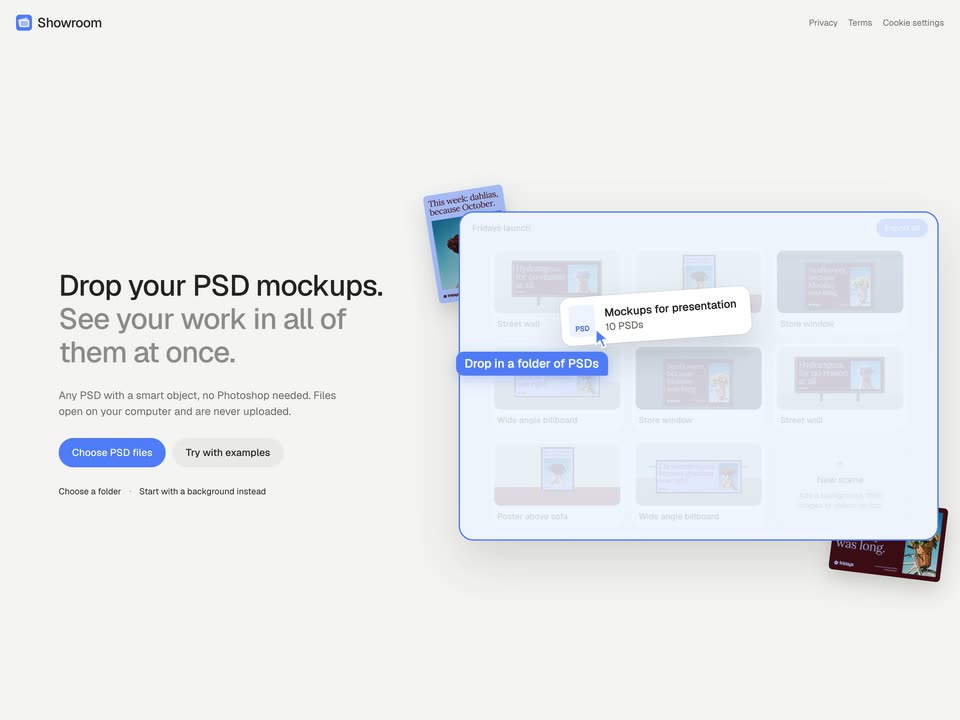
Showroom’s 1:06 launch film runs 32 scenes, about 2.1 s each. The product shows up at 0:03 and 3 features are revealed. The call to action lands at 1:01 (94% in). The video is a fast feature tour: a one second 3D hook and a logo card, then four labeled features (drop PSDs, editor controls, grid sync, video export) each shown inside the live interface, finished by a rapid montage of rendered mockups and a typed out URL. Its signature moves are the pull back camera reveals, the small blue tooltip callouts, and 3D tilted mockup cards floating on a soft off white field.
Footage neededEstimated needs: 5 capture groups — your screens or recordings · 4 filmed passages — shoot, supply or replace · 8 3D passages — build or supply
Is this your launch? to your site or press kit.
More like this
0:36
Omer Bar Tal - We raised a $7M pre-seed to make shopping fun again. @daletlabs gene
Dalet Labs · Oct 2026
1:32

Rhys - Today we're launching Executor v2 It's a massive overhaul to the pro
Executor · B2B · Nov 2026
Seyi - Introducing Showroom, an app that lets you see your designs in every, scene by scene
· 32 scenes as text
01 · Hook · 0:00–0:00
A 3D room mockup shows a framed dahlia poster above a brown leather sofa, with a surfboard and lamp at the sides. The camera pulls back and pans left to reveal a second framed image and a bottom bar reading the template name and a custom option.
Techniques: 3D mockup
Camera: Pull out
02 · Hook · 0:00–0:03
A design-tool screen opens zoomed into a grid of poster mockups, then pulls back to reveal the full workspace: a left column of image thumbnails and a top toolbar. A blue 'One design, every mockup' tooltip rests at lower left.
Techniques: UI zoom
Camera: Pull out
03 · Product intro · 0:03–0:03
Under the Showroom logo, the headline “Every mockup, done at once.” fades in on the left as a blue dahlia poster fades in on the right; a maroon sunflower card slides in from the bottom right, overlapping it, both cards tilted with soft shadows.
On-screen text: “Every mockup, done at once.”
Techniques: 3D mockup
Camera: Static
04 · Product intro · 0:03–0:05
A light background holds a two-line headline left, “Every mockup,” in black and “done at once.” in gray. Right, two tilted print mockups with drop shadows sit in 3D perspective, a blue dahlia poster behind a maroon sunflower card.
On-screen text: “Every mockup, done at once.”
Techniques: 3D mockup
Camera: Static
05 · Feature reveal · 0:05–0:06
A flat landing page on the left holds the headline Drop your PSD mockups while a 3D panel on the right shows a grid of mockup thumbnails. A cursor drags a folder card across the panel and a blue Drop in a folder of PSDs tooltip flashes beneath it.
Techniques: 3D mockup, Cursor demo
Camera: Static
06 · Feature reveal · 0:06–0:13
A light app screen shows a grid of ten mockup tiles filling in from gray placeholders while a cursor drags a file chip into the left sidebar. The tiles refresh with floral poster designs, then the view zooms onto one billboard tile, which gains a blue selection outline.
Techniques: Cursor demo, UI zoom
Camera: Push in
07 · Demo · 0:13–0:18
A red fridays billboard ad, headlined 'Hydrangeas, for no reason at all.' with a bouquet photo, fills a sunlit street. A blue selection frame outlines it with 'Screen' and 'Drag to fit' tags while a cursor drifts across the panel.
Techniques: Cursor demo
Camera: Pull out
08 · Demo · 0:18–0:18
A mockup editor fills the screen: a left panel of framing and scene controls, a central canvas showing a street billboard mockup with a hydrangea bouquet, and a thumbnail strip below. The view zooms in on the billboard as the panel edges scroll.
Techniques: UI zoom
Camera: Push in
09 · Demo · 0:18–0:23
A mockup editor shows a person lying on the ground in a t-shirt printed with a poster. The view reframes onto the colour panel as a cursor drags the hue slider, and the shirt cycles from white to red, orange and purple.
Techniques: UI zoom, Cursor demo
Camera: Static
10 · Demo · 0:23–0:28
A cursor drags the Shadow and Reflection sliders down in the left panel, softening the billboard's shadow and clearing its reflection on the road. The view zooms in on the street wall mockup as the values update live.
Techniques: UI zoom, Cursor demo
Camera: Static
11 · Demo · 0:28–0:31
A video player frame with a play button and timeline shows a maroon street billboard carrying the fridays logo, with a blue Screen tag hovering over it. The billboard fills with a blue photo of hands holding purple hydrangeas and a large serif headline, then the player chrome fades to full screen.
On-screen text: “Hydrangeas, for no reason at all.”
Techniques: UI zoom
Camera: Push in
12 · Demo · 0:31–0:33
A locked-off wide shot of an outdoor billboard on a tree-lined street. The screen shows a static flower ad, hands holding an orange bouquet against blue sky, beside a serif headline. A small blue Screen tag slides in at the top left corner.
On-screen text: “Screen”
Camera: Push in
13 · Demo · 0:33–0:33
A static screen of the mockup editor plays a maroon billboard ad whose white serif headline reads “No garden, fourth floor, fresh flowers.” The timeline ticks forward and a cursor hovers over the Done button.
Camera: Static
14 · Feature reveal · 0:33–0:36
A mockup grid in a design app fills the screen. A zoomed preview of a video billboard with a play button fades out to reveal the thumbnails, then a blue tooltip reading “Every change, on the grid” appears at the lower left.
On-screen text: “Every change, on the grid”
Techniques: UI zoom
Camera: Static
15 · Feature reveal · 0:36–0:39
A product interface shows a grid of mockup previews under the heading 10 mockups, with a left sidebar of small thumbnails. The cursor hovers over a billboard preview, raising a Drag to reorder tooltip, while the grid pans left to reveal more mockups.
Techniques: Cursor demo
Camera: Static
16 · Feature reveal · 0:39–0:41
A light “Showroom” interface shows a grid of billboard mockup thumbnails. The left panel shifts from image assets to a background settings block, and a blue arrow cursor glides toward an empty “Add a background” card at the bottom of the grid.
Techniques: Cursor demo
Camera: Push in
17 · Feature reveal · 0:41–0:43
A cursor navigates a design tool interface, selecting an image from the background options in the left panel. A toast notification confirms the background is set as the cursor moves to the add button.
Techniques: Cursor demo
Camera: Static
18 · Feature reveal · 0:43–0:44
A design tool screen shows a left control panel beside a grid of poster mockups, then the canvas swaps to an empty drop zone with a hand holding a dark red flower and a Pick a background button. A cursor hovers near the button.
Techniques: Cursor demo
Camera: Pan
19 · Feature reveal · 0:44–0:46
A locked-off editor interface shows a canvas with a photo of hands holding dark red flowers in brown paper against a blue sky. A cursor hovers near the top toolbar, a tooltip appears, then the cursor clicks the add button, opening a dropdown of image thumbnails.
Techniques: Cursor demo
Camera: Pan
20 · Feature reveal · 0:46–0:52
The view zooms onto a design canvas showing a teal photo of hands holding dark red flowers under a purple text box. The cursor selects the box and drags its corner handle to enlarge it, a Resize button following the pointer.
Techniques: UI zoom, Cursor demo
Camera: Push in
21 · Feature reveal · 0:52–0:57
A product editor screen shows a settings panel on the left and a slideshow preview on the right. A cursor picks a shape option, the preview frame resizes to the new ratio, the panel slides away, and the cursor clicks Export video, opening a progress dialog.
On-screen text: “Export a video in any shape”
Techniques: Cursor demo
Camera: Push in
22 · Demo · 0:57–0:57
Low-angle locked-off shot of a large lavender billboard mounted on a red brick apartment building. Dark red serif copy fills the panel, with a flower logo and the word fridays in the lower left corner. The frame holds still.
Camera: Static
23 · Demo · 0:57–0:58
A maroon billboard on a tree-lined street shows a periwinkle serif headline beside a square photo of hands lifting purple hydrangeas against blue sky. The small white fridays wordmark slides in at the lower left while the camera stays locked off.
On-screen text: “Hydrangeas, for no reason at all.”, “A new bunch every Friday fridays.flowers”, “fridays”
Camera: Static
24 · Demo · 0:58–0:58
Wide locked-off shot of a lavender billboard on a street wall, dark serif headline reading Chrysanthemums, because grandma was right. A photo of hands holding an orange chrysanthemum bouquet sits at right, and a blue caption pill reads Made in your browser, nothing uploaded at the bottom left.
On-screen text: “Made in your browser, nothing uploaded”
Camera: Static
25 · Demo · 0:58–0:58
A street-level view of a brick building holds a wide maroon billboard mockup in perspective, its serif headline and a window photo of a woman with red flowers held static. A blue pill caption sits at the bottom edge of the frame.
On-screen text: “No garden, fourth floor, fresh flowers.”, “Made in your browser, nothing uploaded”
Techniques: 3D mockup
Camera: Static
26 · Demo · 0:58–0:59
Low-angle locked-off shot of a building corner under a blue sky. A facade billboard shows a hand passing a wrapped bouquet, with the headline Left on your doorstep before lunch and the fridays logo below. A blue pill at bottom left reads Made in your browser, nothing uploaded.
On-screen text: “Made in your browser, nothing uploaded”
Camera: Static
27 · Demo · 0:59–0:59
A lavender card with a maroon serif headline sits over a teal backdrop where hands hold a wrapped bunch of dark red flowers. A blue caption pill reads at the lower left, and the card carries the fridays mark and a small tagline. The frame is locked off with no motion.
On-screen text: “Fresh on Friday.”, “Still lovely”, “on Thursday.”, “A new bunch every Friday”, “fridays.flowers”, “Made in your browser, nothing uploaded”, “Left on your doorstep”, “before lunch.”
Camera: Static
28 · Demo · 0:59–1:00
A framed poster on a wooden wall shows two hands holding white anemones against a blue sky, with a serif headline above and the fridays logo below. A blue pill caption sits at the lower left.
On-screen text: “Made in your browser, nothing uploaded”
Techniques: 3D mockup
Camera: Static
29 · Demo · 1:00–1:00
A framed poster on a wall above a leather sofa shows a bouquet of dark flowers. The poster's headline text swaps from a dahlia message to an anemone message, while a blue caption at the bottom left stays static.
On-screen text: “Made in your browser, nothing uploaded”, “This week: dahlias,”, “because October.”, “fridays”, “This week: anemones,”, “because they’re back.”
Techniques: Kinetic type
Camera: Static
30 · Demo · 1:00–1:01
A lavender construction-fence banner reads Fresh on Friday. Still lovely on Thursday. in maroon serif, flanked by flower photos, with the fridays logo below. Concrete steps and a dark glass façade frame the static shot; a blue caption pill sits bottom left.
On-screen text: “Made in your browser, nothing uploaded”
Camera: Static
31 · Demo · 1:01–1:01
A wide locked-off shot of a city street; a maroon billboard reads “Before lunch, every Friday.” in periwinkle serif beside a flower-bucket photo, as a cyclist rides past and a blue caption pill fades at lower left.
On-screen text: “Made in your browser, nothing uploaded”
Camera: Static
32 · CTA · 1:01–1:06
A blue rounded app icon with a white monitor mark sits top-left on a light gray field. The word showroom.design types out beneath it with a blinking blue cursor, then two gray tagline lines fade in below it.
On-screen text: “showroom.design”, “Drop your PSD mockups.”, “See your work in all of them at once.”
Techniques: Kinetic type
Camera: Static