1:15

Screenpipe YC Launch Video
Screenpipe · Sep 2026
Pond · Oct 2026 · 1:04 · AI-annotated
Pond’s 1:04 launch film runs 27 scenes, about 2.4 s each. The product shows up at 0:02 and 7 features are revealed. The call to action lands at 0:56 (88% in). The video is built as a chain of plain white title cards, each a single centered sentence, followed by a tight UI demo that fills the frame. Pacing is slow and deliberate, with word-by-word text reveals, drifting thumbnails that snap into grids, and the Pond mark bookending the piece.
Is this your launch? to your site or press kit.
Screenpipe · Sep 2026
Polar Browser · Oct 2026
Vercel · Developer tools · Oct 2023
On a white field, a scattered collage of small image and video thumbnails fades in around the edges, drifting slowly, while a single centered line of black text holds still.
On-screen text: “The web is a sea of information.”
Camera: Static
Small photo thumbnails with tiny corner badges float in a loose ring around the edges of a white canvas, drifting slowly. The centered caption holds still in the open middle, framed by the moving collage.
On-screen text: “The web is a sea of information.”
Camera: Static
On a pale background, a ring of small photo thumbnails shrinks and fades toward the center, leaving the black Pond logo. The logo slides left while the wordmark Pond blurs in beside it.
On-screen text: “Pond”
Camera: Static
A black four-lobed mark with a white square center sits left of the word Pond in a sans-serif face, centered on a plain white field. The frame holds still.
Camera: Static
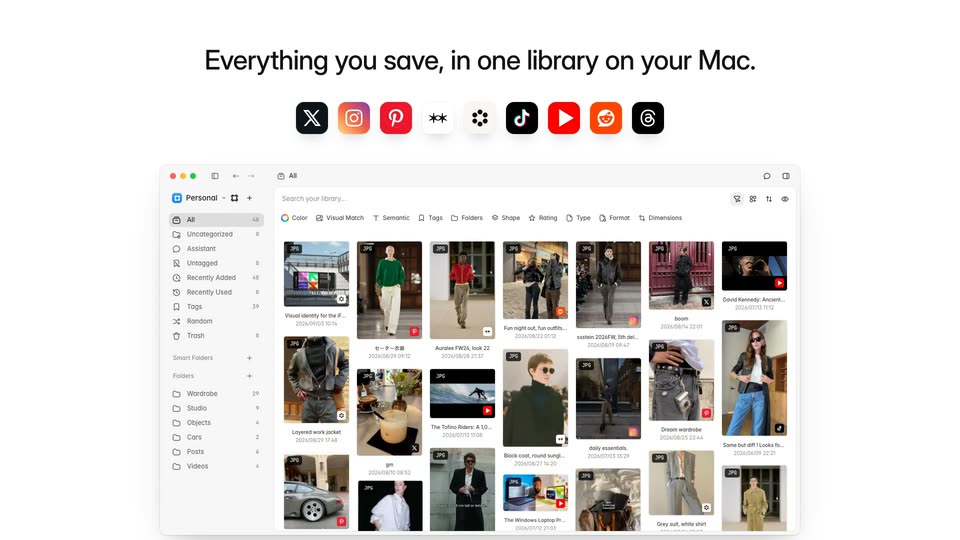
A blurred Pond logo and empty window sharpen into the app interface as a row of source app icons fades in above it. Thumbnails drop from the icons into the grid, filling the library beneath the headline.
On-screen text: “Everything you save, in one library on your Mac.”
Camera: Static
A line of text fades in word by word on a plain white background.
On-screen text: “Like or bookmark as usual. Pond keeps a copy.”
Techniques: Kinetic type
Camera: Static
A single centered line of text on a plain white background fades in from left to right, the first phrase dark before the second catches up to full black.
On-screen text: “Like or bookmark as usual. Pond keeps a copy.”
Techniques: Kinetic type
Camera: Static
A browser window shows an X post with a photo of two coffee drinks. The view zooms onto the photo, which lifts out of the page as a tilted 3D card with a soft shadow while the rest of the interface dims.
Techniques: UI zoom, 3D mockup
Camera: Push in
A light feed panel with a search bar and a Relevant people card sits on a white background. A drink photo slides down and shrinks into a Saved to Pond toast, a green check pops on the blue app icon, then the whole frame blurs out.
Techniques: Morph
Camera: Push in
A small line of dark grey text on a white background reveals itself from left to right, completing the sentence.
On-screen text: “Local-first. Every save is a file you own.”
Techniques: Kinetic type
Camera: Static
A Finder-style window on white is overlaid by a large headline that staggers in, then fades. The view drills into nested folders, a cursor selects media-1.jpg and a preview pane slides in, all while the window slowly zooms.
On-screen text: “Local-first. Every save is a file you own.”
Techniques: Kinetic type, Cursor demo, UI zoom
Camera: Static
A centered sentence builds word by word on a plain off-white field. The first two words, Every save, land in black, then is analyzed on-device. follows in light gray, holding still once complete.
On-screen text: “Every save is analyzed on-device.”
Techniques: Kinetic type
Camera: Static
A single line of black text holds centered on a plain white background, static and locked off, then fades to a faint gray near the end of the clip.
On-screen text: “Every save is analyzed on-device.”
Camera: Static
On a light gray background, a billboard photo sharpens in on the left while a metadata card on the right fills row by row with caption, in-image text, title, a color strip, style bars and tag chips. White ring markers pop onto the photo to flag regions.
Camera: Static
A blurred desktop app fades into sharp focus, revealing a left sidebar of folders and a grid of saved images and articles. A centered caption stays fixed over the interface as it sharpens.
On-screen text: “Search everything you've ever saved.”
Camera: Static
A Mac library window fills the frame. A cursor types fall outfits in the search bar and the thumbnail grid swaps to outfit photos. The view zooms in as the cursor opens the Color picker and drags a warm swatch, then pulls back to the grid filtered to tan-toned images.
Techniques: Cursor demo, UI zoom
Camera: Static
A flat file manager window showing a grid of fashion outfit thumbnails blurs and dissolves to white while the gray headline 'Bring your' fades in at the center.
On-screen text: “Bring your”
Camera: Static
A centered line of dark gray sans-serif text fades in from left to right on a plain off-white background, locking off once the full sentence reads solid.
On-screen text: “Bring your favorite Al to your saves.”
Techniques: Kinetic type
Camera: Static
A flat product window opens with a gray tagline centered in the chat pane, then the line clears as a cursor types a question into the input box and sends it. The interface answers with a list of three saved items, and the view zooms in on the reply.
On-screen text: “Bring your favorite AI to your saves”
Techniques: Cursor demo, UI zoom
Camera: Push in
A chat interface displays a user query bubble on the right asking what was saved for the studio. On the left, a checkmark and 'Found 3 saves' sit above a summary sentence and three result cards with small thumbnails and labels. The layout stays static.
Camera: Static
A blurred product interface fades out to a plain white field as the headline types in word by word at the center, then holds as a static line.
On-screen text: “Plug your library into any MCP client.”
Techniques: Kinetic type
Camera: Static
A single line of dark sans-serif text sits centered on a plain off-white background, held completely static for the duration of the shot.
On-screen text: “Plug your library into any MCP client.”
Camera: Static
A centered, static macOS-style window titled 'cloud ~/studio/lookbook' on white. A prompt line types a command, then a code line and 'Found 4 saves' appear over four fashion thumbnails. A summary sentence scales in at the bottom.
Techniques: Kinetic type
Camera: Static
A white chat card, showing a Pond search for black coat references and four photo thumbnails, fades out. Behind it a grid of feature cards scales in, including 3D Models, Local API, and a central And card, with a left column listing file types.
Camera: Static
A five-by-three grid of feature cards populates with interface snippets, from a search list to a waveform, while the centered headline shifts from light gray to solid black. The font specimen card cycles through letterforms.
On-screen text: “And a lot more.”
Camera: Static
A near-white frame holds a single centered line of gray sans-serif text. The words fade in one by one from left to right, darkening as they arrive, until the full sentence is legible.
On-screen text: “The invisible layer between collecting and organizing.”
Techniques: Kinetic type
Camera: Static
Centered black type on white reads “The invisible layer between collecting and organizing.” The letters scatter and reassemble into “Give it a try. It’s free and open source.” The line clears, then a small four-lobed mark with a rounded-square center appears, darkens from gray to black, and fades out.
On-screen text: “The invisible layer between collecting and organizing.”, “Give it a try. It's free and open source.”
Techniques: Kinetic type
Camera: Static