1:30

Announcing Discord Sound Packs ft. Lil Yachty
Discord · Consumer · Apr 2021
Microsoft’s 1:01 launch film runs 30 scenes, about 2.0 s each. The product shows up at 0:01 and 5 features are revealed. There is no explicit call to action. The video sharpens from an abstract tumble into the Copilot home, then runs five feature demos as 3D-tilted cards orbit on pastel gradients, each triggered by a typed prompt in a pink-glow bar. Cuts track a 118 BPM pulse with quick zooms, rack-focus reveals and a paper-plane cursor, closing on a dusk-ocean prompt montage and the Microsoft logo.
Is this your launch? to your site or press kit.
Discord · Consumer · Apr 2021
Loom · Productivity · Jan 2024
Films whose music sounds like this one, voice left out
PixVerse · Cinematic hybrid, blending orchestral and electronic elements
Apollo · Electronic, Cinematic
Aucert · Upbeat corporate electronic
A slender blue bar with a dark red tip tumbles and shrinks in the upper left of a soft pastel gradient, spinning as it recedes until it fades to a point.
Techniques: 3D mockup
Camera: Static
A blurred, overexposed Microsoft 365 home sharpens into focus, revealing the Copilot chat screen with a grid of prompt cards. A cursor glides to the bottom-right card, which lifts with a drop shadow and a pink glow along its base.
Techniques: Cursor demo
Camera: Push in
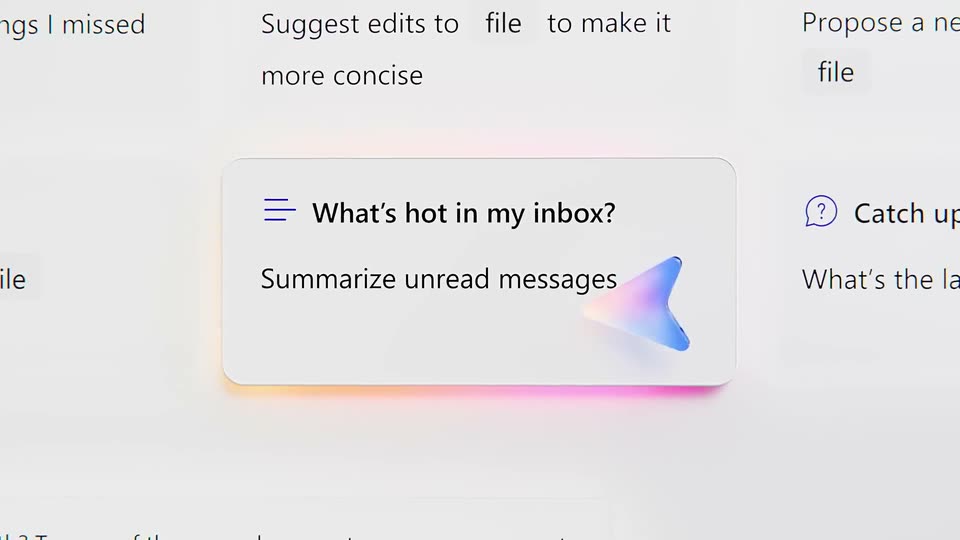
A grid of prompt suggestion cards on a light background zooms in on the central card, which shows a list icon and the line What's hot in my inbox? with a subtitle, while a gradient 3D arrow bobs over its corner and a pink glow pulses beneath it.
Techniques: UI zoom
Camera: Push in
A tilted 3D panel of a People list floats on a soft pink-blue gradient. The rows shift as a blue text caret appears in the command bar below, where the name Kayo Miwa is typed after the prompt Summarize unread messages from.
Techniques: 3D mockup, Cursor demo
Camera: Pull out
A 3D spreadsheet view tilts and pans as four colored ribbons, blue, green, orange and magenta, curve across it, each carrying 3D app icons and avatars. A white pill with a text prompt floats at the center.
Techniques: 3D mockup, Parallax
Camera: Pull out
A 3D weave of colored ribbons carries floating UI pills and avatar chips as the camera pulls back to reveal the full loop, then zooms in with motion blur and resolves into a gradient loop logo beside a white card.
Techniques: 3D mockup, UI zoom, Morph, Speed ramp
Camera: Pull out
A gradient ribbon logo and a white rounded toast card with a pink progress bar slide left across a pale lavender background. The card carries the line “Combing through the info...” and ends centered as the logo exits frame left.
On-screen text: “Combing through the info...”
Techniques: Kinetic type
Camera: Pan
A white summary card with a glowing pink border floats in 3D perspective over a pastel gradient dotted with floating 3D shapes. The card rotates and scales toward a front-facing angle as its body text sharpens into focus.
Techniques: 3D mockup
Camera: Push in
A white Plugins card floats in 3D perspective on a soft lavender gradient. A glassy cursor slides in and taps the Jira Cloud toggle, which flips to an orange gradient as the card tilts toward the camera.
Techniques: 3D mockup, Cursor demo
Camera: Static
A rounded white input bar with a pink and yellow gradient border floats in 3D perspective over a pale lavender background with soft 3D cubes. The Jira ticket prompt types out letter by letter, then the bar flattens into a thin strip as it recedes.
Techniques: Kinetic type, 3D mockup, Parallax
Camera: Pull out
A rounded prompt pill with a pencil icon floats in 3D over a soft pink-to-lavender gradient, tilted angled paper cards drift in the background, and a result card with a smiley icon settles into view below at an angle.
Techniques: 3D mockup
Camera: Pull out
A prompt bar and a Jira ticket card float in 3D over a lavender gradient with soft geometric shapes and a glowing cursor. The card tilts from an angled perspective to a flat front view, then fades out.
Techniques: 3D mockup
Camera: Pull out
A white email card showing a follow-up message and a Draft a reply button floats in 3D perspective, edged with a pink-orange glow and a paper airplane icon. The frame starts soft and tilted, then racks focus as the card sharpens against a blurred Copilot panel.
Techniques: 3D mockup
Camera: Push in
A 3D-tilted email card floats on a white background, its body text and a Draft a reply field in sharp focus while the right column blurs into depth. A glowing gradient border shifts from red to pink and blue as the camera eases around the card.
Techniques: 3D mockup
Camera: Pan
A 3D angled close-up of a tablet shows an AI email workspace with a message on the left, a draft box and a notes panel on the right. The view pans right with a brief ghosted echo on the text over a pink-orange gradient edge.
Techniques: 3D mockup
Camera: Push in
A white document page in 3D perspective, softly out of focus, with body copy and two suggestion pills. A small gradient arrowhead moves across the page and draws a magenta curve as the camera pans right and pushes in.
Techniques: 3D mockup, UI zoom
Camera: Push in
A white email card with a pink border fills with typed text as a blue cursor moves around it. A gray instruction pill floats above, and a second input bar with placeholder text slides in below.
On-screen text: “Draft a reply and say I'm happy to chat further on a call.”
Techniques: Cursor demo
Camera: Pull out
A 3D blue arrow hovers over the Edit in Outlook button on an email card, then the view pulls back to reveal the full message with bulleted research takeaways. The card rests on a light blue field with a glowing pink lower edge.
Techniques: 3D mockup, UI zoom
Camera: Pull out
An email client window floats in 3D space over a soft blue gradient, rotating from a side angle to face the camera. Small 3D shapes, an orange cube, pink sphere and purple arrow, drift at different depths around it. The open message shows customer research results with bolded percentages.
Techniques: 3D mockup, Parallax
Camera: Static
A 3D-tilted Outlook email sits in perspective, a pink prompt bar overlapping it. The camera pushes in on the prompt field, where a sentence types out and a Word document chip appears beside a row of icons.
Techniques: 3D mockup, UI zoom
Camera: Push in
A white prompt bar with a pink rim floats in 3D among pastel blocks, showing a typed command and two file chips. It morphs into a document card with a generated event plan and schedule, the prompt shrinking into a small bubble above. The camera slowly orbits.
Techniques: 3D mockup, Morph, Parallax
Camera: Pan
A tilted 3D tablet screen shows a document beside an AI chat panel listing event times. The prompt “Rewrite the intro to be more professional” types into the input bar, a blue cursor taps send, and the camera drifts as the screen blurs out of focus.
Techniques: 3D mockup, Cursor demo
Camera: Pull out
A tilted close-up of a light document with shallow depth of field, edges blurred. The heading and schedule list scroll slowly upward while the camera holds the diagonal angle, reading through the event timetable.
On-screen text: “Woodgrove Groceries: Recipe”, “Bellow is a comprehensive schedule for the upcoming launch event for Woodgrove box subscription service. Our main goal is to build organic coverage in the press”, “social media. We will be following the timetable closely so that every timing and this event matches our usual high standards.”, “5.30pm: Registration”, “6.00pm: Cocktail and canapé service begins”, “6.15pm: Welcome address from CEO”, “6.45pm: Cookery demo with chef Christelle van Zyl”
Camera: Pull out
A white input card floats in 3D perspective on a soft blue-to-pink gradient. The phrase types out letter by letter, then a 3D arrow cursor glides in and taps the paper-plane send icon at the corner.
Techniques: 3D mockup, Cursor demo
Camera: Static
A fanned stack of paper sheets with cutout leaf shapes rotates in 3D space against a pale gradient background. The top cream sheet reads LAUNCH EVENT in thin outlined type, a pink sheet shows Launch Event in bold sans, and the stack tilts edge-on by the end.
Techniques: 3D mockup
Camera: Pull out
A Word document with a Copilot side panel sits in 3D perspective on a pale gradient background as the camera orbits it. Floating suggestion chips drift in above the page while the document tilts and recedes.
Techniques: 3D mockup, Parallax
Camera: Pull out
A calm ocean at dusk fills the frame, its sky a gradient of blue and pink. White rounded prompt chips float at varying depths, drifting and scaling as the camera moves through them, while a small bird crosses the sky.
On-screen text: “Help me prep for...”, “Rewrite this to sound more professional”, “Give me ideas for...”, “Summarize this article...”, “Create a presentation...”
Techniques: Parallax
Camera: Pull out
A glowing purple column of light over a sunset sea condenses into a slim dark phone standing in the water, mirrored below. White prompt pills float at varying depths and drift apart as the camera pulls back.
Techniques: Parallax, Morph, 3D mockup
Camera: Pull out
A gradient sunset sky over a still ocean. A vertical bar with a purple top stands at center, mirrored in the water, while white pills with faint text float at varying depths. The camera pulls back; the bar shrinks to a horizon point and the pills drift apart and blur.
Techniques: Parallax
Camera: Pull out
A thin gray caret sits centered on a white field. The four-square Microsoft mark fades in at left while the word Microsoft types out letter by letter to its right, ending on a blinking caret.
Techniques: Kinetic type
Camera: Static