1:07

SaaS Product Explainer Video Energy Management Software | Arcus Power x MotionCue
Arcus Power · Jul 2026
Loom · Jan 2024 · 0:38 · AI-annotated
Loom’s 0:38 launch film runs 13 scenes, about 3.0 s each. The product shows up at 0:00 and 4 features are revealed. The call to action lands at 0:35 (92% in), over a voiceover. The video alternates 3D rendered mockups with flat UI close-ups, zooming in and out of Loom cards to introduce each AI feature in turn. Signature moves include blurred zoom transitions, tilted 3D cards, drifting iridescent spheres and hand-drawn red annotations.
Is this your launch? to your site or press kit.
Arcus Power · Jul 2026
Noodle Seed · Oct 2026
Slack · Productivity · Nov 2023
A browser window mockup on a wavy magenta gradient shows a pink 3D scene of spheres, a cube and a letter G balanced on planks. A dark toolbar lines the left edge as a circular thumbnail of a woman slides in from the right.
Camera: Pull out
A dashboard mockup sits in a browser window with a presenter's webcam circle top right; a hand cursor clicks the orange record button on a left toolbar. The frame then zooms out to a rounded purple player, adding an emoji reaction bar and comment buttons below.
Techniques: Cursor demo, UI zoom
Camera: Pull out
A Loom editor settles into frame after a blurred zoom-out. A dashboard mockup with a pink donut chart and two metrics sits left, a circular talking-head video overlaps its corner, a right sidebar lists Loom AI actions. Glowing spheres drift up across the screen at the end.
Techniques: UI zoom
Camera: Pull out
A white Loom AI wordmark with a small spark stays centered over a blurred purple dashboard and soft spheres. The frame is locked off as a brief sign-off.
On-screen text: “Loom AI+”
Camera: Static
A Loom widget sits centered on a dark purple field of floating iridescent orbs. Its Loom AI wordmark swaps to a circular video of a man in a yellow shirt as the timer ticks to 0:02, while a white Dashboard Demo card with metrics slides in behind.
On-screen text: “Loom AI”
Techniques: Morph, Parallax
Camera: Static
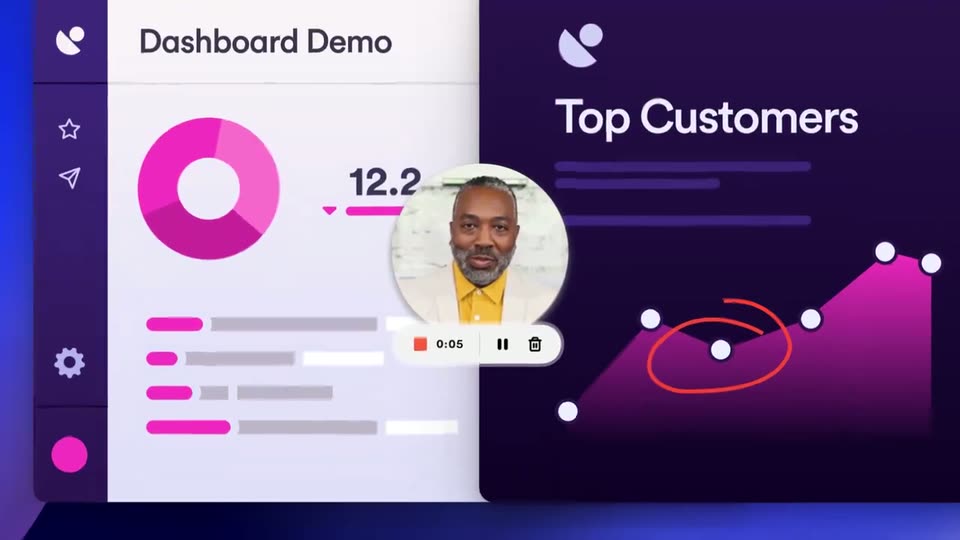
A two-panel dashboard, white card left and dark chart right, holds a circular video bubble of a man in a yellow shirt with a hand cursor below. A red circle traces a dip in the line chart, then the frame pulls back to a tilted 3D tablet on blue.
Techniques: Cursor demo, 3D mockup
Camera: Pull out
A rounded Loom card holds a dashboard demo video with a circular presenter thumbnail and an emoji reaction bar. The camera zooms into the Quick Adjustment! header, then eases down to expose a summary paragraph and a code review panel.
On-screen text: “Quick Adjustment!”
Techniques: UI zoom
Camera: Push in
A product interface card shows a presenter video, a pink line chart with a red circle annotation, and an emoji comment bar. White labels 'Code Review' and 'Bug Fix!' cross-fade over the timeline, then the card tilts in 3D and slides left, revealing a 'Top Customers' heading.
On-screen text: “Code Review”, “Bug Fix!”, “Top Customers”
Techniques: Kinetic type, 3D mockup
Camera: Pan
A Loom interface shows a Top Customers video slide beside an Edit panel where a cursor taps a Copied button, then switches to the Activity tab to reveal a task list. The view zooms out to a full dashboard with a presenter avatar and a reaction bar.
Techniques: Cursor demo, UI zoom
Camera: Pull out
The Loom interface opens on a tilted dashboard mockup beside a transcript panel, a hand cursor tapping the Transcript tab. The view then pans and zooms right, framing the transcript where the filler word umhhm is boxed in purple.
Techniques: Cursor demo, 3D mockup, UI zoom
Camera: Push in
The product UI shows a video preview of a “Top Customers” slide beside a transcript panel. The filler word “uhmmm” glows in a purple pill, morphs, and drops out of the text. A “Hallå!” caption bubble pops over the video as faint multilingual greetings fade in.
On-screen text: “Ciao!”, “Hello!”, “Bonjour!”, “Hallå!”, “Olá!”
Techniques: Morph
Camera: Static
A Loom interface shows a dark Top Customers video card with a pink line chart circled in red, plus a transcript panel on the right. White pill speech bubbles with greetings in many languages, some blurred, slide across the frame at different depths while the camera stays locked off.
On-screen text: “Hallå!”, “Olá!”, “Hej!”, “Hallo!”, “¡Hola!”, “Ciao!”, “Hello!”, “Bonjour!”, “Привет!”, “Hey!”
Techniques: Kinetic type, Parallax
Camera: Pan
On a dark purple gradient, iridescent 3D spheres drift across the frame while blurred chat bubbles slide out of the top corners. The Loom AI wordmark brightens from dim purple to white in the center, and a small purple four-pointed sparkle pops in beside it.
On-screen text: “Loom AI”
Techniques: Parallax
Camera: Static