1:22

Simulithic (YC F26) Launch Video
Simulithic · B2B · Oct 2026
Aucert · Oct 2026 · 1:36 · AI-annotated
Founder interviews in a warm wood-and-leather office alternate with fast cream-and-green motion graphics and dark UI fly-throughs, cut at roughly nine cuts per minute. Signature moves are typed caption bars, green glow outlines on interface panels, and 3D perspective tilts on screens and laptops.
Simulithic · B2B · Oct 2026
Assuryn · Jul 2026
JobWriter · May 2026
Static two-shot of two men in black t-shirts seated in leather armchairs before a wood-slat wall; the left one gestures while speaking. A wall display shows the Aucert.ai logo. White name tags and subtitles slide in along the bottom.
On-screen text: “aucert.ai”, “Vivek”, “Co-Founder, Aucert”, “Rajesh”, “Co-Founder, Aucert”, “On mobile, you don't decide”, “when a fix reaches your users.”
Camera: Pull out
Two men in black t-shirts sit in leather armchairs in an office, a wall screen behind them shows the Aucert.ai logo. The man on the left gestures while speaking, the right man sits still. A large overlay reads USERS DO across the center of the frame.
On-screen text: “USERS DO”
Camera: Push in
A tilted phone mockup floats over a dotted beige background behind the faint headline USERS DO. Its screen shows an app update page; the gray Update button flips to a green check as duplicate screens line the sides, and a gray caption bar types Millions of at the bottom.
On-screen text: “USERS DO”, “Millions of users have to update the app individually,”
Techniques: 3D mockup, Kinetic type, Split screen
Camera: Static
A close grid of phone screens showing an app update page fills the frame, then zooms out to a world map built from the same screens and small gray and green squares. A caption bar stays at the bottom.
On-screen text: “Millions of users have to update the app individually,”
Camera: Pull out
A pixelated world map of gray and green squares sits on a white background. The map blurs out as a gray caption bar with white text appears at the bottom and vanishes, then a large white line, 'that can take months,' fades in at the center and fades out.
On-screen text: “Millions of users have to update the app individually,”, “that can take months.”
Camera: Pull out
Two men in black brand T-shirts sit in leather armchairs, speaking to camera in front of a wall screen showing the aucert.ai logo. The camera slowly pushes in on the pair, then the shot fades to white.
On-screen text: “that can take months.”, “The best mobile teams spend weeks on every single release.”
Camera: Push in
A cream timeline lists four teams, Design, QA, Security, Compliance, each with a small clip of people at a meeting. Green bars fill to check marks for Design and QA, orange bars lag for Security and Compliance, and a gray caption box types the narration below.
On-screen text: “Different teams. The same release.”, “QA, design, security, compliance”, “Individuals tapping through every single flow before anyone signs off.”
Camera: Static
Two men in black t-shirts sit in leather armchairs before a wall screen showing the Aucert logo. The speaker on the left gestures while talking, and a large aucert.ai wordmark appears centered over the frame.
On-screen text: “That is why we built Aucert,”, “aucert.ai”, “a team of AI experts.”
Techniques: Kinetic type
Camera: Pull out
A bearded man in a black t-shirt sits at a wooden table with a laptop, talking to camera in a bright room with white curtains. The shot cuts to the avcert.ai dashboard, a dark interface showing a node graph between two side panels.
On-screen text: “Working with them is simple.”, “Point them at your build”
Camera: Static
A presenter in a black tee sits at a laptop in a bright room while a dark product interface floats in 3D perspective behind him. The interface zooms in on its node map of green dots, ending on the Start scan panel.
On-screen text: “Point them at your build.”
Techniques: 3D mockup, UI zoom
Camera: Push in
A dark node-graph interface sits tilted on a laptop in 3D, then zooms flat to full frame as a Start scan panel opens with a prompt and a text field typing a build note. A white caption sits in a black bar at the bottom throughout.
On-screen text: “Start a scan and they get to work.”, “Point them at your build”
Techniques: 3D mockup, UI zoom
Camera: Static
Aucert.ai's dark dashboard fills the screen. A node map animates center as the scan counter ticks, and the right panel swaps one phone for two phones running the morrow app, finishing with a green outline around them. A presenter video inset sits lower left; captions cycle at the bottom.
On-screen text: “Start a scan and they get to work.”, “They use the app like a real person would.”, “Tapping, typing, screen by screen on their own.”
Camera: Pull out
A dark scanning dashboard fills the frame: a node graph updates in the center while two phone mockups on the right cycle through app screens. A man at a laptop appears in a small webcam box at lower left; a white caption bar sits at the bottom.
On-screen text: “Tapping, typing, screen-by-screen on their own.”
Techniques: Cursor demo
Camera: Static
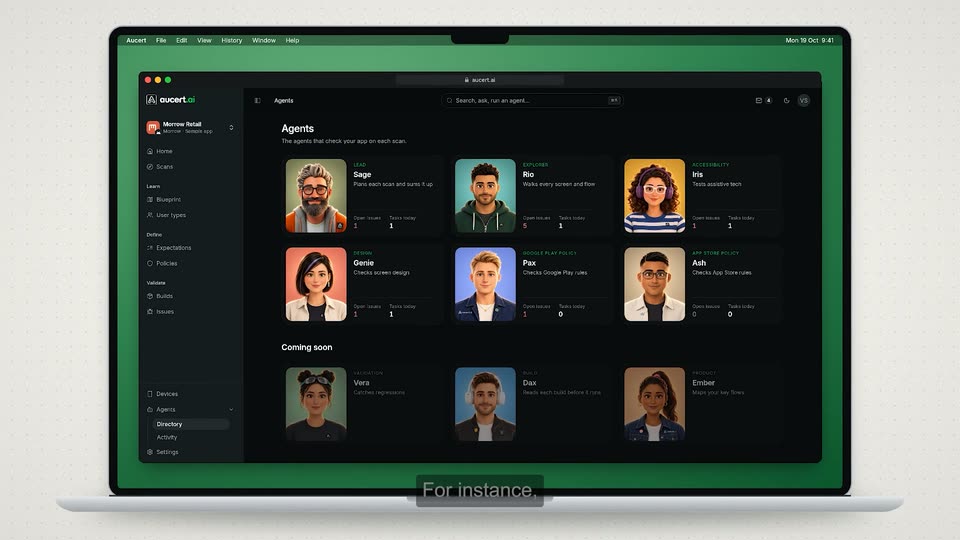
A white laptop in 3D perspective shows a dark app screen on a plain background. A grid of illustrated agent cards populates row by row. The view then zooms into the grid as a green outline highlights the Pax card. Subtitles caption the narration at the bottom.
On-screen text: “The team has multiple AI expert agents.”, “For instance,”
Techniques: 3D mockup, UI zoom
Camera: Push in
A dark grid of agent cards reframes from the Pax card to the Iris card, which gains a green glow. Skill pills pop in beneath each card as the bottom caption switches from “Pax knows Google Play Store policies inside out.” to “Iris understands accessibility policies.”
On-screen text: “Pax knows Google Play Store policies inside out.”, “Iris understands accessibility policies.”, “They learn your product.”
Techniques: UI zoom
Camera: Pan
A dark dashboard scrolls down through a node graph, context rows, and a grid of phone screens, then cuts to an issues list where one row glows green. A webcam inset sits bottom left while a cursor moves over the interface.
On-screen text: “They learn your product.”, “Connect the dots.”, “And define what they should test.”, “Then they validate your build.”, “and catch what's easy to miss.”, “Like a Play Store policy violation”, “that would have blocked the release.”
Techniques: Cursor demo
Camera: Pull out
A dark issue-detail screen holds still while a glowing green outline traces the Evidence panel, then jumps to the Triage panel. A white caption at the bottom swaps from one line to the next. A small picture-in-picture video of a man at a laptop sits in the lower left.
On-screen text: “You see exactly what broke with the evidence.”, “And your team decides what ships.”
Camera: Static
A dark issue detail page fills the frame, a triage panel on the right glowing green. A cursor slides from the Mark fixed button to Assign. A small video of a presenter at a laptop sits bottom left, and a white caption reads at the bottom.
On-screen text: “And your team decides what ships.”
Techniques: Cursor demo
Camera: Static
A bearded man in glasses sits at a table with a laptop, talking to camera in a bright room. Bottom captions build, then a large white headline scales in beside him, 'actual' in green. It cuts to two men before a screen showing the brand logo.
On-screen text: “Most tools help you write test cases.”, “Aucert's agents”, “do the actual testing.”
Techniques: Kinetic type
Camera: Static
Two men in black t-shirts sit in leather armchairs before a wall screen showing the aucert.ai logo. The left man gestures while speaking as white lower-thirds with names, titles and app icons slide in beside each, and a caption bar holds the line at the bottom.
On-screen text: “do the actual testing.”, “We have built mobile apps for billions of users.”, “Vivek”, “Co-Founder, Aucert”, “Rajesh”, “Co-Founder, Aucert”, “WhatsApp”, “Meta”, “Flipkart”, “PhonePe”
Camera: Pull out
A centered headline holds still on a plain background that fades from white to light mint green. The first two words sit in dark green and the brand name in brighter green, both locked in place.
On-screen text: “WE BUILT AUCERT”
Camera: Static
A solid green field holds the white headline WE BUILT AUCERT. Below it, the line because we wanted it ourselves builds word by word, each word scaling in from left to right.
On-screen text: “WE BUILT AUCERT”, “because we wanted it ourselves”
Techniques: Kinetic type
Camera: Static
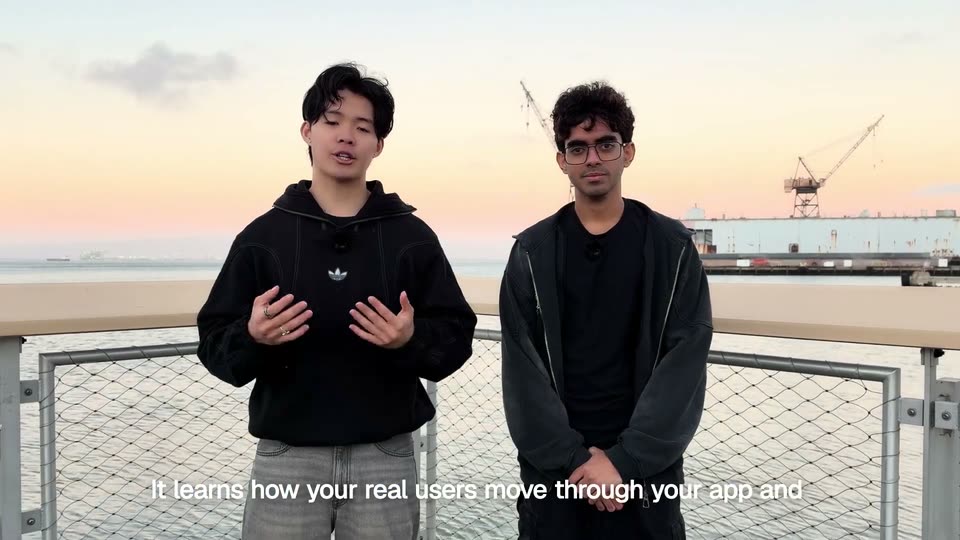
Two men in black brand t-shirts sit in leather armchairs before a wall screen showing the aucert.ai logo. The left speaker gestures with both hands while talking; the right man listens with hands clasped, smiling at the end. White subtitles sit in a dark box at the bottom.
On-screen text: “On mobile, there is no taking a release back.”, “So we help you get it right before it ships.”, “Keep shipping.”
Camera: Push in
On a near-black background, the aucert.ai lockup sits centered, the white triangular app icon left of the wordmark. A white cursor slides in from the right and a green Book a demo pill settles in beneath the .ai, the cursor resting at its left edge.
On-screen text: “aucert.ai”, “Book a demo”
Techniques: Cursor demo
Camera: Static