1:14

Replit ⠕ - The best design work doesn't happen in a chat box. You need space to
Replit · Developer tools · May 2026
Microsoft · Dec 2023 · 0:30 · Full motion · AI-annotated
Microsoft’s 0:30 launch film runs 20 scenes, about 1.5 s each. The product is on screen from the first frame and 4 features are revealed. There is no explicit call to action. Built as a soft pastel 3D world that opens and closes on a home-office set, with four AI features each announced by a centered dark-blue headline and shown through quick 3D interface fly-throughs. Pacing is brisk at about 107 bpm with constant camera pushes, whip pans and particle dissolves, and every feature demo is unified by the same floating iridescent gradient tiles and frosted-glass panels.
Is this your launch? to your site or press kit.
Replit · Developer tools · May 2026
ClickUp · Productivity · Oct 2026
Slack · Productivity · Apr 2024
Films whose music sounds like this one, voice left out
Superhuman · Lo-fi hip-hop / chillhop
PixVerse R2 · Lo-fi hip-hop, chillhop, and electronic sound design
Claude · Lo-fi hip-hop and electronic
A pastel 3D home-office set with a desk, lamp, chair and rug; a laptop on the desk shows the blue Windows bloom wallpaper. The Windows 11 logo and wordmark fade in above the laptop, settling into solid dark blue.
On-screen text: “AI in Windows 11”
Techniques: 3D mockup
Camera: Static
A 3D-rendered desk holds a laptop showing the blue Windows 11 wallpaper, beside a pen cup and stacked books, in a soft pastel room. A dark blue headline floats above the laptop and a small disclaimer line sits at the bottom edge.
On-screen text: “AI in Windows 11”, “Created with the help of AI. Screens simulated. Feature availability and rollout timing may vary.”
Techniques: 3D mockup
Camera: Static
A 3D-rendered desk with a laptop centered in front of a painted pastel backdrop; the laptop screen switches from the Windows 11 flower wallpaper to a white canvas window. A dark blue headline hovers above the lid and a small disclaimer runs along the bottom.
On-screen text: “AI in Windows 11”, “Created with the help of AI. Screens simulated. Feature availability and rollout timing may vary.”
Techniques: 3D mockup
Camera: Static
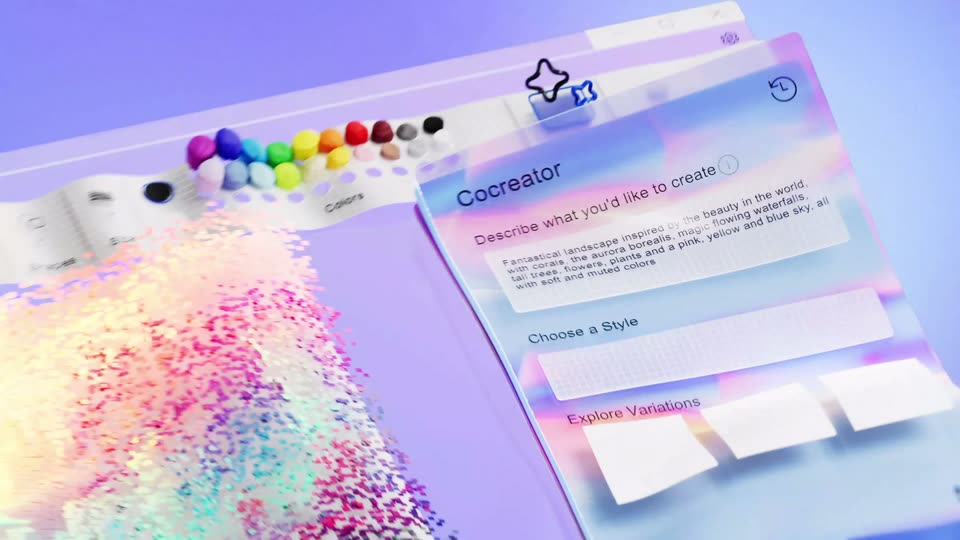
A 3D-tilted design app interface shows a white canvas beside a Cocreator panel. A blue wash clears as the camera pushes in toward the panel and a pink pixelated landscape renders on the left. A static dark blue headline “Spark new ideas effortlessly” overlays the center.
On-screen text: “Spark new ideas effortlessly”, “AI in Windows 11”, “ArcE vol.10”, “Created with the help of AI. Screens simulated. Feature availability and rollout timing may vary.”
Techniques: 3D mockup, Particles, UI zoom
Camera: Push in
A tilted product interface floats in a colorful 3D space as the camera whips past it. A curved glass panel with drifting bubbles sits in the foreground, and a bright glint flashes across the panel as the view blurs.
Techniques: 3D mockup, Particles, Light sweep
Camera: Push in
A shimmering particle field dissolves into a bright 3D fantasy landscape, while a translucent purple card on the right settles into place. The card shows three thumbnails, the first filled with a miniature scene.
Techniques: Particles
Camera: Push in
A frosted-glass panel titled “Explore variations” sits on the right over a shifting, painterly fantasy landscape. Three small thumbnails inside the panel swap to different color versions of the scene while the background pans.
Camera: Static
A 3D interface of floating photo cards tilts and rotates through a soft purple gradient, depth layers of Hawaii images and a sidebar shifting at different speeds. The small caption Explore variations holds still at the frame edge.
On-screen text: “Explore variations”
Techniques: 3D mockup, Parallax
Camera: Static
A blue-to-lavender gradient fills the frame as scattered photo thumbnails drift in from the edges, some sharp, some blurred. A small image of a person on a boat resolves at the center behind a centered headline.
On-screen text: “Find and enhance your photos easily”
Camera: Static
A flat photo card of a cat on a deck floats on a blue-to-purple gradient dotted with blurred iridescent rectangles. A pink wireframe mesh wraps the cat and pulses as the photo fades to a dotted grayscale. A dark caption reads across the card, then clears.
On-screen text: “Find and enhance your photos easily”
Techniques: Morph
Camera: Push in
A photo of a dog wearing a flower lei on a poolside deck assembles from scattered tiles at center on a blue-to-purple gradient, while blurred pastel squares drift behind. A double-arrow icon sits at the photo's top right corner.
Techniques: Masking
Camera: Static
A photo in an editor fades to a soft purple field of floating color squares. A bottom toolbar sharpens as a cursor glides to a layer icon, and the headline “Make edits instantly” settles in the center.
On-screen text: “Make edits instantly”
Techniques: Cursor demo
Camera: Static
A dark blue headline sits above a tilted 3D document toolbar where a large cursor hovers over the Redact text option; pink particles burst from the cursor while oversized light blue 3D letters of the page title scale in the foreground.
On-screen text: “Make edits instantly”
Techniques: 3D mockup, Cursor demo, Particles
Camera: Static
A dark blue caption “Make edits instantly” floats over a 3D flight confirmation on a lavender surface. A cursor opens a small context menu, then the camera glides right across raised pastel blocks reading HNL, 2:02 PM and Terminal, past an embossed airport map.
On-screen text: “Make edits instantly”
Techniques: Cursor demo, 3D mockup, Parallax
Camera: Pull out
A 3D perspective view of a transparent interface dashboard. Large, extruded text elements with iridescent gradients, including a currency code and a date, scale and slide across the frame. 3D line graphs are visible on a panel to the right.
On-screen text: “23”, “48 hours of booking.”, “HNL”, “Honolulu Friday, Oct 27”, “2:02 PM”, “DOWNLOAD NOW”, “L.02”, “DIVE INTO”
Techniques: 3D mockup, Kinetic type
Camera: Static
A stack of illustrated app cards lies in 3D perspective on a purple grid. A cursor clicks the download button, then the top card tilts up and away as the headline Download apps without worry fades in at center.
On-screen text: “Download apps without worry”
Techniques: 3D mockup, Cursor demo
Camera: Static
A centered dark-blue headline holds still over a blue-to-purple gradient while a field of rounded square tiles sharpens from blur into a 3D grid, drifting with depth toward the camera.
On-screen text: “Download apps without worry”
Techniques: Parallax
Camera: Static
A 3D render of holographic phone mockups on a lavender cross-textured surface, with a Windows Smart App Control warning dialog fading into the center. A static tagline reads “Download apps without worry”.
On-screen text: “Download apps without worry”
Techniques: 3D mockup
Camera: Push in
A 3D desk scene with a copper lamp, chair and floral wall. The camera starts tight on the open laptop showing a gradient webpage, then pulls back to reveal the full room. Finally the laptop and books scale down to the left as a blue arrow icon pops in on the right.
Techniques: 3D mockup
Camera: Pull out
A 3D pastel room opens on a desk with a laptop, lamp and books; the camera pulls back to reveal a pool and garden, then the set blurs as the Windows 11 logo and tagline fade in at center.
On-screen text: “Windows 11”, “Easier than you ever thought possible”
Techniques: 3D mockup, Parallax
Camera: Pull out