
1:10
Explore
ClickUp Artifacts Feature Launch Video
ClickUp · Oct 2026 · 0:33 · AI-annotated
made Team: Addx Studio · studio Addx Studio
00:00:00 / 00:33:03
The video is built as a rapid chain of title cards, each bold headline cutting to a 2D or 3D mockup that demos the announced output, at about 25 cuts per minute. Its signature moves are the morphing gradient flower logo, the cartoon hand cursor, and the soft pastel glow that unifies the white UI cards.
No filming indicatedEstimated needs: 4 capture groups — your screens or recordings · 1 official logo — reused across the film · 2 graphic passages — draw or supply · 4 3D passages — build or supply
More like this

1:21

All the launches at Config 2025 | Figma
Figma · Design · May 2025
1:50

The New Descript: A Better Way to Create Video, From Start to Finish
Descript · Design · Nov 2022
ClickUp Artifacts Feature Launch Video, scene by scene
· 27 scenes as text
01 · Product intro · 0:00–0:01
A multicolor gradient star at the center morphs into a rounded flower mark with a white star cutout, then a large gray letter S with a thin vertical bar fades in to its right.
Techniques: Morph
Camera: Static
02 · Product intro · 0:01–0:02
A rounded prompt bar sits centered over a soft pastel gradient. Dark sans-serif text types out left to right, ending with a blinking caret. Small icons sit at the left edge; a multicolor dot logo, a Max selector and a circular send button sit at the right.
Techniques: Kinetic type
Camera: Static
03 · Product intro · 0:02–0:04
A black-outlined hand cursor slides up and taps the round Max button; a blue-pink gradient star pops in with an expanding ripple ring, then the camera pulls back to reveal the Max flower logo at the left edge.
Techniques: Cursor demo, UI zoom
Camera: Push in
04 · Product intro · 0:04–0:05
A four-petal gradient flower logo with a white star at its center morphs from a folded 3D form into a flat planar shape on a white background, as the title Max scales up in the middle.
On-screen text: “Max”
Techniques: Morph, Kinetic type
Camera: Pull out
05 · Feature reveal · 0:05–0:06
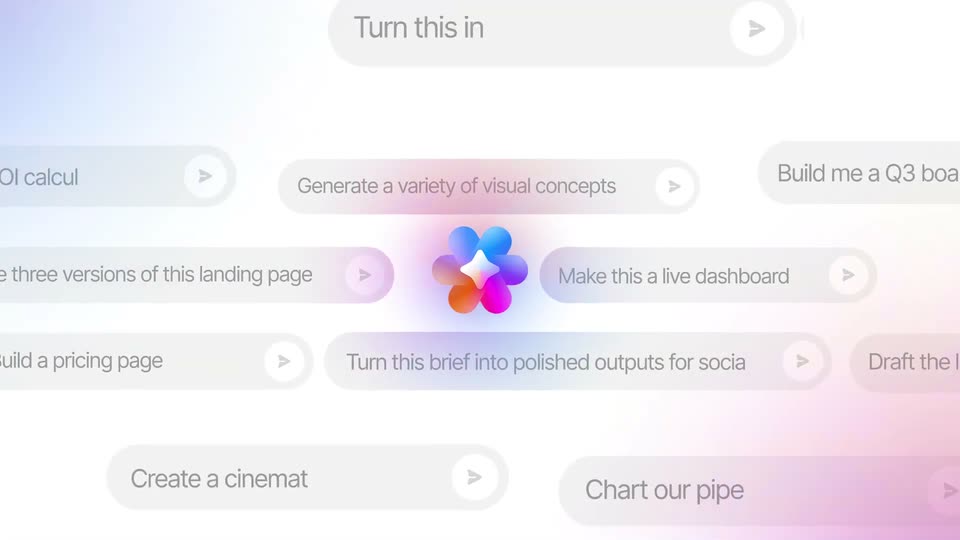
A gradient flower logo with a white sparkle glows at the center of a pale field as translucent prompt pills drift horizontally at varying speeds, their example prompts scrolling past and typing in. The logo stays fixed while pills blur and sharpen with depth.
Techniques: Parallax, Masking
Camera: Pull out
06 · Feature reveal · 0:06–0:07
A grid of rounded prompt chips scrolls slowly downward over a soft pink to lavender gradient, keeping a glowing multicolor flower logo centered in the frame.
Camera: Pull out
07 · Feature reveal · 0:07–0:08
The headline “Variety of outputs.” sits centered over a soft pastel glow. Small rounded gradient icons, a card, a grid and a panel, pop in around the words and drift outward.
On-screen text: “Variety of outputs.”
Camera: Static
08 · Feature reveal · 0:08–0:10
A silver laptop in 3D perspective on a white reflective surface shows a magenta-to-orange gradient screen. Six white app icons float forward and settle into a grid, glowing, while a large headline reads Variety of outputs and tags labeled Presentation, Interactive, Document slide in.
On-screen text: “Variety of outputs.”, “Interactive”, “Presentation”, “Document”
Techniques: 3D mockup
Camera: Pull out
09 · Feature reveal · 0:10–0:11
A waveform of gradient and gray bars compresses into a rounded pill player as a red playhead with a dot drops in from above. Pause and Stop buttons pop in below, and the headline Create audio, scales up.
On-screen text: “Create audio,”
Techniques: Kinetic type
Camera: Static
10 · Feature reveal · 0:11–0:12
On white, a flat player mockup: a rounded waveform bar with a red playhead, above a gray Pause and a gradient Stop button. The headline 'Create audio,' scales and swaps to 'Create' plus a red-to-purple video tile with a play triangle and the word 'vid'.
On-screen text: “Create audio,”, “Create vid”
Techniques: Kinetic type
Camera: Push in
11 · Feature reveal · 0:12–0:13
A rounded video player card with a tulip photo, a white play icon and the word video sits on a plain white background. The card zooms in and drifts right as the blue progress bar fills.
Techniques: UI zoom
Camera: Static
12 · Feature reveal · 0:13–0:13
The heading 'and more.' slides in above three rounded cards on a white background: an audio waveform with a red playhead, a tulip video with a play button and progress bar, and a browser window mockup. Side cards are softly blurred for depth.
On-screen text: “and more.”
Techniques: Kinetic type
Camera: Static
13 · Feature reveal · 0:13–0:14
A white card holds a line chart that draws itself left to right in a blue-to-pink gradient while the headline types in above it. A faint circular dial and a small chart icon fade out at the center.
On-screen text: “Interactive data visualization.”, “and more.”
Techniques: Kinetic type
Camera: Static
14 · Feature reveal · 0:14–0:15
A dark bold headline reads Interactive data visualization above a white dashboard card showing a colorful stacked bar chart. A translucent 3D dial floats in front of the chart; as it turns, the bar values update.
On-screen text: “Interactive data visualization.”
Techniques: 3D mockup
Camera: Static
15 · Feature reveal · 0:15–0:17
The headline holds over a white dashboard card that eases down into frame. A donut chart draws its colored segments, the center total counts up to $2.4M, and the legend bars fill in. A blurred dial floats in the foreground.
On-screen text: “Interactive data visualization.”
Techniques: Kinetic type
Camera: Pull out
16 · Feature reveal · 0:17–0:18
On a plain white background, the word Anywhere scales up and extends to Anywhere in your in dark gray, centered. Below it, workspace: drops in in pink, the colon settling into a period by the end. The frame stays locked off.
On-screen text: “Anywhere in your”, “workspace.”
Techniques: Kinetic type
Camera: Static
17 · Feature reveal · 0:18–0:18
The white word Chat sharpens and scales up at the center of a soft multicolor glow, framed by four blurred gradient slabs arranged as a diamond. Smaller white headline lines, Anywhere in your workspace, settle into the lockup around it.
On-screen text: “Chat”, “Anywhere in your”, “workspace.”
Techniques: Kinetic type
Camera: Pull out
18 · Feature reveal · 0:18–0:19
Close-up of a white rounded card with an orange-to-pink gradient glow along its top edge. A multicolored dot logo sits above a dark gray heading that types word by word, over a static light gray line. The card scales up slightly.
On-screen text: “How can I help you to”, “I can answer questions,”, “Chat”
Techniques: Kinetic type
Camera: Pull out
19 · Feature reveal · 0:19–0:21
A rounded white chat card floats over a pale gradient glow. Under the assistant greeting, the prompt “Make an interactive directory of the team.” types itself out letter by letter behind a thin caret, while a “For this task” list of options stays still below.
Techniques: Kinetic type
Camera: Pull out
20 · Feature reveal · 0:21–0:21
A rotated square with a blue, purple and red gradient border sharpens on a white field as its white outline draws in, and the word Doc fades in from a soft blur at the center.
On-screen text: “Doc”
Techniques: Kinetic type
Camera: Pull out
21 · Feature reveal · 0:21–0:22
A gradient document mockup with placeholder lines and three small squares sits in 3D perspective on a white background. A black-outlined cartoon hand pointer rises from below and taps its lower edge.
Techniques: 3D mockup, Cursor demo
Camera: Static
22 · Feature reveal · 0:22–0:24
A white AI assistant card settles into frame from a tight crop. A hand cursor glides from the prompt field to hover just below it, and a small gradient document icon slides to the field's left edge.
Techniques: Cursor demo
Camera: Pull out
23 · Feature reveal · 0:24–0:24
A rounded square mark built from blue, magenta and orange gradient bands frames a white center where the word Task sits. The mark eases into place while a soft radial glow blooms behind the text.
On-screen text: “Task”
Camera: Pull out
24 · Feature reveal · 0:24–0:26
A close-up of a pink label reading 'Jason' on a project timeline zooms out to reveal a wider Gantt chart board with multiple task rows and a blue label reading 'Lucia'.
Techniques: UI zoom, Cursor demo, 3D mockup
Camera: Pull out
25 · Feature reveal · 0:26–0:28
A task board tilts in 3D perspective as two rounded name tags, blue Lucia and pink Jason, float on either side. A pink bar and a blue arc drop onto the task cards, morphing as they shift.
On-screen text: “Lucia”, “Jason”
Techniques: 3D mockup, Morph
Camera: Pull out
26 · Outro · 0:28–0:29
On a white background, a pink-orange gradient bar and a purple-blue arc rotate and morph, the bar folding into a chevron above the arc to form the logo mark, which then settles centered.
Techniques: Morph
Camera: Static
27 · Outro · 0:29–0:33
The black ClickUp logo and wordmark sit centered on a white background while a soft pink, purple and blue blur drifts slowly left and down behind the white word Artifacts.
On-screen text: “ClickUp Artifacts”
Camera: Static