0:39
Explore
PixVerse - Meet PixVerse R2, our new real-time world model. Explore living world
PixVerse R2 · Sep 2026 · 0:47 · AI-annotated
- Length
- 0:47
- Scenes
- 21 · 2.3 s avg
- Product on screen
- 0:00
- Features shown
- 3
- Voiceover
- Yes
00:00:00 / 00:47:20
PixVerse R2’s 0:47 launch film runs 21 scenes, about 2.3 s each. The product is on screen from the first frame and 3 features are revealed. There is no explicit call to action; a voiceover carries the film. The video is built as a dark title-and-prompt card that dissolves into a chain of bright 3D worlds, each introduced by a short white headline and demoed with a tracked third-person camera plus on-screen WASD and D-pad controls. Cuts are quick and rhythmic, swapping vehicles and characters every few seconds, and the piece closes on a centered gradient logo lockup.
Footage neededEstimated needs: 3 capture groups — your screens or recordings · 1 official logo — reused across the film · 1 filmed passage — shoot, supply or replace · 1 graphic passage — draw or supply · 9 3D passages — build or supply
Is this your launch? to your site or press kit.
More like this
0:19

Archie McKenzie - General Translation has raised $27m led by @martin_casado at @a16z to
General Translation · Nov 2026
0:40
Google AI - Today, we’re growing the Gemini 4 model series by introducing Gemini
Google AI · Nov 2026
PixVerse - Meet PixVerse R2, our new real-time world model. Explore living world, scene by scene
· 21 scenes as text
01 · Product intro · 0:00–0:02
A dark background with a faint dot grid centers the white title PixVerse R2. The view zooms in and shifts down to reveal a smaller grey tagline, Step Into Worlds You Can Shape, above a black text input box.
On-screen text: “PixVerse R2”, “Step Into Worlds You Can Shape”
Techniques: Kinetic type, UI zoom
Camera: Push in
02 · Product intro · 0:02–0:04
On a dark dotted-grid background, a prompt field shows the placeholder “Describe your world...” as a sentence types in with a blinking cursor. The view then pulls back to reveal the bold white PixVerse R2 headline and gray tagline above the now-empty field.
On-screen text: “PixVerse R2”, “Step Into Worlds You Can Shape”
Techniques: Kinetic type, UI zoom
Camera: Pull out
03 · Product intro · 0:04–0:05
Dark dot-grid field with a centered white “PixVerse R2” title and gray tagline above a rounded prompt bar holding a blinking caret and an up-arrow button. Soft pixel blocks fade in around the edges while the text stays still.
On-screen text: “PixVerse R2”, “Step Into Worlds You Can Shape”
Techniques: Particles
Camera: Pull out
04 · Product intro · 0:05–0:06
A flat hero view holds a white PixVerse R2 title, a gray tagline, and a black prompt bar with an up-arrow button. The pixelated mosaic background behind them dissolves from grayscale into a colorful rainbow-over-landscape image over a faint dot grid.
On-screen text: “PixVerse R2”, “Step Into Worlds You Can Shape”
Camera: Static
05 · Feature reveal · 0:06–0:16
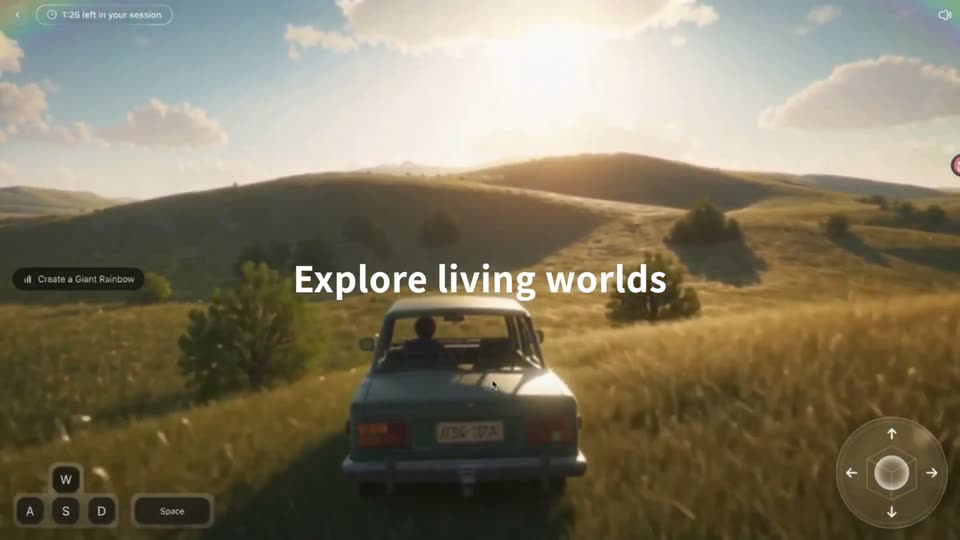
A 3D landscape of golden hills and a rainbow opens with the title PixVerse R2 over a black prompt bar. The title blurs away as the camera flies forward over the hills, then Explore living worlds appears over a car driving through the grass toward the viewer.
On-screen text: “PixVerse R2”, “Step Into Worlds You Can Shape”, “Explore living worlds”
Camera: Push in
06 · Feature reveal · 0:16–0:19
A 3D-rendered green SUV with a roof spare tire drives a narrow track across a grassy hill, camera tracking behind under a bright sky. A session timer counts down top-left while WASD keycaps and a circular D-pad sit in the lower corners.
On-screen text: “Explore living worlds”
Camera: Static
07 · Feature reveal · 0:19–0:22
A third-person camera trails a rider on a green motorcycle carrying a green box across a grassy hillside with trees, rocks and a stone tower, under a blue sky of blocky clouds. Flat HUD overlays show a session timer, WASD keys and two action buttons.
Camera: Push in
08 · Feature reveal · 0:22–0:23
A 3D drone with spinning orange propellers flies forward over a grassy hillside dotted with pines, boulders and a winding river. A HUD overlays the view with a session timer top-left, WASD and Space keys bottom-left, and a directional pad bottom-right.
Techniques: 3D mockup
Camera: Push in
09 · Feature reveal · 0:23–0:24
A drone sits at the left edge over a green field and river. A circular control pad with four white arrows and a center sphere fades in on the right, the left arrow fills with a dark disc, and a K key label scales in beside it.
Camera: Push in
10 · Feature reveal · 0:24–0:25
A circular control pad floats over a textured olive backdrop: a thin ring with four white arrows around a hexagon and a glowing sphere. A dark disc appears behind the left arrow, marking a press.
On-screen text: “K”
Techniques: Kinetic type
Camera: Static
11 · Feature reveal · 0:25–0:26
A 3D drone with orange propellers flies forward over a grassy valley of pines and boulders, the camera tracking from behind as the frame fades in. A circular direction pad and W A S D key hints sit in the corners.
Techniques: 3D mockup
Camera: Pull out
12 · Feature reveal · 0:26–0:27
A white and orange quadcopter with blurred rotors hovers in a 3D mountain valley while the camera glides forward past pine trees and granite cliffs. A HUD overlay shows WASD keys, a Space bar, a directional pad, and a session timer.
Techniques: 3D mockup, Parallax
Camera: Pan
13 · Feature reveal · 0:27–0:28
A glass-domed drone with orange propellers flies forward through a 3D mountain valley, pines blurring past as the camera tracks it. A session timer, WASD keys and a directional pad sit in the corners.
Techniques: 3D mockup, Parallax
Camera: Static
14 · Feature reveal · 0:28–0:30
A third-person game view follows a soldier walking through a ruined, war-torn landscape as the camera tracks forward behind him. WASD keys and a directional pad sit in the bottom corners, with a session timer top left and an HD badge top right.
On-screen text: “Become anyone, anywhere”
Camera: Push in
15 · Feature reveal · 0:30–0:31
A vertical game view shows a hooded character walking past a bare tree and red pagoda toward a large white statue. A white headline spans the center while a cursor drifts across the scene, framed by session and control UI.
On-screen text: “Become anyone, anywhere”
Techniques: Cursor demo
Camera: Push in
16 · Feature reveal · 0:31–0:33
A vertical game demo plays in the center of a black screen, showing a warrior walking through a snowy landscape towards a temple. UI controls and a session timer frame the video.
On-screen text: “Become anyone, anywhere”
Camera: Push in
17 · Feature reveal · 0:33–0:37
A 3D snowboarder in a red and white jacket carves down a sunlit alpine slope, the camera tracking behind. The rider leans into turns past pines and rocky outcrops. A gray key-prompt box at the bottom cycles through W/A, A and A/Space, with a PixVerse · World R2 watermark top right.
On-screen text: “PixVerse · World R2”, “W/A”, “A”, “A/Space”
Camera: Push in
18 · Feature reveal · 0:37–0:38
The camera tracks behind a blocky green character with white wings as it flies over a grassy hill toward a bridge and castle, with white captions overlaying the 3D world.
On-screen text: “PixVerse·World R2”, “Interact in real time”, “Grow Wings and Fly”
Camera: Static
19 · Feature reveal · 0:38–0:39
A winged voxel character sprints toward the camera across a sunlit grass field, a fire effect blooming above its head. The camera tracks behind at ground level as trees and hills slide past under a blue sky.
On-screen text: “Interact in real time”, “PixVerse - World R2”
Camera: Push in
20 · Feature reveal · 0:39–0:44
A green blocky character with a backpack runs across a grassy voxel field, the camera tracking from behind toward a river and distant castle. White key labels W and A pop up at the bottom with the caption Ride a Motorcycle, then the scene fades to black.
On-screen text: “PixVerse·World R2”, “W”, “Ride a Motorcycle”, “Interact in real time”, “A”
Camera: Push in
21 · Outro · 0:44–0:47
On a black background, the gradient PixVerse logo mark and the bold white wordmark scale up from small and dim to full size, with the tagline settling beneath. The centered lockup then holds still for the rest of the clip.
On-screen text: “To create is to play”
Techniques: Kinetic type
Camera: Static