
0:12
Explore
Claude works with you on slides, spreadsheets, and contract redlines
Claude · Nov 2025 · 1:38 · Full motion · AI-annotated
- Length
- 1:38
- Scenes
- 28 · 3.5 s avg
- Product on screen
- 0:06
- Features shown
- 3
- Voiceover
- No
- Views
- 850K on YouTube
as of November 20, 2026
00:00:00 / 01:38:29
- Length
- 1:38
- Scenes
- 28 · 3.5 s avg
- Product on screen
- 0:06
- Features shown
- 3
- Voiceover
- No
- Views
- 850K on YouTube
as of November 20, 2026
Claude’s 1:38 launch film runs 28 scenes, about 3.5 s each. The product shows up at 0:06 and 3 features are revealed. There is no explicit call to action. The video repeats one loop: the week-view calendar isolates a single task card, a chat prompt with attached files runs, the finished document opens in its native app, and the calendar then marks the task complete. Its signature moves are the slow zoom that isolates one event block, the hand-drawn marker loops, and the 3D tilt of finished documents, all held on a flat cream ground with a serif wordmark.
No filming indicatedEstimated needs: 5 capture groups — your screens or recordings · 1 official logo — reused across the film · 1 3D passage — build or supply
Is this your launch? to your site or press kit.
More like this


Similar soundtrack
Films whose music sounds like this one, voice left out
1:05
The Answer to Greatness | Micro RGB | Samsung
Samsung Micro RGB TV · Electronic (future bass, trap, lo-fi hip-hop)
1:53

Mistral AI - Introducing powerful new features in Le Chat, making it more capable
Mistral AI · Lo-fi hip-hop, jazz
0:54
Claude works with you on slides, spreadsheets, and contract redlines, scene by scene
· 28 scenes as text
01 · Hook · 0:00–0:06
A rounded week-view calendar card on a pale background scales up from a centered full-week layout. The grid of pink, green and gray event blocks then pushes in toward the Monday and Tuesday columns, ending on a close-up of the blocks and the blue 9:49 time line.
Techniques: UI zoom
Camera: Push in
02 · Feature reveal · 0:06–0:08
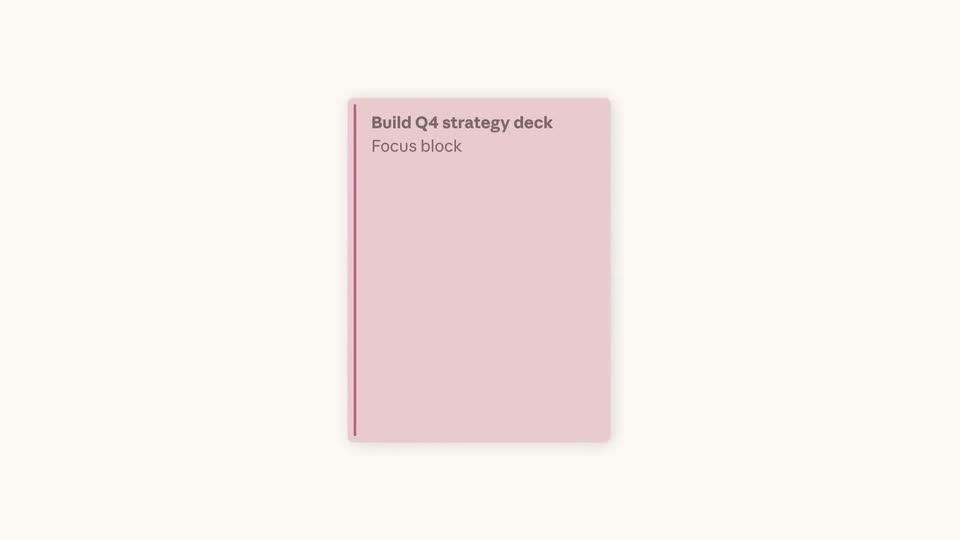
A pale pink calendar event card, marked 'Build Q4 strategy deck' and 'Focus block', floats centered over a faded weekly calendar grid. The grid dissolves to plain off-white, isolating the card with a soft drop shadow.
Camera: Static
03 · Feature reveal · 0:08–0:10
A cursor drags two file thumbnails, tagged with blue name labels, from the bottom right onto a file-plus drop zone captioned “Drop files here to add to chat” over a dimmed chat screen. The overlay then fades away to reveal the full interface with its greeting and input field.
Techniques: Cursor demo
Camera: Static
04 · Feature reveal · 0:10–0:16
A flat, front-on chat interface with a greeting and two file cards. A prompt types itself into the input box character by character, then a hand cursor glides to the orange send button and clicks it.
Techniques: Cursor demo
Camera: Static
05 · Feature reveal · 0:16–0:21
On a cream background, a chat thread streams in line by line, the view scrolling down as the response fills the screen. The input field types a short reply, then a hand cursor clicks the orange send button.
Techniques: Kinetic type, Cursor demo
Camera: Pan
06 · Feature reveal · 0:21–0:28
A chat interface fills in: a user bubble sits at the top, the AI reply streams out with step counters climbing, and the view scrolls up to a file card. A cursor hovers the Open in Microsoft PowerPoint button before the frame fades to white.
Techniques: Cursor demo
Camera: Pan
07 · Feature reveal · 0:28–0:31
A Keynote window mockup tilts from a 3D angle to face the viewer over two seconds. Inside, a dark navy slide reads LUMIFI and Q4 2025 Update, with a $45M Series C stat box on the right.
Techniques: 3D mockup
Camera: Pull out
08 · Feature reveal · 0:31–0:32
A serif headline reading LUMIFI, Q4 2025 Update, $45M sits over a faint 3D dashboard mockup on a cream background, then slides left and fades as a flat weekly calendar UI slides in to fill the frame.
On-screen text: “LUMIFI”, “Q4 2025 Update”, “$45M”
Techniques: Kinetic type, 3D mockup
Camera: Pull out
09 · Feature reveal · 0:32–0:36
A weekly calendar view fills the frame. A blue time line drops from 10:47 to 2:47 as the grid scrolls down, striking through a completed event. A cursor scribbles over a block at the start. The view pulls back to reveal the rounded card on a cream background.
Techniques: Cursor demo, UI zoom
Camera: Pull out
10 · Feature reveal · 0:36–0:37
A pink calendar block labeled Comp analysis deep work sits centered as the blurred weekly calendar grid behind it fades out, leaving the card alone on a plain off-white background.
Camera: Static
11 · Feature reveal · 0:37–0:38
A faint chat interface fades in on a cream background. A cursor drags a stack of three labeled documents up from the lower right toward the greeting, while a hand-drawn file icon with a plus and the drop prompt shift left.
Techniques: Cursor demo
Camera: Static
12 · Feature reveal · 0:38–0:45
Under a serif “Afternoon, Adaira” greeting, three file cards are dragged into the chat drop zone and lock into the attachment row. The prompt types itself out, a hand cursor clicks the orange send button, then the frame zooms into a rounded text chip.
Techniques: Cursor demo, UI zoom
Camera: Pan
13 · Feature reveal · 0:45–0:49
A task list on a cream background. The frame opens zoomed into the first row, then pulls back to reveal the list, which scrolls down through rows of actions and company names, each prefixed by a thin line icon.
Techniques: UI zoom
Camera: Pan
14 · Feature reveal · 0:49–0:52
A file chip on a cream background shows the spreadsheet name and an Open in Microsoft Excel button with a hand cursor on it. The chip zooms, then the Excel window opens below it, showing a comps analysis table on the left and an AI chat panel on the right.
Techniques: Cursor demo, UI zoom
Camera: Static
15 · Feature reveal · 0:52–0:54
A close-up of a spreadsheet table titled LUMI INC. comparable company analysis fills the left side, with a Claude for Excel chat panel on the right. The view zooms out smoothly to reveal the full application window and both panels.
Techniques: UI zoom
Camera: Pull out
16 · Feature reveal · 0:54–0:59
A week calendar on a white card pulls back to reveal the day headers. A black marker boxes the green Client Meeting block, then scribbles a loop over a Thursday note as the blue time line and chip creep down the left gutter.
Camera: Pull out
17 · Feature reveal · 0:59–1:01
A weekly calendar interface displays a hand-drawn circle around a green event block. A blue time indicator line moves upward from 5:27 PM to 10:54 AM, then the view zooms in to focus on the top half of the schedule.
Techniques: UI zoom
Camera: Push in
18 · Feature reveal · 1:01–1:03
A weekly calendar view fades to a plain off-white background as the camera zooms into one pink event block, Work on Acorns & Oak NDA, which settles centered with a soft drop shadow while every other block disappears.
Techniques: UI zoom
Camera: Push in
19 · Feature reveal · 1:03–1:11
A cream chat screen fades in under a serif “Adaira returns!” headline. A cursor drags a document into the input, where it becomes a file card, then types a prompt and clicks the orange send button.
On-screen text: “Adaira returns!”
Techniques: Cursor demo
Camera: Static
20 · Feature reveal · 1:11–1:12
A cream page holds a Lumifi badge, an 'Adaïra returns!' serif heading and a white prompt card with a file chip; a hand cursor rests on the red send button. The card and heading dissolve while a large light-gray word 'workflow' slides in from the right.
On-screen text: “workflow”
Camera: Pan
21 · Feature reveal · 1:12–1:14
A task list item in close-up scales down to reveal a full list of five steps, each with an icon and text, on a light background.
Techniques: UI zoom
Camera: Static
22 · Feature reveal · 1:14–1:17
A light task list with terminal and pencil icons scrolls upward, each row sliding in, ending on a file card labeled Lumifi acorn oak nda with a Google Drive icon and an Open in Microsoft Word button.
Camera: Pan
23 · Feature reveal · 1:17–1:18
A file row card with a document icon, filename, Drive icon and an Open in Microsoft Word button appears on a cream background. A hand cursor moves up to the button and clicks it, the button fills with a darker tone.
Techniques: Cursor demo
Camera: Static
24 · Feature reveal · 1:18–1:21
A Microsoft Word window shows a mutual non-disclosure agreement with a Claude comments panel on the right. A white file card titled 'Lumifi acorn oak nda' with a hand cursor sits over the page, then slides away as the document scrolls down to reveal more comments.
On-screen text: “Lumifi acorn oak nda”, “Document·DOCX”, “Open in Microsoft Word”
Techniques: Cursor demo
Camera: Push in
25 · Other · 1:21–1:25
A weekly calendar view sits on a cream backdrop. A black hand-drawn scribble loops across the Wednesday column as the time line slides down the hours. The view then zooms onto a green Team lunch block, which a rough black rectangle outlines.
Techniques: UI zoom
Camera: Push in
26 · Other · 1:25–1:27
A blurred weekly calendar grid fills the frame, then the background fades to flat cream, isolating a single green event card titled Team lunch at Forest Park, centered with a green left edge.
Techniques: UI zoom
Camera: Push in
27 · Other · 1:27–1:36
A white message field with an olive send button on a cream background types a team note character by character, growing to three lines. It flattens into a gray sent bubble as reaction emojis pop in one by one.
Techniques: Kinetic type, Morph
Camera: Static
28 · Outro · 1:36–1:38
On a plain cream background, the Claude wordmark paired with a coral starburst icon holds centered and still, then fades out to a blank field.
Camera: Static