2:08


tday - product demos your coding agent records
tday.com · B2B · Nov 2026
Notion · May 2025 · 1:28 · AI-annotated
Notion’s 1:28 launch film runs 32 scenes, about 2.8 s each. The product shows up at 0:10 and 3 features are revealed. The call to action lands at 1:19 (90% in), over a voiceover. A presenter-led product tour that alternates a talking head in a bright, minimal office with clean UI mockups on off-white cards, moving from a problem statement through three feature demos (search, research, assistant) to a text-card CTA and logo lockup. The pacing is steady at about 112 bpm, driven by quick zooms, slides and crossfades between UI states, with a consistent cream-and-black palette and a small red-glasses mascot as the signature accent.
Is this your launch? to your site or press kit.
tday.com · B2B · Nov 2026
Anthropic · AI · Jan 2026
Airtable · Productivity · Sep 2021
A man in a dark shirt and glasses sits at a wooden table with a laptop, speaking and gesturing toward the camera. The bright room shows a window, red chair and framed art behind him. A white name caption sits in the lower left.
On-screen text: “Michael Jia”, “Product”
Camera: Static
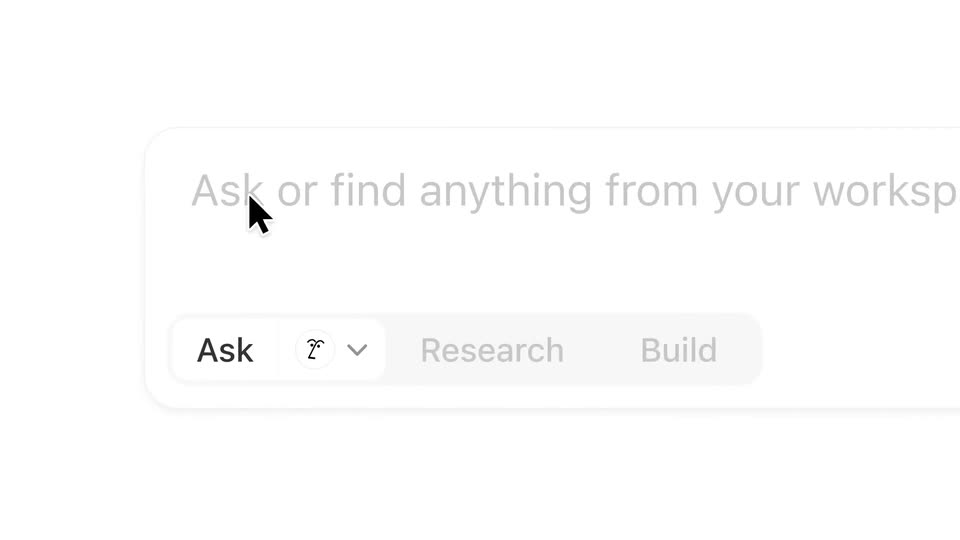
A white search bar mockup with a blinking caret and Ask, Research, Build pills; the pills slide as Research highlights and a cursor hovers over the row, then it cuts to a man with glasses speaking in front of a blurred window.
On-screen text: “Michael Jia”, “Product”
Techniques: Cursor demo
Camera: Static
A man with short black hair and thin metal glasses speaks to camera in a medium close-up, wearing a black collared shirt. The office background stays soft and out of focus behind him as he talks and ends with a slight smile.
Camera: Static
A dashboard home screen with a greeting and four recents cards zooms into the search bar, then into the empty input field where a caret blinks. A cursor moves up from the cards toward the bar.
Techniques: UI zoom
Camera: Push in
On a white background, the headline 'Dashboard launch' types itself out letter by letter behind a vertical cursor bar. As the word completes, it scales up and the view slides along the letters, ending on 'launch' with the cursor at the right edge.
On-screen text: “Dashboard launch”
Techniques: Kinetic type
Camera: Static
A cursor clicks the blue send button in the search bar, and the dashboard header and recent cards fade out to white. A small Thinking label with the brand mark and three colored dots fades in near the top.
Techniques: Cursor demo
Camera: Static
On a white background, a circular logo sits left of the word Thinking and three small colored dots. The line then updates to Searching across, a multicolor grid icon, a GitHub mark and a plus-two badge, followed by All sources and the same dots.
Camera: Static
A ring of third-party app logos rotates slowly on a plain off-white background. The set includes Box, GitHub, Google Drive, Slack, Salesforce, Teams, Gmail, and a red PDF document icon, each scaling gently in place.
Camera: Push in
A man in a dark jacket and glasses sits at a light wooden table, typing on a laptop and speaking to camera. The bright room holds a red chair, a framed grid poster and a floor lamp. Small app-name labels for box, salesforce and PDF appear as overlays.
On-screen text: “box”, “S”, “salesforce”, “PDF”
Camera: Static
A Notion home screen fills the frame as a browser window fades out. A cursor clicks the All sources dropdown, hovers across Slack, Google Drive and GitHub, then the search field types the query How often do we deploy to prod?
Techniques: Cursor demo
Camera: Push in
A chat window types a bulleted answer to a deploy question, then zooms into the text as a source card slides in from the left. The cursor clicks the Notion, Slack and GitHub tabs, swapping the results list beneath.
Techniques: UI zoom, Cursor demo
Camera: Static
A man with short dark hair and thin gold glasses speaks to camera in a medium close-up, framed right of center. He wears a black tee under a dark collared shirt. The background is a soft-focus office with bright windows. The camera stays locked off as he talks.
Camera: Static
A man in a gray jacket and glasses sits at a wooden desk, an open black laptop before him, speaking to camera. His hands rest near the keyboard. A red chair, a framed brick print and a floor lamp sit in the soft-focus background.
Camera: Static
The assistant home screen, with a greeting and four recent cards, shrinks and shifts right as a chat window slides in front, showing a prompt to write a market report and a Thinking indicator. The Ask, Research, Build tabs enlarge in sequence while a cursor moves across them.
Techniques: Cursor demo
Camera: Push in
A light chat window on a gray background shows a user prompt about a market report and a Thinking indicator. The view zooms into the panel as the assistant's plan and a list of search queries populate below the message.
Techniques: UI zoom
Camera: Pan
A white Notion-style card on a light gray field holds a planning paragraph above a list of search results. The list scrolls downward as new entries with magnifying glass and globe icons and timestamps load in.
Camera: Static
A white results panel on a pale gray background scrolls upward once, settling on a list of research sections with small icons, then holds still. A Thinking label with three pulsing dots sits at the bottom of the card.
Camera: Static
A centered app window displays a generated market report. The document body crossfades from an overlapping two-version state and scrolls upward, settling into a clean numbered layout, as a small cursor appears beside the second heading. An empty input box sits at the bottom.
Techniques: Morph
Camera: Static
A close-up of a report's conclusion shows a hand cursor hovering over the Save as page button. The view then zooms out to reveal the full document inside a browser window, with its title, headings and body text.
Techniques: Cursor demo, UI zoom
Camera: Static
A document editor window sits on a light gray background, showing a report heading, an intro paragraph and two numbered section headings with body text. The view holds static for the full clip, no cursor or motion.
Camera: Static
A man with glasses and a dark jacket sits at a wooden desk with a laptop, speaking to the camera. A red chair and a framed print are visible in the bright background.
Camera: Static
A Notion workspace home screen shows a greeting and an ask bar. A hand cursor hovers the Ask tab, a tooltip fades in, then the cursor opens the model dropdown and selects Anthropic Claude 3.7 Sonnet, updating the placeholder text.
Techniques: Cursor demo
Camera: Static
A man with glasses in a dark jacket sits at a light wooden table with an open black laptop, speaking to camera and gesturing with his right hand. A bright room with a window, red chair, and framed poster fills the background.
Camera: Static
A browser window shows a Product Roadmap table with status and owner columns. An AI chat panel on the right expands and a typed answer appears while the table fades to a lighter opacity.
Camera: Static
A documentation window displays a project table beside an AI chat panel that answers a question. The view dissolves into a second document with a page list, and the chat panel switches to a new query with a blue New badge.
Camera: Static
A desktop Docs window lists documents on the left and shows an AI chat answer on the right. A phone mockup fades in at the center, showing the same chat on mobile, then a numeric keyboard slides up over the answer.
Camera: Static
A black iPhone in 3D perspective rests on a pale gray field. Inside, an AI chat streams a bulleted answer about work travel policy while the thread scrolls upward, finishing on a Copy button above the keyboard.
Techniques: 3D mockup
Camera: Static
A man in a dark jacket and glasses sits at a wooden table with an open laptop, lid to camera, speaking to the lens. The bright room behind holds a window, a red chair, a framed poster and a floor lamp. The shot stays a static medium frame.
Camera: Static
A man in glasses and a black shirt speaks to camera in a bright office, a blurred window behind him. The shot holds on his face, then hard-cuts to a cream card with centered black text reading Try for free notion.com.
On-screen text: “Try for free”, “notion.com”
Camera: Static
Black text reading “Try for free” and “notion.com” holds centered on a cream background, then fades out as a thin gray circle outline with a small black logo mark fades in at the center.
On-screen text: “Try for free”, “notion.com”
Camera: Static
A small hand-drawn black mark, resembling a sketchy face with two dots, sits inside a thin gray circle centered on a pale off-white background. The icon shifts subtly in place over the short clip.
Camera: Static
A black Notion cube icon with a serif N sits centered on a pale gray background. The word Notion appears to its right, completing the brand lockup, then the frame holds still.
On-screen text: “Notion”
Camera: Static