1:06

Seyi - Introducing Showroom, an app that lets you see your designs in every
Showroom · Oct 2026
Oki Home’s 1:01 launch film runs 25 scenes, about 2.5 s each. The product shows up at 0:22. The call to action lands at 0:56 (91% in), over a voiceover. The video alternates warm live-action founder shots with 3D phone renders and flat UI mockups on white, moving from a morning promise, through the meetings and threads it removes, to a logo sting and a step-by-step how-it-works tour. Its signature moves are the 3D phone tilting into angle, radial-blur zooms that flatten screens, a rolling glass sphere sweeping over UI panels, and orange gradient highlights that mark key text.
Is this your launch? to your site or press kit.
Two men sit on a white bench in a sunlit room with a tall arched window, the left one gesturing as he speaks. Black name cards hold their titles in the lower corners while large white words fade in around them, matching the voiceover.
On-screen text: “Luofei Chen”, “Oki CEO”, “Aayush Tyagi”, “Oki CTO”, “Morning routine”, “A leader of a”, “tech company”
Techniques: Kinetic type
Camera: Static
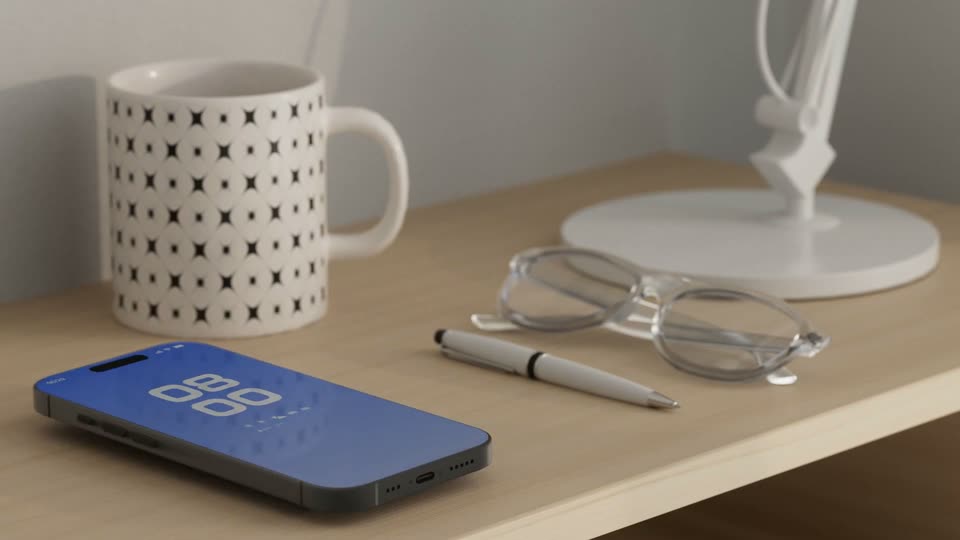
A smartphone rests flat on a wooden desk beside a patterned mug, clear glasses, a pen, and a white lamp. It lifts off the surface and tilts into a 3D angle, its blue screen reading 08:00.
Techniques: 3D mockup
Camera: Static
A blue phone rests on a wooden nightstand beside a white mug, lamp, pen and glasses. It tilts from leaning to upright while its screen shows a blue clock. A bed pillow sits at left, lamp shadow on the wall.
Techniques: 3D mockup
Camera: Push in
A 3D phone mockup floats in a soft-lit set with a blurred mug and lamp, rotating slowly to the right. The blue screen shows a notification card with an envelope icon that fades out, leaving a blank gray screen with a blue top bar.
Techniques: 3D mockup
Camera: Push in
A tilted 3D phone displays a morning OKR report on a dark background. The camera zooms into the screen with a radial blur, flattening the page. White highlight boxes sweep across key sentences one by one, filling with an orange gradient, as the document scrolls.
Techniques: 3D mockup, UI zoom
Camera: Push in
A weekly calendar grid packed with colored meeting blocks sits out of focus under two lines of large text, then pulls sharp into a full schedule as the text dissolves away.
On-screen text: “Any slip here risks missing the July 30 code-freeze.”, “On track (Major progress, nearing completion)”
Camera: Static
A tilted calendar week view sits in 3D perspective on a light background. A dark-purple Threads window slides in from the right, covering the calendar and showing a # PM/Engineers message from Jane.
Techniques: 3D mockup
Camera: Pan
A flat mockup of a purple chat app shows a thread with two messages, then numbers label the sidebar rows. The view blurs into gray lines and zooms onto a white card with a yellow bell icon and a question.
On-screen text: “Is engineering work driving our OKRs?”
Techniques: UI zoom
Camera: Push in
On a plain off-white field, an orange circle holding a white line-drawn brain icon sits at left. The lowercase word okie in dark gray assembles to its right, the dot of the i dropping in, settling into a centered logo lockup.
On-screen text: “okie”
Techniques: Kinetic type
Camera: Static
The Oki logo, an orange circle with a white knot symbol beside the black wordmark, sits centered on a plain white background. The frame is locked off and fully static for the duration.
Camera: Static
The Oki logo, an orange circle with a white knot mark next to a black wordmark, sits centered on a light background. A white card slides in behind it as the logo scales down to fit inside the card.
Camera: Static
The Oki logo card settles on the left of a white field as a thin horizontal line draws out to the right, with vertical branches connecting to app icons: a blue diamond, a Notion tile, a calendar showing 31, and a multicolor bar icon.
On-screen text: “Oki”
Camera: Static
A white network diagram radiates from the Oki logo on the left, a horizontal line branching up and down to app icons for Notion, a calendar, Slack, GitHub and others. The Oki logo scales up while the whole diagram drifts slowly to the left.
Camera: Static
A horizontal line of app icons (Notion, Slack, GitHub, Calendar) blurs as the view reframes, then a white document card with a purple header, a Jane profile and a table flies into the center beside a numbered list.
On-screen text: “Oki”
Techniques: UI zoom
Camera: Static
Three tilted UI panels (a numbered document, a chat window, a task list) sit in 3D perspective on a light background. A translucent white sphere rolls across them left to right, then the camera pulls back to reveal a fourth email panel.
Techniques: 3D mockup
Camera: Pan
A row of tilted UI mockups (a chat thread, a task list, an email view) rotates in 3D perspective while a circular magnifier drifts across. An email notification card with an envelope icon and the line Oki AI Daily Update! slides into the center.
On-screen text: “Oki AI Daily Update!”
Techniques: 3D mockup
Camera: Pull out
A white notification card with an envelope icon and the title sits centered on a blank background. A cursor clicks it, the card fades out, and a full dashboard with a left sidebar and report text reveals behind it, its lines animating in.
Techniques: Cursor demo
Camera: Static
A light dashboard screen with a left sidebar and a daily report body. The view sharpens, then zooms into the report text as a cursor hovers over a highlighted line.
Techniques: UI zoom
Camera: Push in
A Timeline panel floats over a blurred report, listing three dated entries with avatars and source links. A hand cursor hovers across the entries while the view zooms out to reveal more of the document.
Techniques: Cursor demo, UI zoom
Camera: Pull out
A report builder screen shows a role field set to CTO,CEO and a grid of topic pills, several highlighted orange, above a written status report. The view scrolls up to reveal the form header while a cursor hovers over the pills.
Camera: Pull out
A flat product interface shows a row of topic pills under a “What do you care about seeing?” heading. A cursor clicks the “Risks and blockers” pill, which highlights orange, and the report card below crossfades from “Product & Feature Momentum” to “Emerging Risks and Blockers.”
Techniques: Cursor demo
Camera: Static
A light dashboard shows a grid of filter pills above a report card. A cursor slides from the orange Risks and blockers pill to Product Progress, and the card text cross-fades to updated content.
Techniques: Cursor demo
Camera: Static
A static close-up of a dashboard form. A cursor rests on the Team reports pill, which fills orange, and the report card below fades its gray body text to full black. The Day/Week toggle and filter pills stay fixed.
Techniques: Cursor demo
Camera: Static
Two men sit on a bench in a sunlit room with slanted windows; one talks and gestures, then the other turns to the camera and speaks. White overlays fade in in sequence on the left, right, then center. The scene ends on the orange Arc logo on white.
On-screen text: “Your team builds”, “You lead”, “High value decisions”
Techniques: Kinetic type
Camera: Static
On a plain white background, the Oki logo, an orange circle with a white four-lobed mark beside a black wordmark, sits centered. The tagline slides in below it, then a white input field appears and the URL is typed with a blinking caret.
On-screen text: “Company clarity, delivered daily.”, “okiapplications.com”
Techniques: Kinetic type
Camera: Static