2:55

Roark (YC W25) - Demo
Roark · B2B · Feb 2025
Lynx · Jan 2025 · 4:35 · Full motion · AI-annotated
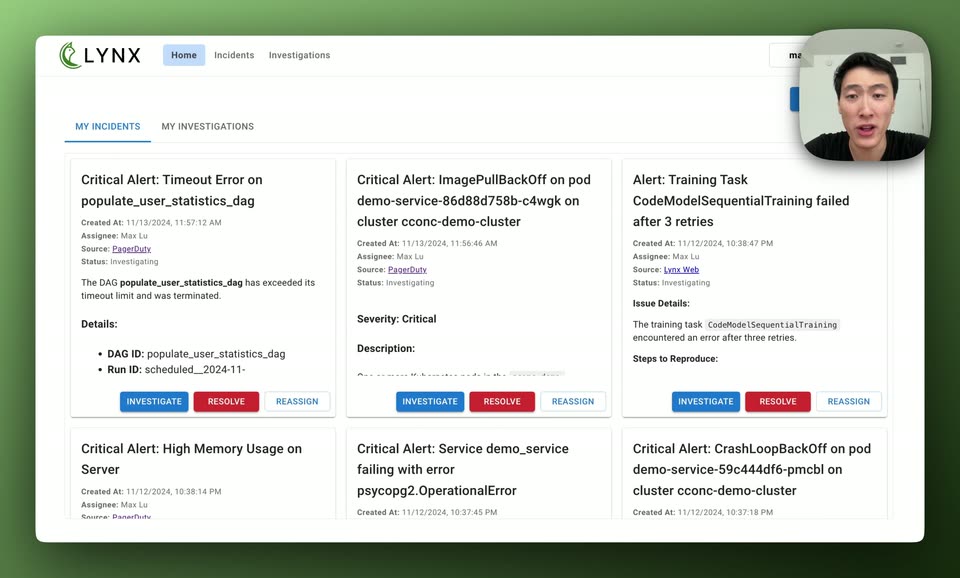
Lynx’s 4:35 launch film runs 18 scenes, about 15 s each. The product is on screen from the first frame. The call to action lands at 4:31 (98% in), over a voiceover. A screen-recording walkthrough staged on a green gradient field, bookended by black LYNX logo cards and anchored by a persistent presenter webcam tile. The camera holds on dashboards, then zooms into chat threads and code blocks to follow each AI investigation, pulling back to reveal resolved states and benefit cards before the contact card.
Is this your launch? to your site or press kit.
Roark · B2B · Feb 2025
AutoComputer · B2B · Nov 2024
Films whose music sounds like this one, voice left out
Ocular AI · Technical tutorial / Product demonstration
Double – Coding Copilot · Instructional voiceover
Stamp · Tech Product Demonstration
A black card holds the green lynx head logo beside the white LYNX wordmark, centered and static. A small rounded webcam inset in the top right shows a man in a black shirt talking. The card sits on a green gradient backdrop for the whole shot.
On-screen text: “LYNX”
Camera: Static
A Lynx dashboard of incident cards sits on a green background, with a small video call window in the top right where a man in a black shirt talks. The frame holds still, then zooms in on the cards as a cursor lands on an Investigate button.
Techniques: UI zoom, Cursor demo
Camera: Push in
A white Lynx incident page opens with a left ticket panel and a right investigation chat, while a presenter appears in a small video window. The view zooms into chat messages and code blocks as the AI investigation scrolls through logs and recommendations.
Techniques: UI zoom, Cursor demo
Camera: Push in
In a chat interface, the Lynx assistant streams its investigation and a numbered recommendations list, the view scrolling to follow. A presenter's webcam stays in the top-right corner. A cursor then types 'Revert this change' into the message box at the bottom.
Techniques: Cursor demo
Camera: Pan
A static screen recording of a team chat shows a message with a git command block and a blue revert button. A webcam of a man occupies the top right, and a red STOP button overlays the input row, where a cursor sits.
Camera: Static
A chat interface fills the frame with a small video-call avatar in the top right corner. A bot card expands and types out an explanation with a git command block, then a cursor moves down and clicks the red EXECUTE button.
Techniques: Cursor demo
Camera: Static
A coding-assistant chat window fills the frame, showing a message with a dark git command block and a pull-request link. A small rounded webcam inset of a man speaking sits top right. A cursor rests on the submit button at the bottom right while the layout stays static.
Camera: Static
A close-up of a dark terminal pane showing git revert output pulls back to reveal the LYNX interface: an incident summary panel on the left and the investigation feed on the right. A small webcam tile of the presenter holds the top-right corner.
Techniques: UI zoom
Camera: Pull out
A split screen pairs a LYNX incident ticket with an investigation chat and terminal code block, a presenter's webcam in the corner. The view zooms into the chat as a cursor hovers the pull request link, then pulls back to the full layout.
Techniques: Split screen, UI zoom, Cursor demo
Camera: Push in
A GitHub compare page fills the frame on a green background, with a small webcam feed of a presenter in the top-right corner. The page scrolls down to reveal a red-and-green code diff while a cursor drifts across the interface.
Techniques: Cursor demo
Camera: Pull out
A browser window of the LYNX dashboard loads: an alert details panel left, an investigation thread with a dark terminal log and chat box right. A small rounded video tile of a presenter sits top-right; the cursor moves to the Home tab at the end.
Techniques: Cursor demo
Camera: Static
A white LYNX dashboard of incident cards fills the screen, a presenter's webcam pinned in the top right corner. A cursor drifts from the top navigation to a middle card, then the view cuts to a blank white page showing a small blue loading spinner.
Techniques: Cursor demo
Camera: Static
A screen recording of the Lynx incident app on a green background, with a presenter's webcam inset top right. The view zooms into the investigation panel showing the reasoning and a kubectl command, then zooms out; a cursor drifts over the text.
Techniques: UI zoom, Cursor demo
Camera: Static
The LYNX incident screen fills the frame, webcam tile top right. The view zooms into the command input; the cursor clicks the red EXECUTE button, then a confirmation message with suggestion chips appears. The view zooms in as the cursor clicks the first chip, filling the input with its question.
Techniques: UI zoom, Cursor demo
Camera: Push in
A chat interface fills the frame: a dark code block shows the deployment updated, a blue bubble asks if the pod runs, and command chips line the bottom. A man's video avatar sits top right beside a red STOP button; a cursor rests in the input field.
Camera: Static
A chat interface shows an AI reply box filling in with an investigation summary, beside a small video call window in the top right. The view then zooms out to reveal a left alert panel marked Resolved and a green success toast at the bottom.
Techniques: Cursor demo, UI zoom
Camera: Pull out
Six light-green rounded cards with black text sit on a dark green wavy background, listing benefits like Reduce Engineer Burnout and Maximize System Uptime. A small webcam feed of a man in a black shirt talks in the top-right corner. The layout holds static through the shot.
On-screen text: “Automate Incident Resolution”, “Maximize System Uptime”, “Reduce Engineer Burnout”, “Relieve Oncall Burden”, “Expand Engineering Capacity”, “Accelerate Time to Resolution”
Camera: Static
A black card on a green field holds the green lynx mark and white LYNX wordmark, with a green button reading [email protected] below. A small video inset of a man in the top-right corner speaks. The frame stays locked off and static throughout.
On-screen text: “LYNX”, “[email protected]”
Camera: Static