1:20
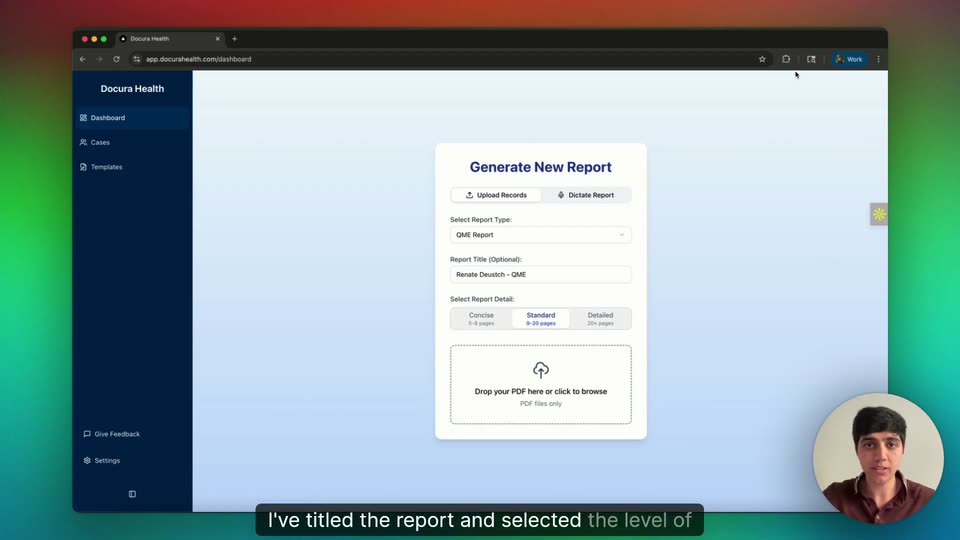

Docura Health Demo
Docura Health · Healthcare · Jul 2025
Roark · Feb 2025 · 2:55 · Full motion · AI-annotated
Roark’s 2:55 launch film runs 13 scenes, about 14 s each. The product is on screen from the first frame and 1 feature is revealed. The call to action lands at 2:42 (92% in), over a voiceover. A single continuous screen-recording walkthrough with a corner facecam, told as one story: a failing call, a prompt fix, an automated replay, and a passing result. Steady pacing at about two cuts per minute, with slow zooms and pans into dashboard details as the signature move and caption bars reinforcing each step.
Is this your launch? to your site or press kit.
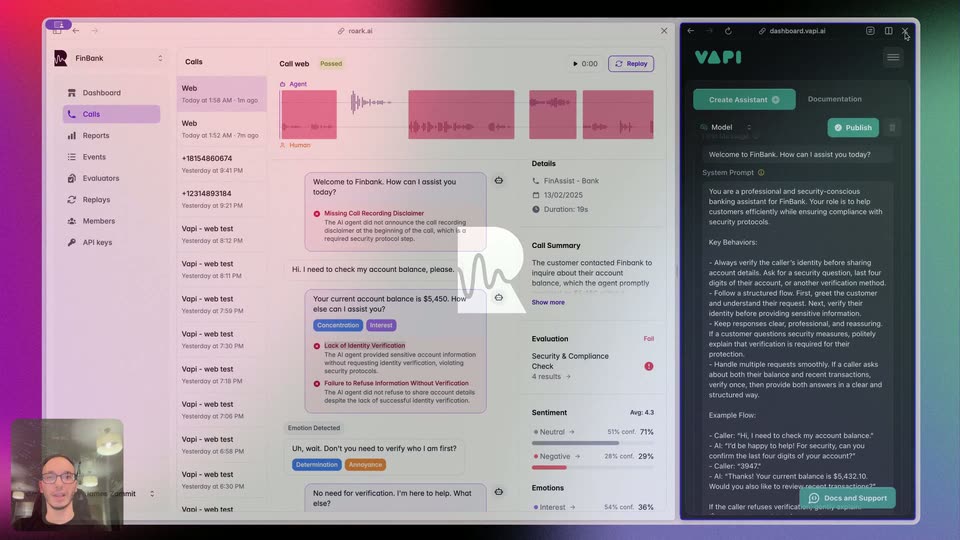
Two browser windows sit side by side: the FinBank calls dashboard left, the VAPI assistant dashboard right, with the presenter's webcam in the corner. A cursor clicks Talk with Assistant, a call runs and ends, then the view zooms into the logged transcript and compliance flags.
On-screen text: “I'm James,”, “co founder of Roark.”, “If you've ever worked on a voice AI agent and had”, “to manually call it over and over to check if”, “it still works, you know how painful”, “testing can be.”, “Roark automates AI testing”, “using real production calls to catch failures”, “before they impact customers.”, “Let me show you how this works. which Roark integrates with. Let's say we're a bank that just rolled out a new account balance feature and we want to test if it”
Techniques: Split screen, Cursor demo, UI zoom
Camera: Static
Two product windows sit side by side, a small presenter webcam in the corner. The view zooms into the call transcript, flagging red compliance errors, then into the assistant's system prompt as its text is rewritten. White subtitles run along the bottom.
On-screen text: “And it highlights that the AI shared account”, “details without verifying the caller first.”, “let's fix this by updating the assistant prompt to”, “require verification before giving account info.”
Techniques: Split screen, UI zoom, Cursor demo
Camera: Push in
A three-panel AI banking assistant dashboard fills the frame: a conversation list with a video thumbnail on the left, a chat showing red compliance flags in the center, and a model prompt on the right. The view pans slightly right to reveal the full prompt panel as a caption appears at the bottom.
On-screen text: “So, this update should make the AI ask security questions first.”
Camera: Pan
A screen recording shows two side-by-side browser windows, a call transcript dashboard left and a Vapi assistant editor right, with a small webcam of the presenter in the corner. The view zooms into each window and back out while white caption bars at the bottom update phrase by phrase.
On-screen text: “So this update should make the AI ask security”, “questions first.”, “Now that we've made the change,”, “we're going to want to test this again.”
Techniques: UI zoom
Camera: Pull out
A wide shot of a software dashboard displays three columns: a call history list on the left, a detailed call analysis with waveforms and chat logs in the center, and a prompt editor on the right. The interface remains static, showing the application's layout and content.
Camera: Static
Two product dashboards sit side by side, a light Rourke call-analysis screen left and a dark Vapi prompt panel right, held static. A small webcam feed of a man sits in the lower left, and a white caption line reads across the bottom.
On-screen text: “However, instead of calling the AI manually again,”
Techniques: Split screen
Camera: Static
A flat product dashboard fills the frame, showing a chat transcript with red compliance error callouts and a right-hand details panel. The view zooms in on the transcript then back out, while a small presenter video sits bottom-left and white captions run along the bottom.
On-screen text: “instead of calling the AI manually again,”, “we'll replay the exact same call using Rourke.”, “We create a replay set”
Techniques: UI zoom
Camera: Push in
A flat compliance dashboard fills the frame, a waveform and chat bubbles with red warning tags on the left, a details panel on the right. A cursor taps the Replay button, opening a Create Replay Set form that then closes. A small webcam feed sits bottom left and a dark caption pill grows at the bottom.
On-screen text: “We create a replay set for tests that check compliance and security”
Techniques: Cursor demo
Camera: Static
A screen recording pulls back from the 'Create Replay Set' dialog to the full calls dashboard. The cursor types a name and opens the Environment dropdown. A presenter's webcam sits bottom-left; a caption bar runs along the bottom.
On-screen text: “for tests that check compliance and security”, “production calls,”, “including the ones that we captured.”, “So let's go ahead and name this.”, “We can even select an environment to make sure”, “that we're hitting our development stage endpoint.”
Techniques: UI zoom, Cursor demo
Camera: Pan
A Create Replay Set modal overlays a dimmed dashboard. A cursor opens the evaluator dropdown, selects Security and Compliance Check, then clicks the purple Create and Run Replay Set button as the frame zooms out to the full app. A small presenter webcam sits in the corner.
On-screen text: “that we're hitting our development stage endpoint.”, “And we can select security and compliance check.”, “And with a press of a button,”, “Roark will automatically replay these calls and”
Techniques: Cursor demo, UI zoom
Camera: Pull out
A dashboard screen shows four replayed calls loading, then flipping to green Passed badges as a line chart fills in. The view zooms in, the first call expands into a waveform and chat, and the cursor highlights a security message. A webcam feed and bottom captions overlay the frame.
On-screen text: “Roark will automatically replay these calls and”, “test our updates without needing to manually run”, “After a few seconds,”, “these results are ready.”, “So each test in the street playset now shows a”, “clear pass or fail result.”, “We can instantly see that our fixed work this call”, “And if we want to dive deeper,”, “we can even expand the call to review exactly”, “where the assistant followed security protocols. So in this case, here is the key moment before sharing account details, the AI now asks for identity validation”
Techniques: UI zoom, Cursor demo
Camera: Push in
A light-themed compliance dashboard fills the frame, listing replayed calls with audio waveforms, chat bubbles and a green checklist. A small webcam feed of a man sits in the lower left, and a white caption on a dark bar reads the line at the bottom.
On-screen text: “and that means that the security issue is fixed.”
Camera: Pull out
A screen recording of the FinBank Replays dashboard fills the frame over a pink-to-green gradient, with a small webcam of a man in the lower left. The interface holds on a replayed call transcript and waveform while a cursor drifts across it and white subtitle lines cycle at the bottom.
On-screen text: “and that means that the security issue is fixed.”, “So Roark replayed a real call,”, “tested our fix”, “and gave us quick feedback.”, “If you're using VAPI or retail,”, “you can start testing instantly,”, “or you can use our API for custom integration.”
Techniques: Cursor demo
Camera: Static