2:20


Executor Demo
Executor · B2B · Aug 2026
Orbkit · Sep 2026 · 1:20 · AI-annotated
Orbkit’s 1:20 launch film runs 8 scenes, about 10 s each. The product is on screen from the first frame and 3 features are revealed. There is no explicit call to action. A slow, single-take screen tour of a dark reference site: it opens on the product title, walks the docs page and the 33-orb gallery, then settles into a long live-parameter session. Its signature moves are the constant shader motion inside each orb, the steady vertical scroll through the grid, and the real-time feedback where dragging a slider recolors both the orb and the code.
Is this your launch? to your site or press kit.
Executor · B2B · Aug 2026
BitBoard · B2B
The Browser Company · Productivity · Dec 2022
A dark product landing page for Shader Orbs holds still: a small metallic orb sits in a dotted ring, three colorful WebGL orbs swirl in cards below. A cursor drifts right, then lands on the middle card, which reframes into a detail view with a code panel on the right.
Techniques: Cursor demo, UI zoom
Camera: Pan
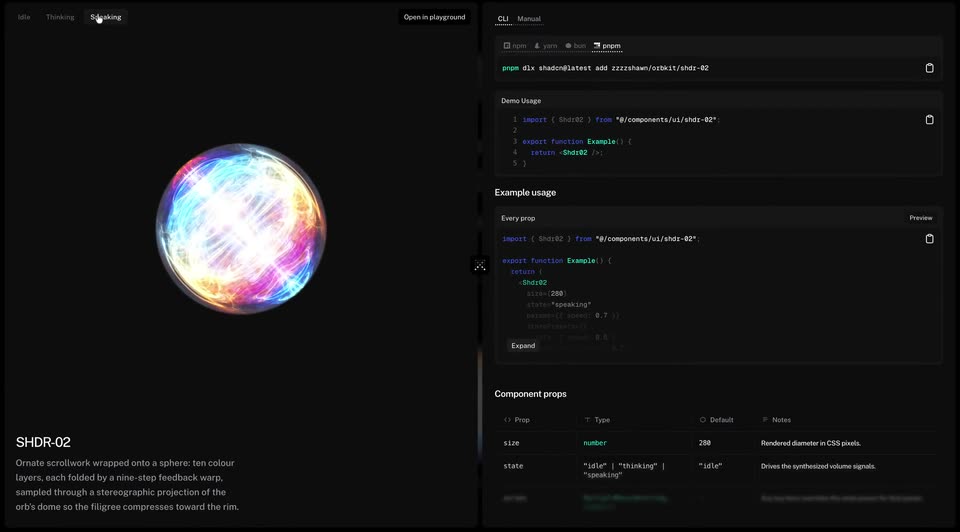
A dark two-column docs page shows a glowing multicolour sphere of swirling filigree on the left and code with a props table on the right. A cursor moves up and clicks the Thinking then Speaking tabs; the sphere brightens and its filigree spins faster.
Techniques: Cursor demo
Camera: Pull out
A dark product page opens on the Shader Orbs title, a one-line description and an install command, then scrolls steadily down a three-column grid of animated 3D shader spheres labeled SHDR-01 to SHDR-33. The orbs continuously deform and shimmer, and the scroll ends on a small credits line.
Camera: Push in
A dark docs screen shows a glowing 3D sphere on the left and code panels on the right. A cursor clicks the Idle, Thinking, Speaking tabs, and the sphere's pattern shifts with each state; the right side then switches to a grid of orb thumbnails.
Techniques: Cursor demo
Camera: Push in
A dark gallery page scrolls up through a three-column grid of animated shader orbs, moving from a credits line and small orb icon at the bottom to the top of the list. A mouse cursor rests at the left margin while the top navigation bar stays fixed.
Camera: Pan
A dark product UI shows a 2x3 grid of glowing 3D shader spheres in rounded cards labeled SHDR-01 to 06, beneath a command bar. The orbs slide down into place with motion blur, then hold static under an Idle, Thinking, Speaking toggle. A white cursor rests at the left.
Camera: Static
A dimmed grid of iridescent orbs fades out as a documentation page fades in, then holds locked off: the SHDR-01 orb with its caption on the left, a code panel with CLI and Manual tabs on the right.
Camera: Static
A dark interface frames a swirling iridescent orb at center, a code block left, a parameter panel right. A cursor drags sliders down the right panel; the orb's texture and the code values update live. The cursor ends on a copy icon.
Techniques: Cursor demo
Camera: Push in