1:58

Introducing Marker Manager
Marker · B2B · Nov 2026
Docura Health · Jul 2025 · 1:20 · AI-annotated
Docura Health’s 1:20 launch film runs 8 scenes, about 10 s each. The product is on screen from the first frame and 2 features are revealed. The call to action lands at 0:59 (74% in), over a voiceover. Founder-led walkthrough that opens on a framed talking head, then hands off to a screen capture of the app with the presenter kept in a small circular bubble. Pacing is steady and explanatory, zooming into UI panels step by step and closing on a URL call to action.
Is this your launch? to your site or press kit.
Marker · B2B · Nov 2026
PARES AI · Real Estate and Construction · Jul 2025
Roark · B2B · Feb 2025
A young man in a brown shirt sits centered against a plain wall, inside a rounded-rectangle frame with a red-to-teal gradient border. He talks to the camera, raising his hand to gesture, while white subtitle captions cycle along the bottom.
On-screen text: “Hi, I'm Akhil.”, “I built Docura Health to save doctors time”, “reviewing records and writing medical legal”, “reports like IME's and QMES.”, “Let me show you how it works.”
Camera: Static
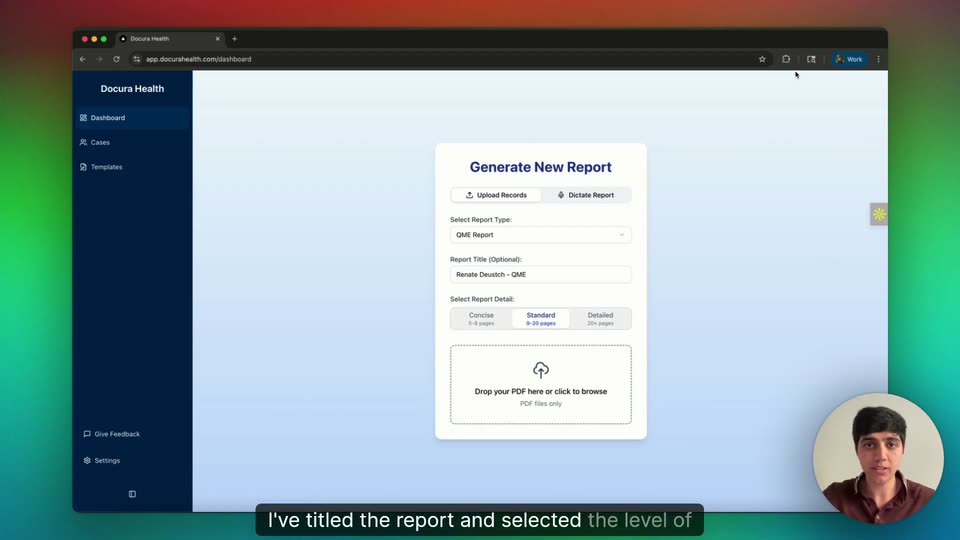
A browser window on a gradient background shows the Docura Health app's Generate New Report card; a presenter's head sits in a circular inset bottom right. Captions roll at the bottom, then the view zooms in on the card as the cursor reaches the PDF drop zone.
On-screen text: “Let me show you how it works.”, “Let's say I'm starting a new case.”, “You can either upload your medical records or”, “dictate a full report.”, “I've already selected the QME report type.”, “I've titled the report and selected the level of”, “Now I'm going to go ahead and drop in the medical”, “records.”
Techniques: UI zoom, Cursor demo
Camera: Push in
A macOS file picker overlays a blurred report form. The cursor highlights a PDF row and the Open button turns blue, then the dialog fades away to reveal the Generate New Report fields. A circular webcam feed of the presenter sits in the lower right.
Techniques: Cursor demo
Camera: Static
After a report modal fades out, the dashboard shows a Processing Document spinner. The view zooms into the sidebar, then the Cases table, as the presenter's webcam and subtitles stay in the corners.
On-screen text: “So while that's processing,”, “we can take a look at a case that's already”
Techniques: UI zoom, Cursor demo
Camera: Push in
A browser window shows the Docura Health app with a dense medical document titled Doctor Briefing. A presenter sits in a small circle at the lower right. The view then reframes onto the Review of Records section with a left filter panel, while caption bars explain each step.
On-screen text: “As we can see here,”, “the first section is the doctor briefing.”, “This is a high level summary before they go into”, “their medical legal evaluation.”, “The next section is the review of records.”, “This is a chronological breakdown of all the records in the PDFs.”
Techniques: UI zoom
Camera: Pull out
A browser window shows the Docura Health Review of Records page, a medical report on the right and a filter panel on the left, with a presenter's headshot in a circle at bottom right. The view zooms into the filter panel, holds, then zooms back out as the report scrolls.
On-screen text: “This is a chronological breakdown of all the”, “records in the PDFs”, “you can filter by anatomical area,”, “specialty and note type.”, “You can also click into page numbers to actually”, “go to the PDF to see exactly where”
Techniques: UI zoom
Camera: Pull out
A static browser capture of the Docura Health app showing a Review of Records document beside a filter sidebar. A dark caption pill at the bottom reads the line while a circular presenter inset gestures in the lower right corner.
On-screen text: “go to the PDF to see exactly where”, “the record is.”
Camera: Static
A browser window with the Docura Health app fills the frame over a shifting gradient. The generated medical report scrolls down through its sections, ending on a table of movement values. A circular webcam of the presenter sits bottom right; subtitle lines swap in on a dark bar below.
On-screen text: “And here's the final output.”, “This is broken down into sections that are”, “required for medical legal reports like QMEs and”, “IMES.”, “Its impairment ratings and tables are also”, “provided in the report.”, “If this is something you might find useful,”, “feel free to try it at uh,”, “docurahealth.com”, “or book a demo on my calendar below. Thank you.”
Techniques: Cursor demo
Camera: Static